Home screen
datui with no path opens the home screen, where you find and open a dataset:
recent files, directories, cloud storage, your catalog and a catalog of public
data.
datui
Ctrl+O returns here from anywhere, on the dataset you left. A filter typed before comes back selected: typing replaces it, and ~ opens the path prompt. Typing narrows the list; Esc clears the filter and selects the first dataset; Enter does what the footer names for the row. Every key is in the keyboard reference.
Open a file or directory
- Type part of a name to narrow the list.
- Select the row and press Enter, or double-click it.
- To browse a directory rather than read it as one table, press →.
To type a path or URL, press ~ with the filter empty. The list
shows the directory being typed, narrowed by the name after the last /, with
the first name picked.
Key at the ~ prompt | Does |
|---|---|
| Tab | Completes the one name left, with / for a directory, or what the names share; a name picked further down, that name |
| ↑ ↓ | Picks a name from the list; ↑ from the first takes the path as typed |
| Enter | Opens the picked name, or the path as typed: a file opens, a directory is gone inside as → does |
| Esc | Closes the prompt |
s3://, gs:// and az:// complete from names datui already knows (listed
sources and prefixes, recents, the example datasets); nothing is asked of the
store, so s3://noaa Tab gives s3://noaa-ghcn-pds/.
The footer names where the list is, how many rows the filter matches and the
order, and at the right Enter, named for what it does on the selected
row (Open, Open all, Inside, Look), what Ctrl+D does
there (^D Add to catalog.toml, or ^D Forget on its own rows), ^E Docs on a
catalog row, then ? keys (F1 keys once a filter is typed, since ?
then types). Letters type into the filter, so
q types q; Ctrl+C quits.
Sections
| Section | Lists |
|---|---|
RECENT | Datasets opened before, grouped by the directory or cloud place each lives in |
| Current directory | Where datui was launched; an empty one says nothing to open here · ~ types a path |
CLOUD | Cloud sources: stores found on this machine and configured ones |
MY DATASETS | Your catalog, catalog.toml: what Ctrl+D added and what you wrote |
| Other catalogs | Each *.toml in the config directory’s catalogs/, then each file catalogs lists, under its label |
EXAMPLE DATASETS | The example datasets that come with datui |
ELSEWHERE | Directories your desktop recorded (freedesktop recently-used.xbel); starts folded |
Found | Search results, while you type |
Folds last between runs. A heading says why its section is listed and how it
stands: catalog.toml, catalog or built in for a catalog; nfs4, listing
(then 1,200 so far as a slow share answers), unavailable, or first 5,000
when a listing stops there.
Recent
Recent ranks datasets by frecency, as zoxide ranks directories: an open counts
four times within the hour, twice within the day, half within the week and a
quarter after. A place (a directory) ranks with its best dataset, and
entering it shows all its files, opened or not. The cursor starts on the
dataset opened last, so Enter reopens it. Places fill up to a third
of the list at first; … more in … places shows the rest.
Add to your catalog
Opening a dataset adds its directory to Recent. To keep a dataset or a
directory on the home screen, press Ctrl+D on its row: it
goes into catalog.toml, listed under MY DATASETS. Ctrl+D
again on that row forgets it. A directory there is a row to step into.
| Row | Ctrl+D adds |
|---|---|
| A file or directory | It, under the row’s name |
| A heading of a directory’s section, or a Recent place | That directory |
| A row of another catalog | A copy: location, login and description |
A row of catalog.toml | Nothing: it forgets the row |
Catalogs has the file’s keys, team catalogs and
datui catalog check. [home] desktop_recents = false drops ELSEWHERE;
datui never writes the desktop’s file, and lists a place there only when you
enter it.
Search below the current directory
Typing narrows every section and searches below the working directory in the
background. Found lists matches by their path from there.
| What | How |
|---|---|
| Matching | fzf-style: runs of characters, word starts and file names rank higher; matched characters are underlined. Known Parquet column names match too, after names. What you open often ranks first, in every section |
| The walk | Once per directory, keeping every data file; each key narrows the last result |
| Results | The best 1,000 ([home.search] max_results); the heading counts the rest and the entries read: 1,000 of 2,500 matches, 23,041 searched |
| Cut short | The heading says partial · out of time, · too many files or · too deep |
| Skipped | Hidden directories (.git, .venv), build and dependency directories (node_modules, target, build, dist, vendor, site-packages, __pycache__, venv, env), other file systems, symlinks. .gitignore is not read |
[home.search] sets the depth, time,
results and exclusions; cross_filesystems = false stays off network shares
and automounts.
The details pane
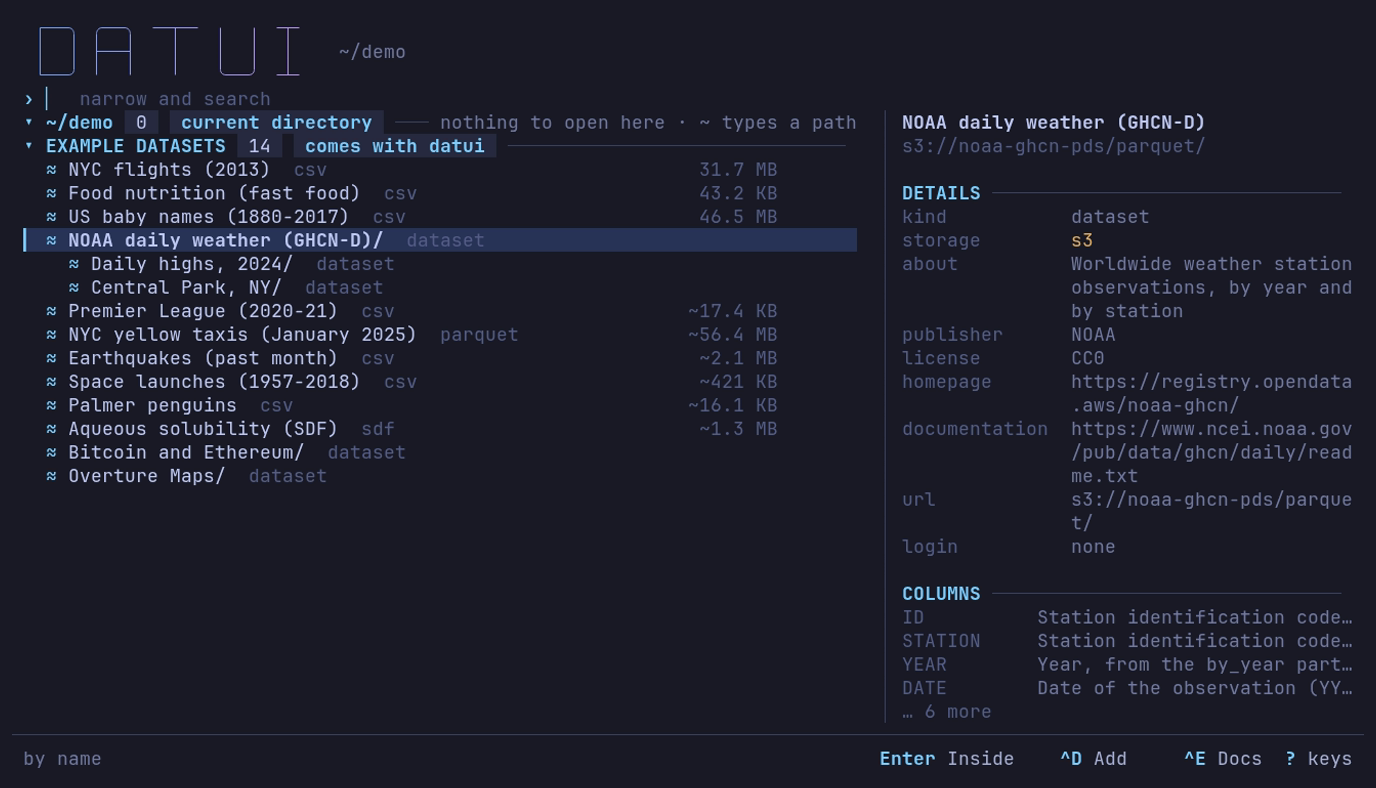
What is NOAA daily weather, and who publishes it? ↓ to it: an S3 dataset from NOAA, CC0, no login, with notes on its columns. Ctrl+E shows them all.
| Field | Says |
|---|---|
| Kind, storage | The format, and the file system or object store. A file a format spec reads, by its glob or its magic, says acme.l2feed file |
| Spec, match | For a spec’s file: the spec’s file, cut in the middle to fit, and what named the file, a chip per condition: [magic L2FD] [version 3], drawn without brackets where the header tint shows (format specs) |
| Read | How a file opens: lazy scan, decompressed copy, converted to Arrow, in memory, or download → one of those (formats) |
| Contains | Files by format, directories and partitions |
| Rows × columns | Known counts; blank when finding them would read the data. Parquet counts come from footers, up to 64 files; past that, ? × 39+ |
| On disk, in memory | The stored size; Parquet’s uncompressed size |
| Row groups | Parquet’s read units |
| Partitions | Keys and values from the directory names |
| Schema | The known columns and types; 3 columns (spec) when a format spec says them, then each column; on open when only opening the file reads them |
| Records | For a file a format spec reads as several record types: 2 types (spec), then each type and its column count (add 5 · cancel 3) |
▲ footer unreadable | A Parquet file whose footer could not be read; opening it will most likely fail too |
Enter, → | What Enter and → do on a directory, a door, a file of tables or a file of record types: all partitions as one table, step in · first row opens all, its tables, every record and its record types |
COLUMNS | What each column means, for a catalog dataset or bookmark with column notes, or a file a format spec documents: the catalog’s description, unit and legend each over the spec’s, as in the Documentation view, or 2 values for a legend alone; … 4 more when the pane is short. Ctrl+E shows the whole page |
ROWS | The first eight rows of a local CSV, TSV, PSV, NDJSON, Arrow IPC or Parquet file, read when the row is selected. Enter opens the file on those rows, so they are read once. [home] preview_max sets the largest file read; 0 turns it off. Network shares and object stores are not read before opening |
Below about 100 columns the pane hides, and the first rows show in a strip at the bottom when the list leaves four lines free.
What a row’s label says
A row reads its name, / for a directory, two spaces, and a label:
data/ 3 dirs, events/ hive, Palmer penguins csv.
| Label | Means |
|---|---|
hive | key=value subdirectories, at least as many as the data files beside them |
delta, iceberg, hudi | A lake table’s marker |
12 parquet, 3 csv | Data files of one format directly inside; 5000+ parquet when the listing stopped |
3 safetensors, 2 gguf | A model: weight files with only JSON beside them; opens as one table |
3 tables | A file that holds tables: SQLite, NumPy .npz, a flight or CAN log, a workbook, an NMEA log, an ELF file. See Info panel |
mixed | Several formats |
3 dirs, dir, dir+ | Only directories; nothing; the listing was cut short |
bucket, container | The top of an object store |
…, a spinner, ? | Not looked at yet, being looked at, failed |
A SQLite database with several tables lists them inside, a row each. A workbook, an NMEA log or an ELF file opens its first worksheet, fixes or symbols on Enter, and a file a format spec reads as several record types opens whole; → lists the record types, and Enter on one opens it alone. A Hugging Face cache lists its splits, as tables, above its files.
Names starting _ or . and _$folder$ markers are passed over, except
partitions such as _date=2025-01-01.
A file not read lazily says how, dim beside its name:
| Marker | Opening it |
|---|---|
decompresses | Decompresses it whole into a temporary file, then scans that: compressed text |
converts | Converts it whole into a temporary Arrow file, then scans that: an Arrow stream, NMEA, GPX, VCD, FIX, SDF |
in memory | Reads it whole into memory: JSON, NDJSON, systemd journal, Avro, ORC, Excel, MIDI, ELF; SafeTensors and GGUF read only their header |
downloads | Downloads it first |
The … files with no reader row, or Ctrl+A, shows files
no reader takes, dimmed; [home] show_unreadable = true shows them always.
Enter on a local one, or Ctrl+X on any local
file, shows its bytes in the hex view. Inside a SQLite database
the same row shows its internal tables.
Opening a directory
→ always goes inside. Enter does what the bar says:
Open all (one table), Inside, Open (a file), or Look (find out first).
Inside, the first row reads the directory as one table and says how:
| Directory | First row | The cursor starts on |
|---|---|---|
| Hive partitions | sales (hive table: year, month) | this row |
| One format, one schema | same (3 Parquet files, one schema) | this row |
| One format, schemas differ | diff (2 Parquet files, schemas differ) | the first file |
| Model weights | llama (model, 3 SafeTensors files) | this row |
| One data file | notes (1 CSV file) | the first file |
| Several formats, or files beside directories | data (all files, mixed) | the first row inside |
| Delta, Iceberg or Hudi | tbl (Delta files, not the table) | the first row inside |
On a mixed directory the pane names what is read and what is skipped. Delta, Iceberg and Hudi files are read without the transaction log, so deleted rows and old versions may show. How files combine is in Open files and directories.
Storage markers
| Marker | ASCII | Where the data is |
|---|---|---|
◦ | . | Local disk |
▪ | * | Memory, such as tmpfs |
↕ | ~ | A network file system: NFS, SMB, sshfs |
≈ | @ | An object store or URL |
◌ | ? | Unknown |
Catalogs
A catalog is a file of named datasets, local and remote, shown as a section
under its label: catalog.toml (MY DATASETS), each file in catalogs/ or listed in catalogs, and
EXAMPLE DATASETS. Catalogs has the keys.
▾ MY DATASETS  5   catalog.toml  ─────────────────────────────────
  ▪ Sales                                          6.8 KB   now
  ▪ Archive/ 1 csv                                          now
  ◦ Gone missing
  ≈ Weather/ dataset
  ≈ Penguins                                      ~16.1 KB
| Row | Enter | Label |
|---|---|---|
| A local file | Opens it | Measured like any file |
| A local directory | Goes inside | What is inside |
| A local path with nothing there | Says so | missing |
| A directory in an object store | Goes inside; Backspace at its top comes back | dataset |
| A remote file | Opens it | Its format, and its size: ~16.1 KB, the catalog’s word for it, until a HEAD sent when the row is selected measures it |
Nothing else remote is asked for until you open or enter a dataset. Inside one,
the title reads My datasets › Weather › by_year, and the pane gives its
description, publisher, license, homepage, URL and login.
Documentation view
Ctrl+E on a catalog row, on a place inside one, or on a file whose format spec documents it, shows what the catalog and the spec say of it, full screen. The Info panel’s Documentation tab shows the same page for the open dataset.
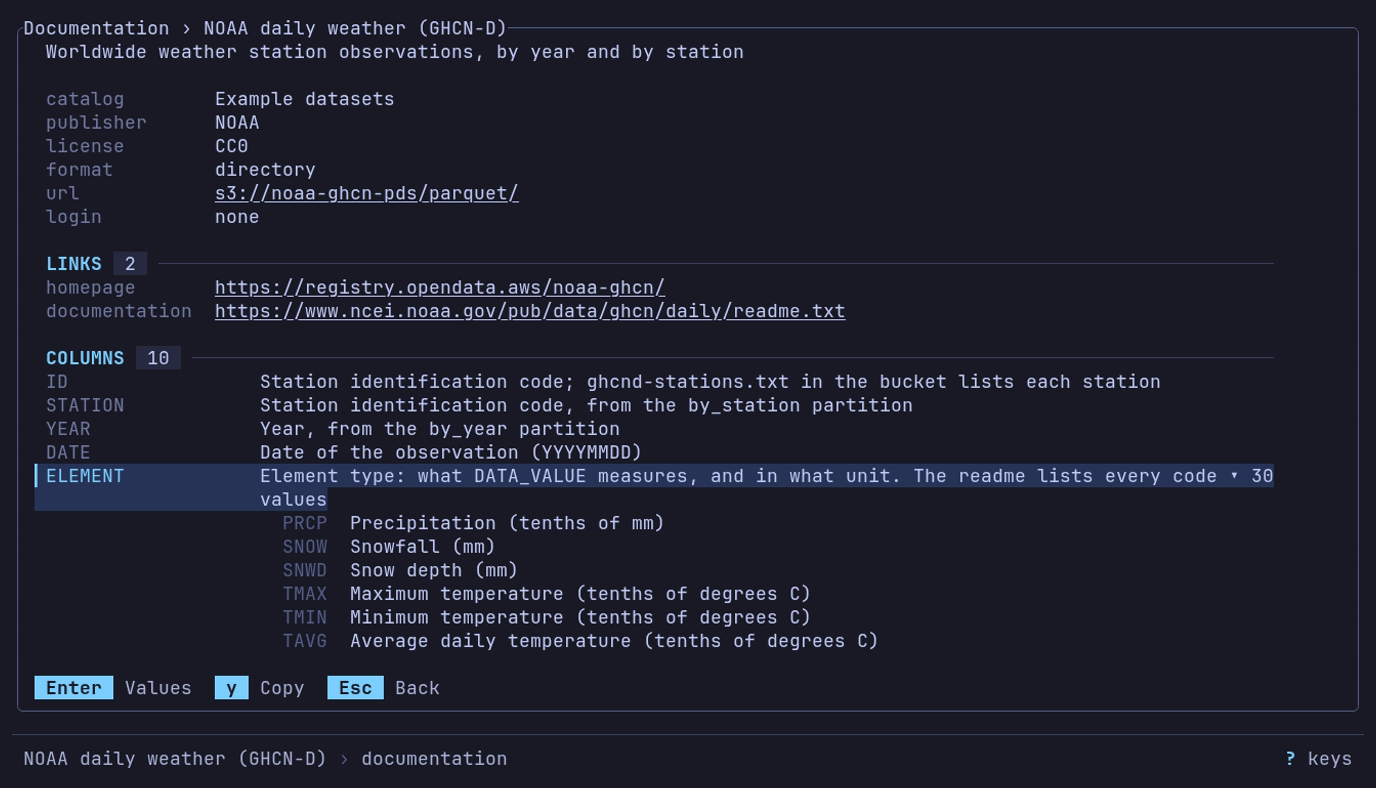
What does ELEMENT hold? Ctrl+E on NOAA daily weather,
↓ to ELEMENT, Enter: TMAX is the maximum temperature
in tenths of a degree C.
| Line | Says |
|---|---|
catalog, publisher, license | Where the entry is from, and the terms |
format, path or url, login, size | What it is, where, how it is read, and how big (~ until measured) |
format spec | The spec that reads the file |
spec file | Where that spec was read from |
LINKS | homepage and documentation, a line each; a long one is cut with … |
RECORD TYPES | A spec’s variants: each one’s name, the type field’s value that picks it (msg_type = 1, kind in ("E", "C")), its column count and its description |
HEADER | A spec’s named [header] fields that have a description or unit, with them |
COLUMNS | Each column, its meaning and unit; ▸ 30 values when it has a legend, which a spec’s enum gives |
FOOTER | A spec’s named [footer] fields that have a description or unit, with them |
BOOKMARKS | The places to start from, and their paths |
When a catalog lists a file a spec documents, the catalog’s description and
documentation link stand. Where both note a column, the catalog’s
description, unit and legend each stand when it gives one, and the spec’s fill
the rest: a catalog description of price keeps the spec’s unit. The columns
only the spec notes, and its record types, stay.
| Key | Does |
|---|---|
| ↑ ↓, PgUp PgDn | Move between lines |
| Enter | Open or close a column’s value legend |
| o | Open the line’s link in the browser, after asking |
| y | Copy the line’s link or value, whole |
| Esc | Back to the list |
o opens only the page’s links (homepage, documentation,
url), and only http:// and https:// ones, without a user name or
password. It first asks Open <URL>? with the whole URL, a host that is not
ASCII in its xn-- form; Enter opens it, Esc does not.
Over SSH, or on Linux and the BSDs without DISPLAY or WAYLAND_DISPLAY,
the browser would not open in front of you, so o is not offered:
y copies the link.
Ctrl+E takes the place of readline’s end of line: the filter has no cursor, and is edited at its end.
Example datasets
Don’t want them? [home] hide = ["examples"] in config.toml hides them for
good; Delete on the heading hides them until datui cache clear; an
examples.toml of your own, in catalogs/, replaces them.
Example datasets is the catalog that comes with datui: data its publishers
host, read with no login, listed after your own. datui ships none of the data;
datui catalog show examples prints the
catalog. Selecting its heading
shows how many datasets it lists, where it comes from, and how to hide it; a
heading of your own catalog shows its file and its [home] hide id.
| Dataset | Data | License |
|---|---|---|
| NYC flights (2013) | Departures from JFK, LaGuardia and Newark; delays in minutes | CC0 (nycflights13) |
| Food nutrition (fast food) | 515 menu items; nutrients per item, not per 100 g | GPL-3 (OpenIntro package) |
| US baby names (1880-2017) | Published name counts by year and sex; counts below five are suppressed | CC0 / public domain |
| NOAA daily weather (GHCN-D) | Worldwide weather station observations, by year and by station | CC0 |
| Premier League (2020-21) | Match rounds, dates, teams and full-time scores | CC0 |
| NYC yellow taxis (January 2025) | One monthly trip file; fares, distances and congestion fees | NYC Open Data terms |
| Earthquakes (past month) | A rolling month of earthquakes; magnitude, depth and location | Public domain |
| Space launches (1957-2018) | Launch records and agencies, failed attempts included | MIT (The Economist extract); credit Jonathan McDowell |
| Palmer penguins | 344 penguins: species, island, bill, flipper length and body mass | CC0; credit Horst, Hill and Gorman (2020) |
| Aqueous solubility (SDF) | 1,025 molecules: solubility (log mol/L), its class, and SMILES | BSD-3-Clause (RDKit) |
| Bitcoin and Ethereum | Blocks and transactions, partitioned by date | AWS sample-code license |
| Overture Maps | Places, buildings, addresses, roads and boundaries, by release | ODbL; places CDLA Permissive 2.0 and Apache 2.0 |
- A web file’s row gives its format and size,
~until measured. One under 50 MB downloads without a question; if it passes 50 MB while downloading, it stops and asks once. A URL typed at ~ is always asked about. - Once opened, a dataset comes back under Recent by its catalog name.
- The pane gives the publisher, license and homepage; check the license before you use the data.
- NYC flights, NOAA daily weather, NYC yellow taxis and Earthquakes carry
their publisher’s documentation: the pane lists what the columns mean
under
COLUMNS, Ctrl+E shows the whole Documentation view, and the Info panel and the inspector explain them once the data is open. - NOAA daily weather lists two bookmarks under it,
Daily highs, 2024andCentral Park, NY. Enter opens one whole; the dataset’s own row still steps inside. - A build without the
httporcloudfeature leaves out the rows it cannot open. - A catalog file named
examples.toml, incatalogs/or listed, replaces this one, even after Delete hid it;[home] hide = ["examples"]hides either, and["examples/nyc-taxis"]one entry. An emptyexamples.tomlhides the section.
The guides use them:
| Dataset | In |
|---|---|
| Palmer penguins | Quick start, charts, Analysis, Python |
| NYC flights (2013) | Query data, charts |
| Food nutrition (fast food) | Sort and filter, copy, data quality |
| US baby names, Space launches | Pivot and melt |
| Premier League (2020-21) | Query data, export |
| NYC yellow taxis (January 2025) | Analysis, data quality |
| Earthquakes (past month) | Charts |
| NOAA daily weather, Bitcoin and Ethereum | Public data in the cloud, views |
| Aqueous solubility (SDF) | Signals and logs |
Cloud sources
CLOUD lists a row per store: logins found on this machine and
connections you configure. For private
storage, sign in first; for a first try with no login, use
Example datasets.
▾ CLOUD  5  ──────────────────────────────────────────────────────
  ≈ Amazon S3         s3      3 buckets     datui config
  ≈ Google Cloud      gcs     4 projects    project: example-project · gcloud
  ≈ Lab MinIO         s3      1 bucket      127.0.0.1:9000 · datui config
  ≈ onprem            s3      403           minio.corp.example:9000 · datui config
| Column | Shows |
|---|---|
| Name | The source’s label, or its name |
| API | s3, gcs or azure |
| Count | Its buckets (projects for Google Cloud, accounts for Azure), a spinner while listing, not listed before the first listing, or why there are none |
| Note | The endpoint, project or profile, and where the login was found |
Enter goes down a level: S3 source › bucket › directory › object;
Google Cloud source › project › bucket › …; Azure source › account ›
container › …. The title shows the trail (cloud › Lab MinIO › data › 2024);
Backspace goes up one level and Esc back to where you
started.
Loading
The rows show at once, with the buckets an earlier run listed. Nothing is
listed, and no credential command (aws, gcloud, az, a
credential_process) runs, until you ask:
| To list | Do |
|---|---|
| One source | Enter or → on it, once a session |
| Every source on screen | Ctrl+R |
| Every source at launch | [cloud] list_on_start = true |
A slow endpoint holds up only its own row. A level lists 1,000 names at a
time (3,000 so far) and stops at 5,000 (first 5,000); typing past them
asks the bucket for the names the filter starts, and the heading adds
+ 1,907 STATION=USW*. Backspace or Esc stops a
listing. Typing also matches bucket names listed before, from every source.
When listing fails, the row says why in a word and the pane gives the whole message:
| Row says | Means |
|---|---|
403 | The login cannot list buckets; an object still opens by its URL |
not logged in | No credentials reached the store |
no project | A Google login that cannot search projects, and none named: set GOOGLE_CLOUD_PROJECT or DATUI_GCP_PROJECT |
unsupported login | An application-default login datui cannot use itself, and no gcloud to ask |
needs gcloud | A login through gcloud, which is not installed |
not signed in | Azure tools installed, nobody signed in; the pane names az login or Connect-AzAccount |
not configured | A variable named in [[cloud.connections]] is not set |
unavailable | The endpoint did not answer |
not found | The source went away since its row was drawn; Ctrl+R looks again |
Delete on a source hides it until datui cache clear. To hide one
for good:
[cloud]
hide = ["gcs-default"]
Which sources appear
datui adds the logins it finds and the connections you configure;
detected sources lists where
each is found, its id and the discover setting. Listing a bucket does not
mean its objects can be read. Catalogs, public or yours, have sections of
their own.
What a cloud row shows
A listing shows name, size and modification time, and labels directories as
local ones are (hive, 12 parquet, dir); job files such as _SUCCESS and
empty folder objects are left out. Row counts and schemas are read when a
dataset opens.
Loading
Enter shows the load’s progress; Ctrl+O
cancels it. A file that fails to open shows the error here, and
Esc returns to the dataset open before. A network location that
does not answer reads unavailable; Ctrl+R tries again.
What datui remembers
The cache holds recent paths, how often and how lately each was opened, what was measured (counts, column names, size, modification time), query history, section folds, bucket listings, hidden cloud sources and each terminal’s last answer about its background, never the data. Your catalog is in the config directory, not the cache. Local facts are measured again when a file’s size or time changes.
| Command | Removes |
|---|---|
datui cache clear --recents | Recent paths only |
datui cache clear | Everything cached: recents, measurements, query history |
datui cache clear --recents
Limits
| Work | Limit |
|---|---|
| Recent paths | 50 |
| Directories promoted from recents | 8 |
| Entries read to label a directory, or listed | 5,000 |
| Subdirectories looked into per listing | 64 |
| Files read for a preview count | 64 |
| Datasets measured at once | 12, those on screen |
| Network directories probed at once | 4 |
| Search | Depth 8; 100,000 files kept; 1,000 matches listed; 1.5 seconds |
Narrow and plain terminals
| Width or height | What changes |
|---|---|
| Below about 100 columns | The details pane hides |
| Below about 56 columns | The size and shape columns hide |
| Wide | The list stops at 84 columns; the pane takes the rest |
| Below 28 rows | The wordmark becomes a one-line title |
Without UTF-8, markers and borders are ASCII;
display.unicode overrides the guess.
Linux packages install a desktop entry for application menus and file managers’ “Open with”; launched from a menu, datui opens here.