Copy to the clipboard
y copies a cell, a row, the view, the table or a Python script that rebuilds it to the system clipboard.
The dialog picks a scope and a format; the last choices are kept, so repeating a copy is y Enter.
Copy a table into a note
On Food nutrition (fast food), summarize each chain:
SELECT restaurant, ROUND(AVG(calories), 0) AS avg_calories,
       ROUND(AVG(protein), 1) AS avg_protein, COUNT(*) AS items
FROM df
GROUP BY restaurant
ORDER BY avg_calories DESC
- Press y. On Scope, press → until it reads Table.
- ↓ to Format, → until it reads Markdown.
- Press Enter to copy. The status line says
Copied 8 rows as Markdown.
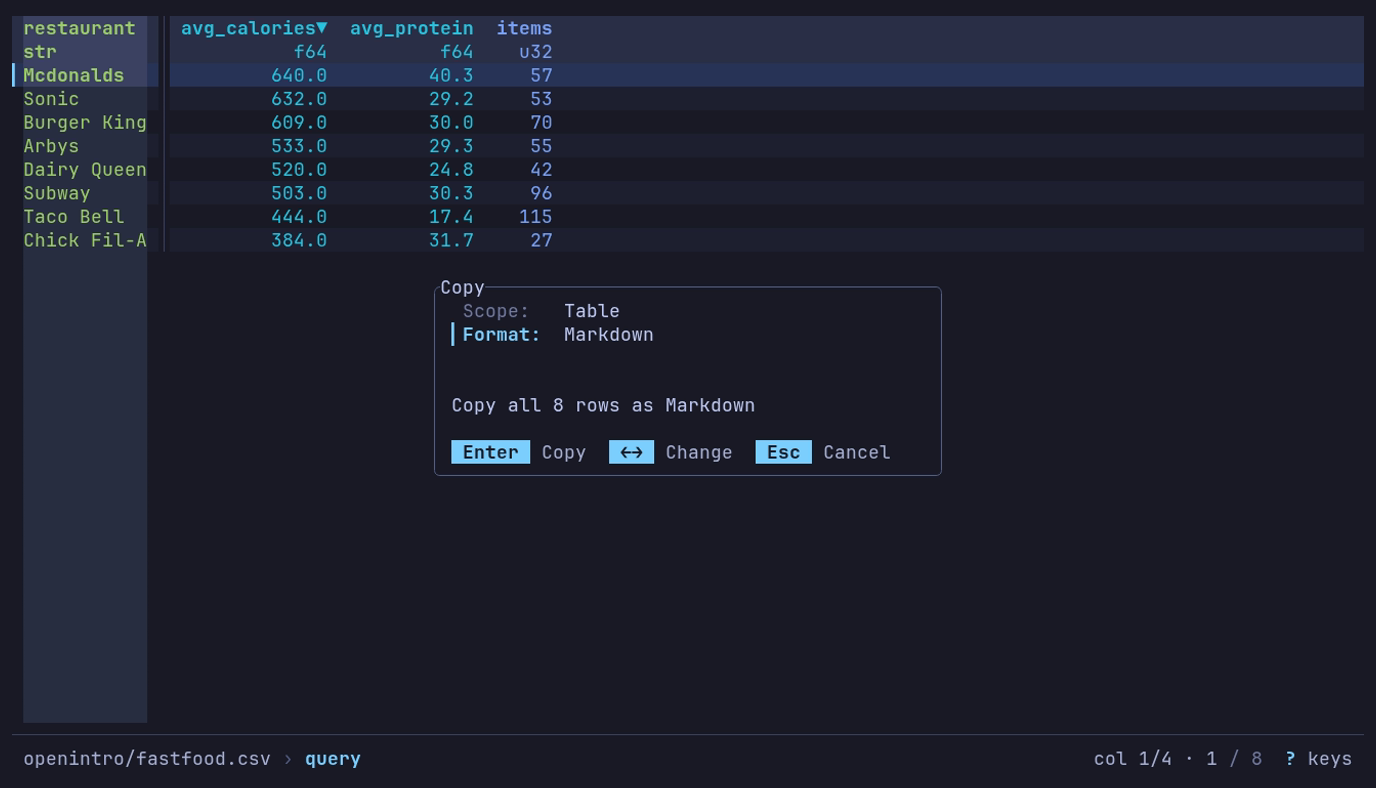
Which chain’s menu is heaviest, in a note? y, Table, Markdown: the dialog says what Enter copies, all 8 rows, Mcdonalds first at 640 calories.
Paste into a note:
| restaurant  | avg_calories | avg_protein | items |
| ----------- | -----------: | ----------: | ----: |
| Mcdonalds   |        640.0 |        40.3 |    57 |
| Sonic       |        632.0 |        29.2 |    53 |
| Burger King |        609.0 |        30.0 |    70 |
| Arbys       |        533.0 |        29.3 |    55 |
| Dairy Queen |        520.0 |        24.8 |    42 |
| Subway      |        503.0 |        30.3 |    96 |
| Taco Bell   |        444.0 |        17.4 |   115 |
| Chick Fil-A |        384.0 |        31.7 |    27 |
Values are copied raw, so round them in the query. The data spells McDonald’s
Mcdonalds.
For a spreadsheet, choose TSV instead. Table includes all matching rows; View includes only the rows on screen.
| Scope | What it copies |
|---|---|
| Cell | The current row’s value in one column, as plain text: the column cursor’s, unless you pick another |
| Row | The current row |
| View | The rows on screen, with every displayed column |
| Table | Everything the view holds, as an export would: rows and columns as queried, filtered and sorted |
| Python (Polars) | The view as a Python script that rebuilds it; see below |
| Format | Details |
|---|---|
| TSV | Tab-separated, what spreadsheets expect from a paste |
| CSV | Comma-separated |
| Markdown | A pipe table, padded and aligned, numeric columns right-aligned |
A TSV or CSV copy to the native clipboard also carries an HTML table flavor,
so a paste into a spreadsheet or an email keeps its columns while a paste into
a terminal stays plain text. Values are raw, like an export: display formatting
is not applied, a float is copied as stored rather than as the table rounds it,
and a null is an empty field. List and struct cells are JSON,
as in a CSV export, and a duration is
ISO 8601 text such as PT3723.004S. A binary column is
base64 in a Table copy; Cell, Row and View copies
hold the ‹binary› placeholder, since the screen never reads the bytes. The Header
toggle is on for View and Table and off for Row; a Markdown table always keeps
its header. The Header row leaves the dialog for the Cell and Python
scopes and the Markdown format, and Format for the Python scope, where
they mean nothing.
To copy one field of the current row, including a hidden or binary one, press Space to inspect the row, move to the field and press y.
A large Table copy asks first, counting binary at its base64 size. A binary
column’s size comes from the Parquet footers read to open a local directory of
Parquet files or a single Parquet object in cloud storage. A copy whose size is
not known asks too: the row count is still being read, or no footer gave a
binary column’s size, as for a single local file.
Above 200 MiB the copy is refused with a pointer to
export. An osc52 copy asks only when its cap is over
10 MiB, since it never holds more than the cap.
Copy the view as Python
Press y, choose Python (Polars) on Scope and press Enter. The clipboard gets a script that builds the view with Polars:
import polars as pl

df = (
    pl.scan_csv("sales.csv", try_parse_dates=True)
    .filter((pl.col("region") == "north") & (pl.col("qty") > 1))
    .sort(["amount", "order_id"], descending=[True, False], nulls_last=True, maintain_order=True)
    .select(["order_id", "customer", "amount"])
)
df is a LazyFrame; df.collect() reads it. The steps come in the order
they were applied:
| In datui | In the script |
|---|---|
| The file | The reader below, with the reader options datui used (delimiter, header, comment lines, skipped lines and rows, null values), then the column names it trimmed and the text columns it read as numbers or dates; a directory or bucket prefix as a glob |
| Query | .filter, .group_by().agg() ordered by the keys, .select, .unique |
| SQL | .sql(..., table_name="df") |
| A find kept with Ctrl+G | .filter on each column as text, pl.any_horizontal across them |
| Pivot, Melt | .group_by().agg() then .pivot(); .unpivot() |
| Drill-down | .filter on the grouped rows with eq_missing |
| Filters, sort, r | .filter, .sort(..., nulls_last=True, maintain_order=True), .reverse() |
| Hidden and moved columns | .select([...]) |
The reader is the one for the format datui read the data as, which a file
known by its bytes rather than its name (a .bin log, a Parquet part file
with no extension) is read as too:
| Format | Reader |
|---|---|
| Parquet | pl.scan_parquet |
| CSV | pl.scan_csv |
| TSV | pl.scan_csv |
| PSV | pl.scan_csv |
| JSON | pl.read_json |
| NDJSON | pl.scan_ndjson |
| Arrow IPC | pl.scan_ipc |
| Avro | pl.read_avro |
| ORC | df = ... |
| Excel | pl.read_excel |
| SafeTensors | df = ... |
| GGUF | df = ... |
| NMEA | df = ... |
| GPX | df = ... |
| audio | df = ... |
| MIDI | df = ... |
| SQLite | pl.read_database |
| VCD | df = ... |
| FIX | df = ... |
| SDF | df = ... |
| NumPy | pl.from_numpy |
| ELF | df = ... |
| ULog | df = ... |
| DataFlash | df = ... |
| candump | df = ... |
| text | pl.LazyFrame |
| systemd journal | pl.scan_ndjson |
A reader that is not a scan reads the file whole and ends in .lazy(); so
does an Arrow IPC stream, read with pl.read_ipc_stream. A SQLite table is
read with SELECT * through Python’s sqlite3, the one table of a database
opened without --table included. A NumPy array is loaded with np.load,
an archive’s by its name, and named as datui names its columns. Where datui
read the data lazily and the script reads it whole, a comment says so in the
words of the Info panel’s Read: line: # Read: lazy in datui; pl.read_database reads the file whole into memory.
These start from df = ... for you to fill in, with a comment naming the
file and the table on screen (flight.bin --table GPS):
- Data piped in on standard input; recorded with
--tee FILE, it is read from FILE instead - A format with
df = ...above, or a read through a format spec - A file compressed with bzip2 or xz
- A CSV read with
--header-rows,--skip-initial-space, or a--commentlonger than five characters
A step the script cannot repeat, such as a drill-down into a group whose rows are lists, is a comment, and the steps after it are commented out.
A file in an object store is read where datui read it, with storage_options
saying what datui read it with that is not a secret:
| Store | storage_options |
|---|---|
| S3 | The endpoint and region in effect, a named source’s own for s3://<source>@bucket |
| Azure | The account an abfss:// URL names |
| Any, read with no signature | skip_signature |
Credentials never go in: give Polars yours where it looks for them, such as
the provider’s environment variables. pl.read_json, pl.read_avro and
pl.read_excel read no object store; the script says to download the file.
A user and password in a URL, and an HTTP URL’s query string (where a signed
URL keeps its signature), are left out, with a comment saying so.
Keys
The dialog takes the keys every dialog takes:
| Key | Action |
|---|---|
| ↓ ↑ or Tab Shift+Tab | Move between rows |
| ← → | The previous or next scope, column or format; on Header, toggle |
| Space | The next scope or format; on Column, open its picker; on Header, toggle |
| Enter | Copy, from anywhere in the form; in a picker, choose |
| ? | Help |
| Esc | Close a picker, then the dialog, without copying |
In the column picker, typing narrows the list and ↑ ↓ move.
How the copy reaches the clipboard
[clipboard] backend in the configuration
chooses the mechanism:
| Backend | How |
|---|---|
auto (default) | native where a display server answers, osc52 elsewhere |
native | The display server (Wayland, X11, macOS, Windows), with the HTML flavor |
osc52 | An escape sequence the terminal applies to the system clipboard |
osc52 is what works over SSH: no display server is involved, the terminal
you are sitting at does the copy. Caveats terminals impose:
- tmux needs
set-clipboard onto pass the sequence through. - Terminals cap the sequence length; datui refuses payloads above
osc52_limit(default 100 KiB) rather than sending a copy that arrives truncated. A Table copy is read in batches and stops at the first one over the cap, so a copy too large is refused without reading the whole table. The clipboard keeps what it held. Some terminals disable OSC 52 writes entirely by default. - No HTML flavor: the terminal takes plain text only.
A native copy on Wayland or X11 belongs to the datui process: quitting can
drop it unless a clipboard manager keeps copies. datui holds the offer for as
long as it runs.