datui documentation
Open, query, chart and export tabular data in your terminal. datui reads local files and cloud storage, and works with Polars frames in Python.
Parquet, CSV, JSON, Arrow, Excel, SQLite, logs, audio, model files and more, including binary formats you describe in a format spec.
Start here: Install datui, then follow the quick start with a small public dataset.
Find a task
| I want to… | Go to |
|---|---|
| Open a file, a directory, a glob or a compressed export | Open files and directories |
| Read a pipe, or follow a file as it grows | Pipes and growing files |
| Know how a format is read, or read my own binary format | Formats · Format specs |
| Connect to S3, GCS, Azure or an HTTP URL | Connect to cloud storage |
| Find recent files or browse buckets | Home screen · Cloud sources |
| Filter rows or write SQL | Query data · Sort and filter |
| Make a chart or reshape a table | Make a chart · Pivot and melt |
| Check missing values or schema changes | Check data quality · Info panel |
| Copy, export, or reuse a result | Copy · Export · Views |
| Explore a DataFrame in Python | Use datui from Python · Python API |
| Change defaults or colors | Configure datui · Settings |
| Look up a key, expression, flag or variable | Keys · Query syntax · Options · Environment |
| Fix a problem | Troubleshooting |
| Build or contribute | Development overview |
Help while you work
Press ? for the current screen’s keys. The footer says what is in effect, and the keys of whatever mode is active. Esc backs out; Ctrl+Q quits. The search button above searches this manual.
Choose another version, watch the demos, or report a problem.
Install datui
datui runs on Linux, macOS and Windows. Pick one method, check it with
datui --version, then go on to the quick start.
| System | Needs |
|---|---|
| Linux | glibc 2.28 or newer, on x86_64 or arm64: Debian 10, Ubuntu 20.04, RHEL 8 and later, and their derivatives. Alpine and other musl systems: build from source |
| macOS | 10.12 on Intel, 11 on Apple silicon |
| Windows | Windows 10 or newer, x64 |
Linux and macOS, one line
curl -fsSL https://raw.githubusercontent.com/derekwisong/datui/main/scripts/install/install.sh | sh
The script installs the latest release for your platform:
| System | What it does |
|---|---|
| Debian, Ubuntu | Adds the apt repository and its signing key with sudo, then installs the package with apt; apt upgrade keeps it current |
| Fedora, RHEL, Amazon Linux | Downloads the release’s .rpm and installs it with dnf |
| Arch Linux and derivatives, x86_64 | Asks, then installs datui-bin from the AUR with yay or paru; pacman owns it and the helper upgrades it. With neither, it says how and offers the archive |
| Other Linux, macOS | Unpacks the release archive: datui into /usr/local/bin, the manual pages into /usr/local/share/man |
It checks each download against the release’s SHA256SUMS, asks before it
changes apt or runs an AUR helper (with no terminal to ask on, it goes ahead),
and runs the installed binary before it reports success. Options go after sh -s --:
| Option | Effect |
|---|---|
--user | Install into ~/.local/bin (or $XDG_BIN_HOME) without root; the default where there is no sudo |
-y, --yes | Answer yes to every question |
--no-verify | Install without checking the download against SHA256SUMS |
-h, --help | Print the options and exit without installing |
Package-manager and binary-download options are below; Uninstall says how to remove each.
Without root
Where there is no sudo, as in Azure Cloud Shell, the script installs the binary
into ~/.local/bin (or $XDG_BIN_HOME) instead, and says how to put that on your
PATH if it is not there. Pass --user to do the same on a machine that has
sudo:
curl -fsSL https://raw.githubusercontent.com/derekwisong/datui/main/scripts/install/install.sh | sh -s -- --user
Package managers
| Platform | Command |
|---|---|
| Windows, WinGet | winget install derekwisong.datui |
| macOS, Homebrew | brew tap derekwisong/datui && brew trust derekwisong/datui && brew install datui |
| Python, PyPI | pip install datui |
| Rust, crates.io | cargo install datui --locked |
| Arch Linux, AUR | yay -S datui-bin # or: paru -S datui-bin |
| Debian, Ubuntu | Apt repository |
| Binaries | Linux, macOS and Windows binaries, .deb, .rpm and Arch tarballs on the latest release |
On Fedora and RHEL, the one-line script installs the .rpm; or install it from
the release, as below.
Homebrew needs brew trust before it will install from a third-party tap. The
pip package installs the datui command and the Python module.
cargo install compiles datui, which takes a C compiler and some minutes; with
cargo-binstall installed,
cargo binstall datui fetches the release archive for your platform instead.
Apt repository
Add the signing key and source once:
curl -fsSL https://derekwisong.github.io/datui-apt/public.key | sudo gpg --dearmor -o /usr/share/keyrings/datui-archive-keyring.gpg
echo "deb [signed-by=/usr/share/keyrings/datui-archive-keyring.gpg] https://derekwisong.github.io/datui-apt/ ./" | sudo tee /etc/apt/sources.list.d/datui.list
sudo apt update
sudo apt install datui
After that, apt upgrade keeps datui current.
Pre-built binaries
Every release on GitHub carries these, with a SHA256SUMS
file and its Sigstore signature. <VERSION> is the release’s version, such as
0.4.0:
| Asset | For |
|---|---|
datui-v<VERSION>-x86_64-unknown-linux-gnu.tar.gz | Linux x86_64, glibc 2.28 or newer |
datui-v<VERSION>-aarch64-unknown-linux-gnu.tar.gz | Linux arm64, glibc 2.28 or newer |
datui_<VERSION>-1_amd64.deb, datui_<VERSION>-1_arm64.deb | Debian, Ubuntu |
datui-<VERSION>-1.x86_64.rpm, datui-<VERSION>-1.aarch64.rpm | Fedora, RHEL |
datui-v<VERSION>-aarch64-apple-darwin.tar.gz | macOS, Apple silicon |
datui-v<VERSION>-x86_64-apple-darwin.tar.gz | macOS, Intel |
datui-v<VERSION>-x86_64-pc-windows-msvc.zip | Windows |
PKGBUILD | The AUR package’s build file |
datui-<VERSION>-cp38-abi3-*.whl | The Python wheels PyPI serves |
An archive holds datui, LICENSE, man/ and completions/. Unpack one and
put datui somewhere on your PATH, or install a package:
sudo apt install ./datui_<VERSION>-1_amd64.deb
sudo dnf install https://github.com/derekwisong/datui/releases/download/v<VERSION>/datui-<VERSION>-1.x86_64.rpm
From source
Needs a Rust toolchain, 1.95 or newer.
git clone https://github.com/derekwisong/datui.git
cd datui
cargo build --release --locked
The binary is target/release/datui. To build a specific release, check out
its tag first (git tag --list, then git checkout vX.Y.Z). To install into
~/.cargo/bin instead, run cargo install --path . --locked from the checkout.
Five features are on by default. --no-default-features leaves them all out;
add back the ones you want with --features:
cargo build --release --locked --no-default-features --features sql,streaming
| Feature | Without it |
|---|---|
cloud | S3, GCS and Azure URLs fail to open; no cloud sources on the home screen |
http | HTTP(S) URLs fail to open |
sql | The command line has no sql:; a view saved with SQL fails to apply |
sqlite | SQLite databases fail to open |
streaming | No Polars streaming engine: an export reads the whole view first, and a Data Quality read runs to its end on Esc |
Example datasets lists only what the build can open.
Manual pages
The .deb, .rpm, AUR package, Homebrew formula and release archives install
the manual pages: man datui, man datui-config, man 5 datui-config, man datui-keys. pip install datui puts
them in the environment’s share/man, which man searches while its bin is
on your PATH.
After cargo install or a build from source, datui man shows them, and this
installs them where man finds them for your user:
datui man --dir ~/.local/share/man
datui man --list lists the pages.
Shell completions
The packages, Homebrew and the release archives (completions/) install the
completion scripts for bash, zsh and fish. Otherwise datui completions SHELL
prints the script for the flags, commands and format names. Set it up once per
shell:
| Shell | Setup |
|---|---|
| bash | source <(datui completions bash) in ~/.bashrc |
| zsh | source <(datui completions zsh) in ~/.zshrc, after compinit |
| fish | datui completions fish > ~/.config/fish/completions/datui.fish |
| PowerShell | datui completions powershell | Out-String | Invoke-Expression in your $PROFILE |
| elvish | eval (datui completions elvish | slurp) in ~/.config/elvish/rc.elv |
Windows
winget install derekwisong.datui
| On Windows | |
|---|---|
| Terminal | Windows Terminal and the classic console window draw 24-bit color; with “Use legacy console” checked, 16 colors. Windows Terminal draws datui’s glyphs; the classic console draws ASCII unless its code page is UTF-8 (chcp 65001). [display] unicode overrides either way (Glyphs or ASCII) |
| Config file | %APPDATA%\datui\config.toml |
| Format specs | %APPDATA%\datui\formats (Format specs) |
| Cache and log | %LOCALAPPDATA%\datui |
~ | datui ~\data\a.csv opens from your user folder in cmd and PowerShell too |
| Mouse | Shift+drag selects text in Windows Terminal while datui has the mouse (Mouse and text selection) |
| Globs | cmd and PowerShell pass *.csv to datui as typed; quote it in Git Bash, as on Linux |
| A file open in another program | A spreadsheet app or database that holds a file exclusively stops datui reading it: datui says so. Close it there and reopen |
| A file datui has open | datui reads files through memory maps, and Windows lets no program truncate, rename or delete a file while it is mapped. A program rotating a log datui has open can fail; close it in datui first (Ctrl+O or q) |
Uninstall
| Installed by | Remove with |
|---|---|
| The script, on Debian or Ubuntu | sudo apt remove datui; then sudo rm /etc/apt/sources.list.d/datui.list /usr/share/keyrings/datui-archive-keyring.gpg drops the repository |
| The script, on Fedora, RHEL or Amazon Linux | sudo dnf remove datui |
| The script, elsewhere | sudo rm /usr/local/bin/datui /usr/local/share/man/man*/datui* |
The script with --user | rm ~/.local/bin/datui ~/.local/share/man/man*/datui* |
A .deb or .rpm | sudo apt remove datui or sudo dnf remove datui |
| WinGet | winget uninstall derekwisong.datui |
| Homebrew | brew uninstall datui, then brew untap derekwisong/datui |
| pip | pip uninstall datui |
| cargo | cargo uninstall datui |
| AUR | sudo pacman -R datui-bin |
| An archive | Delete datui from where you put it |
None of these touch your config, themes, saved views, cache or log. datui config path names the config files; the directories are:
| Config | Cache and log | |
|---|---|---|
| Linux | ~/.config/datui | ~/.cache/datui |
| macOS | ~/Library/Application Support/datui | ~/Library/Caches/datui |
| Windows | %APPDATA%\datui | %LOCALAPPDATA%\datui |
Quick start
Open public penguin measurements from the built-in catalog, compare three species, chart them, and copy the result. Install datui first.
1. Open the data
datui
Type penguins to narrow the home screen, select Palmer penguins under
Example datasets, and press Enter. A catalog file this small
downloads without a question.
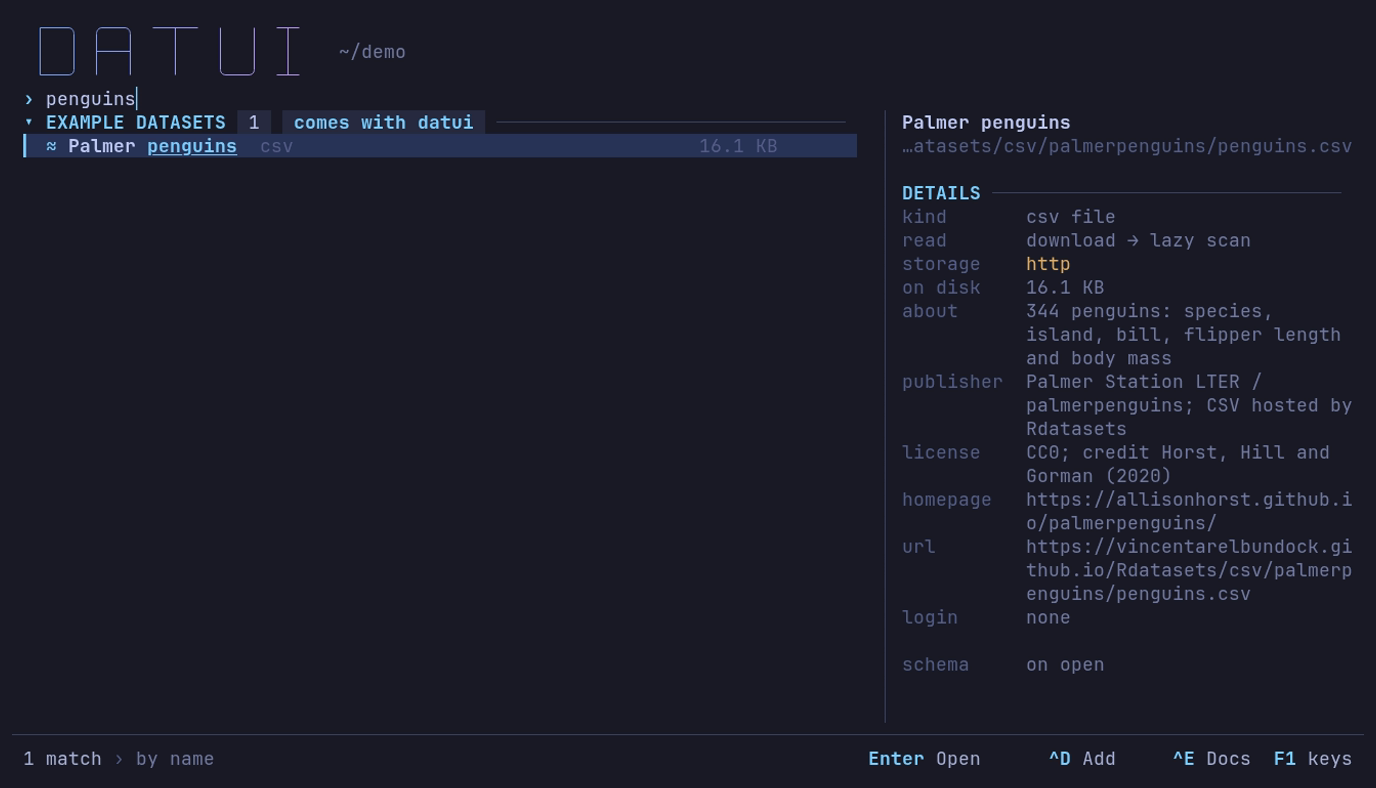
Type penguins: one match, its details beside it. Enter opens it.
The table has 344 penguins. Empty fields in the file are null, shown as ∅;
rownames is the row number the host, Rdatasets, adds. The data is CC0, from
Palmer Station LTER; credit Horst, Hill and Gorman (2020).
To skip the home screen, give the URL; datui asks before it downloads a URL you type, and Enter says yes:
datui https://vincentarelbundock.github.io/Rdatasets/csv/palmerpenguins/penguins.csv
| Key | Action |
|---|---|
| Arrow keys or h j k l | Move around |
| PgUp PgDn | Move a page |
| Wheel, click | Scroll; put the cursor on a cell. A double-click inspects the row |
| i | Info panel: columns and file details |
| ? | This screen’s keys; Enter on one runs it |
| Esc | Close a panel or go back |
| q | Back to the home screen; quits when the table was opened from the shell |
| Ctrl+Q | Quit |
2. Group by species
Which species is heaviest? Press :; the command line opens at
sql:. Type this, then press Enter:
SELECT species, AVG(body_mass_g) AS mean_mass_g, COUNT(*) AS penguins
FROM df
GROUP BY species
ORDER BY mean_mass_g DESC
Type it on one line, or press Alt+Enter for a new line.
| species | mean_mass_g | penguins |
|---|---|---|
| Gentoo | 5076.01626 | 124 |
| Chinstrap | 3733.088235 | 68 |
| Adelie | 3700.662252 | 152 |
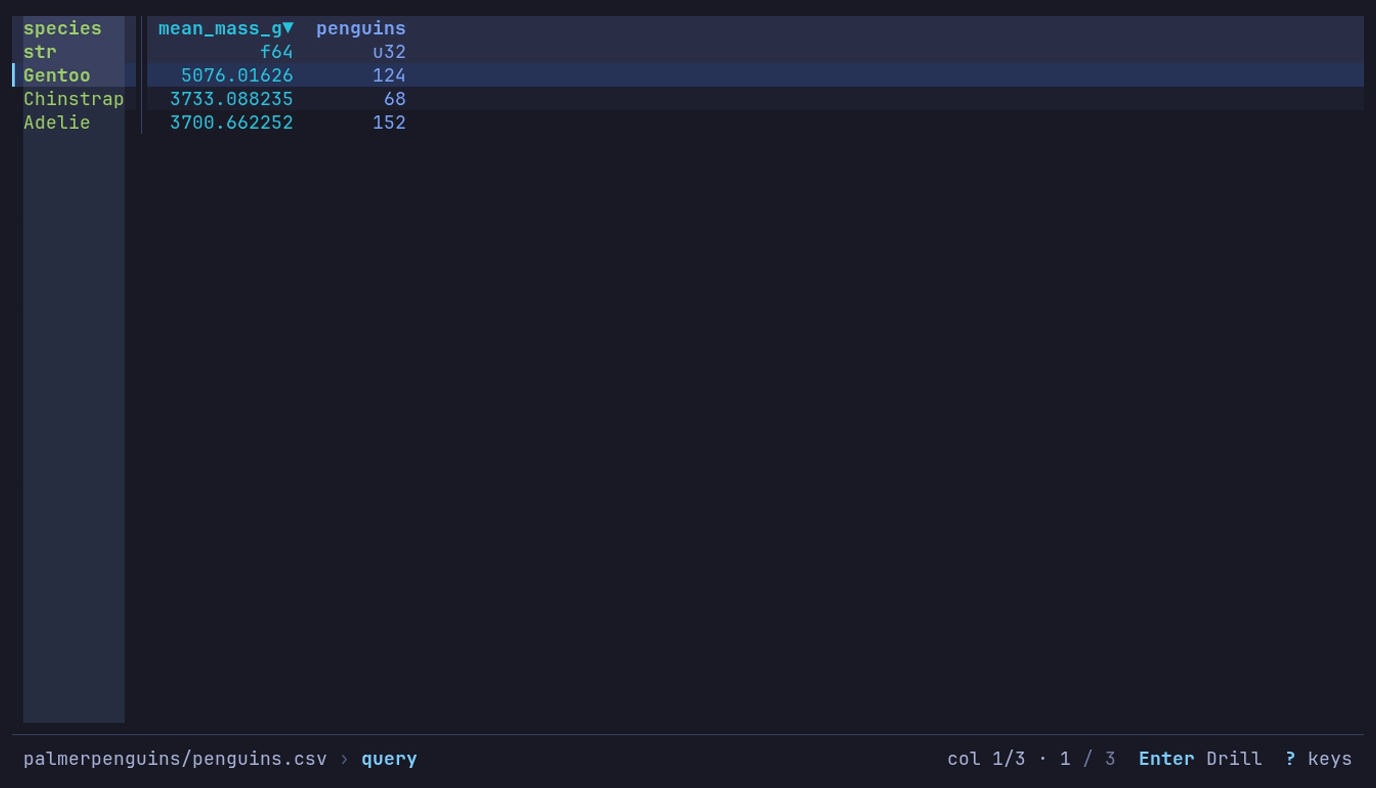
Which species is heaviest? Gentoo, 5,076 g on average over 124 penguins. :, the query, Enter.
AVG skips the two penguins with no mass; COUNT(*) counts every row. The
table is named df. Press Enter on Gentoo to see its 124 penguins,
and Esc to come back.
The same summary is one line in q, a subset of q that evaluates right
to left. Press :, then Ctrl+T for q::
select mean_mass_g: avg body_mass_g by species
A new query starts a fresh view, clearing sidebar filters and sort. See querying for more SQL and q.
3. Chart the measurements
Do heavier penguins have longer flippers? Press R to return to the
original rows, put the column cursor on body_mass_g (g, type
body_mass_g, Enter), then press c for a chart and
2 for Scatter. Y starts on the cursor’s column.
| Shelf | Choose |
|---|---|
| Type | Scatter (2) |
| X | flipper_length_mm |
| Y | body_mass_g |
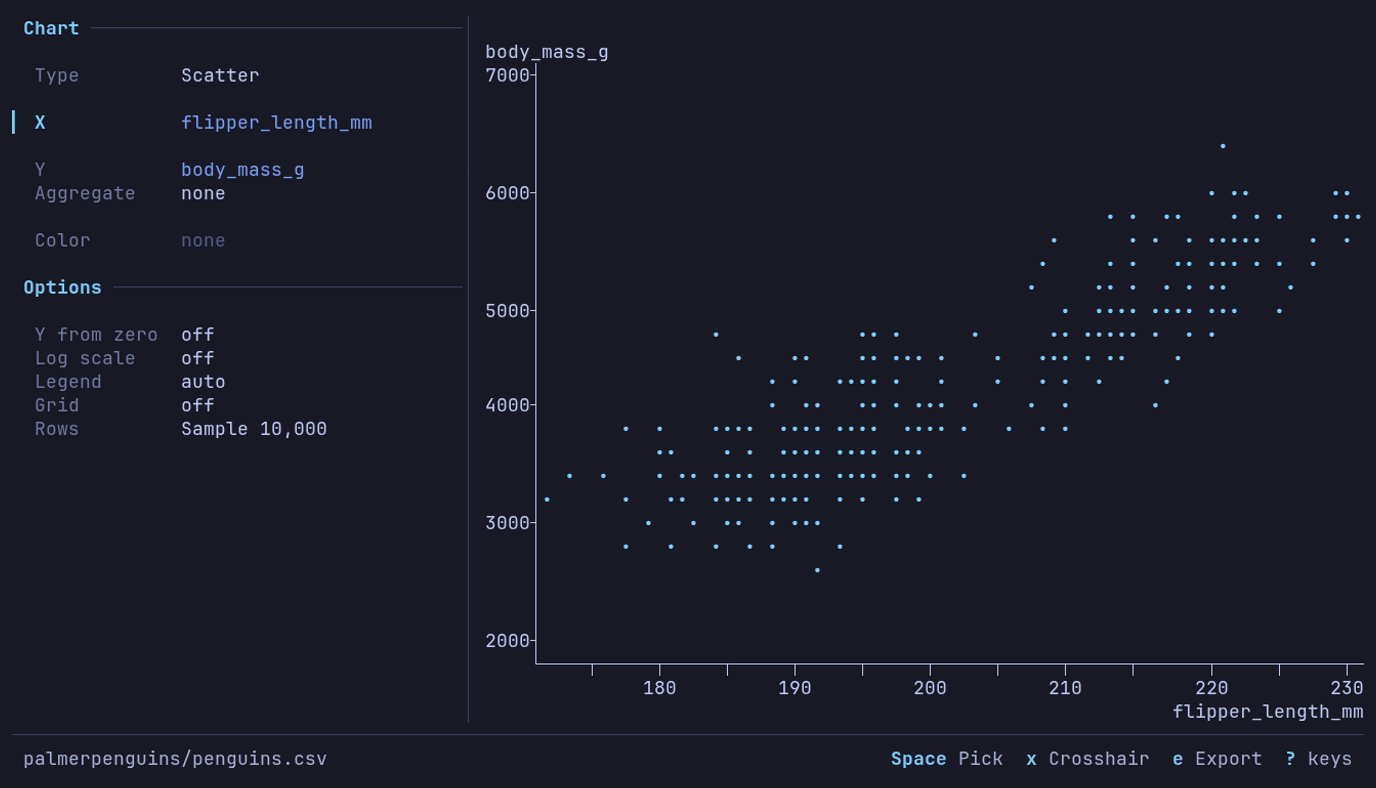
Do heavier penguins have longer flippers? Yes. c 2, then
X flipper_length_mm.
↓ ↑ move between rows of the panel; Space on X opens its picker. Type part of the name and press Enter. The two penguins with no measurements are left out.
Now press 3 for Bar, choose species for X, and on
Aggregate press → for count: Adelie 152, Gentoo 124,
Chinstrap 68.
Press e in the chart to export a PNG, SVG or PDF. Press Esc to return to the table. More chart options.
4. Copy or export
Run the species summary again, then choose an output:
| Do this | How |
|---|---|
| Copy the summary into a note | y → Scope Table → Format Markdown → Enter |
| Export a data file | e → type penguin-summary.csv in Path → Enter |
| Reuse the query on another file | v → s to save a view |
Export and copy use the current rows and columns. They do not overwrite the input file unless you export to that path and confirm.
Use your own data
Replace <FILE>, <DIRECTORY> and <BUCKET>/<PREFIX> with your own:
datui <FILE>
datui <DIRECTORY>/
datui s3://<BUCKET>/<PREFIX>/
datui alone starts at the home screen.
Next: open files and directories, formats, cloud access, or all keyboard shortcuts.
Demos
Two recordings, each of a dataset from Example datasets on the home screen, opened as its publisher serves it. Every step they show is written out in the guides below.
When should I fly out of JFK?
NYC flights (2013): 336,776 departures from New York’s three airports.
Sorted by dep_delay, inspected, then charted as the mean departure delay by
hour, one line per origin. At JFK it climbs from 0.5 minutes at 5:00 to
26.1 at 21:00. The data is 2013’s; this is not a forecast.
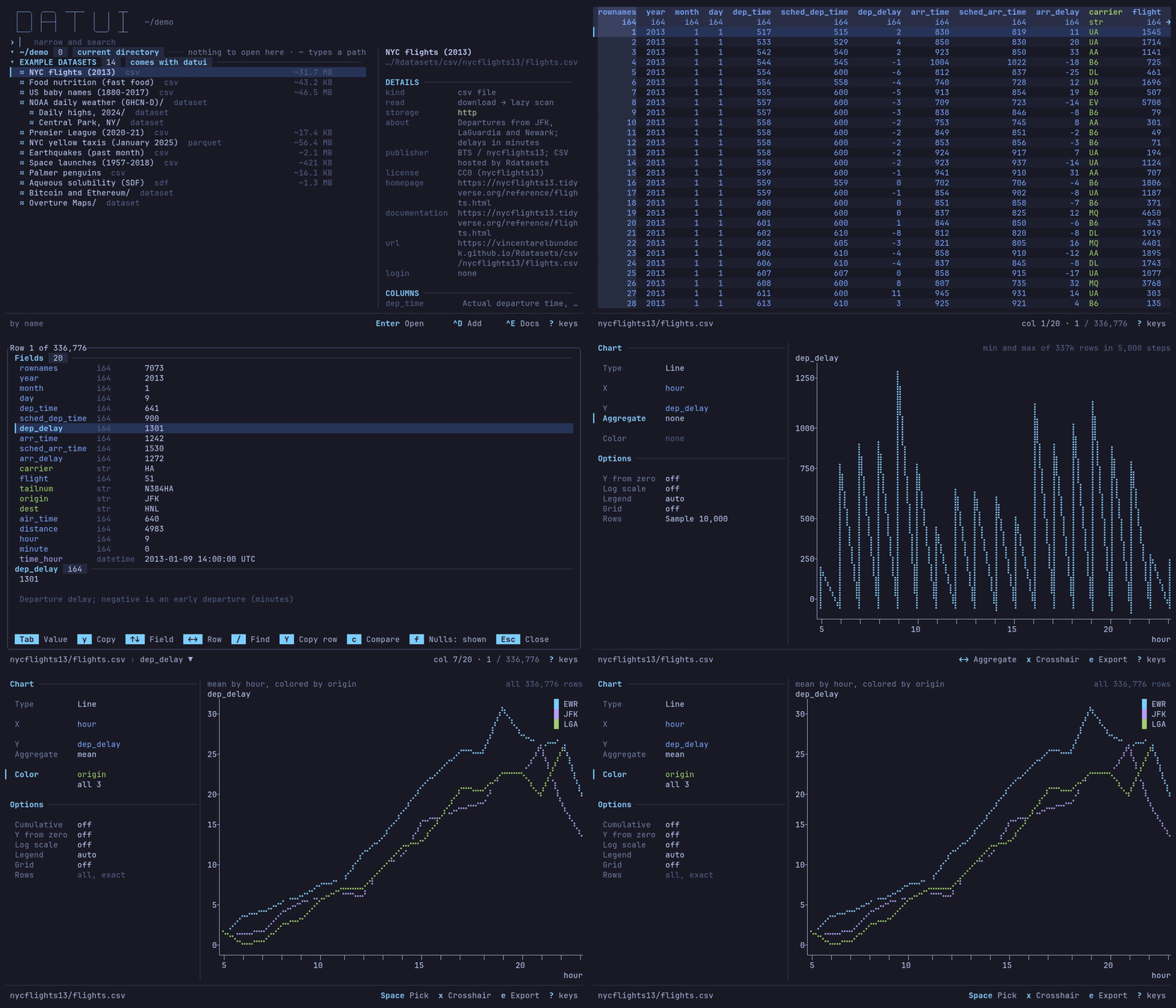
Do it yourself: Query data and Make a chart.
A public bucket, opened in place
NOAA daily weather (GHCN-D) on S3, with no login. Central Park’s 155 years
of daily highs, from the catalog’s bookmark, charted by year; then one year of
the whole bucket, s3://noaa-ghcn-pds/parquet/by_year/YEAR=2024/, opened as
one table and scrolled to its last row. The waits are real; nothing is
downloaded whole.
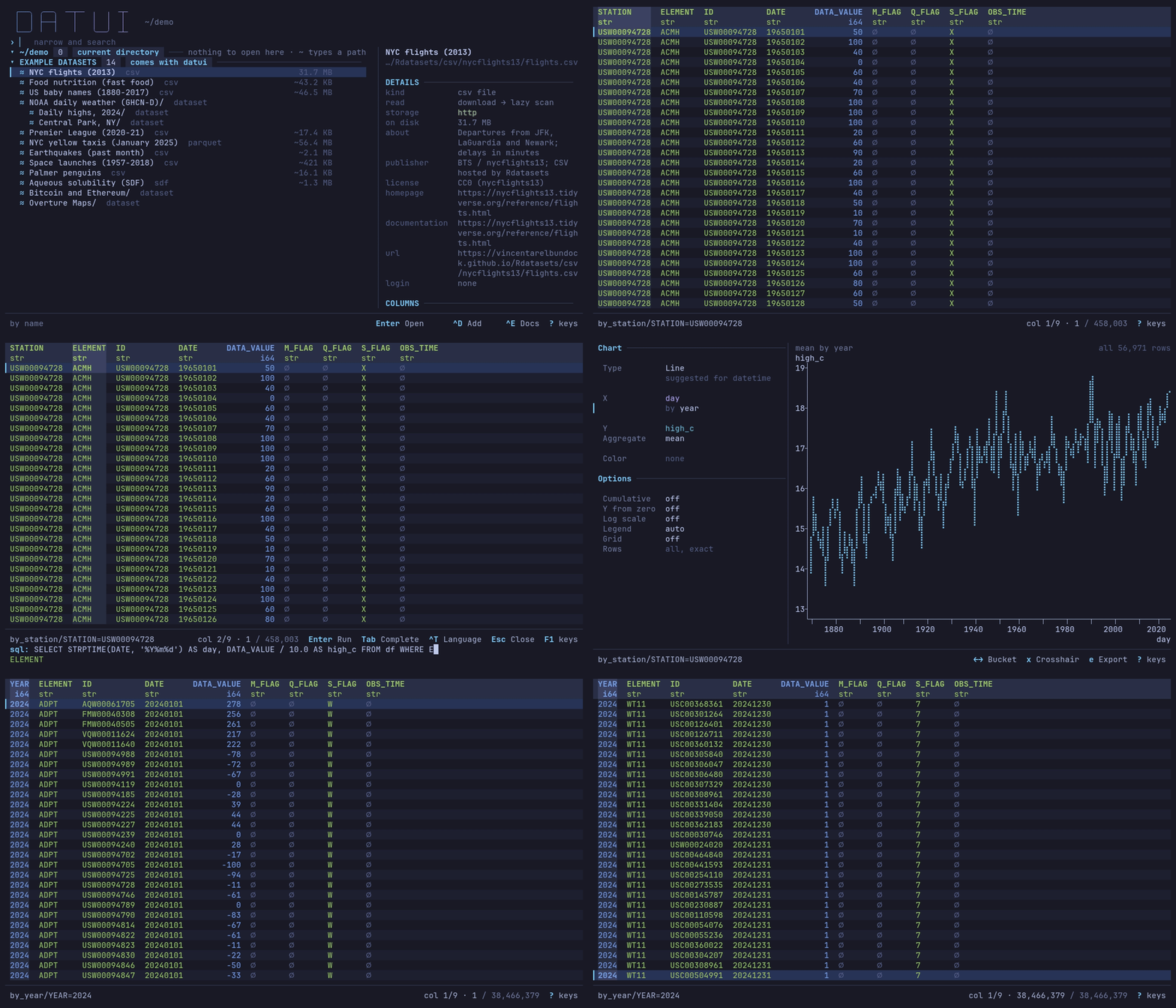
Recorded 2026-10-05 with datui 0.4.0-dev on an 8-core Ryzen 7 9800X3D, over a
wired home connection, with a cold cache: YEAR=2024 opened its 135 files as
one table of 38,466,379 rows in about a second. Your times depend on your
connection and the bucket.
Do it yourself: Connect to cloud storage.
More examples
| Question | Dataset | Guide |
|---|---|---|
| Which species is heaviest? | Palmer penguins | Quick start |
| Which airlines arrive late, and where does AS fly? | NYC flights (2013) | Query data |
| Which matches had the most goals? | Premier League (2020-21) | Dates and messy text |
| The heaviest chicken dishes | Food nutrition (fast food) | Sort, filter and arrange columns |
| Emma, Jennifer and Olivia by year | US baby names (1880-2017) | Pivot and melt |
| Every chart on the built-in data | Several | Make a chart |
| One query, two years of weather | NOAA daily weather (GHCN-D) | Save and apply views |
Home screen
datui with no path opens the home screen, where you find and open a dataset:
recent files, directories, cloud storage, your catalog and a catalog of public
data.
datui
Ctrl+O returns here from anywhere, on the dataset you left. A filter typed before comes back selected: typing replaces it, and ~ opens the path prompt. Typing narrows the list; Esc clears the filter and selects the first dataset; Enter does what the footer names for the row. Every key is in the keyboard reference.
Open a file or directory
- Type part of a name to narrow the list.
- Select the row and press Enter, or double-click it.
- To browse a directory rather than read it as one table, press →.
To type a path or URL, press ~ with the filter empty. The list
shows the directory being typed, narrowed by the name after the last /, with
the first name picked.
Key at the ~ prompt | Does |
|---|---|
| Tab | Completes the one name left, with / for a directory, or what the names share; a name picked further down, that name |
| ↑ ↓ | Picks a name from the list; ↑ from the first takes the path as typed |
| Enter | Opens the picked name, or the path as typed: a file opens, a directory is gone inside as → does |
| Esc | Closes the prompt |
s3://, gs:// and az:// complete from names datui already knows (listed
sources and prefixes, recents, the example datasets); nothing is asked of the
store, so s3://noaa Tab gives s3://noaa-ghcn-pds/.
The footer names where the list is, how many rows the filter matches and the
order, and at the right Enter, named for what it does on the selected
row (Open, Open all, Inside, Look), what Ctrl+D does
there (^D Add to catalog.toml, or ^D Forget on its own rows), ^E Docs on a
catalog row, then ? keys (F1 keys once a filter is typed, since ?
then types). Letters type into the filter, so
q types q; Ctrl+C quits.
Sections
| Section | Lists |
|---|---|
RECENT | Datasets opened before, grouped by the directory or cloud place each lives in |
| Current directory | Where datui was launched; an empty one says nothing to open here · ~ types a path |
CLOUD | Cloud sources: stores found on this machine and configured ones |
MY DATASETS | Your catalog, catalog.toml: what Ctrl+D added and what you wrote |
| Other catalogs | Each *.toml in the config directory’s catalogs/, then each file catalogs lists, under its label |
EXAMPLE DATASETS | The example datasets that come with datui |
ELSEWHERE | Directories your desktop recorded (freedesktop recently-used.xbel); starts folded |
Found | Search results, while you type |
Folds last between runs. A heading says why its section is listed and how it
stands: catalog.toml, catalog or built in for a catalog; nfs4, listing
(then 1,200 so far as a slow share answers), unavailable, or first 5,000
when a listing stops there.
Recent
Recent ranks datasets by frecency, as zoxide ranks directories: an open counts
four times within the hour, twice within the day, half within the week and a
quarter after. A place (a directory) ranks with its best dataset, and
entering it shows all its files, opened or not. The cursor starts on the
dataset opened last, so Enter reopens it. Places fill up to a third
of the list at first; … more in … places shows the rest.
Add to your catalog
Opening a dataset adds its directory to Recent. To keep a dataset or a
directory on the home screen, press Ctrl+D on its row: it
goes into catalog.toml, listed under MY DATASETS. Ctrl+D
again on that row forgets it. A directory there is a row to step into.
| Row | Ctrl+D adds |
|---|---|
| A file or directory | It, under the row’s name |
| A heading of a directory’s section, or a Recent place | That directory |
| A row of another catalog | A copy: location, login and description |
A row of catalog.toml | Nothing: it forgets the row |
Catalogs has the file’s keys, team catalogs and
datui catalog check. [home] desktop_recents = false drops ELSEWHERE;
datui never writes the desktop’s file, and lists a place there only when you
enter it.
Search below the current directory
Typing narrows every section and searches below the working directory in the
background. Found lists matches by their path from there.
| What | How |
|---|---|
| Matching | fzf-style: runs of characters, word starts and file names rank higher; matched characters are underlined. Known Parquet column names match too, after names. What you open often ranks first, in every section |
| The walk | Once per directory, keeping every data file; each key narrows the last result |
| Results | The best 1,000 ([home.search] max_results); the heading counts the rest and the entries read: 1,000 of 2,500 matches, 23,041 searched |
| Cut short | The heading says partial · out of time, · too many files or · too deep |
| Skipped | Hidden directories (.git, .venv), build and dependency directories (node_modules, target, build, dist, vendor, site-packages, __pycache__, venv, env), other file systems, symlinks. .gitignore is not read |
[home.search] sets the depth, time,
results and exclusions; cross_filesystems = false stays off network shares
and automounts.
The details pane
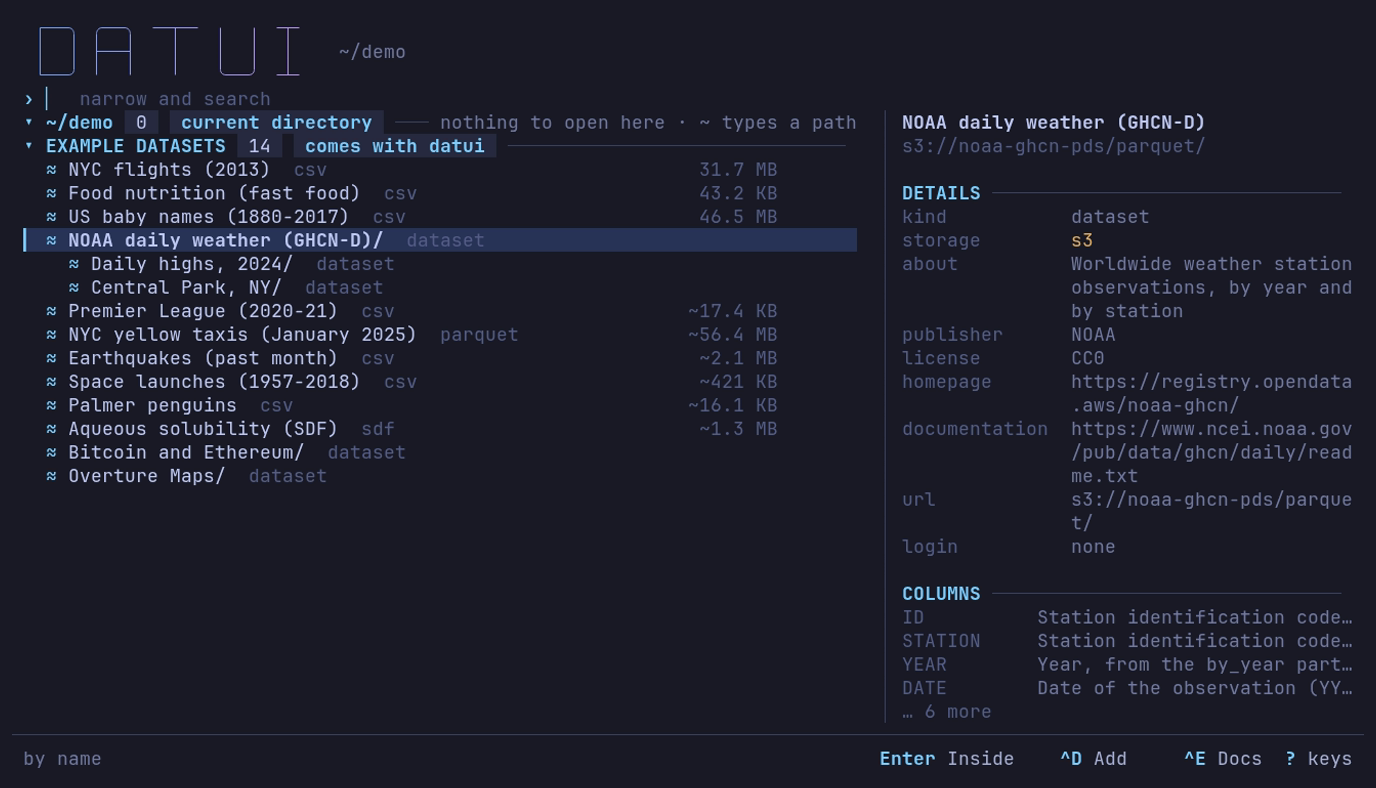
What is NOAA daily weather, and who publishes it? ↓ to it: an S3 dataset from NOAA, CC0, no login, with notes on its columns. Ctrl+E shows them all.
| Field | Says |
|---|---|
| Kind, storage | The format, and the file system or object store. A file a format spec reads, by its glob or its magic, says acme.l2feed file |
| Spec, match | For a spec’s file: the spec’s file, cut in the middle to fit, and what named the file, a chip per condition: [magic L2FD] [version 3], drawn without brackets where the header tint shows (format specs) |
| Read | How a file opens: lazy scan, decompressed copy, converted to Arrow, in memory, or download → one of those (formats) |
| Contains | Files by format, directories and partitions |
| Rows × columns | Known counts; blank when finding them would read the data. Parquet counts come from footers, up to 64 files; past that, ? × 39+ |
| On disk, in memory | The stored size; Parquet’s uncompressed size |
| Row groups | Parquet’s read units |
| Partitions | Keys and values from the directory names |
| Schema | The known columns and types; 3 columns (spec) when a format spec says them, then each column; on open when only opening the file reads them |
| Records | For a file a format spec reads as several record types: 2 types (spec), then each type and its column count (add 5 · cancel 3) |
▲ footer unreadable | A Parquet file whose footer could not be read; opening it will most likely fail too |
Enter, → | What Enter and → do on a directory, a door, a file of tables or a file of record types: all partitions as one table, step in · first row opens all, its tables, every record and its record types |
COLUMNS | What each column means, for a catalog dataset or bookmark with column notes, or a file a format spec documents: the catalog’s description, unit and legend each over the spec’s, as in the Documentation view, or 2 values for a legend alone; … 4 more when the pane is short. Ctrl+E shows the whole page |
ROWS | The first eight rows of a local CSV, TSV, PSV, NDJSON, Arrow IPC or Parquet file, read when the row is selected. Enter opens the file on those rows, so they are read once. [home] preview_max sets the largest file read; 0 turns it off. Network shares and object stores are not read before opening |
Below about 100 columns the pane hides, and the first rows show in a strip at the bottom when the list leaves four lines free.
What a row’s label says
A row reads its name, / for a directory, two spaces, and a label:
data/ 3 dirs, events/ hive, Palmer penguins csv.
| Label | Means |
|---|---|
hive | key=value subdirectories, at least as many as the data files beside them |
delta, iceberg, hudi | A lake table’s marker |
12 parquet, 3 csv | Data files of one format directly inside; 5000+ parquet when the listing stopped |
3 safetensors, 2 gguf | A model: weight files with only JSON beside them; opens as one table |
3 tables | A file that holds tables: SQLite, NumPy .npz, a flight or CAN log, a workbook, an NMEA log, an ELF file. See Info panel |
mixed | Several formats |
3 dirs, dir, dir+ | Only directories; nothing; the listing was cut short |
bucket, container | The top of an object store |
…, a spinner, ? | Not looked at yet, being looked at, failed |
A SQLite database with several tables lists them inside, a row each. A workbook, an NMEA log or an ELF file opens its first worksheet, fixes or symbols on Enter, and a file a format spec reads as several record types opens whole; → lists the record types, and Enter on one opens it alone. A Hugging Face cache lists its splits, as tables, above its files.
Names starting _ or . and _$folder$ markers are passed over, except
partitions such as _date=2025-01-01.
A file not read lazily says how, dim beside its name:
| Marker | Opening it |
|---|---|
decompresses | Decompresses it whole into a temporary file, then scans that: compressed text |
converts | Converts it whole into a temporary Arrow file, then scans that: an Arrow stream, NMEA, GPX, VCD, FIX, SDF |
in memory | Reads it whole into memory: JSON, NDJSON, systemd journal, Avro, ORC, Excel, MIDI, ELF; SafeTensors and GGUF read only their header |
downloads | Downloads it first |
The … files with no reader row, or Ctrl+A, shows files
no reader takes, dimmed; [home] show_unreadable = true shows them always.
Enter on a local one, or Ctrl+X on any local
file, shows its bytes in the hex view. Inside a SQLite database
the same row shows its internal tables.
Opening a directory
→ always goes inside. Enter does what the bar says:
Open all (one table), Inside, Open (a file), or Look (find out first).
Inside, the first row reads the directory as one table and says how:
| Directory | First row | The cursor starts on |
|---|---|---|
| Hive partitions | sales (hive table: year, month) | this row |
| One format, one schema | same (3 Parquet files, one schema) | this row |
| One format, schemas differ | diff (2 Parquet files, schemas differ) | the first file |
| Model weights | llama (model, 3 SafeTensors files) | this row |
| One data file | notes (1 CSV file) | the first file |
| Several formats, or files beside directories | data (all files, mixed) | the first row inside |
| Delta, Iceberg or Hudi | tbl (Delta files, not the table) | the first row inside |
On a mixed directory the pane names what is read and what is skipped. Delta, Iceberg and Hudi files are read without the transaction log, so deleted rows and old versions may show. How files combine is in Open files and directories.
Storage markers
| Marker | ASCII | Where the data is |
|---|---|---|
◦ | . | Local disk |
▪ | * | Memory, such as tmpfs |
↕ | ~ | A network file system: NFS, SMB, sshfs |
≈ | @ | An object store or URL |
◌ | ? | Unknown |
Catalogs
A catalog is a file of named datasets, local and remote, shown as a section
under its label: catalog.toml (MY DATASETS), each file in catalogs/ or listed in catalogs, and
EXAMPLE DATASETS. Catalogs has the keys.
▾ MY DATASETS  5   catalog.toml  ─────────────────────────────────
  ▪ Sales                                          6.8 KB   now
  ▪ Archive/ 1 csv                                          now
  ◦ Gone missing
  ≈ Weather/ dataset
  ≈ Penguins                                      ~16.1 KB
| Row | Enter | Label |
|---|---|---|
| A local file | Opens it | Measured like any file |
| A local directory | Goes inside | What is inside |
| A local path with nothing there | Says so | missing |
| A directory in an object store | Goes inside; Backspace at its top comes back | dataset |
| A remote file | Opens it | Its format, and its size: ~16.1 KB, the catalog’s word for it, until a HEAD sent when the row is selected measures it |
Nothing else remote is asked for until you open or enter a dataset. Inside one,
the title reads My datasets › Weather › by_year, and the pane gives its
description, publisher, license, homepage, URL and login.
Documentation view
Ctrl+E on a catalog row, on a place inside one, or on a file whose format spec documents it, shows what the catalog and the spec say of it, full screen. The Info panel’s Documentation tab shows the same page for the open dataset.
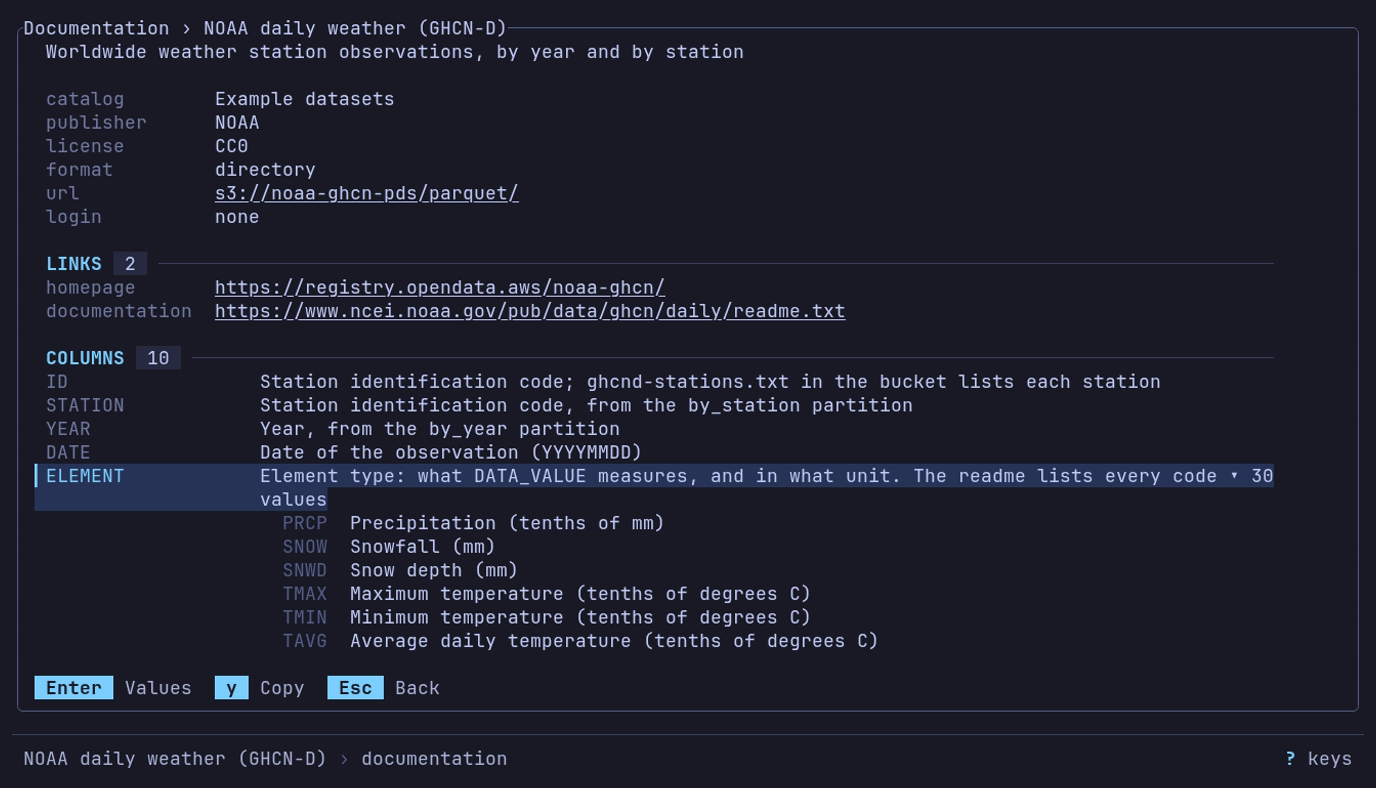
What does ELEMENT hold? Ctrl+E on NOAA daily weather,
↓ to ELEMENT, Enter: TMAX is the maximum temperature
in tenths of a degree C.
| Line | Says |
|---|---|
catalog, publisher, license | Where the entry is from, and the terms |
format, path or url, login, size | What it is, where, how it is read, and how big (~ until measured) |
format spec | The spec that reads the file |
spec file | Where that spec was read from |
LINKS | homepage and documentation, a line each; a long one is cut with … |
RECORD TYPES | A spec’s variants: each one’s name, the type field’s value that picks it (msg_type = 1, kind in ("E", "C")), its column count and its description |
HEADER | A spec’s named [header] fields that have a description or unit, with them |
COLUMNS | Each column, its meaning and unit; ▸ 30 values when it has a legend, which a spec’s enum gives |
FOOTER | A spec’s named [footer] fields that have a description or unit, with them |
BOOKMARKS | The places to start from, and their paths |
When a catalog lists a file a spec documents, the catalog’s description and
documentation link stand. Where both note a column, the catalog’s
description, unit and legend each stand when it gives one, and the spec’s fill
the rest: a catalog description of price keeps the spec’s unit. The columns
only the spec notes, and its record types, stay.
| Key | Does |
|---|---|
| ↑ ↓, PgUp PgDn | Move between lines |
| Enter | Open or close a column’s value legend |
| o | Open the line’s link in the browser, after asking |
| y | Copy the line’s link or value, whole |
| Esc | Back to the list |
o opens only the page’s links (homepage, documentation,
url), and only http:// and https:// ones, without a user name or
password. It first asks Open <URL>? with the whole URL, a host that is not
ASCII in its xn-- form; Enter opens it, Esc does not.
Over SSH, or on Linux and the BSDs without DISPLAY or WAYLAND_DISPLAY,
the browser would not open in front of you, so o is not offered:
y copies the link.
Ctrl+E takes the place of readline’s end of line: the filter has no cursor, and is edited at its end.
Example datasets
Don’t want them? [home] hide = ["examples"] in config.toml hides them for
good; Delete on the heading hides them until datui cache clear; an
examples.toml of your own, in catalogs/, replaces them.
Example datasets is the catalog that comes with datui: data its publishers
host, read with no login, listed after your own. datui ships none of the data;
datui catalog show examples prints the
catalog. Selecting its heading
shows how many datasets it lists, where it comes from, and how to hide it; a
heading of your own catalog shows its file and its [home] hide id.
| Dataset | Data | License |
|---|---|---|
| NYC flights (2013) | Departures from JFK, LaGuardia and Newark; delays in minutes | CC0 (nycflights13) |
| Food nutrition (fast food) | 515 menu items; nutrients per item, not per 100 g | GPL-3 (OpenIntro package) |
| US baby names (1880-2017) | Published name counts by year and sex; counts below five are suppressed | CC0 / public domain |
| NOAA daily weather (GHCN-D) | Worldwide weather station observations, by year and by station | CC0 |
| Premier League (2020-21) | Match rounds, dates, teams and full-time scores | CC0 |
| NYC yellow taxis (January 2025) | One monthly trip file; fares, distances and congestion fees | NYC Open Data terms |
| Earthquakes (past month) | A rolling month of earthquakes; magnitude, depth and location | Public domain |
| Space launches (1957-2018) | Launch records and agencies, failed attempts included | MIT (The Economist extract); credit Jonathan McDowell |
| Palmer penguins | 344 penguins: species, island, bill, flipper length and body mass | CC0; credit Horst, Hill and Gorman (2020) |
| Aqueous solubility (SDF) | 1,025 molecules: solubility (log mol/L), its class, and SMILES | BSD-3-Clause (RDKit) |
| Bitcoin and Ethereum | Blocks and transactions, partitioned by date | AWS sample-code license |
| Overture Maps | Places, buildings, addresses, roads and boundaries, by release | ODbL; places CDLA Permissive 2.0 and Apache 2.0 |
- A web file’s row gives its format and size,
~until measured. One under 50 MB downloads without a question; if it passes 50 MB while downloading, it stops and asks once. A URL typed at ~ is always asked about. - Once opened, a dataset comes back under Recent by its catalog name.
- The pane gives the publisher, license and homepage; check the license before you use the data.
- NYC flights, NOAA daily weather, NYC yellow taxis and Earthquakes carry
their publisher’s documentation: the pane lists what the columns mean
under
COLUMNS, Ctrl+E shows the whole Documentation view, and the Info panel and the inspector explain them once the data is open. - NOAA daily weather lists two bookmarks under it,
Daily highs, 2024andCentral Park, NY. Enter opens one whole; the dataset’s own row still steps inside. - A build without the
httporcloudfeature leaves out the rows it cannot open. - A catalog file named
examples.toml, incatalogs/or listed, replaces this one, even after Delete hid it;[home] hide = ["examples"]hides either, and["examples/nyc-taxis"]one entry. An emptyexamples.tomlhides the section.
The guides use them:
| Dataset | In |
|---|---|
| Palmer penguins | Quick start, charts, Analysis, Python |
| NYC flights (2013) | Query data, charts |
| Food nutrition (fast food) | Sort and filter, copy, data quality |
| US baby names, Space launches | Pivot and melt |
| Premier League (2020-21) | Query data, export |
| NYC yellow taxis (January 2025) | Analysis, data quality |
| Earthquakes (past month) | Charts |
| NOAA daily weather, Bitcoin and Ethereum | Public data in the cloud, views |
| Aqueous solubility (SDF) | Signals and logs |
Cloud sources
CLOUD lists a row per store: logins found on this machine and
connections you configure. For private
storage, sign in first; for a first try with no login, use
Example datasets.
▾ CLOUD  5  ──────────────────────────────────────────────────────
  ≈ Amazon S3         s3      3 buckets     datui config
  ≈ Google Cloud      gcs     4 projects    project: example-project · gcloud
  ≈ Lab MinIO         s3      1 bucket      127.0.0.1:9000 · datui config
  ≈ onprem            s3      403           minio.corp.example:9000 · datui config
| Column | Shows |
|---|---|
| Name | The source’s label, or its name |
| API | s3, gcs or azure |
| Count | Its buckets (projects for Google Cloud, accounts for Azure), a spinner while listing, not listed before the first listing, or why there are none |
| Note | The endpoint, project or profile, and where the login was found |
Enter goes down a level: S3 source › bucket › directory › object;
Google Cloud source › project › bucket › …; Azure source › account ›
container › …. The title shows the trail (cloud › Lab MinIO › data › 2024);
Backspace goes up one level and Esc back to where you
started.
Loading
The rows show at once, with the buckets an earlier run listed. Nothing is
listed, and no credential command (aws, gcloud, az, a
credential_process) runs, until you ask:
| To list | Do |
|---|---|
| One source | Enter or → on it, once a session |
| Every source on screen | Ctrl+R |
| Every source at launch | [cloud] list_on_start = true |
A slow endpoint holds up only its own row. A level lists 1,000 names at a
time (3,000 so far) and stops at 5,000 (first 5,000); typing past them
asks the bucket for the names the filter starts, and the heading adds
+ 1,907 STATION=USW*. Backspace or Esc stops a
listing. Typing also matches bucket names listed before, from every source.
When listing fails, the row says why in a word and the pane gives the whole message:
| Row says | Means |
|---|---|
403 | The login cannot list buckets; an object still opens by its URL |
not logged in | No credentials reached the store |
no project | A Google login that cannot search projects, and none named: set GOOGLE_CLOUD_PROJECT or DATUI_GCP_PROJECT |
unsupported login | An application-default login datui cannot use itself, and no gcloud to ask |
needs gcloud | A login through gcloud, which is not installed |
not signed in | Azure tools installed, nobody signed in; the pane names az login or Connect-AzAccount |
not configured | A variable named in [[cloud.connections]] is not set |
unavailable | The endpoint did not answer |
not found | The source went away since its row was drawn; Ctrl+R looks again |
Delete on a source hides it until datui cache clear. To hide one
for good:
[cloud]
hide = ["gcs-default"]
Which sources appear
datui adds the logins it finds and the connections you configure;
detected sources lists where
each is found, its id and the discover setting. Listing a bucket does not
mean its objects can be read. Catalogs, public or yours, have sections of
their own.
What a cloud row shows
A listing shows name, size and modification time, and labels directories as
local ones are (hive, 12 parquet, dir); job files such as _SUCCESS and
empty folder objects are left out. Row counts and schemas are read when a
dataset opens.
Loading
Enter shows the load’s progress; Ctrl+O
cancels it. A file that fails to open shows the error here, and
Esc returns to the dataset open before. A network location that
does not answer reads unavailable; Ctrl+R tries again.
What datui remembers
The cache holds recent paths, how often and how lately each was opened, what was measured (counts, column names, size, modification time), query history, section folds, bucket listings, hidden cloud sources and each terminal’s last answer about its background, never the data. Your catalog is in the config directory, not the cache. Local facts are measured again when a file’s size or time changes.
| Command | Removes |
|---|---|
datui cache clear --recents | Recent paths only |
datui cache clear | Everything cached: recents, measurements, query history |
datui cache clear --recents
Limits
| Work | Limit |
|---|---|
| Recent paths | 50 |
| Directories promoted from recents | 8 |
| Entries read to label a directory, or listed | 5,000 |
| Subdirectories looked into per listing | 64 |
| Files read for a preview count | 64 |
| Datasets measured at once | 12, those on screen |
| Network directories probed at once | 4 |
| Search | Depth 8; 100,000 files kept; 1,000 matches listed; 1.5 seconds |
Narrow and plain terminals
| Width or height | What changes |
|---|---|
| Below about 100 columns | The details pane hides |
| Below about 56 columns | The size and shape columns hide |
| Wide | The list stops at 84 columns; the pane takes the rest |
| Below 28 rows | The wordmark becomes a one-line title |
Without UTF-8, markers and borders are ASCII;
display.unicode overrides the guess.
Linux packages install a desktop entry for application menus and file managers’ “Open with”; launched from a menu, datui opens here.
Open files and directories
Pass datui a file, several files, a directory, a glob or a URL; files of one shape open as one table.
printf 'id,amount\n1,9.50\n2,3.25\n' > jan.csv
printf 'id,amount\n3,4.00\n' > feb.csv
datui jan.csv
datui jan.csv feb.csv
mkdir -p exports && cp jan.csv feb.csv exports/ && datui exports/
| Command | Opens |
|---|---|
datui FILE | One file, in the format its extension or first bytes say (Formats) |
datui FILE FILE... | Files of the same shape as one table |
datui DIR/ | A directory, as Enter on its row on the home screen does |
datui --hive 'GLOB' | The files a glob matches, as one partitioned table. Quote the glob |
datui URL | An s3://, gs://, abfss:// or https:// URL: Connect to cloud storage |
datui - | Standard input: Pipes and growing files |
datui --format FMT FILE | A file whose name does not say its format |
During a load, Ctrl+O cancels and returns home and Ctrl+Q quits. Every flag is in Command-line options; defaults for most are settings.
Directories
datui DIR/ needs no flag:
| The directory holds | What opens |
|---|---|
| A hive tree, or files that are one table | One table |
| Separate tables, several formats, or no data directly inside | The directory on the home screen; its first row reads everything as one table |
| A Delta, Iceberg or Hudi root | The directory on the home screen, with a warning that the transaction log is not applied |
--hive reads a glob, or a layout that does not say so itself, as
partitioned. Reading flags take part in the decision: datui --no-header exports/ keeps the first rows of headerless CSVs from being taken as
headers, which would make the files look like separate tables.
Hive-partitioned data
A tree of key=value directories (year=2024/month=01/...) opens as one
table, its partition columns first. Pass the root, or a glob with --hive:
datui --hive 's3://noaa-ghcn-pds/parquet/by_year/YEAR=2024/ELEMENT=T*/*.parquet'
- Only Parquet is read as a hive tree; for anything else, open one partition.
- A path that exists is never a glob:
d[1].parquetopens that file. - The Partitions tab of the Info panel lists the keys and values.
- Local and remote directories and remote globs read the schema from the Parquet footers; a local glob is handed to Polars.
Files that disagree
The schema is the union of the files’ Parquet footers; no data is scanned to find it.
| Across the files | In the table |
|---|---|
| A column in only some files | Shown; null in the files that lack it |
Compatible types (Int32, Int64) | Widened to one type |
| Incompatible types (numbers and text) | The type of the most rows; values of the other type are not read |
| An unreadable footer | That file is skipped |
Above 20,000 files the footers are sampled evenly across the list; above 64 the table may open on a partial schema while the rest load. The Info panel says what was read; Large datasets has the details.
When every file’s row count is known, an empty cell says why:
| Cell | Means |
|---|---|
∅ | A null value |
· | The file has no such column |
≠ | The file holds the column in an incompatible type; the value was not read |
Without every row count, all three show as ∅; the column name’s marker
still shows. Queries, pivots and exports write all three as null.
| To | Do |
|---|---|
| Read the conflicting values | Info → Notes, the column’s note, read as text. Not offered for lists, arrays, durations, binary or unknown types. Sorting and filtering then compare text: "10" before "2" |
| Keep every row while filtering on a conflicting column | Use a query. A sidebar filter or sort on the column drops the rows of files that hold the other type, even in an OR (id = 3 OR n = 0); a note counts them, and clearing the filter brings them back |
Compression
.gz, .zst, .bz2 and .xz files are decompressed as they open;
--compression gzip|zstd|bzip2|xz names it when the extension does not.
printf 'id,amount\n1,9.50\n2,3.25\n' | gzip > sales.csv.gz
datui sales.csv.gz
Compressed CSV, TSV and PSV are decompressed once to a temporary file in
--temp-dir, then scanned; -c read.decompress_in_memory=true reads them
into memory instead. Which formats open compressed is in the
formats table.
Temporary files
Decompressed, converted and downloaded files live in the temp directory while datui uses them.
| How datui ends | Its temporary files |
|---|---|
q, Ctrl+Q, Ctrl+C, an error | Removed, a partial download, decompression or conversion included |
| SIGTERM, SIGHUP (closing the terminal) | Removed: the datui command quits as for q and exits 128 + the signal. datui.view() in Python leaves signals, and the files, to Python |
| Windows: closing the console, signing out, shutting down | Removed, as for q |
| SIGKILL, ending the task in Task Manager | Left behind |
On Windows a file still mapped cannot be removed; it is tried again as datui quits.
Binary columns
A binary column shows a dim ‹binary› instead of its bytes. Exports and
analysis still read the bytes, and the inspector shows
them. The color is binary_col in the theme.
Remote data
These are public and open with no login:
datui s3://noaa-ghcn-pds/parquet/by_year/YEAR=2024/ELEMENT=TMAX/
datui https://earthquake.usgs.gov/earthquakes/feed/v1.0/summary/all_month.csv
Connect to cloud storage covers logins and what is downloaded; the home screen’s cloud sources find data without typing a URL.
The table
A dataset opens in the table. ? lists its keys; Keyboard shortcuts lists every screen’s.
| Key | Moves |
|---|---|
| ↑ ↓ or j k | The row cursor |
| ← → or h l | The column cursor |
| PgUp PgDn (Ctrl+B Ctrl+F) | A page |
| Ctrl+U Ctrl+D | Half a page |
| Home End (G) | The first or last row |
| : | A row by number |
| [ ] | Sort by the cursor’s column, ascending or descending |
| / | Find |
| S | Sample the table into memory; the view works on the sample |
Only the table’s own keys act there: a letter with Ctrl or Alt held does nothing, beyond the paging keys above.
The footer
Under a thin rule at the bottom of every screen, one line says where you are and what is in effect, in pipeline order, with the cursor’s place at the right:
weather/daily.parquet › query › prcp > 0 · date ▼ 41,208 / 1,204,331 ? keys
| Part | Says |
|---|---|
weather/daily.parquet | The dataset: its file and the directory it is in |
sample 100,000 of 36.8M | The view is a sample, under the query; 1,234+ while it is drawn |
query | A query is in effect; : shows its text |
prcp > 0 · date ▼ | The filters, then the sort; 2 filters · sorted where the line is short |
41,208 / 1,204,331 | The cursor’s row of the view’s rows, led by col 3/40 when the table is wider than the screen |
? keys | Help: every key of the screen |
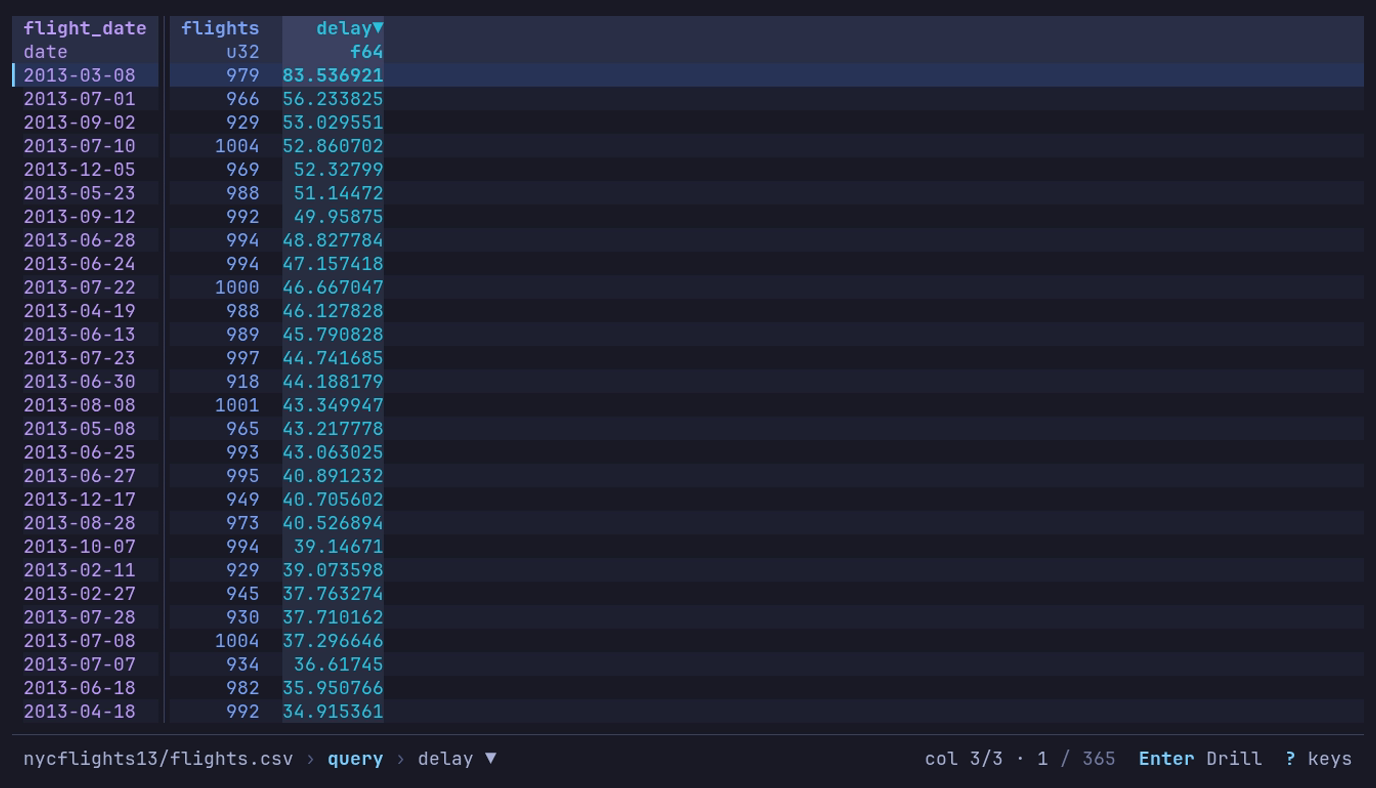
Which day of 2013 left latest? The daily query,
then ] on delay: 2013-03-08, at 83.5 minutes. The footer says
query › delay ▼; the header marks delay▼.
At rest only ? keys is offered. A mode shows its two or three keys while it
is active: after the column cursor moves, +/- Filter [/] Sort F Counts; with
a find in effect, n/N Next Esc Clear; while following a file, t Pause; on a
by view, Enter Drill. A message, such as Copied 3 rows, takes the room of
the dataset’s name for a moment and never adds a line. On a narrow terminal the
line gives up, in order: the dataset’s name (cut in the middle first), the
filters and sort (counted), background work (its spinner alone), the query, and
the position (41,208 / 1.2M). The mode’s keys and help stay.
The footer grows, up to three lines, only for something ongoing: a prompt being
typed (find, the command line) or a job with a count, such as a
find reading past the rows on hand (rows 1,200,000 / 3,475,226 with a bar and
Esc Stop). It takes the rows from the bottom of the table; the top stays put.
Go to a row
: opens the command line; digits alone make it
row:, and Enter goes there (0 is the top).
Another table of the file
T lists the other tables of the file on screen; Enter
opens the one picked in place of this one, as --table would.
| The file | Lists | Each row says |
|---|---|---|
| An Excel workbook | Its worksheets, hidden ones included | The range and size: A1:C13, 13 × 3 |
| A SQLite database | Its tables and views | Its kind, its columns, and the rows ANALYZE stored |
| A file a format spec reads as several record types | The whole file, then each type | Its columns |
| A Hugging Face cache | Its splits | split |
The one open is marked opened. Type to narrow, ↑ ↓ to
move, Esc to keep the table. The query, filters and sort stay with
the table they were on; recents record the new table, and a saved view for it
applies. The footer offers T only on a file of several tables; on
any other, T says Only one table here.
Row numbers
# shows or hides row numbers.
| What | Number |
|---|---|
| Text and logs | The line in the file, as less -N numbers it. On when they open |
| Other formats | The row’s place in the file or dataset. Off when they open |
| Under a sort or a filter | The row’s own number, which moves with it |
| A query, pivot or group’s rows | Their place in the result, which stands for no row of the source |
display.row_numbers turns them on or off whatever the format (true, false) or leaves
them to the format ("auto"); display.row_numbers_start is the first
row’s number. A sorted or filtered view of a scanned file numbers its rows
only while # is on, because the numbering keeps the filter from
being pushed into the scan. A dataset in a store, or of many files, is not
numbered that way at all: there # counts the view’s rows under a
sort or filter, and the footer says # counts the view.
Sort by a column
[ sorts by the cursor’s column ascending, ] descending,
replacing the sort in effect; the same key again on that column takes the sort
away. The header carries ▲ or ▼, and the footer names the sort. The
Sort & Filter sidebar adds secondary sorts.
Empty cells and marked columns
An empty cell shows which kind of empty it is: ∅ (ASCII ~) for a null,
· (ASCII .) for a column the row’s file does not have, ≠ (ASCII !)
for a column its file holds in another type. A column name marked * is not
in every file, or the files disagree on its type; the Info panel’s Schema tab
says where the schema came from. Files that disagree
has the details.
Long values, control characters and column widths: Column widths and In the table.
The mouse
| Mouse | Does |
|---|---|
| Click | Puts the cursor on the cell; on a header, the column cursor on its column |
| Double-click | Enter on the row |
| Wheel | ↑ ↓, three rows a notch; the same in help, the inspector and the sidebars |
| Shift+wheel, or a sideways wheel | ← →: the column cursor |
| Drag a header onto another column | Moves the column there, as H L do |
| Drag the gap right of a header | Sets the column’s width, as < > do |
| Right-click a cell | A menu of the cell’s keys: filter, counts, sort, copy, inspect |
| Click a key in the footer | Presses it; the filters press s, query : |
Dialogs, tabs and the cell’s menu: The mouse.
Shift+drag selects text in most terminals. mouse = false under
[display], or --mouse=false, leaves the mouse to the terminal:
Mouse and text selection.
Keys typed while datui works
While a load, query or other read runs, the footer shows a spinner, and keys typed meanwhile are held and replayed in order once the work is done.
| Key | While busy |
|---|---|
| Ctrl+Q, Ctrl+C | Quit at once |
| Ctrl+O | Goes home at once, abandoning a load |
| At the plain table: q Q, the column cursor (← →, h l, Shift+← →, { }), #, ,, D, the width keys (< > = w), ? and F1 | Act at once |
| ↑ ↓ (j k) | Act at once inside the rows already read, while all that is awaited is more rows |
| A bare Esc, or an Enter that would drill | Dropped |
| An Enter that would inspect | Held as Space |
| Esc while a view is applied | Stops it; the table stays as it was |
| Esc while a find reads | Stops it and the n N typed behind it; the cursor stays put |
| While a sample is drawn: moving, find, Space, i, and the find line, inspector and Info panel | Act at once; Esc stops the sample |
| Anything else | Held |
At most 32 keys are held, and held keys are dropped with the screen they were typed at. At the loading screen nothing is held: the keys above act, the rest are dropped. The mouse is never held: the wheel across, the footer’s keys and a width drag act as their keys do, and the wheel down, a click on the table, a dropped header and the cell’s menu are dropped.
The mouse
Every mouse action is a shortcut to keys: a click or a drag does what the keys it stands for do, and nothing the mouse does needs it.
At the table
| Mouse | Does |
|---|---|
| Click a cell | Puts the cursor on it |
| Click a header | The column cursor on its column |
| Double-click a cell | Enter on the row |
| Double-click a header | Sorts by its column, as [ ] do: ascending, then descending, then off. The header carries the direction |
| Double-click the gap right of a header | Fits the column to the rows on screen, as = does on the cursor’s column, which moves there; it never sorts |
| Drag a header onto another column | Moves the column there, as H L do; a rule on the header marks where it lands. Let go off the columns, or press a key, and nothing moves |
| Drag the gap right of a header | Sets the column’s width by hand, as < > do, from 4 to 240 cells; a column cut at the right side, by its last header cell |
| Right-click a cell | The cursor goes there and the cell’s menu opens |
| Wheel | ↑ ↓, three rows a notch |
| Shift+wheel, or a sideways wheel | ← →: the column cursor |
The cell’s menu
╭───────────────────────────────╮
│ ▎+      Filter to this value  │
│  -      Filter out this value │
│  F      Value counts          │
│  [      Sort ascending        │
│  ]      Sort descending       │
│  y      Copy                  │
│  Space  Inspect row           │
╰───────────────────────────────╯
Each line names its key, and running it presses that key on the cell.
| Key or mouse | Does |
|---|---|
| ↑ ↓ (k j) | Move between the lines |
| Enter, or a click on a line | Close the menu and press the line’s key |
| Esc, or a click elsewhere | Close the menu |
| Any other key | Close the menu, then act as typed |
In dialogs and sidebars
| Mouse | Does |
|---|---|
| Click a field | Focuses it and acts as Space: a checkbox flips, a choice steps, a picker opens, a button runs; a text field takes the cursor |
| Click a row of a list (a sort, a filter, a column in Sort & Filter) | Focuses it; a second click acts as Space |
| Right-click a choice | Steps it back, as ← does; on any other field, only focuses it |
| Click a line of an open picker | Chooses it (flips it, in a list of checkboxes) |
| Click a value in a list beside its field (export formats, compression) | Chooses it |
| Click a tab | Switches to it |
| Wheel over an open picker | Moves through its lines |
Click a key in a dialog’s footer (Esc Cancel) | Presses it; over help, an error or a question, only its footer’s keys take clicks |
| Click outside a dialog | Nothing |
In the footer
| Click | Does |
|---|---|
| A key | Presses it |
? keys | Opens the help |
| The filters and sort | s: the Sort & Filter sidebar |
query | :: the command line, on the query’s text |
While datui works
The mouse is never held for later. A click acts where its keys would act at once and is dropped where they would wait (Keys typed while datui works): a width drag acts at a busy table, as < > do, and a dropped header, a menu line or a click on a field is dropped.
Selecting text
Shift+drag selects text in most terminals. To leave the mouse to
the terminal, set mouse = false under [display], or run with
--mouse=false: Mouse and text selection.
Pipes and growing files
datui reads data piped to it, shows a file or a pipe as it grows, and records a stream while you view it.
| Command | Does |
|---|---|
COMMAND | datui | Shows what is piped in as it arrives; datui - does the same |
datui -f FILE | Follows a file as it grows, as tail -f does |
COMMAND | datui -f - | Shows the rows of a pipe as they arrive, staying on the last row |
COMMAND | datui --tee FILE - | Records the stream to FILE while you view it |
COMMAND | datui --tee - - | COMMAND | Passes the stream on to standard output, viewing it on the way |
Standard input
datui - reads the data piped to it, and so does datui with no path when
something is piped in. Keys still come from the terminal.
printf 'id,amount\n1,9.50\n2,3.25\n' | datui
journalctl -o json -n 500 | datui
printf 'id,amount\n1,9.50\n' > sales.csv && datui - < sales.csv
(echo 1,2; echo 3,4) | datui --no-header -
- The first rows show once a thousand lines have arrived, or fewer when the
producer is slower than that, and datui reads on to the end of the stream.
The view stays where you put it; the footer says
reading stdinand the bytes so far, and the row count reads1,234+until the stream ends. Value counts, analysis and charts opened meanwhile keep the rows they opened on, and t there reads the new ones, as for--follow. - What cannot be read before it is finished (Parquet, an Arrow IPC file, Excel, a compressed stream) is read to the end first; the loading screen counts the bytes.
- NDJSON and journal JSON show the entries whose lines have ended; an object still being written waits for its newline. The journal’s columns are the fields of every line that had arrived when the table opened; NDJSON’s, those of its first 100 lines. A field first seen later joins as a column at the right once the stream ends, so the final columns cover every line. Filters and the sort stay; under a query, a reshape, a group or a drill-down, the column joins once that is cleared.
- The data is written to a temporary file in
spoolunder the cache directory as it arrives, not the system temp directory (memory on many Linux systems);--temp-dirputs it elsewhere. The file is removed when the dataset goes; one left by a crash is removed after a week. Ctrl+O stops the read and removes the file. - The format comes from the first bytes, unless
--formator--compressionnames it: see Detected by content. - The delimited text flags apply.
- The dataset is named
stdin. It is not added to recents, and views match it by its columns only.
Following a growing file
--follow (-f) shows rows as they are appended: to a local CSV, TSV, PSV,
NDJSON or text file, or record batches to an Arrow IPC stream. With -, it
shows standard input as it arrives instead of waiting for it to end.
printf 'time,value\n1,10\n2,20\n' > readings.csv && datui -f readings.csv
(echo time,value; while sleep 0.2; do echo "$(date +%s),$RANDOM"; done) | datui -f -
| Key | Action |
|---|---|
| t | Pause and resume. On a file opened without -f, follow it: the file is read again, as H on the Info panel’s Schema tab reads it, so the query, filters and sort are cleared |
| Esc | Stop following; the rows read stay |
The footer says following and how long ago rows last arrived, or paused
and how many have arrived since, and offers t and Esc.
| What | How it behaves |
|---|---|
| The cursor | A follow starts on the last row and stays there as rows arrive. Moved elsewhere, it stays put, and the bar counts the rows that came in below |
| A partial last line | Waits for its newline. Once standard input ends, a last line with no newline is a row |
| The query, filters, sort, hidden columns | Apply to new rows. Value counts, analysis and charts keep the rows they opened on; the bar counts the new ones, and t there reads them |
| A row that does not fit the types of the first rows | Counted on the bar in the warning color; its values read as null. The follow goes on |
| An NDJSON field the first rows did not have | In a file, the row is counted as not fitting. From standard input, the field joins as a column when the stream ends |
| A refresh | Reads only the rows on screen, from a mark near them: a 10 GB file costs what a 10 MB one does. Under a filter, only the new rows are counted |
| Truncation, rotation | The file is read again from its start, and the bar says so. A deleted file stops the follow; its rows stay |
| How often | On Linux, as an append lands, at most every 250ms; elsewhere and on network file systems, the size is checked every 250ms. read.follow_interval changes it: -c read.follow_interval=1s |
| Standard input | Written to its temporary file until it ends, or Esc, Ctrl+O or quitting stops it. The bar says when it ends. Without -f it is read the same way, but the cursor stays where it is |
An Arrow IPC stream shows a record batch once the batch is whole; one with
dictionary-encoded columns cannot be followed. --follow refuses Parquet,
Arrow IPC files, Excel and the other formats written with a footer, compressed
files, and remote data, with a message.
Recording standard input
--tee FILE records standard input to FILE while you view it: the bytes as they
came, except a WAV stream’s sizes, filled in when it ends (below).
The table reads FILE itself; there is no second copy.
(echo n; seq 1 1000) | datui --tee numbers.csv -
(echo time,value; while sleep 0.2; do echo "$(date +%s),$RANDOM"; done) | datui -f --tee run1.csv -
| When | What happens |
|---|---|
| While it records | The bar shows rec, the bytes written and the rate; then saved with the size, length and file once the stream ends |
| Writing fails (a full disk) | The bar shows stopped and why, in the warning color, and the error dialog says so |
| FILE exists | Refused; --force replaces it |
| Quit or Ctrl+O while the producer still sends | Asks: stop recording, or keep recording until the stream ends (after a quit, datui waits with the terminal handed back). Esc stays |
| Esc at the table | Stops following; the recording goes on |
| SIGTERM, SIGHUP | FILE is finished and closed, and datui exits |
| A WAV stream | Its RIFF and data sizes are filled in when the stream ends, as RF64 past 4 GB when the producer left a JUNK chunk for it. --tee-raw leaves FILE exactly as it came |
Without -f, the whole stream is recorded before the table opens. With -f,
a format that cannot be followed (WAV) shows what had arrived when it opened,
and the recording goes on. FILE is never removed.
--tee - passes the stream on to standard output instead, as tee does, and
draws on the terminal (/dev/tty, or the console on Windows). Standard output
must go to a pipe or a file. The table reads a temporary copy in
--temp-dir; the bar says sent once the stream ends, and a reader
downstream that stops reading stops the copy, saying so.
(echo n; seq 1 1000) | datui --tee - - | gzip > numbers.csv.gz
To record a serial device or a sound card, replace <DEVICE> with yours:
cat <DEVICE> | datui -f --tee capture.log -
arecord -D <DEVICE> -f S16_LE -r 48000 -c 2 -t wav - | datui -f --tee take1.wav -
Connect to cloud storage
Pass datui an s3://, gs://, abfss:// or https:// URL, or open a
cloud source on the home screen.
datui s3://noaa-ghcn-pds/parquet/by_year/YEAR=2024/ELEMENT=TMAX/
datui gs://cloud-samples-data/bigquery/us-states/us-states.parquet
datui https://earthquake.usgs.gov/earthquakes/feed/v1.0/summary/all_month.csv
| Storage | URL | Login |
|---|---|---|
| Amazon S3 | s3://<BUCKET>/<KEY> | AWS profile or keys |
| MinIO, R2, Ceph | s3://<BUCKET>/<KEY>, or s3://<NAME>@<BUCKET>/<KEY> | A custom endpoint |
| Google Cloud Storage | gs://<BUCKET>/<KEY> | gcloud or a service account |
| Azure Blob Storage | abfss://<CONTAINER>@<ACCOUNT>.dfs.core.windows.net/<PATH> | Azure CLI or PowerShell |
| HTTP(S) | https://... | None |
| Public buckets | Any of the above | None |
One remote path opens per run; a directory, prefix or glob can hold many files. This page is the one home for cloud logins; the variables are listed in Environment variables.
Amazon S3
The examples below use your names: replace <PROFILE>, <BUCKET> and
<PREFIX> with yours.
AWS_PROFILE=<PROFILE> datui s3://<BUCKET>/<PREFIX>/
| Login | How |
|---|---|
| A profile | AWS_PROFILE, else default. Sign in to an SSO profile first: aws sso login --profile <PROFILE> |
| Keys | AWS_ACCESS_KEY_ID, AWS_SECRET_ACCESS_KEY, and AWS_SESSION_TOKEN for temporary ones; region from AWS_REGION or AWS_DEFAULT_REGION |
| A task role | ECS, Lambda and EKS roles are used as found. An EC2 instance role needs [cloud] instance_identity = true |
| None | Requests go unsigned, which reaches public buckets |
Each bucket’s region is found on its own.
AWS profiles
With no keys in the environment or the config, datui uses the profile the AWS tools would.
| The profile holds | datui |
|---|---|
aws_access_key_id and aws_secret_access_key | Uses them |
credential_process | Runs it (aws-vault, granted, 1Password and the like) |
sso_session, role_arn, credential_source or web_identity_token_file | Runs aws configure export-credentials --profile <name>; needs the AWS CLI |
The files are AWS_CONFIG_FILE and AWS_SHARED_CREDENTIALS_FILE, else
~/.aws/config and ~/.aws/credentials. A profile’s region and
endpoint_url (or an s3 endpoint_url under its services section) apply,
after AWS_ENDPOINT_URL_S3 and AWS_ENDPOINT_URL. Every other profile that can
log in is a source of its own on the home screen, aws-<profile>; one with an
endpoint is S3-compatible, and its URLs are s3://aws-<profile>@bucket/key.
S3-compatible storage (MinIO, R2, Ceph)
Point datui at the endpoint with the AWS variables. Replace the endpoint, keys
and <BUCKET>:
AWS_ENDPOINT_URL=http://localhost:9000 AWS_ACCESS_KEY_ID=<KEY_ID> AWS_SECRET_ACCESS_KEY=<SECRET> AWS_REGION=us-east-1 datui s3://<BUCKET>/sales.parquet
The endpoint is the first of AWS_ENDPOINT_URL_S3, AWS_ENDPOINT_URL and
AWS_ENDPOINT that is set. There are no flags or config keys for keys: on the
command line they show in ps and the shell history.
Several stores at once
Name each store in the config, with the environment variables that hold its keys; the config holds the names, never the values:
[[cloud.connections]]
name = "lab"
kind = "s3"
endpoint_url = "http://localhost:9000"
access_key_id_env = "LAB_KEY"
secret_access_key_env = "LAB_SECRET"

[[cloud.connections]]
name = "onprem"
label = "On-prem MinIO"
kind = "s3"
endpoint_url = "https://minio.corp.example:9000"
access_key_id_env = "ONPREM_KEY"
secret_access_key_env = "ONPREM_SECRET"
A name is lowercase letters, digits and -. Put it before the bucket to say
which store you mean; replace <BUCKET> and <KEY>:
datui s3://lab@<BUCKET>/<KEY>
| URL | Reaches |
|---|---|
s3://<NAME>@<BUCKET>/<KEY> | The S3-compatible store of that name |
s3://<BUCKET>/<KEY> | The AWS_* login, as above |
- Servers set up in the MinIO client (
mc alias set,MC_HOST_<alias>) or s3cmd need no config: they are the sourcesmc-<alias>ands3cfg. - A connection of
kind = "s3"withoutendpoint_urlis a second AWS login; its URLs stays3://bucket/key. - A catalog keeps a dataset of one of these
stores on the home screen with
connection = "onprem". - Cloud connections has every field.
Google Cloud Storage
Sign in, then open a file; replace <BUCKET> and <KEY>:
gcloud auth application-default login
datui gs://<BUCKET>/<KEY>
| Login | datui |
|---|---|
GOOGLE_APPLICATION_CREDENTIALS, a service account variable, or gcloud auth application-default login | Uses it directly |
Only gcloud auth login | Asks gcloud for a token, for the active configuration |
| Workload identity federation or an impersonated service account in the application-default file | Asks gcloud; without it, the row says unsupported login |
Another gcloud configuration with a different account | A source of its own, gcloud-<configuration> |
Every project the login can see is listed on the home screen. A project named
in DATUI_GCP_PROJECT or GOOGLE_CLOUD_PROJECT is listed first, and is the
one listed when the login cannot search for projects.
Azure Blob Storage
Sign in with the Azure CLI (or Connect-AzAccount in Azure PowerShell), then
open a file; replace <CONTAINER>, <ACCOUNT> and <PATH>:
az login
datui abfss://<CONTAINER>@<ACCOUNT>.dfs.core.windows.net/<PATH>
| URL | Accepted |
|---|---|
abfss://<CONTAINER>@<ACCOUNT>.dfs.core.windows.net/<PATH> | Always; the form datui writes and remembers, which Polars, Spark and DuckDB read too |
abfs://, https://<ACCOUNT>.blob.core.windows.net/<CONTAINER>/<PATH> and its dfs form | Always |
az://<CONTAINER>/<PATH>, adl://, azure:// | When the account is known: typed inside an account on the home screen, named in the environment, or the only kind = "azure" source |
| Login | Found by |
|---|---|
az login | ~/.azure (or AZURE_CONFIG_DIR); datui runs az account get-access-token |
Azure PowerShell, Connect-AzAccount | ~/.Azure/AzureRmContext.json; datui runs pwsh (or powershell.exe) once for its tokens. With az signed in too, az is used |
| A service principal or AKS workload identity | AZURE_TENANT_ID and AZURE_CLIENT_ID, with AZURE_CLIENT_SECRET or AZURE_FEDERATED_TOKEN_FILE. With AZURE_STORAGE_ACCOUNT_NAME it reads that account; without, it finds its accounts as a sign-in does |
AZURE_STORAGE_CONNECTION_STRING | A connection string with AccountKey or SharedAccessSignature; UseDevelopmentStorage=true for Azurite |
AZURE_STORAGE_ACCOUNT_NAME with AZURE_STORAGE_ACCOUNT_KEY or AZURE_STORAGE_SAS_TOKEN | An account and its key or SAS token |
With Azure tools installed and nobody signed in, the Azure row says
not signed in and names the command to run. In Azure Cloud Shell, az is
signed in already; the install script puts datui in ~/.local/bin there
(without root).
Reading blobs as a sign-in needs the Storage Blob Data Reader role; Owner or
Contributor on the subscription is not enough, except on an account with
hierarchical namespace where your login owns the container. When a read is
refused for that reason and the login may fetch the account’s keys, datui reads
with the key instead, as the Azure Portal does; the details pane says
access key, and the key stays in memory. An account with shared-key access
disabled is never read that way. To read only as your sign-in:
[cloud]
use_azure_account_keys = false
Public data
Public buckets and containers open with no login:
datui s3://noaa-ghcn-pds/parquet/by_year/YEAR=2024/ELEMENT=TMAX/
A container of many datasets opens on the home screen, to browse:
datui abfss://release@overturemapswestus2.dfs.core.windows.net/
| The machine has | datui |
|---|---|
| No login for that cloud | Reads unsigned |
| A login | Signs with it. If refused, tries once more unsigned, and remembers for the session which worked (Azure refuses a public container to a login from another tenant) |
The home screen’s Example datasets lists
public data with publishers and licenses. A
catalog of your own reads its datasets with no
login, even on a machine that has one, with auth = "anonymous". GBIF’s
occurrence snapshots are CC BY-NC 4.0 (https://www.gbif.org/terms):
label = "GBIF"

[occurrences]
name = "Occurrences"
url = "s3://gbif-open-data-us-east-1/occurrence/"
auth = "anonymous"
license = "CC BY-NC 4.0"
Parquet part files with no extension, like GBIF’s occurrence.parquet/000001,
open as Parquet, as does a local file with no extension that starts and ends
with PAR1.
Examples on public data
NOAA’s daily weather for 2024 is one hive partition, YEAR=2024, with an
ELEMENT= directory per measurement. On the home screen: Example datasets,
Enter on NOAA daily weather (GHCN-D), → on by_year,
Enter on YEAR=2024. Or:
datui s3://noaa-ghcn-pds/parquet/by_year/YEAR=2024/
38,466,379 rows, with YEAR and ELEMENT as columns from the directory
names.
Central Park from the catalog’s bookmark, then q, ~, the path, Enter twice and G. Recorded on a wired home connection with a cold cache; the waits are real.
The most common measurements:
SELECT ELEMENT, COUNT(*) AS observations, COUNT(DISTINCT ID) AS stations
FROM df
GROUP BY ELEMENT
ORDER BY observations DESC
PRCP (precipitation) leads with 11,456,946 observations from 42,758
stations, then SNOW, TMAX and TMIN. The query reads every file.
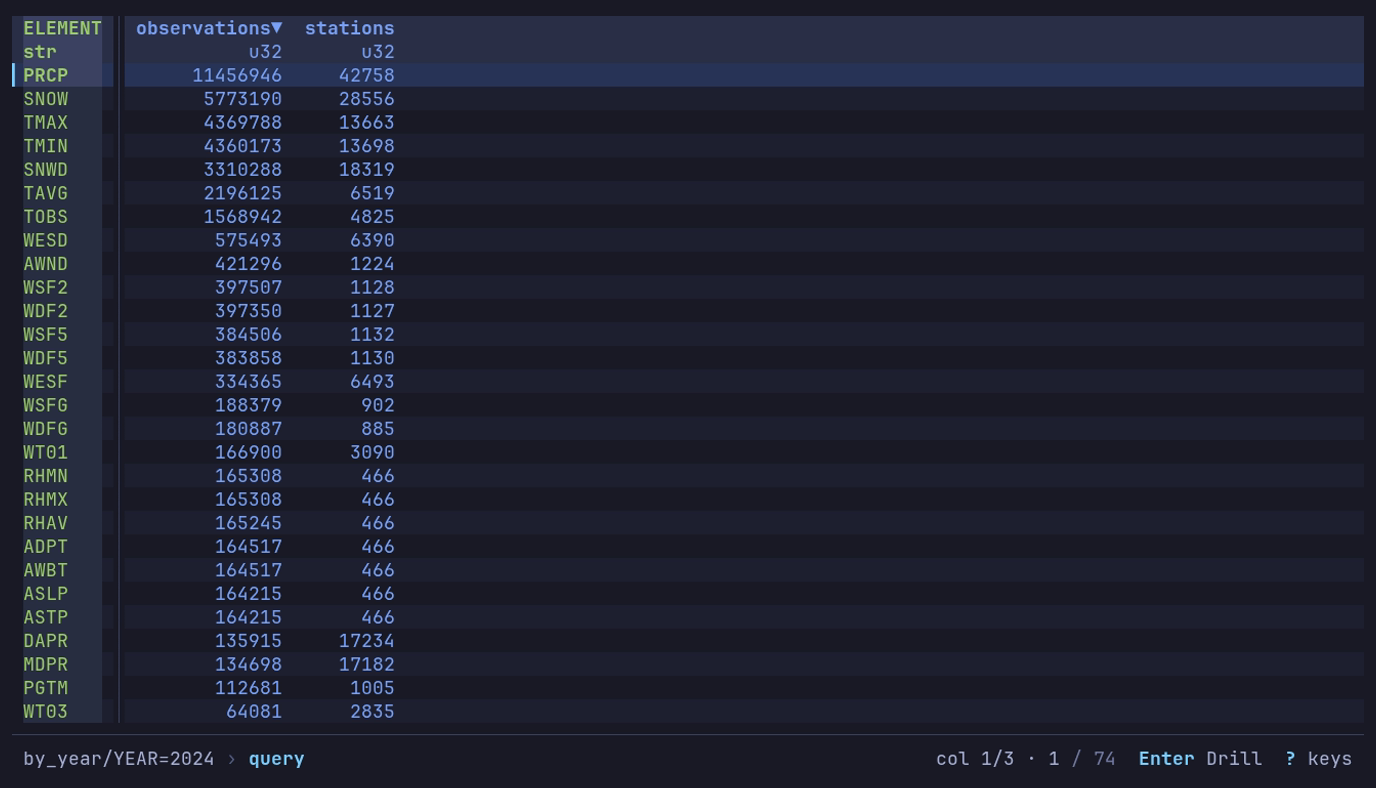
Which measurements are most common in 2024? :, the query,
Enter: 74 elements, PRCP first.
In ELEMENT=TMAX, USW00094728 is Central Park and DATA_VALUE is tenths
of a degree Celsius:
SELECT CAST(STRPTIME(DATE, '%Y%m%d') AS DATE) AS day, DATA_VALUE / 10.0 AS high_c
FROM df
WHERE ID = 'USW00094728'
ORDER BY day
366 days, from −6.0 to 35.0 °C: chart day against high_c as a line.
Bitcoin blocks are partitioned by day. On the home screen: Bitcoin and
Ethereum, → on btc, Enter on blocks. Or:
datui s3://aws-public-blockchain/v1.0/btc/blocks/
A filter on the partition column reads only the matching days:
SELECT EXTRACT(MONTH FROM mediantime) AS month, COUNT(*) AS blocks,
       SUM(transaction_count) AS txs
FROM df
WHERE date >= '2024-01-01' AND date < '2025-01-01'
GROUP BY month
ORDER BY month
12 rows, 4,179 to 4,761 blocks a month. The table opens before every footer
is read; the bar counts them, Reading footers: …, while you work.
HTTP and HTTPS
datui https://earthquake.usgs.gov/earthquakes/feed/v1.0/summary/all_month.csv
datui --format csv 'https://earthquake.usgs.gov/fdsnws/event/1/query?format=csv&starttime=2024-01-01&endtime=2024-01-02'
The file is downloaded to the temp directory (--temp-dir), then opened;
--format names a format the URL does not. The copy is removed when datui
exits, a quit mid-download included (temporary files).
A model file’s header is read by range instead (Model files).
Every request datui makes, to a web server or a cloud store, sends
User-Agent: datui/VERSION (+https://github.com/derekwisong/datui): datui and
its version, nothing about you or the machine. http.user_agent replaces it:
datui -c 'http.user_agent=<NAME/VERSION (CONTACT)>' <URL>
A file that is not there (404) or a host that does not answer says so on its home row, in place of the size, before you open it.
What gets read
| Source | Read |
|---|---|
| A Parquet file, prefix or glob in a bucket | In place: the footers, then the row groups needed |
| A CSV or NDJSON prefix in a bucket | Scanned in place |
| An Arrow IPC file, prefix or glob in a bucket | Scanned in place |
| Arrow IPC streams in a bucket | Asks, then converts each to a temporary IPC file as it downloads |
| SafeTensors or GGUF, anywhere | The header only, by range |
| HTTP(S), and every other format | Downloaded first |
The formats table has every format. Paging reads ahead of the screen; queries, sorting and analysis may read the whole input (Large datasets).
Building without cloud support
A build without the cloud and http features
(from source) refuses remote
URLs with a message saying so, and a bucket in a catalog reads
cloud support not in this build.
Info panel
i at the table opens the Info panel: the dataset’s schema, what its format records, how it is stored and read, and what datui noticed about it. i or Esc closes it. While the dataset has unread notes, i opens on the Notes tab; after that, on Model, Audio, MIDI or VCD for those files, and on Schema for anything else.
The panel’s footer names the keys that work now. ← → (or Tab Shift+Tab) switch tabs from anywhere, and the body always has the keys: the rail marks the schema’s current row. When the schema is taller than the panel, the footer counts the columns out of view.
| Tab | Shows |
|---|---|
| Schema | Row and column counts, column types, schema source, file coverage, and a Parquet file’s per-column compression. A column’s unit, when a delimited format spec read a unit row or the file names one (DataFlash, a DBC dictionary). A dataset a catalog documents adds what each column means (About), the selected column’s note and codes below, and the documentation’s link |
| Documentation | A dataset a catalog lists, or one inside it, or a file whose format spec documents it: the page Ctrl+E shows on the home screen (Documentation view). ↑ ↓ move, Enter opens a column’s legend, o opens a link in the browser after asking (how), y copies a line’s link or value |
| Format’s own | What the file says besides its rows, named for its format; see the table below |
| Metadata | The metadata line a delimited format spec names, as key and value; appears for files read through one |
| Resources | File size, how the file is read, buffered memory, and loading measurements |
| Partitions | Partition columns for a hive-partitioned dataset |
| Notes | Schema differences, skipped files and other findings; appears when there are notes |
The file size, and a Parquet, Arrow IPC, Avro or ORC file’s tab, are read in the
background the first time the panel opens for a dataset: the few KB at an end of the
file the open read too, and none of its rows. Until they arrive the size and the tab
read reading...; a file that cannot be read shows why in their place. Remote
sources, directories, globs, datasets of several files, and compressed or streamed
copies have no file size and no such tab.
Column types
Enter on the Schema tab, or Change type… in the cell menu (a
right click on a cell), changes the column’s type for the view: the same names,
formats and rules a format spec’s type
takes. Combine into datetime… in the cell menu, on a text, date or time
column, makes a column as a spec’s derived column
does.
| Choice | Does |
|---|---|
A type name (i64, f64, str, bool, …) | The column reads as it at once. A value that does not fit is null |
date, time, datetime | A format next: each line shows what it makes of the column’s first value (03/04/2024 → 2024-04-03), and a format typed (%d.%m.%Y) is the format |
as read | The type the read gave the column |
- The type row shows a changed type in the accent, and the footer says
typed zip(ortyped 3) before the filters and sort. - The first time the change is made, one pass counts the values it made null,
and the Notes tab says how many:
code: 1 value not i64, read as null. - Filters, charts, analysis, find, value counts and exports see the new type; a Parquet export writes it.
- A saved view keeps each change as a spec’s
[columns]entry says it,{ "name": "zip", "type": "str" }. On data without the column, the step is left out with a note. - A query, a pivot or a melt starts from the data as read, without the changes.
Tabs by format
Each format has its own tab beside Schema, or none, and a file that holds several
tables lists them on the home screen as places inside it
(shop.db/orders, book.xlsx/Sales) that recents record and Enter opens.
| Format | Tab | Lists inside the file |
|---|---|---|
| Parquet | Parquet | no |
| Arrow IPC | Arrow | no |
| Avro | Avro | no |
| ORC | ORC | no |
| Excel | Excel | tables |
| SQLite | SQLite | tables |
| CSV, TSV, PSV, JSON, NDJSON | none | no |
| SafeTensors, GGUF | Model | no |
| NMEA | GPS | tables |
| GPX | GPS | no |
| audio | Audio | no |
| MIDI | MIDI | no |
| VCD | VCD | no |
| FIX | FIX | no |
| SDF | SDF | no |
| NumPy | NumPy | tables |
| ELF | ELF | tables |
| ULog | ULog | tables |
| DataFlash | DataFlash | tables |
| candump | CAN | tables |
| systemd journal | Journal | no |
| text | none | no |
CSV, TSV, PSV, JSON, NDJSON and plain text have no tab of their own: text holds its rows and nothing else.
An .xlsx or .xlsm workbook lists its worksheets
from its directory, without reading them; an .xls or .xlsb file keeps its worksheet
names where only reading the workbook finds them, so it opens its first worksheet and
--table or T names another. On the Excel and SQLite tabs,
↑ ↓ move a cursor over the worksheets or tables and
Enter opens the one under it in place of this one.
A Hugging Face cache directory lists its
splits inside it the same way (cache/test), above the files they are made of.
Every key of the panel is in the keyboard reference. The row count is the dataset’s, not the page’s; D at the table shows the column types in a second header row.
On a CSV, TSV or PSV file, H on the Schema tab reads the first row
as data, under column_1, column_2, …, and again as column names. It reads
the file again, so the query, filters and sort are cleared, and the panel
closes. The footer offers it only for those files.
Model
For a SafeTensors or GGUF file, i opens on the Model tab:
| Line | Shows |
|---|---|
| Format | SafeTensors or GGUF v3, the tensor count, and the file count for a sharded checkpoint |
| Parameters | The sum of every tensor’s parameters, in full and abbreviated (8.0B), and the size of the tensor data |
| Types | Each dtype or quantization type’s share of the parameters, largest first |
| Metadata | Key and value: SafeTensors __metadata__ and the index’s metadata, or GGUF’s key/value pairs |
Values are shown whole up to 64 KiB, so a chat template wraps over as many
lines as it takes; a longer value, such as a whole tokenizer.json, ends with
how much more there is.
Arrays of up to 16 items are listed; longer ones, such as a tokenizer’s
vocabulary, show their length ([128,256 strings]). Across several files, the
first file to name a key gives its value.
Audio
For a WAV, BWF, RF64 or AIFF file, i opens on the Audio tab:
| Line | Shows |
|---|---|
| Format | WAV, WAV (Broadcast WAV), RF64, AIFF or AIFF-C, the channel count and the sample rate |
| Samples | 24-bit integer, with the valid bits when fewer; the encoding; and whether [read] audio_float is on |
| Frames | The frame count, the length (1:02:03.250) and the size of the sample data |
| Warnings | A data size the file does not hold, frames past the 4,294,967,295 a table holds, or bytes after the last whole frame |
| Metadata | bext.* (description, originator, origination, time reference, coding history), ixml.* (project, scene, take, tape, note) and the iXML document itself, info.* from LIST INFO, AIFF’s name and annotation, then each marker: its time, frame, region length and label |
A data size of 0 or a placeholder, as a recorder leaves it, says so: the frames are counted from the file’s size.
MIDI
For a MIDI file, i opens on the MIDI tab, or on Notes first when a note never ends or a file could not be read:
| Line | Shows |
|---|---|
| Format | MIDI format 1, the timing (480 ticks per quarter, or SMPTE frames), and the track count |
| Length | The time of the last event (2:05.250), the event count, and the notes, with how many never end |
| Tempo | The first tempo, and the range and number of changes when it changes; the first time and key signatures |
| Copyright | The first copyright notice, when there is one |
| Tracks | Each track’s number and name, its events, notes, channels and instrument name |
For a directory of songs, the lines are totals and the tempo range, and the list is the files that could not be read, with why.
File format tabs
For a VCD dump, i opens on the VCD tab; for every other format the tab sits beside Schema.
| Tab | Lines | List |
|---|---|---|
| Parquet | Rows and row groups, the rows in each; compressed and uncompressed size and the codecs; format version and writer; the footer’s metadata keys | Columns: each one’s least and greatest value and its nulls, from the row groups’ statistics, where every group has them |
| Arrow | Record batches and dictionaries; columns and byte order | Metadata: the schema’s and the footer’s key and value |
| Avro | The record’s name, fields and codec; its documentation | Field docs: each field’s documentation, where it has one |
| ORC | Rows and stripes, the rows per stripe; format version and compression | Metadata: what the writer kept, key and value |
| Excel | Worksheets, how many are hidden or hold no cells; the worksheet opened | Worksheets: each one’s range and size (A1:D100, 100 × 4), as the opened worksheet’s cells or the other worksheets’ declarations give it |
| SQLite | Page size and pages; schema version, user version and text encoding; tables and views; whether row counts are stored | Tables: each one’s kind, columns and the rows ANALYZE stored for it. No table is counted to fill it |
| GPS | NMEA: rows of the table opened, sentences and lines. GPX: points, tracks, routes and waypoints. Both: the time span and the latitude and longitude bounds of the rows | Sentences (NMEA): each type and how many |
| VCD | Timescale, signal and scope counts; value changes and their time span; $date, $version, $comment | Signals: each path with its type, width and identifier |
| FIX | Messages per BeginString; the dictionaries read with the log, each with what it matches and how many messages | Tags: each column with its tag number and the names the dictionaries give it, each dictionary’s when they differ |
| SDF | Records, fields, and how many records are V3000 | Fields: each one’s type and how many records hold it |
| NumPy | Shape, type, order (C or Fortran) and format version; for an archive’s array, the archive and how many arrays it holds | Fields: each one’s type, subarray shape and byte offset |
| ELF | Class, machine, type, entry point; bytes in loaded, unwritten sections (flash) and in written ones (RAM); the symbol count | Sections: each one’s address, size and flags |
| ULog | Version, topic tables, dropouts | Info and parameters: each info message, and each parameter’s starting value |
| DataFlash | Message types with records and defined; records; whether the log has units | Messages: each type’s records, format characters and length |
| CAN | Frames, interfaces, whether timestamps are wall-clock; each dictionary read and what it matches; frames no dictionary names | Messages: each one’s id, frames, signals and comment |
A list of more than 10,000 shows the first 10,000 and how many more there are.
Notes
Notes explain what datui found while listing files and reading metadata:
| Finding | Evidence |
|---|---|
| Missing columns, conflicting types, or types widened for reading | Parquet footers |
| Empty files, large row groups, or many small files | Listing and footers |
| Inconsistent partition keys | File paths |
| Unreadable footers or files skipped because of their format | Listing and metadata reads |
| Plain files from a Delta, Iceberg or Hudi table | Directory markers |
| Rows excluded because a filter/sort column has incompatible types | Schema metadata and the active view |
Each note states its scope, such as in all 6,541 footers or
in 20,000 of 200,000 footers (sample). Background metadata reads can update
these findings. Notes reuse information gathered during loading; they do not
scan the data values. For null rates, duplicates and other content checks,
use Data Quality.
When all footers are available, a missing-column note may identify the first
partition containing a column, or a single partition where it appears.
Datui omits these patterns when metadata is sampled or partition names cannot
be reliably ordered, such as part=2 and part=10.
Lake tables: datui reads their plain files without applying table metadata. The displayed row count may include deleted rows and superseded versions. See lake table directories.
Each note is one sentence and a line beneath it saying what it is based on,
so in 1 of 3 files never stands for files datui has not looked at. The list
shows whole notes only, never a claim without its basis; when it is taller
than the panel, the corner counts the notes out of view.
Enter on a type-conflict note offers read as text: the column is read from the files that disagree too, at the type each wrote, so the values the conflict hid show, and the marks and the note go. Nothing is listed or read from the footers again. A filter or sort on the column then compares text, and a note says so. See files that disagree.
Most notes describe the dataset as opened. Filter/sort exclusion notes follow the active view and disappear when those controls are cleared. Queries, pivots and drill-downs hide dataset notes until you reset or return to the original level.
Unread notes accent the i key and open on the Notes tab. Set
notes_accent = false under [display] in the config
to disable the accent; the notes are still collected and the tab still
appears.
Measurements
The Resources tab reports work datui can measure:
| Metric | Meaning |
|---|---|
| Listing | Time spent finding files, plus the number found |
| Footers | Time spent reading Parquet metadata, plus footer reads |
| Last page | Time spent fetching the visible rows, plus files read |
| Total | Listing time plus footer time |
Listing and Footers appear for paths handled by datui’s metadata reader, including Parquet directories and remote sources. Paths delegated directly to Polars may omit those measurements. Last page is available on either route, unless the dataset is already known to be empty.
Footer reads can exceed the number of files: schema and row-count passes may read the same footer more than once. Use the Listing count for dataset size. A dataset opened from cached metadata reads no footers and shows no Footers row.
Inspect a row
Press Space at the table to see every field of the current row, and the focused field’s whole value. It opens on the field of the column cursor’s column. Esc or Space closes it.
Enter, or a double-click on the row, opens it too, except on a row of a by query or a SQL
GROUP BY, where Enter
drills down into the group and Space inspects.
Where Enter drills, the footer says Enter Drill.
The title counts the rows: Row 3 of 60. Inside a drill-down it counts the
group’s rows and names the group, Row 3 of 20 · region=north, since the
inspector covers the breadcrumb.
The list takes the rows its fields need and the value the rest; when they do
not all fit, the value keeps the lines it needs, up to half the height, and
the list scrolls, with … 5 above and … 12 more at its ends. At 140
columns and wider the fields and the value sit side by side at full height,
and the fields flow into as many columns as fit: a row with more fields than
the screen has rows narrows the value to make room for them. At 240 columns
and wider, a row with a binary field gives the value room for a hex dump of
32 bytes a line. The fields’ rule counts
them, 14 · 2 null · 1 empty, and the footer offers only the keys that act
now.
The table cuts long text at the edge of its column and rounds floats to its preview. The inspector shows what is stored:
| Value | Shown as |
|---|---|
| Float | The shortest decimal that reads back to the stored value: 1000000.125, not the table’s 1.0000e6. -0.0, NaN, inf and -inf as they are |
| Integer | Every digit. When the table groups digits, a line under it says what the table shows |
| Datetime | Every digit of its unit and the zone’s offset: 2024-01-02 04:04:05.000120 +01:00. One past the calendar’s range shows its stored number: -9223372036854775807 us since 1970-01-01 UTC |
| Text | Whole, wrapped between words, a line per line break; its length, line count and any spaces at either end are named on the rule above it. Over 1 KB, the list’s preview ends with its size: … · 2.1 MB |
| JSON text | Indented, with json on the rule. e shows it raw or escaped |
| Empty text | "" in the list; empty string in the pane, or "" escaped |
| Empty bytes | 0 bytes · empty in the list; empty binary in the pane |
| Null | ∅ null; · absent or ≠ conflicting where the dataset’s files differ |
| List, struct | One item per line, text quoted |
| Binary | Its size, 1.0 MB (1,048,576 bytes), and what the first bytes say it is: PNG, JPEG or GIF with its dimensions, PDF, gzip, zstd, zip, Parquet, Arrow. UTF-8 bytes read as text; others as a hex dump |
Exact means the value as Polars stored it, not the spelling in a CSV file: a
1.50 read from CSV is the float 1.5.
A dataset a catalog documents
says more under the value: what the field means, and what the value stands
for when the documentation lists it. In NOAA’s weather data, AWDR under
ELEMENT reads AWDR = Average daily wind direction (degrees), and a blank
Q_FLAG reads blank = did not fail any quality assurance check.
Keys
| Key | Action |
|---|---|
| ← → or h l | Previous and next row; the table’s cursor moves with it |
| Tab Shift+Tab | Into the value (below) |
| Enter | Open a struct, a list or JSON text (below), read a field the table’s rows do not hold, or on a group’s row drill down |
| y Y | Copy the value; copy the row as JSON (below) |
| e w | The value’s next view; word or hard wrap |
| c m | Compare with the next row; pin this one |
| o | Open the value elsewhere |
| f s / | Nulls shown or hidden; field order; find a field |
The keyboard reference has every key.
Read a long value
Tab or Shift+Tab moves the focus, and the ▎ rail, into
the value. Nothing moves: the list and the value are split by what they hold, so
a long value already has its room.
| Key | Action |
|---|---|
| ↑ ↓ or j k | Scroll a line |
| PgUp PgDn | Scroll a page |
| Home End | The top and the end |
| / | Find in the value; n N go to the next and the last place. Lowercase text ignores case |
| e w y o | As in the fields |
| ← → or h l | Previous and next row |
| Esc Tab | Back to the fields; Esc clears a find first |
Only what is on screen is wrapped, so the end of a 2 MiB string or a 1 MiB
binary is as near as its start: Tab End. The rule says
where the pane is: lines 41-73 of 4,000 · 1% for text,
0x0-0x1ff of 0x100000 for bytes.
Word wrap breaks between words and after / & ? , ; | -, so a URL wraps at its
separators. A long run with no spaces, such as base64, fills each row instead.
w switches to hard wrap, at the pane’s edge, for every value until
pressed again.
Views
e cycles the views that apply to the value, and the rule names the one shown. The footer offers e only where there is more than one.
| Value | Views |
|---|---|
| Text that parses as JSON (up to 1 MiB) | JSON (indented), Raw, Escaped |
| Other text | Raw, Escaped |
| UTF-8 bytes | Text, Hex, Escaped |
| gzip or zstd holding text | Hex, Text (the first 64 KB decompressed), Escaped |
| Other bytes | Hex, Escaped |
JSON text over 64 KB is indented in the background; until then it shows raw,
with json, indenting... on the rule. gzip and zstd are decompressed in the
background when their Text view is chosen, with decompressing... on the rule
until then; bytes that turn out to hold no text go back to Hex, and the rule
says not text. Escaped text tells a line break (\n)
from a backslash followed by n (\\n), and shows invisible characters such
as a no-break space as \u{a0}.
Compare two rows
c adds a column with the next row’s values, and Δ (* in an ASCII
terminal) marks each field whose values differ. The rule counts them,
14 · 5 differ, and the title names the other row: Row 2 of 60 · compare with 3. At 240 columns and wider the row before is shown as well, in row
order (previous, this, next), each named over its column, and the title says
compare with 1 and 3; a field is marked when it differs from either.
f then lists only the fields that differ.
m pins the current row: Compare then shows it beside each row you
move to with ← →, and the title says compare with pinned 3.
m on the pinned row lets it go. Esc or c
leaves Compare; the next Esc closes the inspector.
Drill down into nested values
Enter on a struct, a list or an array opens it one level down:
a struct’s fields, or a list’s items as [0], [1], … with their types and
previews. Text that holds a JSON object or array opens the same way, its keys
in the document’s order. The footer says Enter Open where it applies.
| Key | Action |
|---|---|
| Enter or → l | Open the focused item |
| Esc or ← h | Up a level; at the row, Esc closes |
| ↑ ↓ or j k, Home End | Move between items |
| y | Copy the focused item; a JSON object or array as indented JSON |
| Space | Close |
The title is the path from the row: Row 42 of 60 › customer › address.
On a narrow terminal the middle steps give way to …. A list of structs,
or a JSON array of objects, shows as a table with a column per field (the
first object’s keys); +3 after the header counts the columns that do not
fit, and the focused item’s whole value is under the table.
| Limit | |
|---|---|
| Items | Only the items on screen are read: a list of a million items opens at once, and End reaches the last |
| JSON text | Up to 64 KB is parsed on the key; longer text in the background, with the spinner. Text over 4 MiB is not opened; Tab reads it in the value |
| Depth | JSON nested deeper than 128 levels does not open |
Text that does not parse stays where it is, and the footer says why:
Not JSON: key must be a string at line 1 column 2. From then on
Enter leaves it as text, read in the value like any other.
Copy a field or the row
y copies the focused value through the same clipboard as the
copy dialog, as its view shows it: numbers exact, lists and
structs as JSON, indented JSON in the JSON view, the text bytes hold in their
Text view, other bytes as base64 (the footer says y Copy base64), a null as
nothing.
Y copies the whole row as one JSON object, field names as keys and
values exact, without leaving the inspector. Hidden and binary fields are
included once read; otherwise the message counts them:
Copied row 3: 12 fields, 2 not read.
A copy over an osc52 clipboard’s osc52_limit_kb is refused.
Open a value elsewhere
o writes the focused value, as its view shows it, to a read-only
temporary file named for the field, the row and its kind (.json, .xml,
.txt, .png, .pdf, .bin, …), and opens it:
| Value | Opened with |
|---|---|
| Text, JSON, bytes with no known kind | $VISUAL, $EDITOR or $PAGER, else less (on Windows, the system’s opener). It has the terminal until it exits, and the file is removed then |
| Images and PDFs | The system’s opener: xdg-open, open, or Windows’ start, which asks for a program when none is set. The file stays until datui quits |
A program named with arguments, such as code --wait, runs with them. Nothing
is read back into the dataset.
Hidden and binary columns
The table reads only the columns it shows, and reads a binary column as a
‹binary› placeholder. In the inspector, columns hidden in
Sort & Filter are listed after the others with a ⊘
mark, and they and binary columns read not read. Enter on one reads
those fields for this row, in the background. From then on, while the focus
stays on that field, each row moved to is read too, without holding the keys. The read also checks the
row’s other fields: if a query’s sort with ties put another row there on
reading again, the pane says so instead of showing that row’s values. A sort
from Sort & Filter or a SQL ORDER BY keeps tied rows in order, and a SQL
result comes back in one order, so a second read finds the same row.
In the table
The table keeps a row on one line. A line break in a value shows as ¶, a
tab as » and another control character or a direction mark (such as
U+202E, which would turn the rest of the row around) as ¤ ($, > and ?
in an ASCII terminal), so line1\nline2 reads line1¶line2 instead of
line1line2.
A date or datetime past the calendar’s range, such as a sentinel of
i64::MIN + 1 microseconds, shows its stored number:
-9223372036854775807 us since 1970-01-01 UTC, 2147483647 days since 1970-01-01. So do Describe, Data Quality and copies.
Hex view
The hex view shows a file as its bytes: the offset, the bytes in hex in groups of four, and the same bytes as ASCII. Use it to look inside a file datui has no reader for, and to work out the layout of a format spec.
| Opens it | |
|---|---|
| A local file no reader and no spec takes | Opens here instead of failing |
Enter on a binary row of the home screen | Rows shown with Ctrl+A |
| Ctrl+X on the home screen | Any local file under the cursor |
| x in the Info panel | The dataset’s file, when it is one local file |
datui --hex FILE | Any local file |
The file is memory-mapped, never read whole: drawing reads only the rows on screen, and a find reads the file on a worker. A file of many gigabytes opens at once.
Find a record’s length
This makes feed.bin, 500 records of 25 bytes that each start with SYNC,
and opens it:
make_feed.py
import ctypes


class Record(ctypes.LittleEndianStructure):
    _layout_ = "ms"
    _pack_ = 1  # no padding: 25 bytes a record
    _fields_ = [
        ("sync", ctypes.c_char * 4),
        ("seq", ctypes.c_uint64),
        ("price", ctypes.c_uint32),
        ("change", ctypes.c_int16),
        ("size", ctypes.c_int16),
        ("flags", ctypes.c_int32),
        ("check", ctypes.c_uint8),
    ]


with open("feed.bin", "wb") as f:
    for i in range(500):
        f.write(bytes(Record(b"SYNC", i, 3 * i, -i, i, 0, i % 256)))
python3 make_feed.py
datui --hex feed.bin
Press f, type SYNC, Enter. The status line says the
matches are 25 bytes apart; R makes that the bytes per row, and
the records line up:
Hex · feed.bin · 12,500 bytes · 25 bytes/row (fixed)
offset    00 01 02 03  04 05 06 07   08 09 0a 0b  0c 0d 0e 0f   10 11 12 13  14 15 16 17   18
00000000  53 59 4e 43  00 00 00 00   00 00 00 00  00 00 00 00   00 00 00 00  00 00 00 00   00  SYNC·····················
00000019  53 59 4e 43  01 00 00 00   00 00 00 00  03 00 00 00   ff ff 01 00  00 00 00 00   01  SYNC·····················
00000032  53 59 4e 43  02 00 00 00   00 00 00 00  06 00 00 00   fe ff 02 00  00 00 00 00   02  SYNC·····················
0x19 of 0x30d4 · 0.2% · found SYNC · every 25 bytes · format unknown
Bytes 4 to 11 count up in each record: a little-endian u8 field, in a
format spec’s types. The byte inspector reads
the bytes at the cursor every way at once, which is how the rest of the
layout is found.
Layout
| Width | Bytes per row |
|---|---|
| 60 columns | 8 |
| 80 columns | 16 |
| About 150 columns | 32 |
| About 300 columns | 64 |
| Under 50 columns | As many as fit, without the ASCII column |
The byte inspector sits beside the bytes when there is room for it and 16 bytes
per row; elsewhere i opens it under them, in at most half the rows,
counting the readings that do not fit. r or
--hex-width N fixes the bytes per row (1 to 4096) so that records line up;
a row wider than the screen shows the part the cursor is in.
Bytes are colored by class: 0x00, printable ASCII, whitespace, other control
bytes, 0x80 to 0xFE, and 0xFF. The colors are the hex_* slots in
the color settings. In the ASCII column a
byte that is not printable is · (. on a terminal without Unicode).
Keys
| Key | Action |
|---|---|
| f, n N | Find; the next and previous match, round the end of the file |
| : | Go to an offset |
| R | Make the distance between matches the bytes per row |
| r | Bytes per row; empty for as many as fit |
| i Enter | Show or hide the byte inspector |
| v | Mark a range from the cursor; the status line counts it |
| B | Read the file with a format spec |
| Esc | Stop a find; close the byte inspector or the mark; then back to where it came from |
Moving takes vim’s keys (h j k l, w b, 0 $, g G); the keyboard reference
has every key.
Go to an offset
| Typed | Goes to |
|---|---|
4096 | Byte 4096 |
0x1000 | Byte 4096 |
+16, -16 | 16 bytes after or before the cursor |
e-8 | The eighth byte from the end; e-1 is the last |
Find
| Typed | Finds |
|---|---|
PAR1 | The text, as UTF-8 bytes |
0x1acffc1d | Those bytes |
de ad be ef | Those bytes: two or more hex pairs |
de ?? be ef | ?? matches any byte |
"de ad" | The text in quotes, even when it looks like hex |
Ctrl+U in the prompt finds text as UTF-16 little-endian. A match may span rows. Every match on screen is marked, and Esc stops a find still reading a large file.
The byte inspector
At the cursor, little-endian and big-endian side by side:
| Reading | |
|---|---|
u8 to u64, i8 to i64 | With the 3-, 5- and 6-byte widths (u24, u40, u48) |
f16, f32, f64 | Floats |
bits | The byte in binary |
varint, zigzag | A LEB128 varint, its length, and its zigzag value |
unix s, ms, us, ns | A Unix time, when it lands between 1980 and 2100 |
yyyymmdd | A date written as an integer |
days 1970, days 2000 | A count of days since either date |
text | The text up to the first NUL |
null? | The null sentinels the bytes hold: an int’s min, a uint’s max, NaN |
A marked range (v) shows its length under the readings.
Query data
: opens the command line in the footer: a row number, or a query in
SQL or q over the table. The prefix says what Enter will do: row:
while the line is digits alone, else sql: or q:.
Ctrl+T switches between SQL and q, keeping what is typed,
and the line opens in that language next time. With a query in effect the line
opens on its text, in its language, selected: typing replaces it, the arrows
edit it.
| Prefix | What you type | Example, on NYC flights (2013) |
|---|---|---|
row: | A row number | 1200 |
sql: | SQL over the table named df | SELECT carrier, COUNT(*) AS flights FROM df GROUP BY carrier ORDER BY flights DESC |
q: | Datui’s short language, a subset of q, described below | select flights: count flight by carrier |
| Key | Action |
|---|---|
| Enter | Go to the row, or run the query; an empty query returns to the full table |
| Tab | Complete the column name being typed (in SQL, df too) |
| Ctrl+T | SQL or q |
| Esc | Cancel |
| ↑ ↓ | The language’s history |
To keep the rows that hold some text, find it with / and press Ctrl+G.
Running a query, or clearing one, starts a fresh view: sidebar filters, sort,
frozen columns and pivot/melt are dropped. Apply them after the query. A SQL
ORDER BY on columns marks their headers ▲ or ▼, as a sort does, until a
sort from the sidebar replaces it. The
command line stays open until the query’s first rows are in. A query that fails on
the data is not applied: the reason shows under it, the table keeps what it
showed, and the query stays to fix.
To start in q, set query.default_mode:
[query]
default_mode = "q"
A build without the sql feature
has q alone.
Run a query
Open NYC flights (2013) from Example datasets on the home screen: 336,776
departures from JFK, LaGuardia and Newark, delays in minutes. When does a JFK
departure leave late? At sql::
SELECT hour, AVG(dep_delay) AS mean_delay, COUNT(dep_delay) AS flights
FROM df
WHERE origin = 'JFK'
GROUP BY hour
ORDER BY hour
Statements are split over lines here to read; type them on one line, or press Alt+Enter for a new line. 19 rows, one per scheduled hour. The mean delay climbs from 0.5 minutes at 5:00 to 26.1 at 21:00. In q the same query is one line:
select mean_delay: avg dep_delay, flights: count dep_delay by hour where origin = "JFK"
Which airlines arrive late?
SELECT carrier, AVG(arr_delay) AS delay, COUNT(*) AS flights
FROM df
GROUP BY carrier
ORDER BY delay DESC
F9 is last at +21.9 minutes; AS, at −9.9, arrives early on average. Press Enter on AS to see its 714 flights: every one is Newark to Seattle. Esc comes back. See Drill down a GROUP BY.
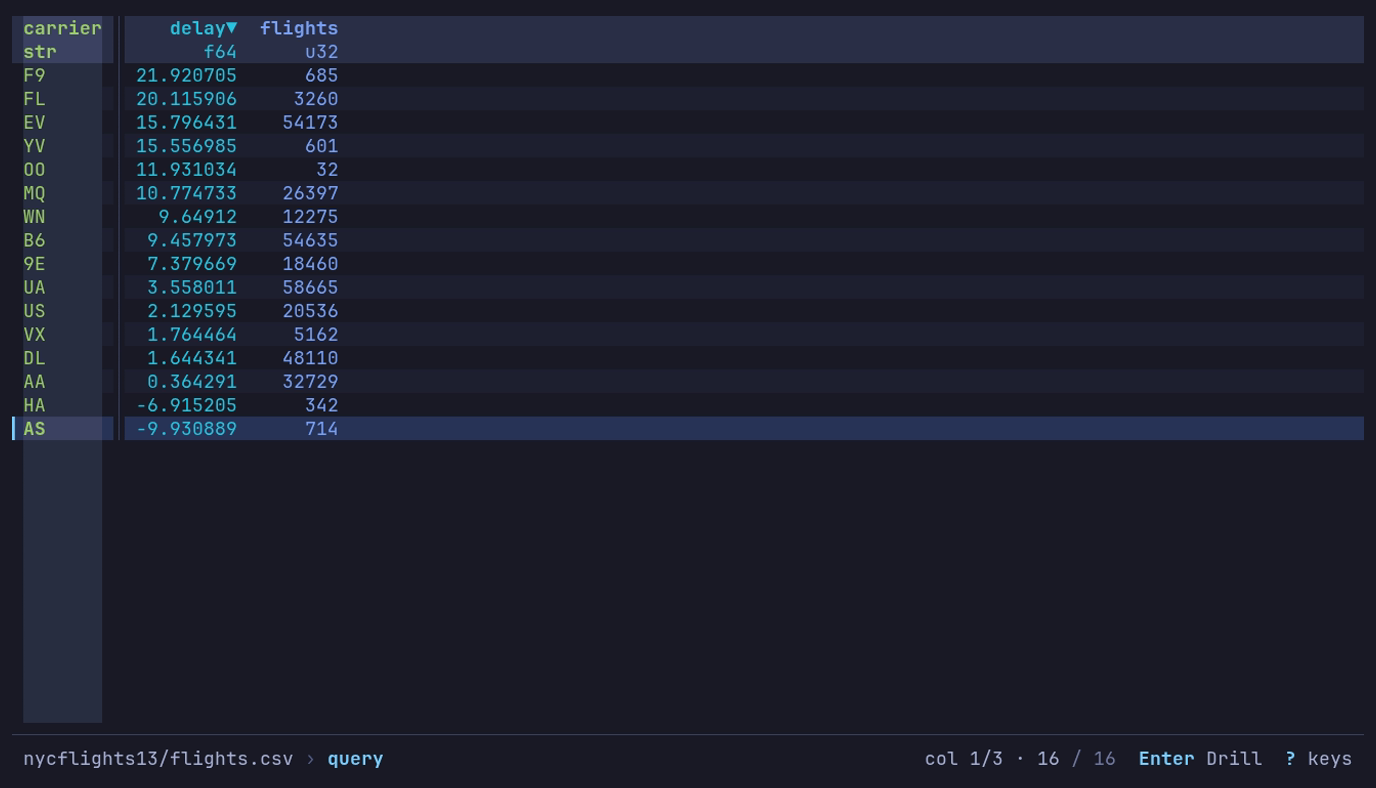
Which airlines arrive late? F9, by 21.9 minutes on average; AS arrives early. :, the query, Enter, then G to AS.
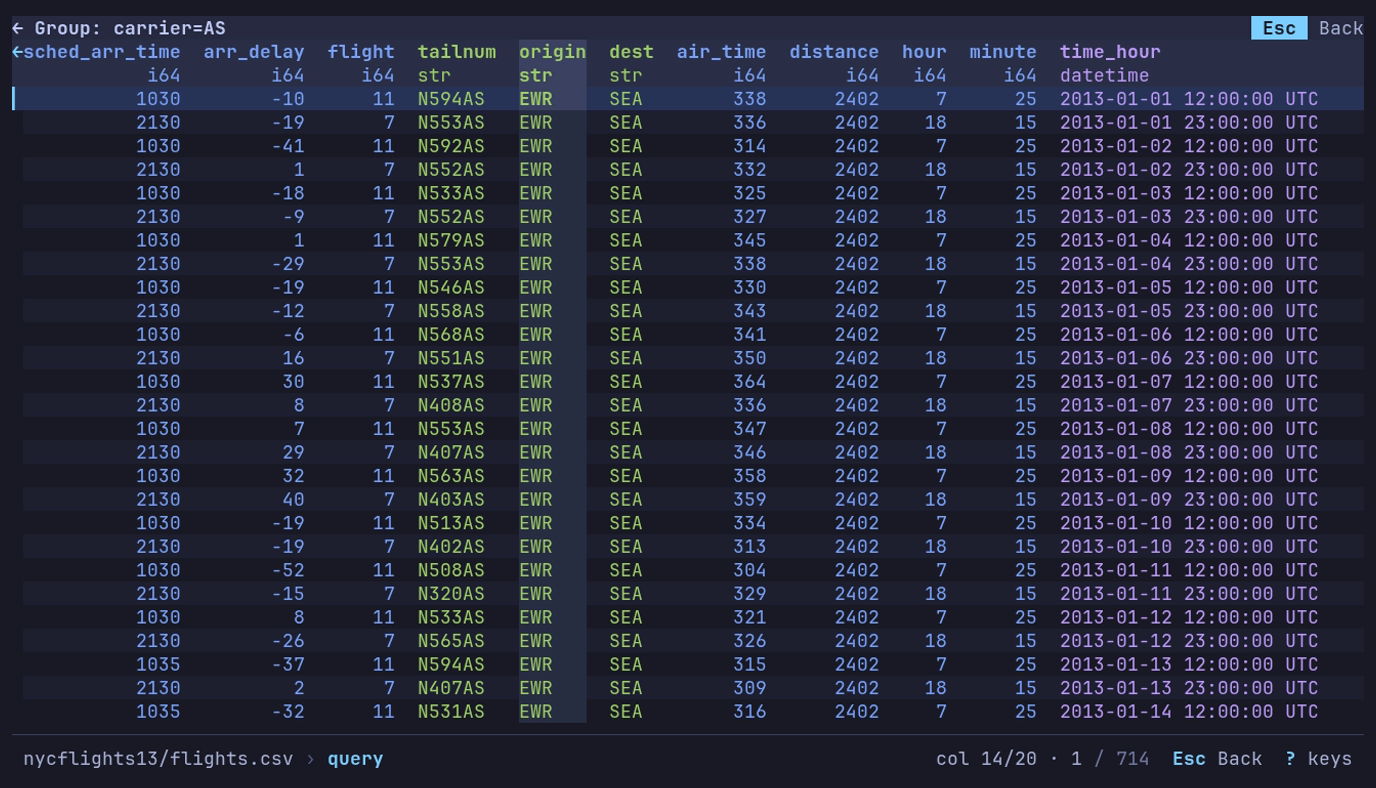
Where does AS fly? Enter on AS: its 714 flights, Newark (EWR) to
Seattle (SEA). Esc goes back.
SQL
SQL mode runs the SQL that the bundled version of
Polars supports,
not the full SQL standard. A statement reads one table, df:
df is | While |
|---|---|
| The group’s rows | Drilled down into a group |
| The pivot or melt result | A pivot or melt is in effect |
| The data as loaded | Otherwise |
Sidebar filters and sort are not part of df, and neither is the previous
statement’s result: each statement starts from df again.
A statement’s rows come back in one order on every read: joins, unions,
DISTINCT and groupings keep the order of the rows they read (a grouping that
drills down, with no ORDER BY or LIMIT, is sorted by
its keys instead), and rows that an ORDER BY ranks equal keep the order they
come in. Paging through the result never repeats a row or skips one, and a
LIMIT without ORDER BY keeps the same rows.
Write SQL
| Key | In SQL |
|---|---|
| Tab | Complete the column name, or df, being typed. Press again for the next match |
| Alt+Enter | Start a new line |
| Enter | Run the statement |
| ↑ ↓ | Move between lines; past the first or last, walk the history |
- The columns of
dfare listed under the input in their types’ colors, narrowed to the name being typed. Names with spaces complete in double quotes:"Team 1"; in q, ascol["Team 1"]. - A long statement wraps onto a second line, then scrolls within the two.
- An empty input shows an example to start from:
SELECT * FROM df WHERE ....
When a statement fails on a value that will not convert, the reason names the column, the values that failed and SQL that gets past them:
| Failure | Try |
|---|---|
STRPTIME meets text that does not match the format | Trim it first: STRPTIME(SUBSTR(Date, 1, 15), '%a %b %d %Y'), or REPLACE |
CAST meets text that is not a number | TRY_CAST(col AS INT), which reads it as null |
CAST(col AS DATE) meets a date not written YYYY-MM-DD | STRPTIME(col, '%d/%m/%Y') with the format it is written in |
The count is exact when the whole column was checked before the run stopped. Otherwise it says “At least N”, from the rows read so far.
Dates and messy text
Premier League (2020-21) writes dates as Sat Sep 12 2020, and twelve
postponed matches as Tue Jan 12 2021(P). Scores are text such as 4–3, with
an en dash. SQL takes both apart:
SELECT Round,
       CAST(STRPTIME(SUBSTR(Date, 1, 15), '%a %b %d %Y') AS DATE) AS match_date,
       "Team 1" AS home, "Team 2" AS away,
       CAST(SPLIT_PART(FT, '–', 1) AS INT) + CAST(SPLIT_PART(FT, '–', 2) AS INT) AS goals
FROM df
ORDER BY goals DESC, match_date, home
SUBSTR drops the (P). Two matches had nine goals: Aston Villa 7–2
Liverpool on 2020-10-04 and Manchester Utd 9–0 Southampton on 2021-02-02.
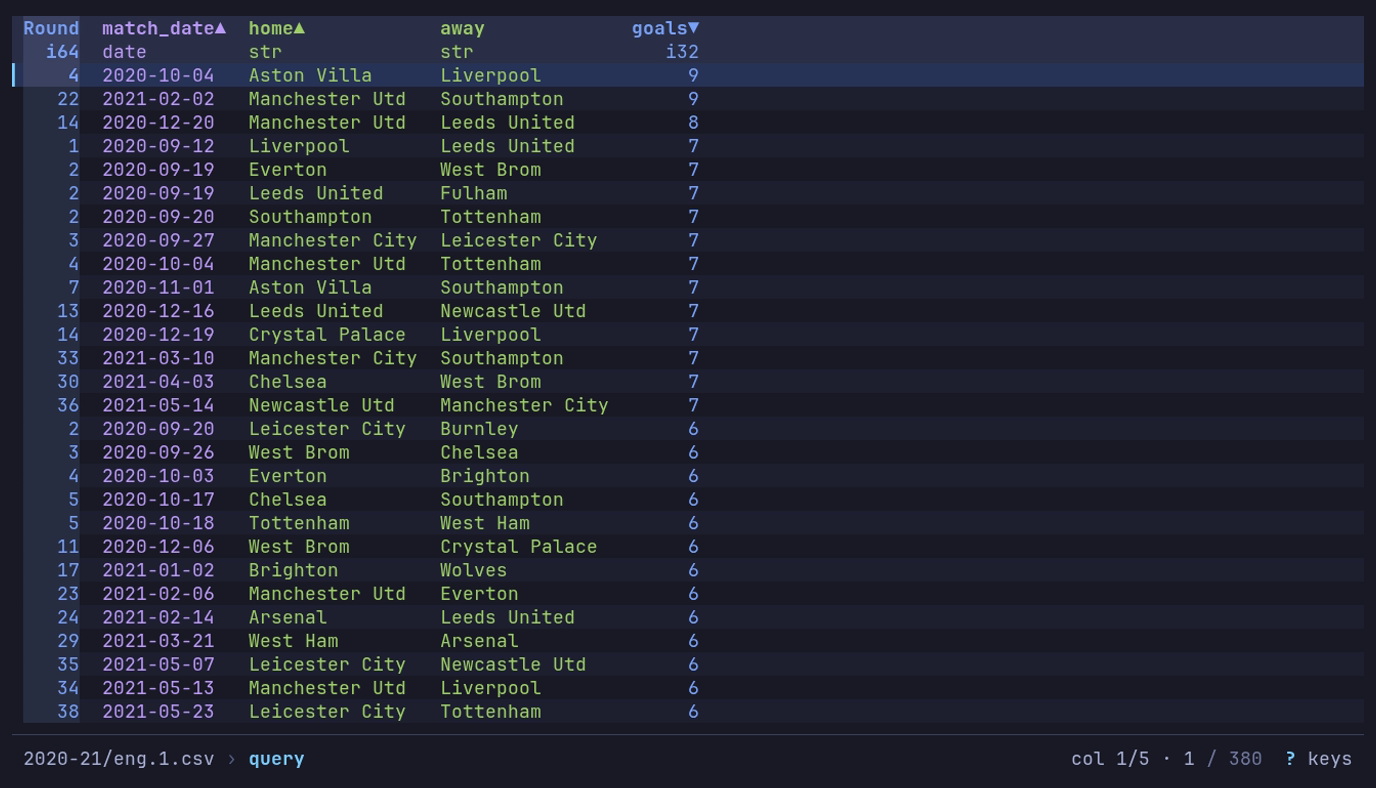
Which matches had the most goals? :, the query, Enter:
match_date is a date and goals a number, two nine-goal matches first.
NYC flights has a time_hour timestamp, but it is in UTC, so a late-evening
departure lands on the next day. The local date is in year, month and day:
SELECT DATE(CONCAT_WS('-', year, month, day)) AS flight_date,
       COUNT(*) AS flights, AVG(dep_delay) AS delay
FROM df
GROUP BY flight_date
ORDER BY flight_date
365 rows, one per day of 2013. Chart flight_date against delay as a line
and 2013-03-08 stands out at 83.5 minutes.
A date or datetime past the calendar’s range, such as a sentinel of
i64::MIN + 1 microseconds, has no calendar text:
| In a query | A date past the calendar |
|---|---|
.str, .format, like, .part, .slice, .replace, .strip, ^ with text | Its stored number, as the table shows it: -9223372036854775807 us since 1970-01-01 UTC |
SQL CAST(... AS VARCHAR), ||, CONCAT, STRFTIME; COALESCE, CASE or UNION with text | Its stored number |
.date, .time, .year, .month_start and the other date parts; SQL date functions and INTERVAL arithmetic | Null |
SQL CAST(... AS TIMESTAMP); ^, COALESCE, CASE, GREATEST or LEAST with a datetime | Null when the datetime cannot count it |
A nanosecond datetime only spans 1677-09-21 to 2262-04-11. Near those ends,
such as pandas’ Timestamp.max:
| In a query | Near the ends of the nanosecond range |
|---|---|
.month_start | Null within a month of 1677-09-21 |
.month_end | Null within a month of either end |
SQL INTERVAL arithmetic | Null when the interval could carry it past an end |
With a time zone: .date, .time, .doy and the rows above | Null within a day of either end |
| A date cast to a nanosecond datetime or met with one, as above | Null before 1677-09-22 or after 2262-04-11 |
Drill down a GROUP BY
Press Enter on a row of a GROUP BY result to see the rows behind
it: the rows of df that passed the WHERE and share the row’s keys, with
every column of df, a key that is a column first. A null key shows the rows
whose key is null.
Esc comes back to the grouped rows, cursor and frozen columns as
they were.
On NYC yellow taxis (January 2025), 3.5 million trips, group by a computed key:
SELECT EXTRACT(HOUR FROM tpep_pickup_datetime) AS pickup_hour,
       COUNT(*) AS trips, AVG(tip_amount) AS avg_tip, AVG(fare_amount) AS avg_fare
FROM df
GROUP BY pickup_hour
ORDER BY pickup_hour
24 rows: 18:00 is the busiest hour with 267,951 trips, 4:00 the quietest with 20,033. Enter on hour 4 shows those 20,033 trips.
| Drills | Does not drill |
|---|---|
SELECT keys, aggregates FROM df [WHERE] GROUP BY keys, then any HAVING, ORDER BY, LIMIT | Joins, subqueries, WITH, UNION |
A key named by its column, its select alias, its position (GROUP BY 1) or the same expression as selected | Window functions (OVER), DISTINCT ON, GROUP BY ALL, UNNEST |
Computed keys: EXTRACT(HOUR FROM ts) AS h | A key that is not selected, or written differently in SELECT |
Where a statement does not drill, Enter
inspects the row instead. Where it drills, the footer
says Enter Drill. A result that drills has the
keys that lead it frozen, as a q by does. Without ORDER BY or LIMIT it comes back sorted by its keys,
since Polars returns groups in no fixed order.
q
q is a subset of the q language, not a complete q or q-sql, and it evaluates right to left. Use it where it is shorter than the SQL:
| Dataset | q | SQL |
|---|---|---|
| Palmer penguins | select mean_mass_g: avg body_mass_g by species | SELECT species, AVG(body_mass_g) AS mean_mass_g FROM df GROUP BY species |
| NYC flights (2013) | select mean_delay: (avg dep_delay).round[1] by hour | SELECT hour, ROUND(AVG(dep_delay), 1) AS mean_delay FROM df GROUP BY hour |
| NYC yellow taxis | select trips: count VendorID by tpep_pickup_datetime.hour | SELECT EXTRACT(HOUR FROM tpep_pickup_datetime) AS hour, COUNT(VendorID) AS trips FROM df GROUP BY hour |
| US baby names | select total: sum n by name where name in ["Emma", "Jennifer", "Olivia"] | SELECT name, SUM(n) AS total FROM df WHERE name IN ('Emma', 'Jennifer', 'Olivia') GROUP BY name |
from df is optional and accepted after the columns and by, as in q and like SQL’s FROM df:
select mean_delay: avg dep_delay by hour from df where origin = "JFK".
Right to left means a * b + c is a * (b + c), and (a + b) * 2 > 100 is
(a + b) * (2 > 100): put the comparison first, 100 < (a + b) * 2.
Query syntax has the grammar, every accessor
and more examples on the built-in datasets.
A by clause without aggregates gives one row per group; with aggregates,
one summary row per group. Press Enter on a group to drill down to
its rows; a row above the table names the group, and Esc comes back.
A group without aggregates shows the columns you selected; an aggregated one shows
every column of the rows behind it, after the query’s where, key columns first.
The cursor, frozen columns and column order come back with Esc.
Save a query
A view saves the active query, in its language, with the filters and sort, to replay on the next file of the same shape.
Find in the table
/ (or f) moves the cursor to a cell holding text, a regex or letters in order, without changing the rows; Ctrl+G keeps only the rows that match.
Type what to find. As you type, the matching cells among the rows on hand light
up, and the prompt says how many are on screen (3 on screen); nothing is read
for that. Press Enter: the cursor, column cursor and all, goes to the
first matching cell at or after its row, highlighted until the cursor leaves it.
Find reads the view as it stands (query, filters, sort, the columns shown) and
never changes it.
| Key | Action |
|---|---|
| / or f | Find. The prompt holds the last pattern, selected, so typing replaces it |
| n | Next match after the cursor’s cell, left to right then down |
| N | Previous match before the cursor’s cell |
| Esc | While a find reads, stop it and the n N typed behind it; the cursor stays where it was. Otherwise clear the find |
n and N start from the cursor’s cell, as in vim: move
the column cursor along a found row and n finds the next match to
its right. Past the last match n comes round to the first, and the
footer says Wrapped to the top; N comes round the other way. Each
n typed while a find reads runs in turn: five move five matches.
Esc stops them all.
In the prompt
| Key | Action |
|---|---|
| Enter | Go to the first match at or after the cursor’s row; on an empty field, clear the find |
| Ctrl+G | Keep only the rows that match, as a filter |
| Ctrl+R | Regex on or off |
| Ctrl+T | Letters in order on or off |
| Ctrl+L | Only the column cursor’s column, or every column shown |
| ↑ ↓ | Earlier patterns |
| Esc | Cancel |
Case is ignored until the pattern has a capital letter: oslo finds Oslo,
Oslo does not find oslo. In a regex, an escape such as \S is not a
capital. Each value is matched as text, so 05-17 finds a date and 2.5 a
number; binary and nested columns are skipped.
| Match | Pattern | Finds |
|---|---|---|
| Text | chicken | Crispy Chicken Sandwich |
| Regex (Ctrl+R) | ^Chick | Chick-n-Strips, not Crispy Chicken |
| Letters in order (Ctrl+T) | chkn | Chick-n-Strips, Crispy Chicken: the letters need not be adjacent; spaces in the pattern are ignored |
Keep the matches
Ctrl+G in the prompt keeps only the rows with a match, as
a filter: the footer shows it (has "chicken", has /^Chick/,
name has letters "chkn" when limited to a column), and so does the
Sort & Filter sidebar, where it is removed like any
other filter; R resets the view. The find stays in effect, so
n walks the matches among the rows kept.
The footer
While a find is in effect the footer offers n/N and
Esc, and its status line shows the pattern: find "chicken", or
find /^ch/ for a regex, find ~chkn for letters in order, with in name when
it is limited to a column. match 3 follows when the finds so far walked from
the top of the view to the cursor. Nothing counts every match: a find reads only
as far as the next one.
Large data
A find starts in the rows already read. Past them it reads the view on, a
window at a time, and the footer counts the rows read on a line of its own
(rows 1,200,000 / 3,475,226, with a bar when the view’s rows are counted);
Esc or Ctrl+O stops it. A filtered view, a CSV
or NDJSON cannot skip to a window, so N there reads the rows before
the cursor in one pass, and n from deep in the view reads windows no
smaller than the rows above them. The order of a sorted view, a SQL result
included, is the order on screen, so n never skips or repeats a row.
Sort, filter and arrange columns
s opens the Sort & Filter sidebar, where you sort, filter, hide, move, freeze and size columns.
It opens on what is in effect: the sort and the filters, one row each. The Columns tab beside it lists every column. The tab bar is the first row: ← → there switch tabs. The sidebar takes the keys every dialog takes:
| Key | Does |
|---|---|
| ↓ ↑ or Tab Shift+Tab | Next or previous row, wrapping |
| ← → | Change the row’s value: the tab, a sort’s direction, a filter’s and/or, a column’s sort |
| Space | Act on the row: flip a sort, edit a filter, add one, step a column’s sort |
Filter, sort and hide columns
Open Food nutrition (fast food) from Example datasets: 515 menu items from eight chains, nutrients per item. Find the chicken dishes with at least 40 g of protein, heaviest first:
- Press / to find, then Ctrl+T for letters
in order. Type
chickenand press Ctrl+G to keep the 178 of 515 that match. - Press s: the sidebar opens on
add sort…. Press ↓ twice, past the find’s filter, toadd filter…and Space. Typeproteinand press Enter,>=and Enter,40and Enter. - Press ↑ three times to
add sort…and Space. Typecaloriesand press Enter, then Space on the new sort for descending. - Press ↑ to the tab bar, → for Columns and
↓ into the find field. Type
vit, then ↓ v ↓ v to hidevit_aandvit_c. - Press Enter to apply.
The table shows 30 of 515, led by McDonald’s 20 piece Buttermilk Crispy
Chicken Tenders at 2,430 calories. The calories header carries ▼.
Filter on a cell
At the table, + and - filter on the cell under the cursor, where the row cursor and the column cursor cross.
| Key | Does |
|---|---|
| + | Keep the rows whose value in this column is the cell’s; on a null cell, keep the nulls |
| - | Drop those rows; on a null cell, drop the nulls |
Each press adds a filter to the Sort & Filter tab, joined to the others
with and, so you can edit or delete it there and R clears it. The
value is the cell’s exactly as stored: a float to its last digit, so 0.1 + 0.2
and 0.3 are two values even where the table draws both as 0.3, and a date
and time to its last fraction of a second, in its zone. A list, struct or
binary cell has no value to compare; the bar says so.
Apply or cancel changes
| Key | Does |
|---|---|
| Enter | Apply everything staged and close, from any row (in the filter editor, Enter takes the step) |
| Ctrl+Enter or Ctrl+J | Apply from anywhere, including mid-edit — the row in progress is saved. Ctrl+Enter needs a terminal that tells it from Enter; Ctrl+J works on every terminal |
| Esc | Close an open picker or filter editor; otherwise close without changing anything |
| C | Clear the current tab’s staged state |
Sidebar filters and sort apply to the current query or reshape result. Running
a new query clears them, so apply the query first and the sidebar settings
afterward. The footer names the filters and the sort, and counts the rows kept
beside the cursor’s: 1 / 30. Info shows the dataset’s total.
Canceling the sidebar discards whatever was staged; reopening it shows what
is actually applied.
Columns tab
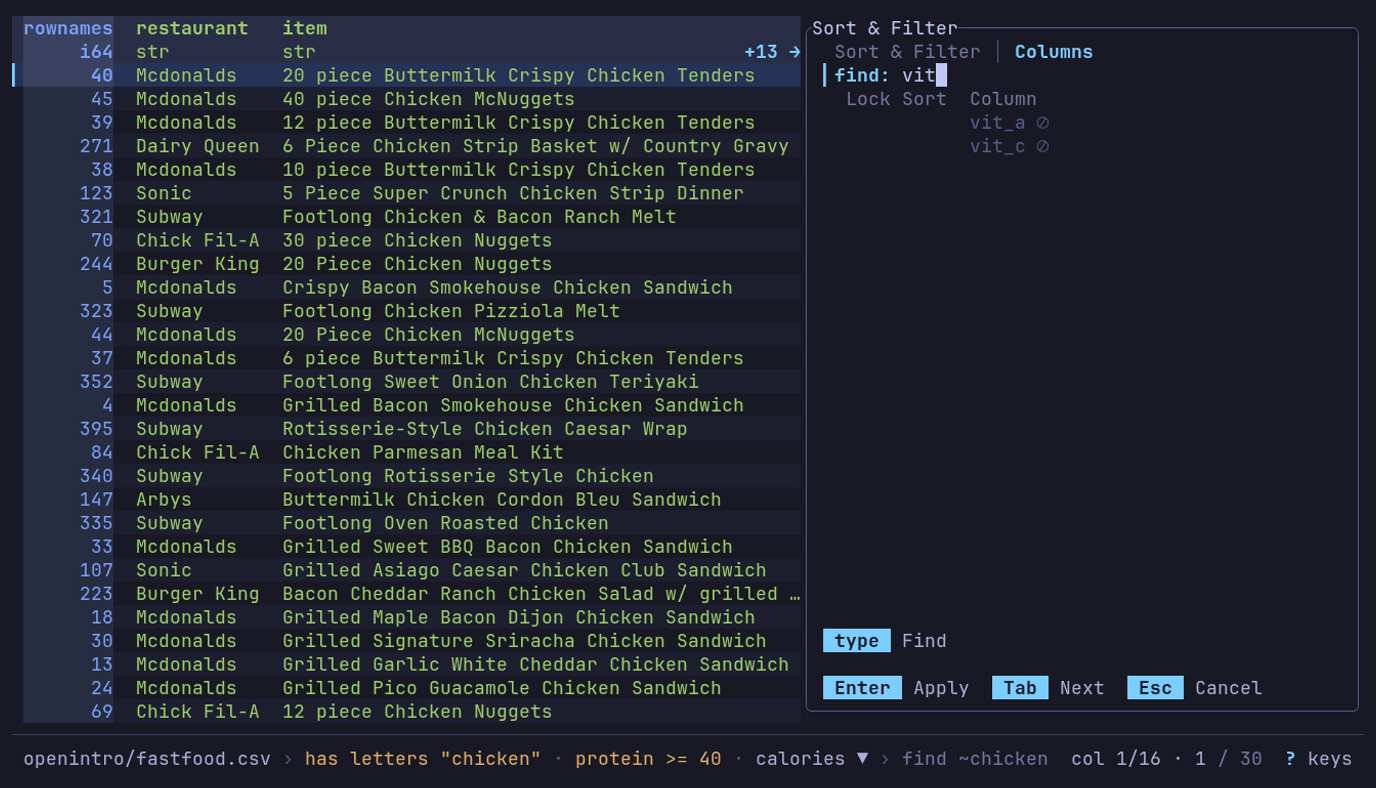
Which chicken dishes have the most protein, heaviest first? The
five steps above: 30 of 515, McDonald’s 20
piece Buttermilk Crispy Chicken Tenders first. s again,
↑ → to Columns, ↓ and vit show the two
hidden columns.
One row per column, with its lock, its place and direction in the sort
(1▲, 2▼), a width set by hand, and a ⊘ when it is hidden. Each sorted column’s header in the
table carries its own direction mark (▲/▼), so the sort and r
reversing it are visible at a glance. ↓ from the tab bar reaches
the find field; type in it to narrow the list, and ↓ again goes to
the list, on the table’s column cursor (or the first match), then:
| Key | Action |
|---|---|
| ↑ ↓ PgUp PgDn Home End | Move in the list; ↓ stops at the last column, and … 12 more counts those out of view above and below |
| Space → | Cycle this column’s sort: none, ascending, descending (← steps back) |
| Del | Remove this column from the sort |
| 1 to 9 | Put this column at that position in the sort order; 0 removes it. A digit past the end of the order says so on the status line |
| [ ] | Move this column earlier or later in the sort order |
| + - | Move this column left or right in the table |
| L | Freeze this column and every column above it on the left |
| v | Hide or show this column (it keeps its place in the list, dimmed) |
| < > (, .) | Make this column 4 cells narrower or wider |
| f | Fit this column to the rows on screen; the list shows fit until you apply |
| w | Back to the automatic width |
Column widths
Each column keeps the width it was first drawn at, so paging, scrolling,
reordering, hiding and opening a sidebar move nothing. A longer value on a
later page ends in … (ASCII ...).
| Column | Automatic width |
|---|---|
| Text, lists, structs and names | The first page’s widest, at most two fifths of the window: 32 cells at 80 columns, 48 at 120 (16 to 64) |
| Numbers, dates, times, flags | The widest value seen so far, never cut; paging does not narrow it |
The last column on screen also takes the room left at the right edge, so a long text there shows more of each value. A number column, which sits flush right, and a width set by hand keep their width.
A number is cut only when it is the first scrolling column and has no room; otherwise it waits, whole, for the scroll.
A query, a pivot or melt, drilling down or back up, a new sort, r and a new filter change the rows, so automatic widths are learned again from the first page they show.
At the table, the column cursor’s column takes < > (4 cells narrower or wider), = (fit to the rows on screen) and w (automatic) at once, so you see each change as you make it. The Columns tab stages the same keys for any column until Enter.
A width set with < >, = or f is kept through paging, resizing and reordering until w, C or R. Text gets exactly that width; a number column is never narrower than its numbers. Applying only width changes leaves the table on the page you were on.
The space between columns is the display.cell_padding setting:
"comfortable" (2 cells, the default), "compact" (1) or a number. See the
settings reference.
Frozen columns
Frozen columns stay at the left edge, left of a │, while the rest scroll.
When the window is too narrow for all of them beside a usable scrolling
column, the separator turns dashed (┆, ASCII :) and the frozen columns
that do not fit scroll after it, so every column stays reachable. The freeze
is kept: a wider window shows them all frozen again. A value or name cut
short at the edge of its column ends in … (ASCII ...).
Every column carries its own direction, so calories can run descending while
restaurant runs ascending. Nulls go last in either direction.
Back in the main view, r reverses every direction at once and R resets everything: query, filters, sort, column order, hidden columns and widths, frozen columns, pivot/melt, drill-down and the applied view.
Move across a wide table
The table has a column cursor as well as a row cursor: the cursor’s column is
tinted from header to last row, and the cell where it crosses the current row
stands out from both. On a 16-color terminal, or with NO_COLOR, its header
and that cell are drawn reversed.
| Key | Moves |
|---|---|
| ← → or h l | The cursor one column. The columns scroll only when it would leave the screen |
| Shift+← → | A page of columns; the cursor goes to its first column |
| { } | The cursor to the first column, or to the last on the last page |
| g | The cursor to a column you name: type to narrow the list, Enter goes |
- Shift+→ starts the next page at the first column not shown whole, so a column cut at the edge is read whole there. A column wider than the window still moves one at a time.
- The last page is full: it ends with the last column.
- Shift+← right after Shift+→ goes back to the page it left; otherwise it ends the page before with the column left of the first one shown.
- g leaves a column already whole on screen where it is; another becomes the first after the frozen ones, or lands on the last page.
- Frozen columns stay put, and the cursor walks them too: h from the first scrolling column goes to the last frozen one, and l back goes to the first scrolling column, scrolling back to it.
- At the last page, Shift+→ takes the cursor to the last column; at the first, Shift+← takes it to the page’s first column, then the first.
- The cursor stays on its column when columns are hidden, moved or frozen in the sidebar; when its own column is hidden, the column that takes its place takes the cursor.
- g lists the columns the table shows, in its order. Hidden columns are not listed: show them with v on the Columns tab. A frozen column is on screen already, so choosing it moves nothing.
H and L move the cursor’s column itself one place left or right, the cursor with it: the same column order the Columns tab’s + - set, and R puts it back. A frozen column moves among the frozen ones, and a scrolling column among the scrolling ones.
The keys that act on one column act on the cursor’s:
| Key | On the cursor’s column |
|---|---|
| F | Value counts |
| [ ] | Sort by it, ascending or descending, in place of the sort in effect; again to take the sort away |
| + - | Filter on its cell |
| s | The sidebar opens with its Columns cursor there, and a new filter starts on it |
| y | The Cell scope copies its value in the current row |
| Space | The inspector opens on its field |
| / | Ctrl+L in the prompt finds in it alone; a match moves the cursor to its column |
Once the column cursor moves, the footer offers those keys: +/- Filter [/] Sort F Counts. It says where the cursor is too: col 43/300 before the row, while
there is room. It counts the columns the table shows, frozen first; hidden
columns are not counted.
Sort & Filter tab
What is in effect, under two rules: Sort, one row per key in order
(1 ▲ restaurant), then add sort…; Filters, one row per filter
(column, operator, value, and how it joins the row above: and/or),
then add filter….
| Key | On a sort | On a filter |
|---|---|---|
| Space | Flip ascending and descending | Edit it: column, operator, value |
| ← → | Flip ascending and descending | Toggle and/or |
| [ ] | Move it earlier or later in the sort | Move it up or down the list |
| d Del | Remove it | Remove it |
Space on add sort… opens a list of the columns not sorted yet, on
the table’s column cursor: type to narrow, Enter adds the column as
the last key, ascending. Space on add filter… starts a new
filter on the column cursor’s column. C removes every sort and
filter. While something is staged, the footer’s Apply is in the accent.
Editing a filter walks three steps on the row: pick the column (type to narrow, ↑ ↓ move, Enter chooses), pick the operator the same way, then type the value — Enter saves the row, and Esc abandons the edit and only the edit. Then Enter applies.
| Operator | Meaning |
|---|---|
= != | equal, not equal |
< > <= >= | less, greater, or equal |
contains !contains | text contains, or does not contain, the value |
is null not null | the value is null, or is not; these take no value |
The operator list offers what the column’s type takes: a number, date or time
has no contains, and a flag only =, != and the null tests.
The value is read as the column’s type, so > 1000 on a number column is a
numeric comparison and >= 2024-01-01 on a date column compares dates:
| Column | Write the value as |
|---|---|
| Whole number, float | 1000, -3.5, 1e-6; a float compares exactly, so = 0.3 does not hold 0.1 + 0.2 |
| Flag | true or false |
| Date | 2024-01-01 |
| Date and time | 2024-01-01 (its midnight), 2024-01-01 05:30, 2024-01-01T05:30:00.25; a column with a time zone reads the clock there, and an offset (+01:00, Z) names the instant instead |
| Time | 05:30, 05:30:00, 05:30:00.25 |
| Duration | 1d 2h 30m, 90s, 1500ms, -5m: whole numbers of d h m s ms us ns |
| Decimal | 1.5, read at the column’s scale, so it is 1.50 |
A value the column cannot read keeps the sidebar open, and the line above the
keys says why, such as day: "2024-13-01" is not a date written YYYY-MM-DD. A
clock a time zone skips or repeats (the night clocks change) asks for its
offset. Filters stay in place while you chart, analyze or export, and are
saved in views.
From the command line
For anything more involved, a SQL WHERE or the where clause of a
q query takes
expressions, OR groups and date arithmetic.
Pivot and melt
p reshapes the table: Pivot turns values into columns, Melt turns columns into rows. It reshapes the rows the query and filters leave.
p opens the builder full screen: the form on the left, a live preview of the result on the right. Below 100 columns the preview sits under the form.
| Preview line | Says |
|---|---|
| Input | The rows the preview ran over: all 376 rows, or the first 1,000 rows of 1,939,184 of a larger view, unsorted when the view is sorted (a small sorted view is read in its order) |
| Result | The shape, rows × columns. ? is what the first rows cannot tell; a pivot’s columns read 12+ until applied |
▲ | A pivot with 100 or more new columns, or why the reshape fails on these rows |
Under them, the first rows of the result, typed and colored as the table draws them. Each change to the form runs the preview again in the background; Enter applies the reshape to the whole view.
Pivot
Open US baby names (1880-2017) from Example datasets: 1.9 million rows
of year, sex, name, n and prop. Keep three girls’ names:
SELECT year, name, n FROM df WHERE sex = 'F' AND name IN ('Emma', 'Jennifer', 'Olivia')
376 rows. Press p and choose these settings on Pivot:
| Setting | Value | Meaning |
|---|---|---|
| Index | year | One row per year |
| Columns | name | One output column per name |
| Values | n | The count to put in each cell |
| Aggregate | last | There is one value per year and name, so any aggregate keeps it |
Use ↓ to move through settings. Space opens a column picker; type to narrow, Space to select and Enter to close it. ← → step Aggregate.
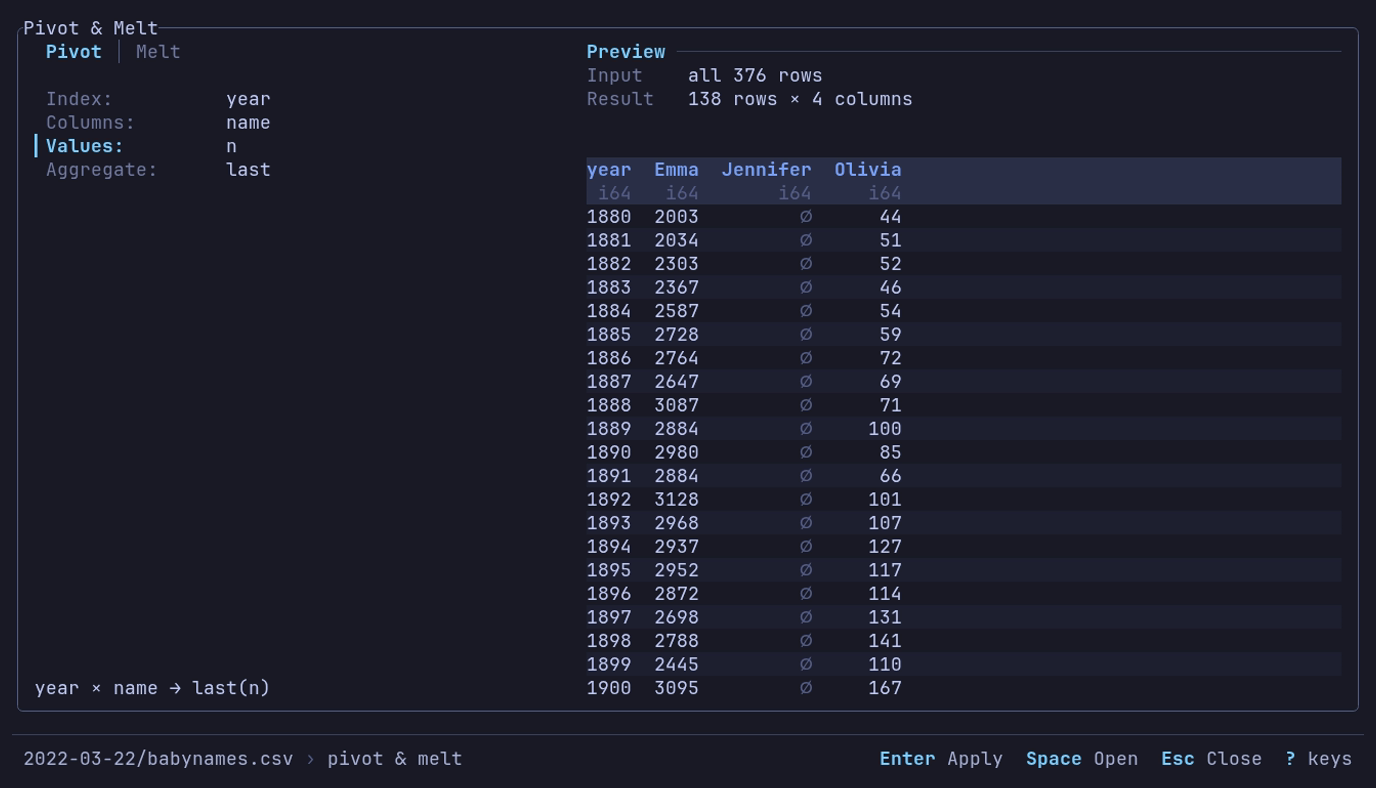
One column per name, a row per year? The preview says 138 rows × 4 columns
before anything is applied. p, then Index year,
Columns name, Values n.
The status footer under the builder reads <dataset> › pivot & melt and names the keys
that act on the focused field, here Enter Apply Space Open Esc Close.
Press Enter to apply.
The result has 138 rows, one per year, and the columns year, Emma,
Jennifer and Olivia. A year with no count for a name is null: Jennifer is
∅ before 1916, and in 1917 and 1918. Chart it as three lines; see
the examples.
Output columns are sorted alphabetically. Pivot reads the rows once, in the background, and keeps one value per index and column pair in memory; filter large datasets first. A pivot that would make more than 10,000 columns is refused, with the count it would make; so is a view whose pivot would.
A date or datetime past the calendar’s range, such as a sentinel of
i64::MIN + 1 microseconds, names its column by its stored number, as the
table shows it: -9223372036854775807 us since 1970-01-01 UTC.
Choose an aggregate
Available functions are last (default), first, min, max, avg, med,
std and count. String values support only first and last.
Those two functions are positional and retain nulls. After sorting with nulls
last, last returns null for any group ending in a null.
Count with a pivot
count turns rows into tallies. On Space launches (1957-2018), with no
query, press p and set:
| Setting | Value |
|---|---|
| Index | launch_year |
| Columns | category |
| Values | tag |
| Aggregate | count |
62 rows of launches per year: O for those that reached orbit, F for
failures. 1967 has 127 and 12. Rows come in the order the years first appear
in the file; a line chart draws them in X order regardless.
Melt
To turn the names pivot back into rows, press p, select Melt, and set:
| Setting | Value |
|---|---|
| Index | year |
| Strategy | All except index |
| Variable name | name |
| Value name | n |
The name fields start as variable and value, selected: typing replaces
them. Apply with Enter. The result has 414
rows with columns year, name and n: the 376 counts, plus a null for each
of the 38 years Jennifer has none.
Other strategies select columns by regex (By pattern), data type (By type) or an Explicit list. The form shows how many columns match, and the preview the rows they make, before it runs.
Melting dates together with text makes the values text. A date past the calendar’s range becomes its stored number, as in a pivot.
Press R from the table to clear the reshape and other view changes.
Keys
The builder takes the keys every dialog takes. It opens on its first row, Pivot or Melt.
| Key | Action |
|---|---|
| ↓ ↑ or Tab Shift+Tab | Move between the rows |
| ← → | On the first row, switch Pivot and Melt; on Aggregate, Strategy or Type, the previous or next value; on Columns or Values, the previous or next column; in a text field, move the cursor |
| Space | On a choice, its next value; on a column row, open its picker (type to narrow) |
| ↑ ↓ in the picker | Move; Space chooses, or toggles where several can be chosen |
| Enter | In the picker, choose; otherwise apply, from anywhere |
| Esc | Stop a pivot being computed and keep the builder; close the picker alone, undoing the toggles made since it opened (Enter keeps them); otherwise close without applying |
| ? | Help |
Views
A view saved after a pivot or melt stores the reshape and the query, filters and sort it ran over. When it is applied, the order is that query, filters and sort, the pivot or melt, then any SQL, filters and sort on its result, then column order.
Value counts
F at the table counts the rows holding each value of the column cursor’s column, with a summary of the column above them. Esc goes back.
Move the cursor with h l or g. ← → on the counts move to the previous or next column, and the table’s cursor goes with them.
Which carrier flies most
Open NYC flights (2013) from Example datasets on the home screen, press
g, type carrier, Enter, then F:
Value Counts · carrier · all 336,776 rows
 Rows 336776   Distinct 16   Nulls 0

 carrier   Count▼        %  Cum %
▎UA         58665    17.4%  17.4%   ████████████████████████████████████████████
 B6         54635    16.2%  33.6%   █████████████████████████████████████████
 EV         54173    16.1%  49.7%   ████████████████████████████████████████▋
 DL         48110    14.3%  64.0%   ████████████████████████████████████▏
Four carriers fly almost two thirds of the flights. Enter on B6
shows its 54,635 flights as a drill-down, Group: carrier=B6; Esc
comes back to the counts.
→ moves to flight, a number: it opens as a histogram of its
counts, under a summary that answers whether the column can be added up:
 Rows 336776   Distinct 3844   Nulls 0   Sum 664096549   Mean 1971.9236   Min 1
 Max 8500
c turns a number’s histogram into the listing of its values, and back.
Histogram
A number column’s counts show as a histogram: 40 bins from the least value to
the greatest, or a bin per value when an integer column spans fewer than 40.
When the tails reach ten times past the 1st to 99th percentile, the bins span
that range instead and the values outside it are counted under the plot:
1,207 values outside p1-p99. The bins are made from the counts, so they are
exact wherever the counts are. c shows the listing; another column
opens as its own type says.
What the screen shows
| Part | What it says |
|---|---|
| Header | The column, and what was counted: all 336,776 rows, or sample of 100,000 of 657,752 rows |
| Summary | Rows, Distinct (null not among them) and Nulls; Sum, Mean, Min and Max for numbers; Min and Max for dates and times. A sample has no Sum |
| Rows | Each value’s rows, its percent of all of them, the running percent, and a bar beside the most common value’s |
∅ | The nulls, on a row of their own: ranked by their rows when sorted by count, last when sorted by value |
other (N values) | Past the 1,000 most common values, the rest in one row, without a bar |
Values are written as the table writes them: , groups digits here too.
Keys
| Key | Action |
|---|---|
| ↑ ↓ or j k | Move |
| PgUp PgDn | A page |
| Home End or G | First and last row |
| ← → or h l | Previous or next column; a column counted before shows at once |
| Enter | The rows holding the value, as a drill-down. Esc there comes back |
| s | Sort by count or by value; the header’s mark says which |
| c | A number’s histogram, or the listing of its values |
| a | Count every row, when the counts are of a sample |
| y | Copy the counts as TSV: every value with its count, percent and cumulative percent |
| e | Export the same table to a file |
| ? F1 | Help |
| Esc | Back to the table. While every row is being counted, stop and keep the sample |
What is read
The counts are of the view: the query, the filters and a drill-down apply. One pass over the column counts every row, in the background; Esc or another column stops it.
A remote view, or one over 100 times the sample size (10,000,000 rows at the
default), held in one Parquet or IPC file, is
sampled first instead: a few of its row groups are
read, and the header says sample of. a then counts every row. A
view the sampler would have to read whole anyway, such as a directory of
files or a CSV, is counted exactly from the start. The sample size is
[analysis] sample_rows; 0 always counts every row.
Make a chart
c charts the rows the query and filters leave, starting from a chart chosen for the column cursor’s column. Esc returns to the table.
| Cursor column | Chart c opens |
|---|---|
| A number | Its histogram |
| Text, categorical or boolean | A bar of its counts per value |
| A date or a time | A line over it, of the first numeric column (Y is left to pick when there is none) |
The panel says suggested for f64 under Type until the type is changed.
c again from the same column on the same dataset brings back the
chart as it was left; from another column it suggests again.
The panel
The panel on the left holds four shelves, the same four for every type, then
the options. A shelf the type does not use stays in place, dimmed, with why
(density, same as X); focus passes over it.
| Shelf | Holds | Under it |
|---|---|---|
| Type | Line, Scatter, Bar, Histogram, Box, KDE, Heatmap | suggested for <type> |
| X | A column: what the type takes on X | The time bucket of a date X on a line or scatter; the bar order; the histogram’s bins |
| Y | A column, several on a line or scatter (one series each); on a histogram, count or share | On a line, scatter or bar, the Aggregate row, and cumulative when it is on |
| Color | A category column: one series per value | Which values: top 10 of 16 by rows, all 3, 3 picked of 4,812 |
The plot’s title row says how the chart is made of the rows: mean by month, running sum, colored by carrier, count per bin, one box per carrier. The
columns are named at their axes, the Y column over the y axis and X under the
x axis at the right, so the title row is blank for a plain line or scatter. At
its right end, dimmed, the chart says what it read: sample of 10,000 of 337k rows · seed 42891, 1,207 values outside p1-p99. The seed draws the same
sample again; a chart of every row names none. When the row is too narrow for both, the
notes are cut with …, or left out.
Plot two columns
Open Palmer penguins from Example datasets, as in the quick start, then:
- Press c, then 2 for Scatter.
- Choose
flipper_length_mmfor X andbody_mass_gfor Y.
Use ↓ to move through the rows and Space to open a shelf’s picker. Type part of a name to narrow it; on Y, Space toggles a column and Enter closes the picker. The picker leaves out the X column. The two penguins with no measurements are left out.
Points are drawn in X order, so a line runs left to right whatever order the table is in. Nulls are dropped per series: a row with no X is left out, and a missing Y drops that series’ point and breaks its line. Other series keep their points.
Esc keeps the chart as you left it: sort or filter the table, press c on the same column, and the same shelves chart the new view. A column the view no longer has is dropped from the chart. Opening another dataset starts over.
Aggregate
The Aggregate row under Y, on a line, scatter or bar: ←
→ step through none, count, distinct, sum, mean, median, stdev, quantile,
min, max, first and last. With
one, the rows that share an X (and a color) are made one point, or one bar, over every row of the view, in one
group-by in the background; the chart says how many rows in its title row (all 336,776 rows, or rows in the groups shown when a color leaves values out without Other),
and the footer Grouping 337k rows... while it runs. Without one, a
chart samples, and says so.
| Aggregate | Each point or bar | Y |
|---|---|---|
| count | The rows | None needed |
| distinct | The different values, nulls left out (nunique in a query counts a null as one) | Any column, text too; another aggregate lets a text Y go |
| sum, mean, median, min, max | As named | A number |
| stdev | The sample standard deviation (n − 1). A group of one row has none and draws no point | A number |
| quantile | The percentile on the line under Aggregate, p90 to start; ← → there step 1, 5, 10, 25, 75, 90, 95 and 99. Linear interpolation between the two nearest values | A number |
| first, last | The first or last value in the view’s order, nulls passed over: its sort, which Aggregate names (last · by time_hour ▲), or else the order the rows were read in (last · by row order) | A number |
| Option | What it does |
|---|---|
| Time bucket | Line and Scatter, under a date or datetime X: none, day, week (from Monday), month, quarter, year. A bucket with no aggregate takes mean; an aggregate on a date X with no bucket starts by the day |
| Cumulative | Line and Scatter, with count, sum, mean, median, min or max; the others take none, since a running sum of distinct counts, deviations, percentiles or first values is none of those so far: off, running sum, or compound. The rows run as a total in X order, per series, and each point is the total at the end of its X or bucket: a running sum of Y, or Y’s rates compounded over every row, (1 + y1)(1 + y2)… − 1. The aggregate is set aside meanwhile (a count runs as a count of rows); Aggregate says mean · compound of rows |
An X of more than about 200,000 values is refused before any row is grouped, judged from a sample of X, with the advice to bucket it.
On NYC flights (2013), with no query: press c on carrier, pick
arr_delay for Y and step the aggregate to mean. Sixteen bars, F9
longest at 21.92 minutes; HA and AS arrive early on average, so their bars
grow left of zero.
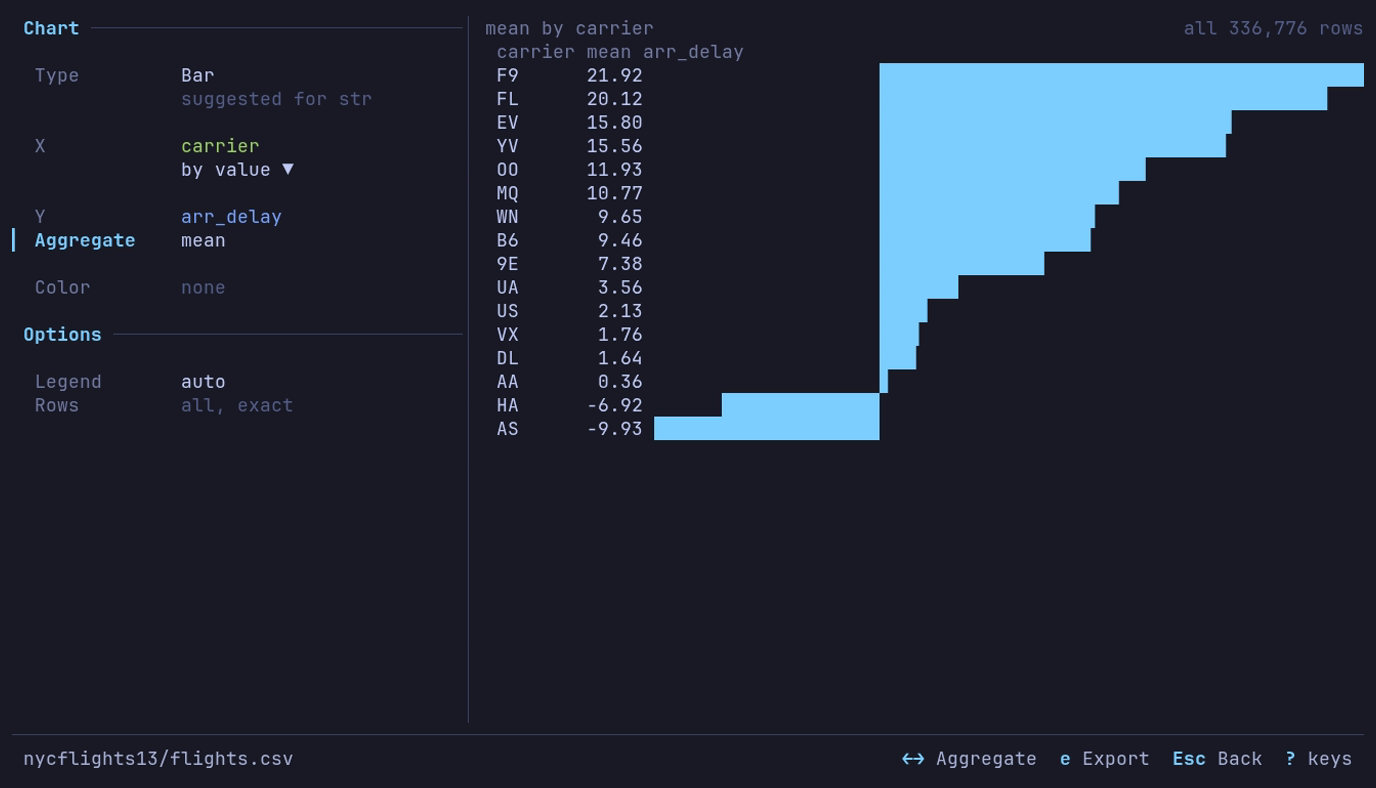
Which airlines arrive late? F9, by 21.92 minutes on average. c on
carrier, Y arr_delay, → on Aggregate to mean.
Color
Color splits a chart into one series per value of a category column, each in its own palette color. Without a pick, the ten values with the most rows are drawn (all of them, when the view is filtered to fewer); the line under Color says which. Space on that line lists every value with its rows, most first: type to narrow, Space toggles a value (up to ten), Enter charts the ones picked. The values are counted over the whole view.
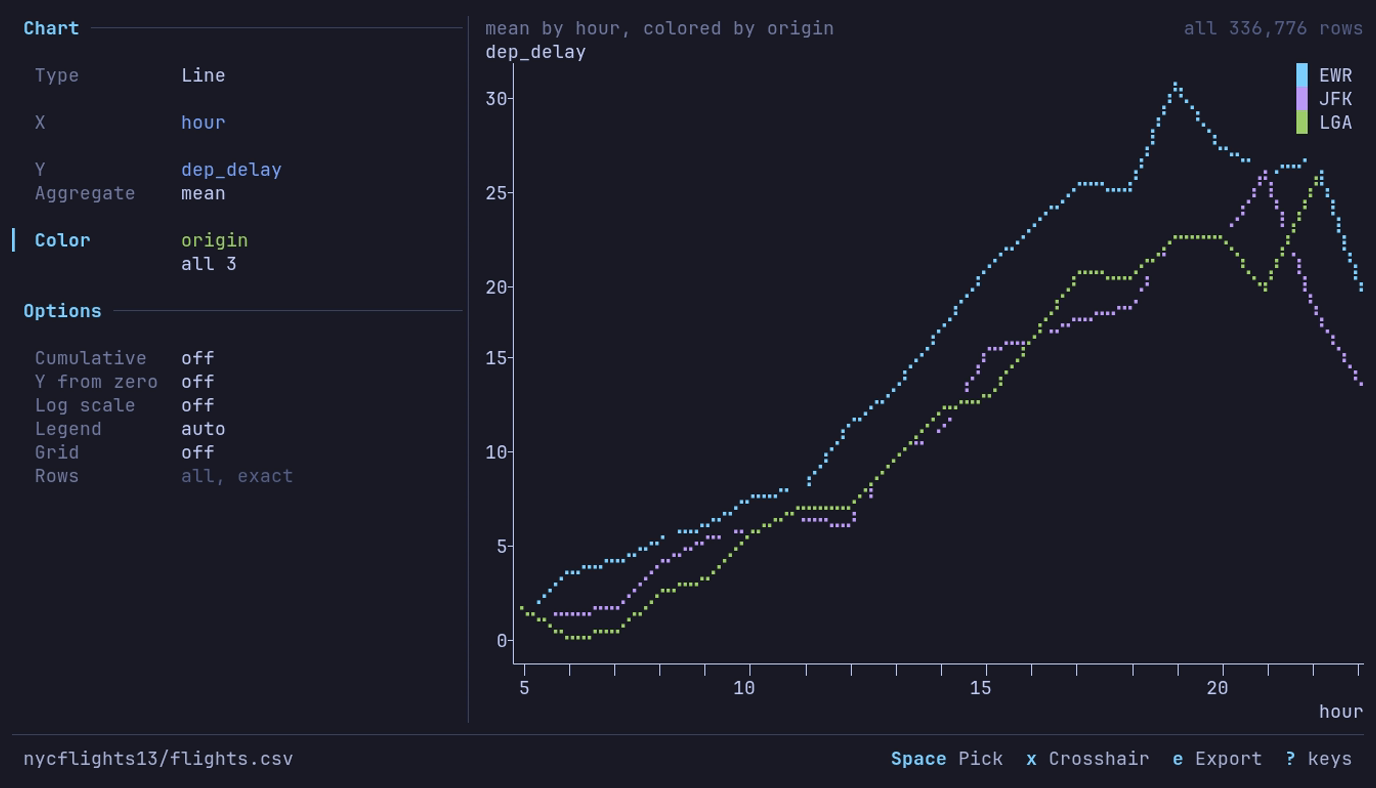
Which New York airport leaves latest, and when? Newark in the evening,
31.1 minutes on average at 19:00. A line of dep_delay by hour,
Aggregate mean, Color origin.
Other gathers every value without a series of its own into one more
series, the legend’s last entry, in dimmed. ← → on the
line under Color turn it on or off; the line then reads top 10 + 6 other
or 3 picked + 4,809 other. It starts on for a scatter and off for the other
types. When every value has a series there is no Other.
| Type | With Color |
|---|---|
| Line, Scatter | A line or set of points per value. Other is one more line, aggregated over the rest as the others are; on a scatter its points are drawn under the colored ones, so the cloud keeps its shape. Several Y columns are already one series each, so Color is dimmed |
| Bar | A bar per value in each category’s row, under a legend of the values; Other is one more bar per category. Needs an aggregate |
| Histogram | Each value’s bins as an outline over the others, which filled bars would hide. Y can be share of group: each bin’s share of its group’s rows inside the range, so groups of different sizes compare. Other is one more outline. The range (p1-p99) is the whole column’s |
| KDE | A curve per value; Other is one more |
| Box | Dimmed: a category on X already makes a box per value, ten by rows |
| Heatmap | Dimmed |
A null value is a series of its own, named null.
Chart types
| Type | Plots | X | Y |
|---|---|---|---|
| Line | Lines in X order | A number, date or time | Up to ten numeric columns, or a count |
| Scatter | Points | A number, date or time | Up to ten numeric columns, or a count |
| Bar | One horizontal bar per category | A text, categorical, boolean or integer column | A numeric column with an aggregate, a count, or a column already one row per category |
| Histogram | Rows per bin | A number | Count or share |
| Box | Quartiles and whiskers | A category, one box per value, or none | A number |
| KDE | A smoothed density curve | A number | Density |
| Heatmap | Density of two variables | A number | A number |
| Option | Types | What it does |
|---|---|---|
| Bins | Histogram (under X), Heatmap | 5 to 100 bins for a histogram, 5 to 60 a side for a heatmap |
| Bandwidth | KDE | A multiple of the usual bandwidth, 0.2x to 5.0x |
| Range | Histogram, Box, KDE | All values, or p1-p99 (the 1st to 99th percentile) to leave out outliers that squash the rest; the chart counts what it left out |
| Order | Bar (under X) | By value, largest first, or by label: text A to Z, numbers ascending |
| Y from zero, Log scale | Line, Scatter | The Y axis from zero; ln(1 + y), its ticks naming y |
| Legend | Line, Scatter, Bar, Histogram, KDE | auto or off |
| Grid | Line, Scatter, Histogram, Box, KDE | Lines at the labeled ticks |
| Rows | Charts that sample | Sample of a size, or Every row; an aggregate reads every row and says all, exact. See Large tables |
Axes, grid and legend
Ticks fall on round values, steps of 1, 2 or 5 times a power of ten (or 25, 250 and so on), as many as the plot has room for: about one label per 15 columns and one per 4 rows. The y axis runs from the round value below the data to the one above it. Smaller unlabeled ticks mark the steps between labels where there is room.
| Axis | Ticks and labels |
|---|---|
| Numbers | One notation and precision per axis, in the table’s digit grouping and decimal separator (number format). Counts and integer columns tick in whole numbers |
| Dates and times | Calendar boundaries: years, months, days, hours, minutes. A label names the unit that turns there: 2026 at a new year, Apr at a new month, Mar 5 at a new day among hours, otherwise 12 or 06:00. The first label also names the year |
| Log scale | 1, 10, 100 and on, with 2 and 5 between when there is room, and 0 where the data starts there; one format, shortened to 1k, 10k, 1M when narrow |
| Too narrow | Fewer ticks, then shorter labels (12.3k, 12,3k); a time axis falls back to its ends. When two labels are nearest the spacing and more fit, more: 0 2 4 6, not 0 5 |
| Feature | What it does |
|---|---|
| Grid | Dotted lines at the labeled ticks, under the series, in chart_grid. g or the Grid row toggles it; chart_grid in the [analysis] section sets where a new chart starts (off) |
| Legend | Names the series when there are two or more: a swatch and a name per series, with no frame, cleared from the plot where it covers the fewest points (a corner, or the middle of an edge). The Legend row hides it |
| Crosshair | Line and Scatter: x gives the plot the keys. ← → step a line down the plot from point to point (a column at a time where they crowd), Home End go to the ends, and under the plot a readout gives x and each series’ value there: date: 2020-04-30 high_temp: 67.2. A series with no value there reads ∅. x, Tab or Esc hand the keys back to the panel. A click on the plot puts the crosshair there |
| Marks | Lines in braille. A scatter marks each point with a dot, or in braille past one point per four cells. Histogram bars fill their bins |
Without UTF-8 the grid is . and : and the tick marks +. Exports and the
Distribution plots write their numbers the same way.
Count rows per category
With Palmer penguins open, press c on species: a bar of its
counts. The bars read Adelie 152, Gentoo 124, Chinstrap 68: no query needed.
Counts are exact. The whole view is counted in one pass that keeps a count per
category and no rows, whatever the sample size, and the chart says so under the
plot: all 344 rows.
| Case | What happens |
|---|---|
| More than 100,000 categories | The count stops and the chart says so. Count by a column with fewer values |
| A null category | Its own bar, labeled ∅ |
| Equal counts | A to Z |
| Another category, or leaving the chart, while it counts | The count stops; nothing partial is kept |
Chart one value per category
With the aggregate none, a bar chart takes a result that is already one row per category: the bar is the row’s value. Group first with a query, then chart it. On NYC flights (2013):
- Press : and run
SELECT carrier, AVG(arr_delay) AS delay, COUNT(*) AS flights FROM df GROUP BY carrier ORDER BY delay DESC. - Press c on
carrier, pickdelayfor Y, and step the aggregate to none.
The same sixteen bars as the mean above, F9 longest at 21.92 minutes.
| Case | What happens |
|---|---|
| A category repeats | Refused: the chart says how many rows and categories it found and suggests the query that groups them, or an aggregate. Bars are not summed or averaged for you |
| More bars than rows | The bars that fit, then + 212 more counting the rest |
| Negative values | Bars grow left of zero |
| A null category | Its own bar, labeled ∅ |
| A null value | That category is left out and counted in the title row |
A chart with no aggregate reads at most Rows rows, so a grouped result with more categories than that is sampled, and says so.
Examples on the built-in datasets
Each starts from the dataset of that name under Example datasets.
| Chart | Data and query | Settings | What you see |
|---|---|---|---|
| JFK delay by hour | NYC flights, the JFK query | Line; X hour, Y mean_delay | A climb from 0.5 minutes at 5:00 to 26.1 at 21:00 |
| A year of delays | NYC flights, the daily query | Line; X flight_date, Y delay | 2013 on a date axis; the peak is 83.54 on 2013-03-08 |
| Delay by carrier | NYC flights, no query | Bar; X carrier, Y arr_delay, mean | F9 longest at 21.92 minutes |
| Names per year | US baby names, no query | Line; X year, Y name, distinct | 1,889 different names in 1880, a peak of 32,510 in 2008 |
| Delay spread by month | NYC flights, no query | Line; X month, Y dep_delay, stdev | Widest in July at 51.6 minutes, narrowest in November at 27.6 |
| Late departures by month | NYC flights, no query | Line; X month, Y dep_delay, quantile p90 | One flight in ten leaves 79 or more minutes late in July, 26 in September and November |
| Last flights of 2013 | NYC flights, sorted by time_hour | Bar; X carrier, Y dep_delay, last | WN’s last departure of the year 48 minutes late, FL’s 14 minutes early |
| Three names | US baby names, the pivot of Emma, Jennifer and Olivia | Line; X year, Y Emma, Jennifer, Olivia | Jennifer’s peak of 63,604 in 1972; Emma and Olivia rising after 2000. Emma and Olivia start in 1880; Jennifer, with no published counts before 1916, starts there |
| Launches per year | Space launches, the count pivot | Line; X launch_year, Y F, O | O, launches that reached orbit, near 130 a year from the late 1960s to the mid-1980s, then a slump in the 1990s; F, failures, along the bottom |
| Central Park highs | NOAA daily weather, by_year/YEAR=2024/ELEMENT=TMAX, the station query | Line; X day, Y high_c | 366 daily highs from −6.0 to 35.0 °C |
| Earthquakes on a map | Earthquakes (past month), no query | Scatter; X longitude, Y latitude | The Pacific Ring of Fire. A sample of 10,000; set Rows to Every row for all of them |
| Calories by chain | Food nutrition, the restaurant summary | Bar; X restaurant, Y avg_calories, none | Mcdonalds first at 640, Chick Fil-A last at 384 |
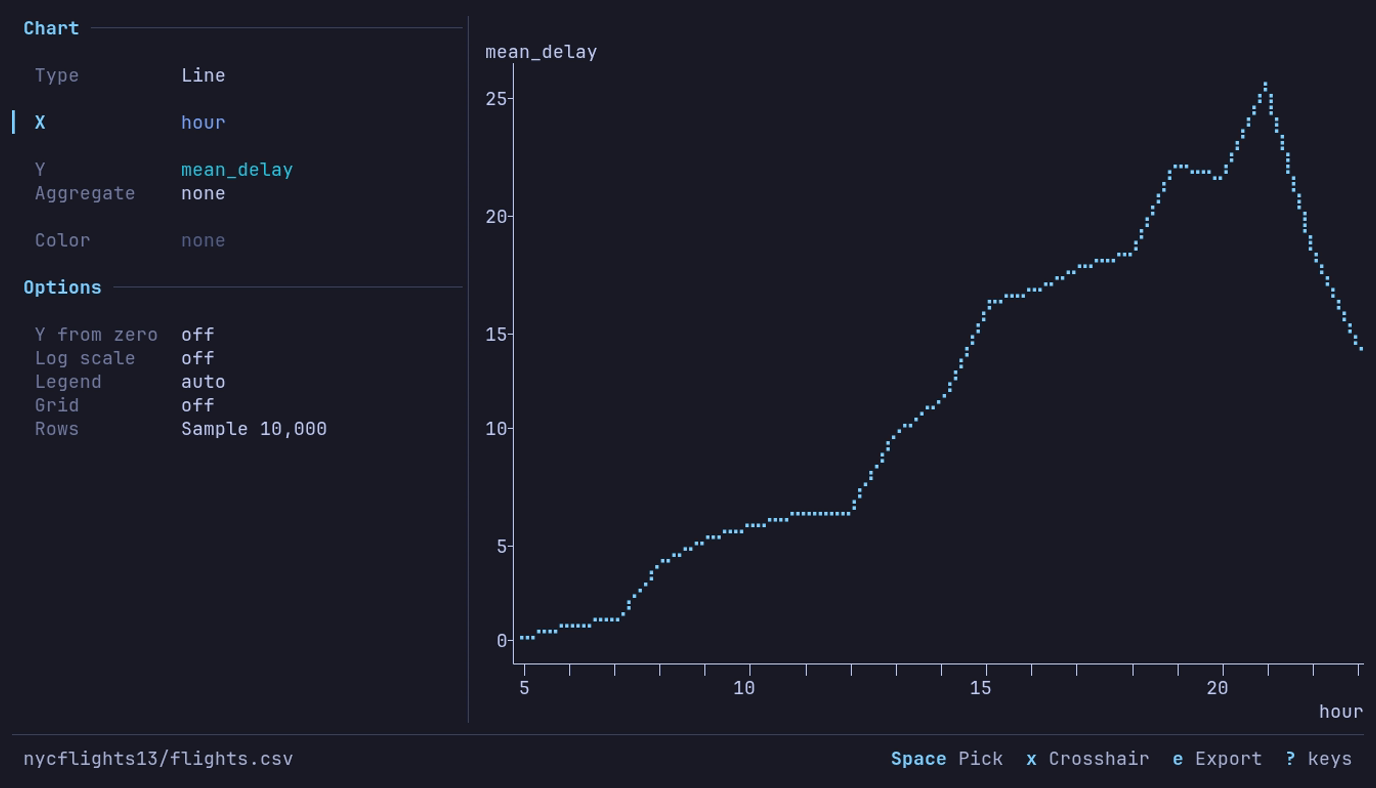
When does a JFK departure leave late? In the evening, 26.1 minutes on average
at 21:00. The JFK query, then c
1 on mean_delay, X hour.
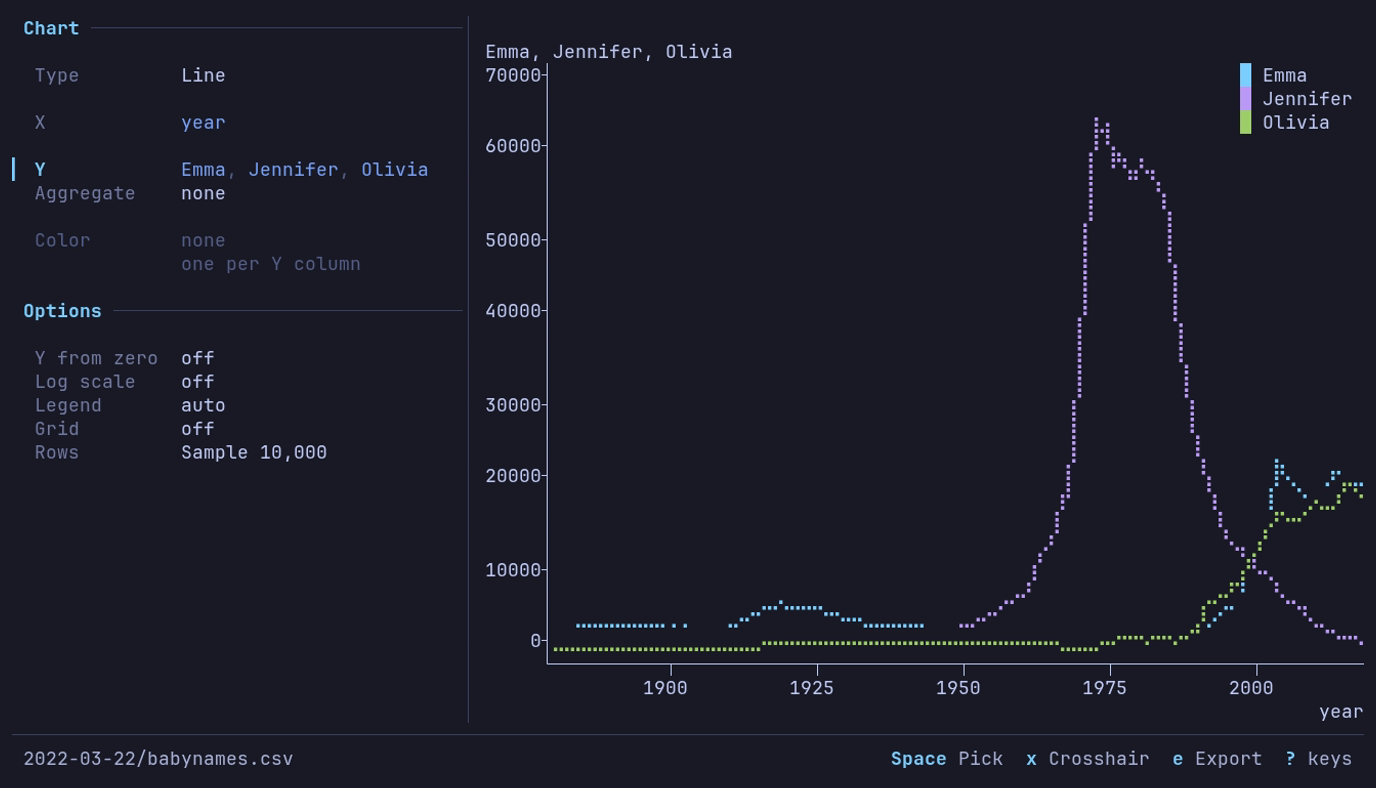
How did three names rise and fall? Jennifer peaks at 63,604 in 1972; Emma and
Olivia rise after 2000. The pivot, then c
1, X year, Y all three.
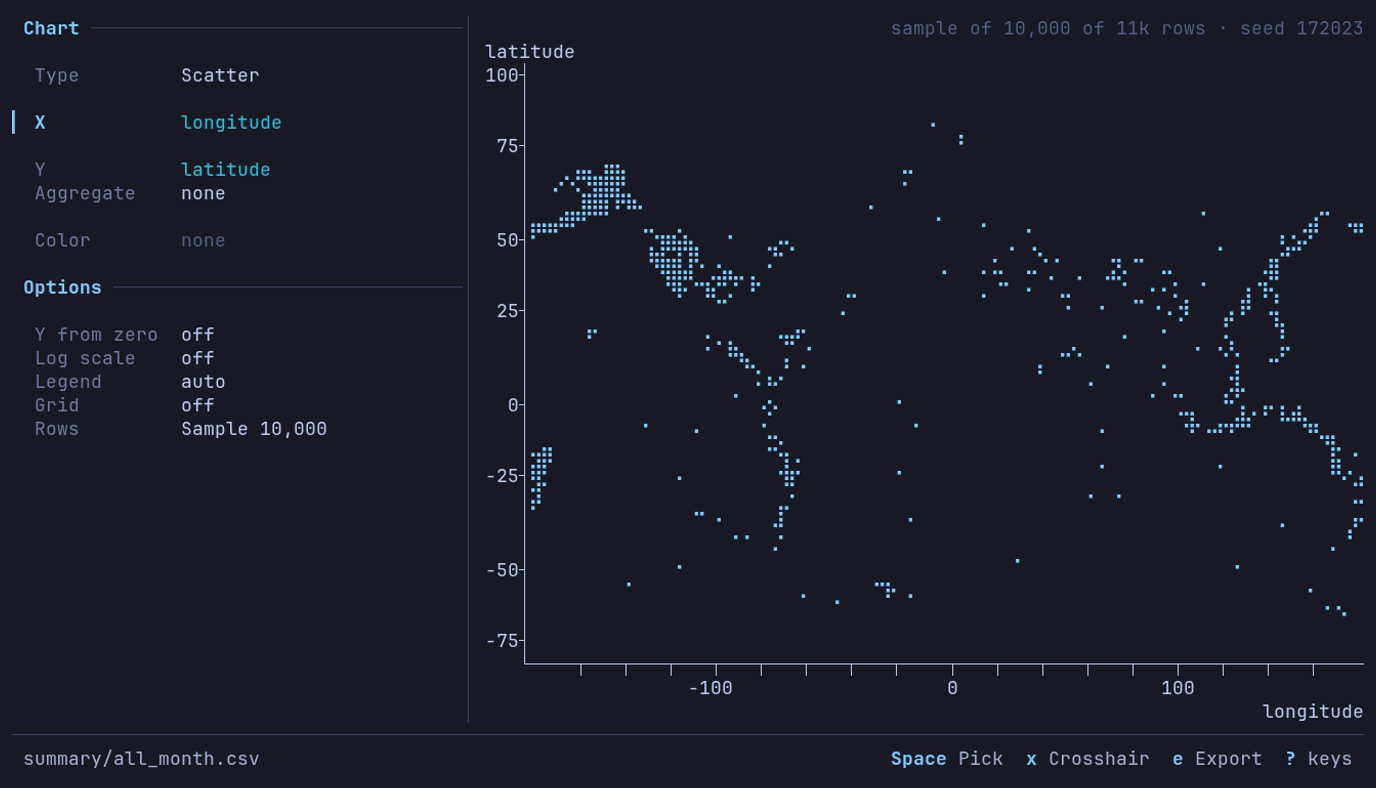
Where does the earth shake? Around the Pacific. c 2 on
latitude, X longitude. A rolling feed: your month draws its own points.
Large tables
| Option | What it does |
|---|---|
| Rows | Rows a chart without an aggregate reads. A larger table is sampled across all of it, and the chart says so at the right of the title row, with the sample’s seed: sample of 10,000 of 3.5M rows · seed 42891. Every row reads the whole view. A Line over a larger table is not sampled: see below |
| Aggregate | Reads every row, whatever the sample size |
| The view’s sample | Read whole: the Rows row goes, and the title row names the sample and its seed: sample 100,000 of 3.48M · seed 42891 |
On Rows:
| Key | Does |
|---|---|
| ← → or Space | Switch between Sample 10,000 and Every row (36.8M), which names the view’s rows once the table has counted them |
| Digits | Type a sample size in place: 50000, 50,000, 50k, 250k, 2m. A size of at least the view’s rows is Every row |
| Backspace | Edit the size being typed |
| Enter | Read what the row says. Leaving the row reads it too |
| Esc | Put the row back as it was, without reading |
Nothing is read while the row is being changed: the chart stays as drawn, and
the line under the row says Enter to read. A size that is not one (12x, 0)
says why there and is not read. Sample keeps its size while Every row is
chosen.
The sample is drawn as the analysis tools
draw theirs, with the same seed: 50 runs of one Parquet or IPC file, or one
streamed pass over anything else. Another option, or another chart of columns
already read, draws from the same rows without reading the table again. An
exported chart carries the same notes under the plot. The default size comes
from chart_rows in the
[analysis] config section and is 10,000.
A Line chart with no aggregate and no color, over more rows than the sample
size, draws an envelope instead: X is cut into half as many steps as the sample
size, and each step draws its lowest and highest value, so every peak of a
waveform or a long time series stays on the plot where a sample would miss it.
Two streamed passes read the view: the rows and X’s range, then each step. The
chart says so in its title row: min and max of 192M rows in 5,000 steps.
Scatter keeps the sample, and so does a Line over Parquet read in place from
S3, GCS or Azure, which the envelope would download whole twice.
Keys
| Key | Action |
|---|---|
| 1–7 | Switch the type directly, from anywhere: Line, Scatter, Bar, Histogram, Box, KDE, Heatmap ([ ] step) |
| ↓ ↑ or Tab Shift+Tab | Move between the panel’s rows |
| Space Enter | Open a shelf’s picker, or the Color values; toggle an option, or take its next value. The panel applies as it changes, so Enter acts as Space does |
| ← → | Step the type, the time bucket, the aggregate, cumulative, bins, range, order or sample size (+ - too, PgUp PgDn for bigger steps on the sample size); on a shelf of one column, the previous or next column; flip a toggle |
| g | Grid on or off |
| x | The crosshair, on a line or scatter chart |
| e | Export the chart |
| ? | Help |
| Esc | Back to the table |
In a picker: type part of a name to narrow, ↑ ↓ move, Enter or Space chooses (on a line or scatter chart’s Y and on the Color values Space toggles one in or out), Tab or Shift+Tab chooses and moves to the next or previous row, and Esc backs out of the picker alone.
Export
e in the chart view opens the export dialog, on its path. Type a
path and press Enter; the keys are those of every
dialog, and Ctrl+P recalls a
path exported to before. A path ending .png, .svg or .pdf takes that
format; any other path gets Format’s extension after it (chart.v2 writes
chart.v2.png). You are asked before an
existing file is overwritten, and a failed export leaves it as it was
(Overwriting). A blank path, or a failed
write, keeps the dialog open with the reason under the fields.
| Field | What it sets |
|---|---|
| Format | PNG, SVG or PDF; SVG and PDF are vector, their text set as outlines |
| Style | Light: white, with colors that stay apart for color-blind readers and in print. Dark: the terminal theme’s colors. Transparent: Light with no background |
| Size | A preset, below; typing Width or Height makes it Custom |
| Legend | Line ends: each line named at its right end, the default for line and KDE charts (other charts take a legend at the top right). A corner, or Off. A chart whose legend is off exports with it off |
| Opacity | Scatter: Auto (the default) draws points opaque up to 1,000 and fainter as there are more, down to 15% from 100,000, so a dense cloud shows where it is densest; or 100%, 50%, 20% |
| Point size | Scatter: Small, Medium (the default) or Large, 1.6, 2.4 or 3.6 pt |
| Line width | Line, colored or not: Thin, Normal (the default) or Bold, 1, 1.5 or 2.5 pt; the legend’s swatches follow |
| Y from zero | Line: On takes zero into the Y axis. It starts as the chart’s Y from zero option. Bars always start at zero |
| Title, Description | Over the chart. The description starts as the title row’s words, how the chart is made: Mean by month, colored by carrier; empty when it has none. The Y column is named over the plot’s left edge, as on screen |
| Notes | Under the chart, after what the chart says about its rows (a sample, values a range left out) |
| Source, Byline | The last line: Source: … and the byline. Source starts from the catalog entry when the dataset came from one: its name, publisher and license |
| Recipe | Include (the default, from chart.export_recipe) writes how the chart was made into the file; Omit writes no datui metadata at all |
| Size | Pixels | Prints at |
|---|---|---|
| Slide 16:9 | 1920 × 1080 | 10 × 5.6 in |
| Document | 1600 × 1000 | 10 × 6.25 in |
| Square | 1200 × 1200 | 8 × 8 in |
| Single column | 1050 × 788 | 3.5 × 2.6 in, 300 dpi |
| Double column | 2100 × 1300 | 7 × 4.3 in, 300 dpi |
| Custom | 16 to 8,192 a side | the last preset’s resolution |
The recipe is a JSON document that reads back as a view:
| Key | Holds |
|---|---|
datui | The version that wrote it |
source | The path, or the URL without its user, password, query string or fragment |
table | The table of a file of tables, when it is one |
rows | What the chart read: the sample with its seed, or every row |
settings | The view’s: the sample’s scope, method, size, seed and how it was drawn, with the view it was drawn through; the query, filters, sort, column layout and types, reshape; the chart, its options and its export settings, the dialog’s words included |
| The image is the same either way; the recipe can carry paths, | |
| bucket names and query values, so Omit before sharing a file that should not. |
| Format | Recipe in |
|---|---|
| PNG | An iTXt chunk, keyword datui-recipe |
| SVG | A <metadata> element, the root’s first child |
The document info, /DatuiRecipe |
datui -c chart.export_recipe=false
Text is set in IBM Plex Sans, bundled with datui, so a chart comes out the same on every machine; a character it lacks falls back to a system font. Its size follows the page: smaller on a journal column, larger on a slide. A bar chart exports up to its first 100 bars and counts the rest.
Colors
Series take chart_1 through chart_10 from the
theme, in order; bars and histograms take
chart_1, Other dimmed, and the grid chart_grid. The Dark export takes
the same slots, its background background, and its text text_primary and
text_secondary.
Two series never share a color. A slot the theme gives the same color as an
earlier one is skipped, and on a 256- or 16-color terminal, or under
NO_COLOR, the slots are counted as the terminal shows them: a chart draws one
series per distinct color, so a 16-color terminal draws fewer (top 4 of 16 by rows), with Other for the rest when it is on. A Dark export skips a
repeated slot too, and otherwise always has all ten.
Analysis
a opens Analysis: Describe, Distribution, Correlation Matrix and Data Quality, over a sample of the table.
A list of tools sits on the right: ↑ ↓ pick a tool and Enter opens it, moving into its pane. Tab or Shift+Tab moves between the list and the result. Esc in the result goes back to the list, and Esc there returns to the table. Results last while the table shows the same rows: a again shows them as you left them.
Analysis runs on the data as you see it, after any query and filters, unless the sample is set to read the source.
Describe
Summary statistics per column, like Polars’
describe:
count, nulls, mean, standard deviation, min, 25th percentile, median, 75th
percentile and max. Date, datetime, time and duration columns get all of them
but the standard deviation, written as the table writes them; text columns get
min and max. When they do not all fit, the header counts those out of view
(+4 →) and ← → scroll to the last. Distribution scrolls
its columns the same way.
On NYC yellow taxis (January 2025), 3,475,226 trips: press a,
Enter on Describe, set Random seed to 1 in the Sample form
and press Enter. The header reads
Describe · sample of 100,000 of 3,475,226 rows. fare_amount has a mean of
16.92 and a median of 12.47, from −595.20 to 950.00: refunds and typos are
part of the data. passenger_count and four other columns have 16,000 nulls.
Distribution
Compares each numeric column against fourteen distributions — Normal, Log-Normal, Uniform, Power Law, Exponential, Beta, Gamma, Chi-Squared, Student’s t, Poisson, Bernoulli, Binomial, Geometric and Weibull — and names the one the values are consistent with, along with the Shapiro-Francia normality statistic and p-value, coefficient of variation, outlier count (past 1.5 IQR from the quartiles or 3 standard deviations from the mean, over every value in the sample), skewness and kurtosis.
| What | How |
|---|---|
| Parameters | Maximum likelihood for normal, log-normal, uniform, exponential, gamma (Minka’s approximation), beta, Weibull, power law (from the smallest value), Poisson, Bernoulli and geometric; moments for chi-squared, Student’s t and binomial |
| P-value | Kolmogorov-Smirnov on up to 500 values, calibrated by 199 samples drawn from the fit and refitted, so estimating the parameters from the data is accounted for. <0.005 when none of the samples came close |
| Verdict | Among the families not rejected (p of 0.01 or more), the lowest AIC; a simpler family that holds is named instead unless the richer one is decisively better (AIC 10 or more lower). No clear fit when every family is rejected |
n/a | The family cannot describe the values: a log-normal of negative values, a Poisson of fractions |
| Column | Says |
|---|---|
| Distribution | The family the values are consistent with; Constant when the column has one value, No clear fit when every family is rejected |
| P-value | The fit’s p-value; with no clear fit, the best any family managed |
| Shapiro-Francia | The normality statistic W’, from 0 to 1, higher is more normal, on up to 5,000 values |
| SF p-value | Royston’s approximation: how likely a W’ this low is if the values were normal |
| CV | Coefficient of variation: standard deviation over mean, spread independent of scale |
| Outliers | Values past the outlier bounds, and their share of the sample |
| Skewness | Asymmetry: positive is right-tailed, negative left-tailed |
| Kurtosis | Tail heaviness; 3.0 is normal |
| Color | When |
|---|---|
| Green or cyan | A p-value of 0.05 or more |
| Yellow | Outliers 5–20%, |skewness| of 1 or more, kurtosis 1 or more away from 3, CV above 1, or a p-value between 0.01 and 0.05 |
| Red | No clear fit, outliers above 20%, extreme skewness or kurtosis, or a p-value of 0.01 or less |
A p-value is how surprising the values would be if they came from the fitted distribution, not the probability that they did. The tests assume independent draws: a time series such as a price over years is dependent, and its histogram need not match any family.
Press Enter on a column for the detail view: the verdict, then a Q-Q plot and a histogram comparing the values with the family chosen in the list, drawn with that family’s fitted parameters. ↑ ↓ choose another family to compare with, which does not change the verdict; s toggles the histogram between linear and log scale; Esc returns to the table.
| Detail | Shows |
|---|---|
| Fit | The verdict and its p-value; it stays as you choose other families |
| SF, Skew, Kurt, CV | As in the list |
| Median, Mean, Std | The middle value, the average, and the standard deviation |
| Q-Q plot | The values against the chosen family’s quantiles; points on the diagonal mean a good match, and where they leave it the data differs |
| Histogram | The values in bins, with the chosen family’s density drawn over them in the theme’s secondary series color |
| Distributions | Each family with its p-value, highest first; choosing an n/a family says why |
The list’s last row names the histogram’s scale. Log needs positive values:
asked for on others, the histogram stays linear and the scale reads Linear
in the warning color.
On the same taxi sample, every column reads No clear fit, which is honest
for fares, distances and tips. fare_amount has 10,459 outliers (10.5%),
skewness 6.92 and kurtosis 279.05; its detail view shows the median, 12.47,
as Describe does.
Correlation matrix
Pairwise correlations between every numeric column, colored by strength. Move around with the arrow keys and press Enter on a cell for the pair: the coefficient with a plain reading of it, R², the p-value, and how many row pairs it was computed from, out of the total rows. Enter on a diagonal cell does nothing. Correlation is undefined for a constant column. r draws a new sample from the matrix, not from inside the pair’s detail.
| Key | Action |
|---|---|
| m | Method: Pearson r or Spearman ρ, named in the title |
| Enter | The selected pair |
Spearman is Pearson’s r of the ranks: it reads any relation that only rises or only falls, where Pearson reads a straight line. Both use the rows where the two columns hold a value, and both come from the one run, so m reads nothing. Spearman ranks at most 64 Mi values (rows times numeric columns); past that, as when every row of a large table is read, the matrix has Pearson only and s chooses a smaller sample.
Cells show three decimal places and the pair four. A value that would round to 1 but is not exactly 1 shows as 0.999 (0.9999 in the pair), so 1.000 always means a perfect relation.
On Palmer penguins, first hide rownames, the host’s row number, so it is
not treated as a measurement: s, Tab, ↓,
v, Enter. Then a, Correlation Matrix,
Enter to read all 344 rows. flipper_length_mm against
body_mass_g is r = 0.871, strong positive, from 342 of 344 rows.
Data quality
Choose Data Quality to check the rows in scope and get a report: what is likely wrong, what depends on intent, and which columns are clean. It opens on its Setup, which starts from the same sample as every other tool and reads nothing until you run it.
See Check data quality for the workflow and the reference for Setup, keys and metric definitions.
Sampling
Every analysis tool reads the same sample: which rows, how they are picked,
how many, and the seed. The first tool you run on a dataset shows the
Sample form in its pane with the cursor in it: change a setting or press
Enter to run with the form as it stands; Esc goes back to
the tool list. After that, every tool you pick runs at once on the same sample. A
value the data does not hold, or rows that match nothing, is refused with what
the data does hold. s opens the form again from any tool;
Enter applies it and runs the tool on screen again, and
Esc discards the edit. The other tools’ results go with the old
sample, so switching tools compares like with like. The header says what was
read: Describe · sample of 100,000 of 36,839,175 rows · source year=2020..2022.
| Setting | Choices |
|---|---|
| Rows from | All rows (the table as shown, with its count), The source, unfiltered (only when a filter or query changes the rows), Partitions, Files, Row range, Time range; a choice appears only when the table has it |
| Method | Random (default), Equal per value, First rows, Every row |
| Per value of | For Equal per value: the column to split by; partition columns come first |
| Sample size | Rows, or rows per value for Equal per value, typed over the one shown: 50000, 50,000, 50k, 250k, 2m. Read on Enter; a size that is not one says why. The default is [analysis] sample_rows |
| Random seed | For Random and Equal per value: any whole number, typed over the one shown; the same seed reads the same rows, so 0 or 1 is a sample anyone can repeat. r draws a new one |
Each kind of rows brings its own settings, with what it needs to know:
| Rows from | Settings |
|---|---|
| Partitions | Partition: the column. Values: one value, a list (2019,2021) or an inclusive range (2020..2022) compared in the column’s own type; the values the source holds are listed under it |
| Files | Files: their numbers, like 1,3; the numbered files are listed under it and ticked as they are typed, PgUp PgDn scrolls |
| Row range | From row and To row, inclusive and 1-based, in the order the table shows; it starts as the whole table |
| Time range | Column, From and Before: dates or RFC 3339 timestamps, the Before date not included |
Partitions, files and time ranges read the source, ignoring the query and filters.
| Method | What it reads |
|---|---|
| Random | A seeded random sample across all the rows chosen |
| Equal per value | Up to the sample size from each value of a column, so a small partition is represented beside a large one. At most 2,000,000 rows are kept: past that, every value keeps the same smaller number, and the header says what it was lowered to. Refused past 10,000 values |
| First rows | The first rows in order: the fastest read, and only the head |
| Every row | No sampling |
| Key | Action |
|---|---|
| s | Open the Sample form |
| v | View the sample’s rows in the table: sort, filter, query, copy or export them; Esc returns to the tool |
| r | Draw another sample (a new seed) |
| a | Read every row, after confirming the count; sets the method to Every row |
| Esc | Cancel a run in progress |
How a spread sample is read depends on the source:
| Source | Sample | Reads |
|---|---|---|
| One Parquet or IPC file, unfiltered | 50 runs of rows at seeded places across it | The row groups those runs fall in |
| Anything else: a directory or hive table, a filter, a query, CSV | A seeded uniform sample, kept while the rows stream past | Every row once, holding only the sample |
The sort is left out of an analysis read: no statistic depends on it. While a cancelled run is still finishing, no tool starts another read: a, r, v and a new run wait. Data Quality reads the same sample, at the same size, as every other tool.
A view with its own sample (S at the table) is read
whole by every tool: the header says Reads the view's sample 100,000 of 3.48M, and s edits the view’s sample, drawing it again before the
tool runs; Every row there takes it away.
The sample’s starting size is analysis.sample_rows;
0 starts at every row. For one run, --sample-rows N:
[analysis]
sample_rows = 100000
Check data quality
Data Quality reports missing values, repeated values and changes across files or time: a, Data Quality, Enter.
The pane is Setup: every setting a run takes, before anything is read. Press Enter to run it as it stands, or change it first. Nothing in Setup reads the data; Enter does, once.
| Section | What you set |
|---|---|
| Rows & sample | The sample every analysis tool reads: which rows, how they are picked, how many, the seed |
| Columns | Text read as time, time roles, the intervals between them, and what each column must hold |
| Study | Grain, the windows rows are expected in, comparison, values or file metadata only, latency threshold, and the window an interval goes in |
| Read | What Run will read: a sampling pass, a count, rows a run already read, or no read at all |
s opens the Sample form over Setup; its Enter applies the sample to Setup and returns there. Esc discards everything changed in Setup. After a run, e opens Setup again.
Check missing values
Open Food nutrition (fast food) from Example datasets, then:
- Press a, choose Data Quality and press Enter.
- Press Enter in Setup. The table’s 515 rows are fewer than the sample size, so every row is read.
| Finding | Columns | Reads |
|---|---|---|
| ▲ Mixed spellings | item | 2 values spelled more than one way: 4 Piece Chicken Nuggets and 4 piece Chicken Nuggets, and the same for 6 |
| Missing values | vit_a, fiber, protein | 0.19% to 41.6% |
| Missing together | vit_c, calcium | 210 rows (40.8%) |
| Nearly unique | item | 10 repeated (98.1% unique) |
| Single value | salad | always “Other” |
Press 2 for Columns: each column’s missing count and findings. A filter changes the rows checked; to ignore it, press s, set Rows from to the unfiltered source, and press Enter twice: once to apply the sample, once to run.
On a large file the run reads a sample. On NYC yellow taxis (January 2025)
with Random seed 1, the header reads
Data Quality · sample of 100,000 of 3,475,226 rows, and the one note is
passenger_count, RatecodeID and three more columns missing together in
16,000 rows (16.0%) of the sample.
Inspect a finding
On Overview, select a finding and press Enter: its numbers, the evidence and what to check. Press Enter again to open the matching rows; on a sampled run these are the sample’s rows, the ones the finding counted. Esc returns to the finding.
| Finding | Enter on its detail opens |
|---|---|
| Duplicate rows | Every row that has a copy, copies together, most copied first |
| Numbers as text, Dates as text | The values that do not parse, which stop a cast |
| Several columns, such as Missing values | The rows missing in any of them. The detail lists each column’s count; the rows with any of them are a range, not a sum |
| Numbers, Dates or Codes as text that all parse | Nothing: the detail says every value parses |
The rows come from the ones the run kept, so opening them reads nothing. A full scan keeps no rows, and an older sample may have been released: then Enter shows what reading the rows would take, and only Enter there reads. Esc reads nothing.
To see fewer findings, press c for one column’s or t for one type’s; o orders them by rows affected, then by rate. Problems stay above notes, the line above the list says what is narrowed, and Esc shows every finding again. None of it reads or measures anything.
| Page | Use it for |
|---|---|
| Overview | Problems, notes and clean columns, most important first |
| Columns | Each column’s findings, nulls, distinct values, parse rates and ranges |
| Segments | Compare files, partitions, days or row chunks |
| Trends | Each column across the whole range |
| Intervals | The time between two dates in each segment, and every count behind it |
← → move between the pages.
Compare parts of a dataset
Press e for Setup. Move to Grain and press ← →, or Space for the list: by file, by a partition column, by day, week or month of a date column, or in chunks of rows. Set Compare to the segment before or a baseline the same way, then press Enter to run.
Segments lists each segment’s rows, its share of null cells and its largest change: a row count that halved or doubled, or a column’s rate that moved past sampling noise. o puts the largest changes first, Enter shows a segment’s columns beside the one it is compared with, and b makes the selected segment the baseline.
Trends draws each column across the whole range, the rows per segment first, pooling consecutive segments into bars; m changes the measure. A sample thin per segment, such as 100,000 rows over years of days, names only large changes on Segments; Trends shows the smaller ones. To judge single days, sample Equal per value of the date, or read every row.
Read a trend
On Trends, a sampled report draws the rows the sample drew under the exact
rows, and says how many segments it reached thinly or not at all: a segment
with rows and no sampled row is a bar of its own mark (·, ? in ASCII),
never a short bar. Select a line and press Enter for its bars;
↑ ↓ walk them.
| Row | Says |
|---|---|
| Span | The bar’s calendar range, or its first and last segment |
| Segments | How many it pools, how many were not sampled, how many under 30 sampled rows |
| Rows | Rows sampled of the exact count, or every row read |
| The measure | The count, of how many rows or values, and the rate |
| 95% interval | Where the rate likely sits, from the sample; none when every row was read |
| Previous bar | The rate before and now, the move in points, and whether it is clear or within sampling noise; the baseline’s bar when comparing with one |
When segments are thin, press w: Setup opens with the next coarser window staged (days to weeks, weeks to months). Its Read says what that costs, often nothing, since days sum into weeks; Enter runs it and Esc keeps the grain you had. Nothing on these pages reads.
Find gaps in time windows
A window with no rows is a gap only once you say rows belong in it:
- With a time-window grain, move to Expected in Setup and press Space.
- Choose Windows: every window of the grain, or for hours and days, weekdays only.
- Optionally type From and Before, such as
2024-01-01and2025-01-01. Blank, the range runs from the first window found to the last. - Press Enter, then Enter to run. With a report on screen and nothing else changed, this reads nothing: the windows are checked against the counts the report holds.
Trends then sums up the expected windows, and g lists each run of them with no rows to show:
| Gap | Means |
|---|---|
| empty | No rows in the scope, by the exact count the run took |
| not sampled | Rows there, with their count, and none in the sample |
| out of scope | Outside the time range the scope reads: the run did not look |
A range is checked over at most 20,000 windows; past that, Trends says so and asks for a shorter range or a coarser grain.
Measure the time between dates
- In Setup, move to Time roles and press Space. Give each role its column: datui does not infer a column’s meaning from its name.
- Intervals lists the pairs measured, such as
event to received. Press Space on it to choose any start and end. Setup names a role that is in no interval. - Optionally set Latency over to count breaches, and with a daily grain, Window by to put each delay on the day it started or ended.
- Press Enter to run, then 5 for Intervals.
| Count | Out of |
|---|---|
| Both ends | The segment’s rows |
| Missing start, Missing end, Unparsed start, Unparsed end | The segment’s rows |
| Negative, Zero, Over the threshold | Rows with both ends |
A breach is duration > threshold: exactly an hour is not over an hour.
Enter on an interval opens its detail at any terminal size;
Enter on a count there shows its rows; on a sample, they are cut
from the rows the run kept rather than read from the file again. Valid from
to valid to reads as a validity period: no end is open, and an end before
its start ends first.
Times stored as text
A column of times written as text, such as 01/31/2024 08:15:00, is read as
time only when you say how:
- In Setup, move to Text as time and press Space.
- Choose the column, then its format. Each format says how many of the values on screen it reads, and the one that reads the most comes first.
- The column now splits by day, week or month under Grain, and can take a Time role.
The format applies to this study only: every other check still sees the text.
A format with an offset, such as 2024-01-31T08:15:00Z or +05:00, reads
each value as an instant in UTC; a time with no zone beside it is read as UTC,
and Setup says so.
Values the format does not read are reported as Unparsed times, not as
missing values, and Enter on the finding opens their rows. A role or
grain on text with no format is named in Setup before you run.
Declare what a column must hold
Declare what a column must hold, and the run reports the rows that break it:
- In Setup, move to Column intent and press Space.
- Choose a column and press Space for its form.
- Tick Key for the columns whose values together name one row, Required
for a column every row must fill, type the Allowed values separated by
commas (quote one that holds a comma:
"a, b"), or a Minimum and Maximum. Text can be Read as a whole number or decimal; a range then compares the number. Enter applies. - Enter on the list returns to Setup; Enter there runs.
| Finding | Counts |
|---|---|
| Repeated key | Rows that share their key with another row |
| Incomplete key | Rows with no value in part of the key |
| Required, missing | Rows with no value |
| Not allowed | Values outside the set, out of the column’s values |
| Out of range | Values below the minimum or above the maximum |
| Unparsed numbers | Text that does not read as the number |
Each is a problem, with its rows one Enter away. Intent reads nothing of its own: it is measured on the rows the run reads, and a change to it reuses the rows a run already read. On a sample, a key finds repeats among the sampled rows only: a repeat there is a repeat in the data, and no repeat says nothing about the rest. Setup’s Read says so before you run; set the sample’s method to Every row to check every row, which adds one pass over the key’s columns.
Export the report
On any report page, press x. Type a path, choose JSON or Markdown with Tab and ← →, and press Enter.
| Format | Holds |
|---|---|
| JSON | Every measurement, the setup it was measured with, the source and the reads, versioned for tools (schema) |
| Markdown | The verdict, coverage, findings with their evidence, the checks, the gaps and the setup |
The report is written from what is on screen: nothing is read, and the data need not still be there. A file that exists is overwritten only after you confirm, and only once the whole report is written; see Overwriting. A failed write keeps the dialog open, the path as typed and the reason under it.
Check the read size
Setup’s Read section says what Enter will read before it reads:
one sampling pass (which also counts the grain’s segments when it streams), a
count of the grain’s column for exact segment totals, rows a run already read,
or nothing when the report is already on screen or in the session cache.
After a sampled run, changing roles, text formats, column intent, row chunks or
a coarser window of a counted grain reads nothing; after any run, so does
changing the comparison or expected windows. A new seed, size or scope reads a
new sample.
The Read rule names the rows runs have kept for reuse, such as
100,000 rows kept · 12.4 MiB; d releases them, and the next run
that would have used them reads its sample again.
A full scan of a remote dataset (S3, GCS, Azure) reads its scope once per check.
When the whole dataset fits [analysis] quality_local_copy (2GiB by default) and the
free disk, Read says 1 fetch of 8 objects (16.5 MiB) to a local copy · up to 7 passes over it: each object is fetched once into the cache directory,
and every pass, and every later full scan of the dataset, reads the copy. The
Read rule then adds local copy · 16.5 MiB, and d releases it with
the rows. Otherwise Read says the passes go to the source, and why, such as
No local copy: 3.0 GiB over the 2.0 GiB limit. See
Local copy of a remote source.
p shows the access plan in full. Reading every row asks for
confirmation first; Esc there leaves the sample and the report as
they were.
While a run reads, the progress names its stage, whether that stage reads the source, and the rows seen where the read can count them. Esc cancels: a sampling pass, or a full scan’s passes, stop at the next batch, and a local copy being fetched stops at its next chunk and is removed. A read that cannot stop is shown as finishing, in the header and in Setup, until it ends; until then Run waits, nothing else reads beside it, and the last report stays.
Under the verdict, every report says what it covers:
✓ No problems found  12 of 12 columns clean
Checks  7 sampled · 2 metadata · 1 unavailable
Rows    100,000 of 36,839,175 sampled (0.27%) · 36,839,175 traversed
Limits  Nearly unique: needs every row checked
Checks counts what ran, over what, and what could not run; Limits says why, and names thin segments and unread footers. Rows gives the rows behind the numbers, and the rows the run’s reads passed through to get them.
The header says what each result was measured on:
Data Quality · sample of 100,000 of 36,839,175 rows. Missing-column and
type-conflict findings describe the loaded source’s footers, whatever rows the
sample covers.
See the reference for the metric definitions, and Keyboard shortcuts for every key.
Large datasets
datui reads only the rows on screen to show a table, but a query, sort, aggregation or analysis may read the whole input.
datui --sample-rows 50000 https://d37ci6vzurychx.cloudfront.net/trip-data/yellow_tripdata_2025-01.parquet
| To | Do |
|---|---|
| Page quickly through a large dataset | Prefer Parquet: its footers hold the types and row counts, and it is read a row group at a time |
| Open local partitions | Pass the directory (datui events/), so datui combines the footers and counts the rows |
| Analyze many rows | Analyses read a sample, 100,000 rows by default; --sample-rows N changes it, 0 reads every row |
| Work on part of a large table | S draws a sample into memory: the query, Analysis, charts and export run on it, and export saves it |
| Chart many rows | Charts read [analysis] chart_rows rows, 10,000 by default, spread across the table; aggregate a long time series first to chart every step |
| Pivot a large table | Filter first: a pivot reads every row it covers to find its columns |
| Open compressed CSV, TSV or PSV | Put --temp-dir on a disk with room for the uncompressed file |
| See what a format reads | The formats table: lazy scan, decompressed copy, converted to Arrow, or in memory. Past [read] memory_warning (1 GiB by default), datui asks before reading a file into memory |
| See what was read | i → Resources for the buffer and the loading measurements; Notes for row groups and small files |
[performance] streaming (on by default) runs what Polars can in batches; it
is not a memory limit on every query. Performance
has measured times to first rows and memory.
How large datasets open
A directory of more than 64 Parquet files, local or in the cloud, opens on the first and last files by name and reads the other footers in the background; the footer counts them on a line of its own. Until they are in:
- The total row count is estimated from a random sample of 2,000 footers, read
first:
~4.12B (est.)in the footer and on the Info panel. - Every empty cell shows as
∅. - New columns join the end of the table as they are found; Notes says how much was read.
- A query, pivot or drill-down leaves the new columns out until you return to the data as opened.
Above 20,000 files the background pass reads a sample of the footers, and the
row count reads the rest: the footer shows files 18,402 / 842,225 and
Esc stops it, leaving the estimate. Counts read 256 footers at once.
| Files | Row count |
|---|---|
| Up to 64 | Exact at once, from every footer |
| Up to 20,000 | Estimated, then exact when the background pass is done |
Up to read.exact_count_files (50,000) | Estimated, then counted in the background |
| More | Estimated; c on the Info panel counts exactly, and so does End |
A count keeps each file’s footer in the cache by its path, size, time and etag. Counting the dataset again, after a stop, or after files were added, reads only the footers it does not have.
Value counts of a dataset of files say in the footer how many of the files the read has reached.
While a directory or prefix is listed, the loading screen counts the files:
Listing files: 412,000; Ctrl+O stops it. A large S3 or
Google Cloud prefix is listed in parallel key ranges. Partition columns come
from the listing: the newest file’s path names them, and the first and newest
files’ values set their types.
The Notes tab flags layouts that make an open slow:
| Finding | Why it matters |
|---|---|
| Median row group above 64 MiB | A page may need a large row group read |
| More than 10,000 files, median below 1 MiB | Many footer reads before the first rows |
Different partition keys, such as date and dt | The partition columns differ across the dataset; key order alone is fine |
-c read.parquet_schema=first skips datui’s union of the footers and lets
Polars take one file’s schema; the partition-key check is skipped too.
Opening it again
The schema of a remote dataset, or of a local directory of more than 64
files, is cached by its URL or path. Opening it again lists the files; when no
name, size, time or etag changed, no footer is read. The home screen uses the
same cache to show a local directory’s full row count without reading a
footer. The cache keeps 128 MiB
of schemas and drops the dataset opened longest ago first.
datui cache clear clears it with the rest of the
cache.
Sample a table
Draw a sample of a large table into memory and work on it: the table, the query, Analysis, charts and export all read the sample.
S at the table opens the Sample form; Enter draws it.
datui -c analysis.sample_memory_limit=8GiB https://d37ci6vzurychx.cloudfront.net/trip-data/yellow_tripdata_2025-01.parquet
| Key | Does |
|---|---|
| S | The Sample form, on the view’s sample or a new one |
| Enter | Draw the sample; again past a memory warning, to draw anyway |
| Esc in the form | Close it; the view’s sample stays as it was |
| Esc while it is drawn | Stop; the rows so far stay. Before the first rows come, the view stays as it was |
| Method → No sample, or R | Take the sample away |
The form’s settings (which rows, the method, the size, the seed) are the analysis sample’s. Every row reads No sample here.
A step of the view
The sample sits between the source and the query: source, then sample, then the query, filters and sort, which run over the sample’s rows. The footer says it in that order:
yellow_tripdata_2025-01.parquet › sample 100,000 of 3.48M › query 1 / 41,208
| Footer | Means |
|---|---|
sample 100,000 of 3.48M | 100,000 rows of the 3.48M the scope holds |
sample about 100,000 of 3.48M | Kept row by row by chance: about the size asked for |
sample 1,234+ | Still being drawn |
sample 58,700 of 3.48M, stopped | Stopped before its end: by Esc, or by memory |
query › sample 2,000 of 41,208 | Drawn from the query’s rows: S on a queried view |
To sample part of a table, choose it under Rows from (a row range, partitions, files, a time range), or query first and press S on the queried view. Taking the sample away keeps the query, filters and sort laid on it, over the source again; a sample drawn from a query’s rows returns to that query.
A pivot is read whole, so no sample is drawn under one: sample the pivoted view (Rows from All rows) instead. A sample with a pivot laid on it is taken away with R, which takes the pivot too.
The same seed keeps the same rows. A random sample of a stream is kept row by row when the total is known and in a reservoir when it is not; drawn again, in the session or from a view, it is drawn the way it was first.
Rows as they arrive
The table shows the rows while the sample is drawn, the view staying where it is, as a pipe does. Until the first rows come, the view it replaces stays; a draw that fails or stops before then leaves it as it was. Rows show in the order they arrive, then in the order the source holds them once the sample ends.
| Read | Rows show |
|---|---|
| One Parquet or IPC file | Each of the 50 seeded runs as it lands |
| First rows, every row | Each batch as it is read |
| Random over a stream, the total known | Each row kept with chance size ÷ total, as it is read: about the size asked for |
| Random over a stream, the total unknown | All at the end; the footer counts the rows read meanwhile |
| Equal per value | All at the end |
While it is drawn, moving, find, the inspector and the Info panel act at once. Anything that needs every row (a sort, a query, Analysis, a chart, an export) waits until it is drawn.
What reads it
| Where | Reads |
|---|---|
| Analysis | The sample, whole; s there edits the view’s sample |
| Charts | The sample, whole; the chart’s Rows row goes, and its note names the sample and its seed |
| Export | The sample’s rows, with the query, filters and sort: the way to keep a sample on disk |
| Views | The sample’s settings, never its rows: applied again, it draws the same rows from the seed |
Memory
The sample is held in memory and never written to disk. The form’s size line
shows the cost when the table has measured its rows: 100,000 rows · ~380.0 MiB.
| When | datui |
|---|---|
| The estimate is more than the memory available now | Warns on the form, naming the setting; Enter again draws anyway, with no running check |
| Memory runs low while it is drawn | Stops, keeps the rows so far, and says so: Sample stopped at 3.9 GiB (58,700 rows): memory ran low. A sample that keeps its rows to the end (an unknown total, equal per value) stops when what it holds could not fit twice, keeping those |
| There is no estimate | Draws, the running check as the backstop |
analysis.sample_memory_limit sets a
fixed ceiling, checked before and while it is drawn; unset, the memory
available now decides; 0 turns off the warning and the stop:
[analysis]
sample_memory_limit = "8GiB"
Copy to the clipboard
y copies a cell, a row, the view, the table or a Python script that rebuilds it to the system clipboard.
The dialog picks a scope and a format; the last choices are kept, so repeating a copy is y Enter.
Copy a table into a note
On Food nutrition (fast food), summarize each chain:
SELECT restaurant, ROUND(AVG(calories), 0) AS avg_calories,
       ROUND(AVG(protein), 1) AS avg_protein, COUNT(*) AS items
FROM df
GROUP BY restaurant
ORDER BY avg_calories DESC
- Press y. On Scope, press → until it reads Table.
- ↓ to Format, → until it reads Markdown.
- Press Enter to copy. The status line says
Copied 8 rows as Markdown.
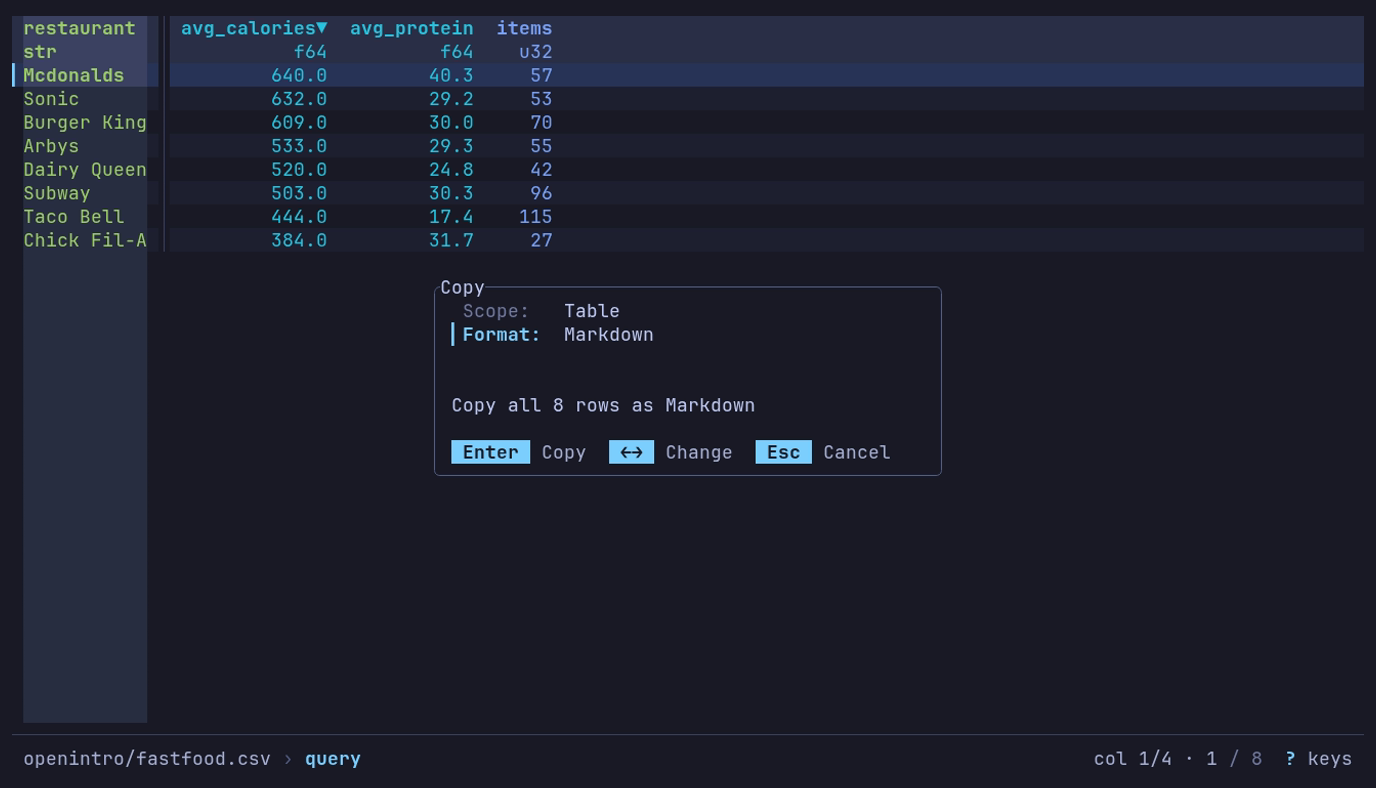
Which chain’s menu is heaviest, in a note? y, Table, Markdown: the dialog says what Enter copies, all 8 rows, Mcdonalds first at 640 calories.
Paste into a note:
| restaurant  | avg_calories | avg_protein | items |
| ----------- | -----------: | ----------: | ----: |
| Mcdonalds   |        640.0 |        40.3 |    57 |
| Sonic       |        632.0 |        29.2 |    53 |
| Burger King |        609.0 |        30.0 |    70 |
| Arbys       |        533.0 |        29.3 |    55 |
| Dairy Queen |        520.0 |        24.8 |    42 |
| Subway      |        503.0 |        30.3 |    96 |
| Taco Bell   |        444.0 |        17.4 |   115 |
| Chick Fil-A |        384.0 |        31.7 |    27 |
Values are copied raw, so round them in the query. The data spells McDonald’s
Mcdonalds.
For a spreadsheet, choose TSV instead. Table includes all matching rows; View includes only the rows on screen.
| Scope | What it copies |
|---|---|
| Cell | The current row’s value in one column, as plain text: the column cursor’s, unless you pick another |
| Row | The current row |
| View | The rows on screen, with every displayed column |
| Table | Everything the view holds, as an export would: rows and columns as queried, filtered and sorted |
| Python (Polars) | The view as a Python script that rebuilds it; see below |
| Format | Details |
|---|---|
| TSV | Tab-separated, what spreadsheets expect from a paste |
| CSV | Comma-separated |
| Markdown | A pipe table, padded and aligned, numeric columns right-aligned |
A TSV or CSV copy to the native clipboard also carries an HTML table flavor,
so a paste into a spreadsheet or an email keeps its columns while a paste into
a terminal stays plain text. Values are raw, like an export: display formatting
is not applied, a float is copied as stored rather than as the table rounds it,
and a null is an empty field. List and struct cells are JSON,
as in a CSV export, and a duration is
ISO 8601 text such as PT3723.004S. A binary column is
base64 in a Table copy; Cell, Row and View copies
hold the ‹binary› placeholder, since the screen never reads the bytes. The Header
toggle is on for View and Table and off for Row; a Markdown table always keeps
its header. The Header row leaves the dialog for the Cell and Python
scopes and the Markdown format, and Format for the Python scope, where
they mean nothing.
To copy one field of the current row, including a hidden or binary one, press Space to inspect the row, move to the field and press y.
A large Table copy asks first, counting binary at its base64 size. A binary
column’s size comes from the Parquet footers read to open a local directory of
Parquet files or a single Parquet object in cloud storage. A copy whose size is
not known asks too: the row count is still being read, or no footer gave a
binary column’s size, as for a single local file.
Above 200 MiB the copy is refused with a pointer to
export. An osc52 copy asks only when its cap is over
10 MiB, since it never holds more than the cap.
Copy the view as Python
Press y, choose Python (Polars) on Scope and press Enter. The clipboard gets a script that builds the view with Polars:
import polars as pl

df = (
    pl.scan_csv("sales.csv", try_parse_dates=True)
    .filter((pl.col("region") == "north") & (pl.col("qty") > 1))
    .sort(["amount", "order_id"], descending=[True, False], nulls_last=True, maintain_order=True)
    .select(["order_id", "customer", "amount"])
)
df is a LazyFrame; df.collect() reads it. The steps come in the order
they were applied:
| In datui | In the script |
|---|---|
| The file | The reader below, with the reader options datui used (delimiter, header, comment lines, skipped lines and rows, null values), then the column names it trimmed and the text columns it read as numbers or dates; a directory or bucket prefix as a glob |
| Query | .filter, .group_by().agg() ordered by the keys, .select, .unique |
| SQL | .sql(..., table_name="df") |
| A find kept with Ctrl+G | .filter on each column as text, pl.any_horizontal across them |
| Pivot, Melt | .group_by().agg() then .pivot(); .unpivot() |
| Drill-down | .filter on the grouped rows with eq_missing |
| Filters, sort, r | .filter, .sort(..., nulls_last=True, maintain_order=True), .reverse() |
| Hidden and moved columns | .select([...]) |
The reader is the one for the format datui read the data as, which a file
known by its bytes rather than its name (a .bin log, a Parquet part file
with no extension) is read as too:
| Format | Reader |
|---|---|
| Parquet | pl.scan_parquet |
| CSV | pl.scan_csv |
| TSV | pl.scan_csv |
| PSV | pl.scan_csv |
| JSON | pl.read_json |
| NDJSON | pl.scan_ndjson |
| Arrow IPC | pl.scan_ipc |
| Avro | pl.read_avro |
| ORC | df = ... |
| Excel | pl.read_excel |
| SafeTensors | df = ... |
| GGUF | df = ... |
| NMEA | df = ... |
| GPX | df = ... |
| audio | df = ... |
| MIDI | df = ... |
| SQLite | pl.read_database |
| VCD | df = ... |
| FIX | df = ... |
| SDF | df = ... |
| NumPy | pl.from_numpy |
| ELF | df = ... |
| ULog | df = ... |
| DataFlash | df = ... |
| candump | df = ... |
| text | pl.LazyFrame |
| systemd journal | pl.scan_ndjson |
A reader that is not a scan reads the file whole and ends in .lazy(); so
does an Arrow IPC stream, read with pl.read_ipc_stream. A SQLite table is
read with SELECT * through Python’s sqlite3, the one table of a database
opened without --table included. A NumPy array is loaded with np.load,
an archive’s by its name, and named as datui names its columns. Where datui
read the data lazily and the script reads it whole, a comment says so in the
words of the Info panel’s Read: line: # Read: lazy in datui; pl.read_database reads the file whole into memory.
These start from df = ... for you to fill in, with a comment naming the
file and the table on screen (flight.bin --table GPS):
- Data piped in on standard input; recorded with
--tee FILE, it is read from FILE instead - A format with
df = ...above, or a read through a format spec - A file compressed with bzip2 or xz
- A CSV read with
--header-rows,--skip-initial-space, or a--commentlonger than five characters
A step the script cannot repeat, such as a drill-down into a group whose rows are lists, is a comment, and the steps after it are commented out.
A file in an object store is read where datui read it, with storage_options
saying what datui read it with that is not a secret:
| Store | storage_options |
|---|---|
| S3 | The endpoint and region in effect, a named source’s own for s3://<source>@bucket |
| Azure | The account an abfss:// URL names |
| Any, read with no signature | skip_signature |
Credentials never go in: give Polars yours where it looks for them, such as
the provider’s environment variables. pl.read_json, pl.read_avro and
pl.read_excel read no object store; the script says to download the file.
A user and password in a URL, and an HTTP URL’s query string (where a signed
URL keeps its signature), are left out, with a comment saying so.
Keys
The dialog takes the keys every dialog takes:
| Key | Action |
|---|---|
| ↓ ↑ or Tab Shift+Tab | Move between rows |
| ← → | The previous or next scope, column or format; on Header, toggle |
| Space | The next scope or format; on Column, open its picker; on Header, toggle |
| Enter | Copy, from anywhere in the form; in a picker, choose |
| ? | Help |
| Esc | Close a picker, then the dialog, without copying |
In the column picker, typing narrows the list and ↑ ↓ move.
How the copy reaches the clipboard
[clipboard] backend in the configuration
chooses the mechanism:
| Backend | How |
|---|---|
auto (default) | native where a display server answers, osc52 elsewhere |
native | The display server (Wayland, X11, macOS, Windows), with the HTML flavor |
osc52 | An escape sequence the terminal applies to the system clipboard |
osc52 is what works over SSH: no display server is involved, the terminal
you are sitting at does the copy. Caveats terminals impose:
- tmux needs
set-clipboard onto pass the sequence through. - Terminals cap the sequence length; datui refuses payloads above
osc52_limit(default 100 KiB) rather than sending a copy that arrives truncated. A Table copy is read in batches and stops at the first one over the cap, so a copy too large is refused without reading the whole table. The clipboard keeps what it held. Some terminals disable OSC 52 writes entirely by default. - No HTML flavor: the terminal takes plain text only.
A native copy on Wayland or X11 belongs to the datui process: quitting can
drop it unless a clipboard manager keeps copies. datui holds the offer for as
long as it runs.
Export data
e writes the view to a file: every row and column as queried, filtered and sorted.
Export a CSV
- Open Premier League (2020-21) from Example datasets and run the goals query.
- Press e and type
goals.csvin Path. The field starts with a suggested name, the dataset’s with-export; typing replaces it, and Enter takes it as it stands. - Press Enter. If the file exists, confirm whether to overwrite it.
The status line says Exported to goals.csv; a long path is cut from its
start, so the file name stays. The file holds a header and 380
matches, in the query’s order:
Round,match_date,home,away,goals
4,2020-10-04,Aston Villa,Liverpool,9
22,2021-02-02,Manchester Utd,Southampton,9
14,2020-12-20,Manchester Utd,Leeds United,8
match_date is written as a date because the query casts it; a STRPTIME
result alone is a datetime and exports as 2020-10-04T00:00:00.000000.
The file contains all matching rows and displayed columns, not just the page on screen. Numbers use their raw values, without display formatting.
A view with a sample writes the sample’s rows: S on a
remote table, then e to sample.parquet, keeps a local sample of it.
The export waits until the sample is drawn.
| Format | Extension | Options |
|---|---|---|
| CSV | .csv | Delimiter, header, compression |
| TSV | .tsv | Header, compression; the delimiter is a tab |
| PSV | .psv | Header, compression; the delimiter is a pipe |
| Parquet | .parquet | |
| JSON | .json | Compression; one array |
| NDJSON | .jsonl, .ndjson | Compression; one object per line |
| Arrow IPC | .arrow, .ipc, .feather | |
| Avro | .avro |
Each export format also offers Source file for a dataset whose files disagree; see below.
The dialog starts on the format datui read the data as, where it writes that format: a TSV file exports as TSV, a Parquet part file with no extension as Parquet. Otherwise it keeps the last format picked.
Excel, ORC, NMEA, GPX, VCD, FIX, SDF and SQLite can be read but not written.
Lists and structs
A by query, SQL ARRAY_AGG or a nested source file gives list, array or
struct columns. CSV, TSV and PSV have no such types, so they write each of
those cells as JSON text; the dialog says so when the view has one.
| Table shows | CSV cell |
|---|---|
[1, 2] | [1,2] |
["a", "b"] | ["a","b"] |
{1,"a"} | {"x":1,"label":"a"} |
A null list or struct is an empty field; NaN and infinity inside one are
null, which JSON has no other spelling for. Polars reads the text back with
str.json_decode.
Parquet, Arrow, JSON and NDJSON keep lists, arrays and structs as they are.
Binary
CSV, TSV, PSV, JSON and NDJSON have no bytes type, so they write a binary value as
standard base64 text, inside lists and structs too: hi is written aGk=.
Polars reads it back with str.decode("base64"). Parquet, Arrow and Avro keep
the bytes.
Durations
CSV has no duration type, so a CSV export writes a duration as ISO 8601 text in seconds: the text JSON and NDJSON exports write, and the same alone or inside a list or struct. It is exact in every unit, down to the nanosecond.
| Table shows | CSV cell |
|---|---|
1h 2m 3s 4ms | PT3723.004S |
-1s -500ms | -PT1.5S |
1500ns | PT0.0000015S |
0ms | P0D |
Parquet and Arrow keep the duration type; Avro writes microseconds, below.
Dates past the calendar
A date or datetime past the calendar’s range, such as a sentinel of
i64::MIN + 1 microseconds, has no calendar text. CSV, JSON and NDJSON write
its stored number, as the table shows it:
-9223372036854775807 us since 1970-01-01 UTC. Parquet and Arrow keep the
value.
Avro types
Avro keeps booleans, 32- and 64-bit integers and floats, strings, binary, dates, millisecond and microsecond datetimes, lists and structs. Other columns are converted, inside lists and structs too:
| Column | Avro |
|---|---|
| Array | List |
| Categorical, enum | String |
| 8- and 16-bit integer | 32-bit integer |
| 16-bit float | 32-bit float |
| Unsigned 32- and 64-bit integer | 64-bit integer; a value past its range fails the export |
| Decimal, 128-bit integer | String of the exact value, such as 327.68 |
| Nanosecond datetime | Microsecond datetime; digits past the microsecond are dropped |
| Datetime with a time zone | The same instant in UTC, without the zone |
| Time, duration | 64-bit integer of microseconds (a time counts from midnight) |
| Null | String |
An Avro name is letters, digits and _, and does not start with a digit, so
Avro export renames columns and struct fields that are not: any other
character becomes _, a leading digit gets a _ in front, and a name that
is then taken gets _2, _3 and so on. A valid name is never changed. The
dialog says so when the view has such a name.
| Column | Avro field |
|---|---|
my col | my_col |
2024 | _2024 |
délai | d_lai |
a-b, beside a_b | a_b_2 |
A renamed field keeps its original name as its doc in the file’s schema.
Keys
The dialog opens on the path and takes the keys every dialog takes:
| Key | Action |
|---|---|
| ↓ ↑ or Tab Shift+Tab | Move between format, path and options |
| ← → | Change the format, or the compression; in the path, move the cursor |
| Space | Toggle a checkbox; the next format or compression |
| Ctrl+P Ctrl+N | In the path: the paths exported to before |
| Enter | Export, from anywhere in the form. On a blank path the form says “Enter a file path.” instead |
| ? | Help |
| Esc | Close without exporting |
Typing a path with a known extension selects the matching format, and a
trailing .gz/.zst/.bz2/.xz sets the compression (out.csv.gz selects
CSV, gzipped); picking a format afterward rewrites the typed extension to
match, so the file’s name and its bytes agree.
Overwrite confirmation defaults to No: ← → or Tab pick Overwrite or No, Enter confirms the one picked, and Esc declines. Declining returns to the form with your path intact. The chart’s export dialog asks the same way.
The CSV Delimiter starts as --delimiter when given, else a comma. Only
its first ASCII character counts, and Tab moves focus, so a tab
cannot be typed there: pick TSV.
Format lists the formats on its row, the chosen one highlighted, and
the rows under it are the chosen format’s options: they come and go as
← → step the format. Where the row is too narrow for
them all, it shows the chosen one alone, ‹ TSV ›. A click on a format
chooses it.
Overwriting
An export is written to a hidden file beside the destination, named
.datui-XXXXXX-<name>, and moved into place only once every byte, including
the compressed file’s end, is written and synced to disk. The status line says
Exported to only after that move.
| Case | Result |
|---|---|
| The export fails | The old file keeps its bytes and permissions; a new export leaves no file. The hidden file is removed. The dialog comes back as you left it, the reason under the fields: fix the path and press Enter |
| You confirmed the overwrite | The file is replaced whole. On Linux and macOS it keeps its permission bits |
| A file appears at the path after you pressed Enter without being asked | It is left alone and the export fails |
| The file is read-only or you may not write it, or the path is a directory, a pipe or a device | The export fails before anything is written |
| The directory is not writable | The export fails, even where the file itself is writable: the hidden file is made in the directory |
| The path is a symbolic link | The file it points to is replaced; the link stays |
The replacement is a new file: the old file’s owner, ACLs, extended attributes and hard links are not carried over, and on Windows its attributes are the defaults. If datui is killed during an export, the hidden file can be left behind. A power cut just after the move can leave the old file in place. On filesystems with no atomic no-replace rename and no hard links, such as FAT and some network mounts, a file created at the path in the instant before the move can still be replaced. Chart and Data Quality report exports work the same way.
Large exports
| Export | Written |
|---|---|
| CSV, TSV and PSV without compression, Parquet | Streamed: written in batches as the rows are read; the export never holds the whole view |
| Compressed CSV, TSV and PSV, JSON, NDJSON, Arrow IPC, Avro | The whole view is read into memory, then written |
Streaming needs streaming on in [performance], the default, and a
build with the streaming feature; without either, every export reads the
whole view first. Streaming bounds what the export
holds, not what the view needs: a sort, a by or GROUP BY query, or a join
still holds its input in memory before the first row is written. The status
line counts the bytes written so far.
Source file
For a dataset with missing columns or conflicting types, Source file adds the original file path to each exported row. This helps trace empty values back to the files that produced them.
The ∅, · and ≠ cell markers all
export as null. Use the source path with the original file’s schema to
distinguish their causes.
The option is offered only for those datasets, and is off by default. If the
data already has a column called source_file, that column is left alone and
datui’s is added at the end as source_file_1, or the next free number.
Charts export separately, to PNG or EPS, from the chart view.
Save and apply views
A view saves the active sample, query, filters, sort, column layout, frozen columns, reshape and chart, and applies them to the next file of the same shape. v opens the views list.
Save and reuse a query
Central Park’s daily highs, in NOAA’s public weather data, for 2024 and then 2023:
- Open
s3://noaa-ghcn-pds/parquet/by_year/YEAR=2024/ELEMENT=TMAX/, as thedatuiargument or from the home screen: Enter on NOAA daily weather (GHCN-D), → onby_yearand onYEAR=2024, then Enter onELEMENT=TMAX. Typing narrows each list. - Run the station query: 366 rows.
- Press v, then s. The name starts as the directory’s,
ELEMENT=TMAX: typeCentral Park highsover it and press Enter to save. - Open
YEAR=2023/ELEMENT=TMAX/the same way. Press v: the view is listed with Matchsame columns. Press Enter.
The view runs the query on 2023: 365 rows, 2023-01-01 to 2023-12-31.
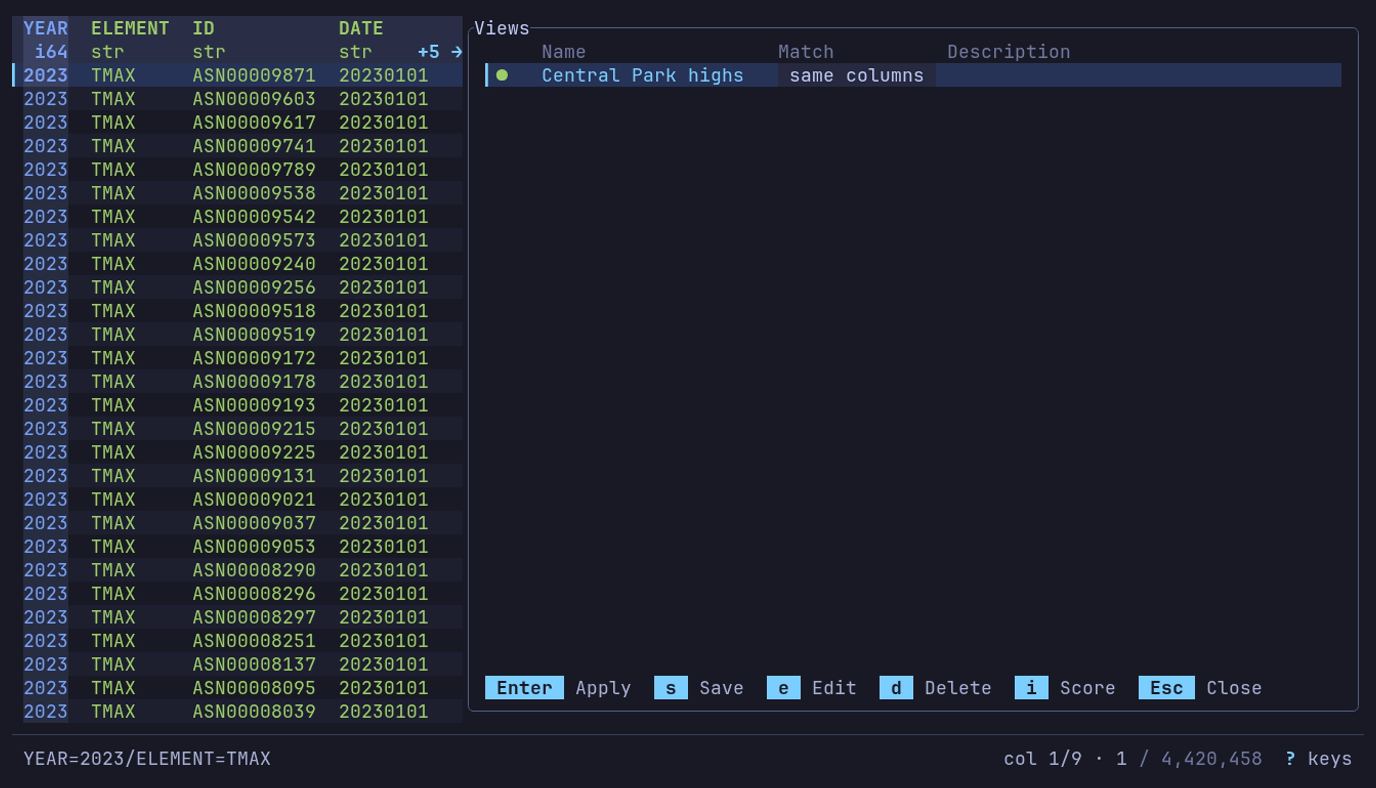
Does a view saved on 2024 fit 2023? v on YEAR=2023/ELEMENT=TMAX:
Central Park highs, matched by same columns.
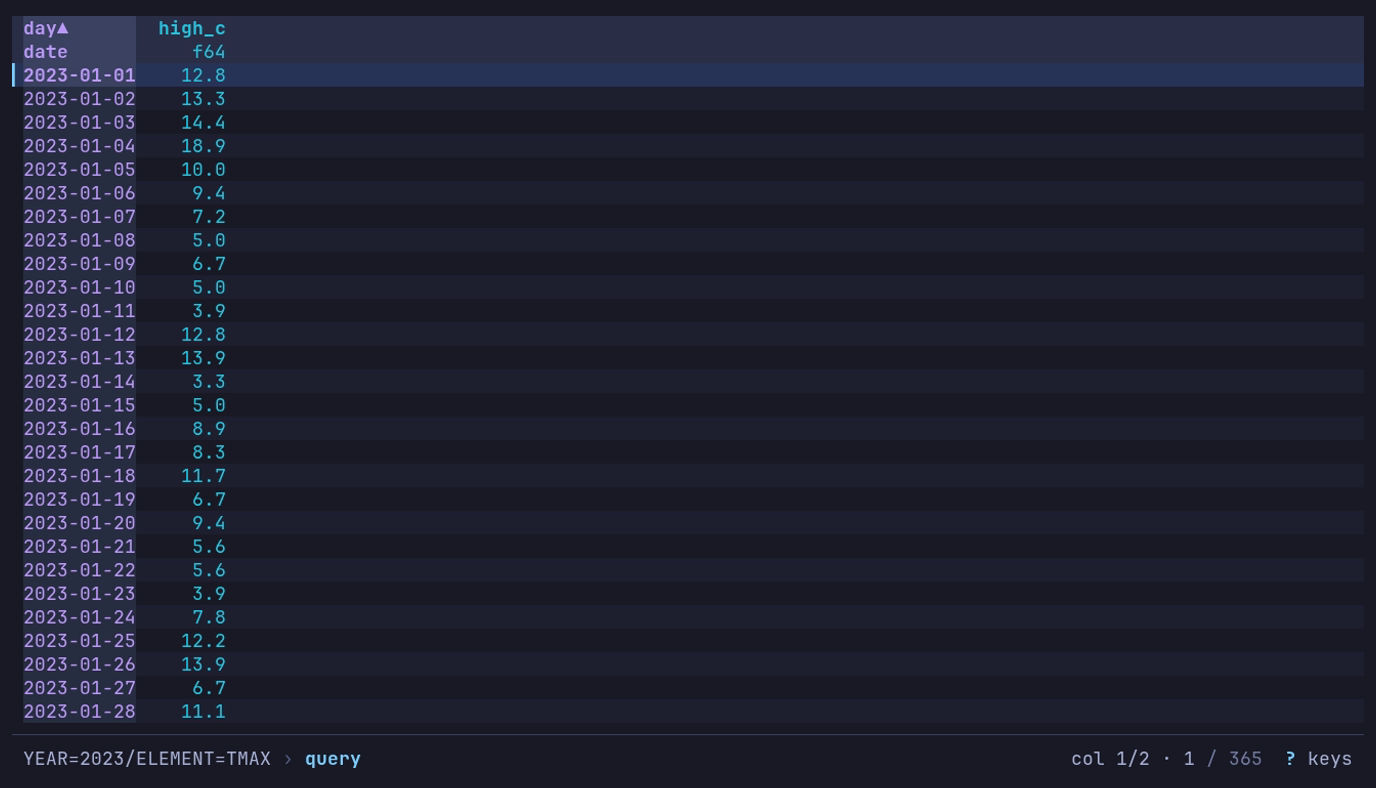
Enter applies it: 365 daily highs of 2023, 12.8 °C on New Year’s Day.
A view stores transformations, not a copy of the data. The next file produces its own results.
| A view with | When applied |
|---|---|
| A sample | Draws it again from its scope, method, size and seed: the same rows, never stored. Its query, filters and sort go on as the rows arrive |
| A chart | Lands on the table; c draws the chart, with its options and how it was last exported. The footer offers c |
Saving is unavailable until the current table has a change to store. In the description field, Enter inserts a newline; Ctrl+J saves from there, or Tab out and press Enter. The form takes the keys every dialog takes; in the description, ↑ ↓ move between its lines first.
Open the views list
| Key | Action |
|---|---|
| v | Open the views list |
| V | Apply the best-matching view without opening the list; when none matches, the list opens instead |
When V or automatic application applies a
view, the footer names it and says why it matched:
View "Central Park highs" applied: same columns.
Or from the command line, with --view: replace <NAME> with the view’s
name and <PATH> with what to open, as in
datui --view "Central Park highs" s3://noaa-ghcn-pds/parquet/by_year/YEAR=2022/ELEMENT=TMAX/:
datui --view "<NAME>" <PATH>
A view’s pivot and first rows are read in the background, with a spinner in the footer. Esc stops it and keeps the table as it was. A view that fails on the data is not applied, and a dialog says why.
List controls
Views are listed by how well they fit the open file, and a score mark beside each says how well. A check mark marks the one currently applied, and the Match column says why a view fits:
| Match | The view’s rule that fits |
|---|---|
same file | Exact path or relative path |
same columns | Schema |
glob | Path pattern or filename pattern |
| Key | Action |
|---|---|
| Enter | Apply the selected view |
| s | Save the current state as a new view |
| e | Edit the selected view |
| d | Delete it, after confirming: the question starts on No; ← picks Delete, Enter confirms |
| i | Show how the selected view’s score was computed |
| Esc | Close |
Save a view
The save form starts with the filename as its name, which is required, selected: typing replaces it, and an arrow key keeps it for editing. Add a description if needed, then expand Matching with Space to choose which files should match the view:
| Match | Fits a file when |
|---|---|
| Exact path | its absolute path, or its URL for remote data, is the same |
| Relative path | its path relative to the current directory is the same; local files only |
| Path pattern | its path matches a glob |
| Filename pattern | its name matches a glob |
| Schema | it has all the view’s columns; extra columns are fine |
A view saved on one table of a SQLite database or NumPy archive records the
table, shown as Table under Matching. Its path rules then fit only that
table: shop.db/orders and shop.db --table orders are the same file, and
shop.db/customers is not. Schema matching still carries the view to any
table with its columns.
Data piped to standard input and frames passed from Python
(datui.view(frame)) have no path, so their views match by schema alone.
Schema matching is enabled by default. It records the columns as loaded, before the query, so a view whose query renames columns still matches the next file. Matching views rank above unrelated ones, and matches combine: a view fitting by relative path and exact schema outranks one fitting by exact path alone. A file whose columns merely include the view’s scores low, below a pattern match. Other match rules, and how often and how recently a view was used, also affect the score. Press i to inspect it. V and automatic application use only views with a matching rule.
Only the active query is saved, in its own mode: SQL, Text or q. Filters, sort, column order and reshape are saved regardless. After a pivot or melt, the view also keeps the query, filters and sort the reshape ran over, and applies them before it. A reshape of a reshape, such as a melt of a pivot, cannot be replayed: the view keeps only the last one.
Editing (e) changes a view’s name, description and matching. Its saved settings — and the columns its schema rule matches on — follow the table only while the view is the one applied, so renaming a view never overwrites what it carries.
Apply on open
views.auto_apply applies the best-matching
view when a file opens:
[views]
auto_apply = true
Manage views
Views are JSON files in the views/ directory beside your
config file.
| Command | Does |
|---|---|
datui views list | List the saved views: name, what files they match, when last used |
datui views rm <NAME> | Remove one |
datui views clear | Remove them all |
Use datui from Python
datui.view() opens the terminal UI on a Polars frame, a file or a URL, and
can hand the final view back as a LazyFrame.
pip install datui
The package on PyPI installs the datui
command and the datui module. Python 3.10 or later.
Python API lists every option, the return value
and the errors.
View a frame
import polars as pl
import datui

url = "https://vincentarelbundock.github.io/Rdatasets/csv/palmerpenguins/penguins.csv"
penguins = pl.scan_csv(url)
datui.view(penguins)
datui.view(penguins.collect())
A LazyFrame passes its plan, not its data, and stays lazy: datui reads the rows it shows. Sorting, aggregation and other operations may still scan the whole input. A DataFrame works too. q closes datui and returns to Python.
View a path
view also takes a path, a URL or a list of paths, with the command line’s
options as keywords:
import polars as pl
import datui

pl.DataFrame({"month": [1], "sales": [10.5]}).write_parquet("jan.parquet")
pl.DataFrame({"month": [2], "sales": [12.0]}).write_parquet("feb.parquet")
datui.view(["jan.parquet", "feb.parquet"])

with open("data.csv", "w") as f:
    f.write("1;north\n2;south\n")
datui.view("data.csv", delimiter=";", no_header=True)
Remote paths read as they do on the command line:
import datui

datui.view("s3://noaa-ghcn-pds/parquet/by_year/YEAR=2024/ELEMENT=TMAX/")
datui.view("https://vincentarelbundock.github.io/Rdatasets/csv/palmerpenguins/penguins.csv")
The keywords are the flags’ and the config keys’ names: delimiter for
--delimiter, row_numbers for display.row_numbers, and config for any
key, as -c sets it. Pass them as keywords or as a datui.DatuiOptions.
datui.OPTION_NAMES lists them; Python API
gives each one’s type and flag. For a frame, only display options apply.
Return the current view
import polars as pl
import datui

url = "https://vincentarelbundock.github.io/Rdatasets/csv/palmerpenguins/penguins.csv"
result = datui.view(pl.scan_csv(url), capture=True)
if result is not None:
    print(result.collect())
Run the species summary from the
quick start and press
q: result collects to the three rows, Gentoo 5076.01626 and 124
penguins first. Collecting reads the CSV from the web again.
capture=True returns the final table’s view on a normal quit: the applied
query, filters, sort, drill-down, reshape and column order, over all matching
rows, as a LazyFrame even for DataFrame input. None when no dataset was open
at quit.
Collecting runs the returned plan again, with Python’s own Polars; the rows datui showed are not cached.
| Source | What collecting the result does |
|---|---|
Scanned files (pl.scan_*, paths) | Executes the plan again and rereads the files, which must still exist |
In-memory frame (df.lazy()) | The plan can embed the DataFrame, so it may be copied on the way in and again on the way out, even when the result is a few rows |
| Materialized intermediates | A LazyFrame built from an already computed intermediate may carry that intermediate’s data too |
| Downloaded or decompressed files | Refused with RuntimeError: the temp file is removed when datui exits. Export with e instead |
Without capture, exporting with e is the way to get data out.
Compatibility
A frame is handed over as a serialized Polars plan, which the wheel reads with its own embedded Polars (0.55). The two need to agree on the plan format:
Python polars | Frames |
|---|---|
| 1.43 | The release Polars pairs with Rust 0.55; fully tested |
| 1.38 to 1.42 | Read in testing (scan, filter, group by, join, cast, sort, unique) |
| 1.44 | Most plans read; 1.44 writes joins 0.55 cannot read |
| 1.37 and earlier | Refused: older path format |
The wheel declares polars>=1.38 and never downgrades the polars you have. A
plan the wheel cannot read raises ValueError before the TUI opens, naming the
release it is built for. Paths do not go through the plan and work with any
polars version — though a view captured with capture=True always comes back
as a plan, and one your polars cannot read raises RuntimeError after the
TUI closes.
Build from source
Configure datui
datui reads one TOML config file; every key is in Settings.
datui config init
That writes the file with every key commented out at its default. Uncomment what you want, then restart datui.
| OS | Config file |
|---|---|
| Linux | ~/.config/datui/config.toml |
| macOS | ~/Library/Application Support/datui/config.toml |
| Windows | %APPDATA%\datui\config.toml |
| Command | Does |
|---|---|
datui config init | Write the file; --force replaces one that is there |
datui config path | Print the files read, imports first |
datui config keys | List every key: its type, default, the value in effect and what set it |
DATUI_CONFIG_DIR moves the directory; Environment variables
lists the rest.
Set common defaults
[display]
row_numbers = true
number_format = "thousands"

[theme]
mode = "light"
This shows row numbers, groups digits, and starts from the light palette.
Datasets and directories to list on the home screen are not here: they are in
your catalog, catalog.toml, which
datui config init writes empty beside the config file.
Find a setting
| Change | Reference |
|---|---|
| Type inference, decompression, following | Read |
| CSV comments, nulls and inference rows | CSV |
| Number formatting, columns and row numbers | Display |
| Row buffers and the streaming engine | Performance |
| Analysis sample size or chart rows | Analysis |
| The home screen and its search | Home · Home search |
| Named datasets and directories, local or remote, and the example datasets | Catalogs |
| Cloud accounts and connections | Cloud connections |
| Clipboard over SSH | Clipboard |
| Colors and symbols | Colors · Glyph overrides |
| A theme from your desktop | Theme from your system |
Override a setting
-c KEY=VALUE sets any key for one run; it is repeatable, and the last of one
key wins. A flag of the key’s own, such as --sample-rows, beats -c:
printf 'a,b\n1,2\n' > data.csv
datui -c display.row_numbers=true data.csv
datui -c csv.comment='#' -c performance.streaming=false data.csv
datui --sample-rows 0 data.csv
The last one makes every analysis tool, Data Quality included, read every row. An unknown key is refused with the nearest ones.
| Precedence, lowest first | |
|---|---|
| Built-in defaults | |
| Imported files | In the order listed |
| Your config file | A key you write wins over an import, even when it equals the default |
| Environment | DATUI_LOG over log.level; cloud variables over [cloud] |
-c KEY=VALUE | |
| A flag of the key’s own |
Import other config files
import names TOML files to merge in before this file’s own settings: a theme
generated by something else, a team’s shared file. Replace <FILE> with the
file’s path:
import = ["<FILE>"]

[display]
row_numbers = true
- Imports apply in the order listed, each over the last; this file’s own values apply after all of them.
- A file changes only the keys it writes. One written as the built-in default
still overrides an import:
notes_accent = trueundoes an importedfalse. Tables such as[theme.colors]or[display.number_format]merge key by key. - These lists add up across files:
catalogs,[home] hide,[cloud] hide,[cloud] env_filesand[formats] path. A[[cloud.connections]]entry replaces the earlier one of its name; two of one name in one file are an error. - TOML cannot unset a key, so a key with no default, such as
sidebar_width, stays set once an import sets it; set it to the value you want. - An imported file may itself
import. Chains stop at 8 files; a cycle is an error. - Paths may be absolute, relative to the importing file, or use
~and$VAR. - A missing import is skipped with a warning on stderr. An import that cannot be read or parsed stops datui with its path, as your own file does. No config file means the defaults.
Glyphs or ASCII
display.unicode = "auto" (the default) draws Unicode glyphs when the terminal
is doing UTF-8, and the ASCII set otherwise. "always" or "never" skips
detection.
| Environment | Set |
|---|---|
LC_ALL, LC_CTYPE or LANG set (first non-empty wins) | Unicode if it names UTF-8 (en_US.UTF-8), else ASCII (C) |
None set, Windows Terminal (WT_SESSION) | Unicode |
None set, VS Code’s terminal (TERM_PROGRAM=vscode) | Unicode |
None set, Windows console code page 65001 (chcp 65001) | Unicode |
| None set, anything else | ASCII |
Number formatting
display.number_format groups digits, so 248956422 reads 248,956,422.
, toggles it for the session.
| Preset | 1234567.89 becomes |
|---|---|
none (default) | 1234567.89 |
thousands | 1,234,567.89 |
european | 1.234.567,89 |
si | 1 234 567.89 (narrow no-break space) |
swiss | 1'234'567.89 |
indian | 12,34,567.89 |
underscore | 1_234_567.89 |
system | What LC_ALL, LC_NUMERIC or LANG says, else thousands |
For finer control, a table:
[display.number_format]
grouping = "thousands"
group_separator = ","
decimal_separator = "."
floats = true
float_precision = 2
exclude_columns = ["year", "*_id", "zip"]
floats groups float columns too; float_precision rounds them (leave it out
to keep the file’s own decimals); exclude_columns takes globs of columns never
grouped, for numbers that are labels. Every value of a grouped column is
grouped. Formatting is display only: exports, queries, filters and views use
the raw values.
Themes
[theme]
dark = "night-market"
light = "day-market"
A theme is a named set of colors, one per slot.
theme.dark is used when the terminal is dark and theme.light when it is
light. Two are built in, and those are the defaults:
| Theme | For |
|---|---|
night-market | Dark terminals: Tokyo Night with one cyan accent |
day-market | Light terminals: Tokyo Night’s day variant |
Every *.toml in themes/ in the config directory (datui config path
shows where that is) is a theme too, named by its file. This one is
themes/my-dusk.toml:
extends = "night-market"
description = "Night Market with a warm accent"
accent = "#e0af68"
chip_key = "#e0af68"
| Key | Means |
|---|---|
extends | The theme the unset slots come from. Without it, they come from night-market when the theme is used as theme.dark and from day-market when it is used as theme.light |
description | Shown by datui theme list |
| Any slot | The same slots and color forms as [theme.colors] |
The repository’s
contrib/themes/
has more, each crediting its palette: gruvbox-dark and high-contrast. Copy
one into themes/ to use it.
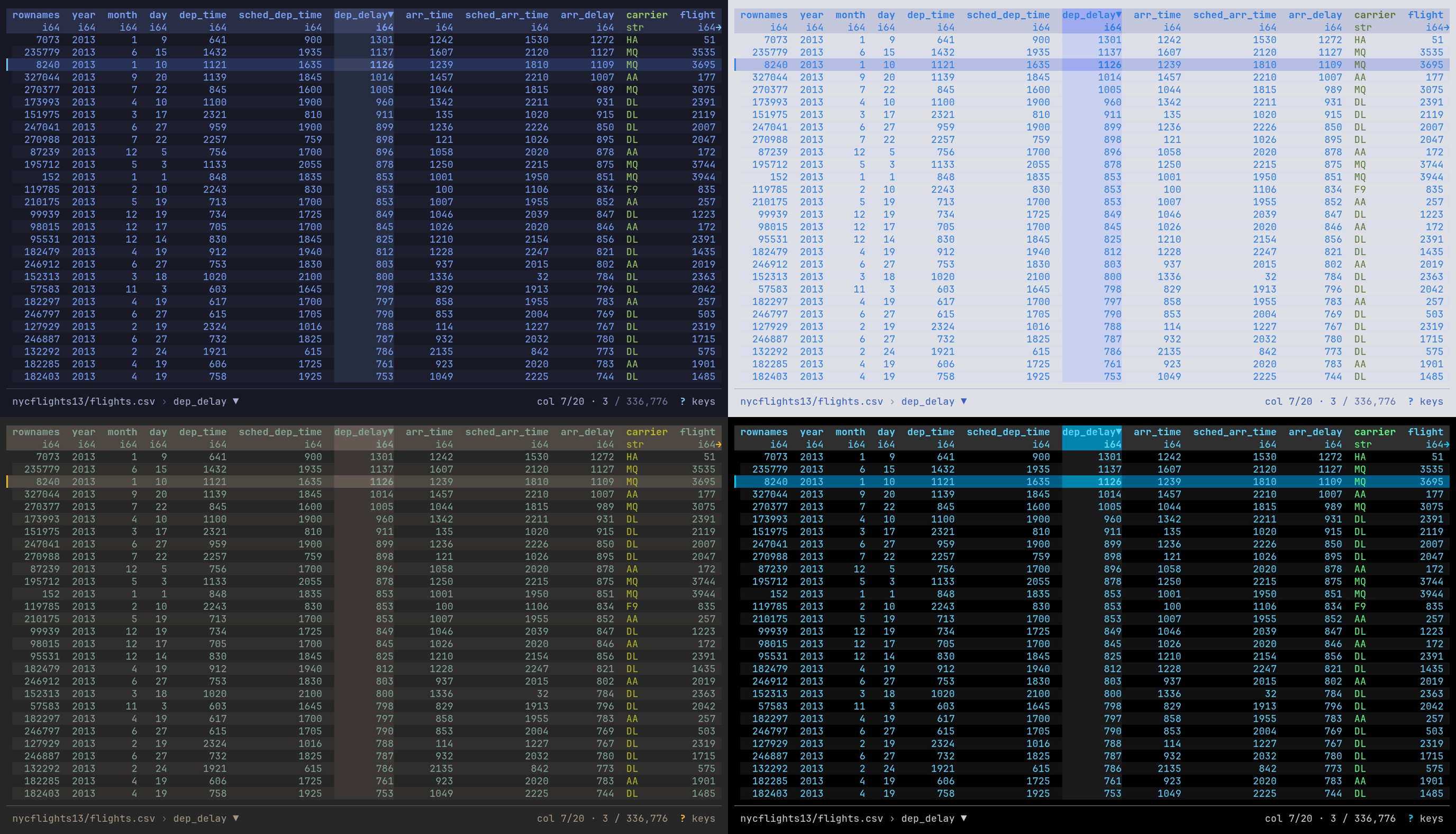
One table in each theme: night-market and day-market (top), gruvbox-dark
and high-contrast (bottom), sorted with ] on dep_delay.
datui -c theme.mode=light uses day-market for one run.
datui theme list lists the themes; datui theme show NAME prints one with
every slot, to save into themes/ and edit. A theme file with a mistake is
left out with a warning. A theme name that cannot be used falls back to its
mode’s built-in, with a warning when that mode is in use: always under auto,
otherwise only for the pinned mode.
The colors are worked out in this order, each step over the one before:
| Step | Gives |
|---|---|
theme.mode, or the terminal under auto | Dark or light |
theme.dark or theme.light | The theme for that mode |
extends, theme by theme | Slots the theme leaves unset |
[theme.colors] | Your own slots, over the theme in either mode |
Light and dark
[theme]
mode = "light"
theme.mode picks the theme: auto (the default) follows the terminal,
dark always uses theme.dark, light always uses theme.light. The
header fill, row stripes, borders and dim text sit a few shades off the
terminal’s background, so a dark theme’s shades are unreadable on a light
background.
auto asks the terminal for its background color (OSC 11) at startup and
does not wait for the answer. The first frame uses, in this order:
| Source | When |
|---|---|
| The terminal’s answer | It is in before the first frame; light when black text reads better on it than white |
| The last answer from this terminal | One was given before; remembered in the cache by TERM_PROGRAM, else TERM |
COLORFGBG | The terminal sets it |
dark | None of these |
An answer that arrives after the first frame switches the theme if it differs. On a light terminal seen for the first time, that is one dark frame before the light theme.
Under auto the theme follows the terminal: when its window comes back into
focus, datui asks again and switches between theme.dark and theme.light if
the scheme changed. That takes a
terminal that reports focus; in tmux, turn on set -g focus-events on.
The question is not asked on Windows, on the Linux console (TERM=linux), or
when standard output is not a terminal. A terminal that does not answer
costs nothing at startup and is left at COLORFGBG or dark: set mode
there.
Colors
[theme.colors] changes a few slots over the theme in use, in both modes;
for more than a few, write a theme file. Every color is a slot
(the slots), written one of three ways:
| Form | Example | Shown |
|---|---|---|
| Hex | "#ff9e64" | Exactly on a true-color terminal; the nearest of 256 on xterm-256color; basic ANSI below that |
| Name | "bright_red" | black red green yellow blue magenta cyan white, bright_*, gray dark_gray light_gray, default (the terminal’s own) |
| Indexed | "indexed(236)" | An entry of the xterm 256-color palette |
NO_COLOR set to anything turns color off. A Dracula theme, saved as
themes/dracula.toml and picked with theme.dark = "dracula":
description = "Dracula"
accent = "#bd93f9"
accent_bright = "#ff79c6"
gradient_start = "#8be9fd"
gradient_end = "#ff79c6"
chip_key = "#bd93f9"
chip_label = "#ff79c6"
background = "#282a36"
surface = "#44475a"
controls_bg = "#44475a"
text_primary = "#f8f8f2"
text_secondary = "#6272a4"
text_inverse = "#282a36"
table_header = "#f8f8f2"
table_header_bg = "#44475a"
table_selected = "#44475a"
table_alternate_row = "default"
table_column_separator = "#bd93f9"
type_str = "#50fa7b"
type_int = "#8be9fd"
type_float = "#bd93f9"
type_bool = "#f1fa8c"
type_temporal = "#ff79c6"
success = "#50fa7b"
warning = "#ffb86c"
error = "#ff5555"
dimmed = "#6272a4"
chart_1 = "#8be9fd"
chart_2 = "#ff79c6"
chart_3 = "#50fa7b"
chart_4 = "#f1fa8c"
chart_5 = "#bd93f9"
chart_6 = "#ff5555"
chart_7 = "#ffb86c"
Glyph overrides
[glyphs] replaces single symbols when your font has better ones than the
set every common terminal font carries. Keys are the slot names in
glyphs.rs;
spinner, score_marks, mini_bars and bar_eighths take lists:
[glyphs]
in_object_store = "☁"
spinner = ["◐", "◓", "◑", "◒"]
- An override keeps the display width of the glyph it replaces; a wrong width is refused at startup, naming the slot. Nerd Font icons work where the font has them.
- Overrides apply only to the Unicode set: under
display.unicode = "never", or when detection finds no UTF-8, the ASCII set draws. spinnertakes any number of frames;score_marksexactly 5,mini_barsandbar_eighthsexactly 8. The wordmark cannot be overridden.
Mouse and text selection
datui takes the mouse by default: the wheel scrolls, a click selects, and a drag moves or sizes a column (The mouse). To select text with the terminal meanwhile, hold its bypass modifier as you drag:
| Terminal | Select text |
|---|---|
| Most (GNOME Terminal, Konsole, kitty, Alacritty, WezTerm, Windows Terminal, xterm) | Shift+drag |
| iTerm2 | Option+drag |
tmux with set -g mouse on | Shift+drag, or tmux’s own copy mode |
To leave the mouse to the terminal, --mouse=false for one run, or:
[display]
mouse = false
Theme from your system
To follow a theme something else generates (a desktop theme manager, chezmoi,
home-manager, a dotfiles repository), import the
file it writes. Your own settings still win. Replace <FILE> with the
generated file:
import = ["<FILE>"]
The imported file may set any section, not only [theme.colors].
Omarchy
Omarchy renders per-app theme files from templates when you switch themes. Datui ships one. These steps need an Omarchy system.
-
Install the template from the repository:
mkdir -p ~/.config/omarchy/themed curl -fsSL https://raw.githubusercontent.com/derekwisong/datui/main/contrib/omarchy/datui.toml.tpl \ -o ~/.config/omarchy/themed/datui.toml.tpl -
Import the file Omarchy generates, in
~/.config/datui/config.toml:import = ["~/.local/state/omarchy/current/theme/datui.toml"] -
Switch themes as usual, here to Tokyo Night:
omarchy theme set tokyo-night
The template sets theme.mode from the theme’s polarity and maps its accent
onto datui’s accent, gradient and selection tint. A running datui keeps the
theme it started with; the next launch takes the new one.
A color in your own config.toml wins over the import, even when it equals
the built-in default:
import = ["~/.local/state/omarchy/current/theme/datui.toml"]

[theme.colors]
type_int = "#ff8800"
To override one theme only, import a second file that only that theme
provides. In ~/.config/datui/config.toml:
import = [
  "~/.local/state/omarchy/current/theme/datui.toml",
  "~/.local/state/omarchy/current/theme/datui.override.toml",
]
and in ~/.config/omarchy/themes/osaka-jade/datui.override.toml:
[theme.colors]
type_int = "#ff8800"
type_float = "#ff00ff"
Omarchy copies your theme directory into place before rendering templates, so
the override arrives untouched. Themes without the file are skipped with a
warning on stderr. Name it datui.override.toml: a file named datui.toml
replaces the generated file and drops every color it does not restate.
Troubleshooting
| Problem | What to do |
|---|---|
| The file is ignored | Check the path for your OS above, or datui config path. A file that does not parse stops datui with its path, line and reason |
| A key seems to do nothing | Warnings go to stderr, which the UI hides: run datui data.csv 2> /tmp/datui.log and read it after quitting. An unknown key is named there with the nearest ones; datui config keys lists them all |
| An import does not apply | Check the file exists at the resolved path, and that nothing later in the chain, a -c or a flag, overrides it |
Invalid color value for 'accent': Unknown color name | A typo in a name. Names ignore case; hex needs six digits; indexed is indexed(0) to indexed(255) |
| Colors look wrong | The terminal may not take true color, so hex is approximated; try names or indexed(...). Everything monochrome: NO_COLOR is set |
Header or chip text cut off or garbled in VS Code’s terminal or on xterm-256color | Some terminals mishandle a background color on those rows; set them to the terminal’s own, below |
| The config file does not parse | The error names the file, line and reason, then the way out: fix that line, or move the file aside to start from the defaults, after which datui config init writes a fresh one. A broken import is named by its own path; moved aside, it is skipped |
| Start over | datui config init --force rewrites the file with the defaults; with no file, datui runs on them |
| Odd home-screen state: recents, folded sections, a hidden source | datui cache clear resets the cache: recents, folds, remembered places, hidden sources and Example datasets, measurements and histories; never your data or config, and not the log. A cache line that cannot be read is skipped and logged in datui.log (The log) |
[theme.colors]
controls_bg = "default"
table_header_bg = "default"
The log
datui.log in the cache directory (~/.cache/datui on Linux,
~/Library/Caches/datui on macOS, %LOCALAPPDATA%\datui on Windows) holds
Polars warnings, the errors datui showed, internal errors with their
backtraces, cache and history failures, and anything else written to stderr
while the UI was up, with credentials masked. It is capped at 1 MB, the
previous file kept as datui.log.1; datui cache clear leaves both. On
Windows it receives Polars warnings and datui’s own messages, not other stderr
output.
| Set | How |
|---|---|
| Another file | --log-file PATH, or log.file |
| Level | --log-level, DATUI_LOG or log.level: error, warn (default), info, debug, trace or off |
Formats
datui reads 27 formats: Parquet, CSV, TSV, PSV, JSON, NDJSON, Arrow IPC, Avro, ORC, Excel, SafeTensors, GGUF, NMEA, GPX, WAV/AIFF audio, MIDI, SQLite, VCD, FIX, SDF, NumPy, ELF, ULog, DataFlash, candump, plain text, systemd journal, and binary formats you describe in a format spec.
The extension says the format; --format names it when the extension does
not, and text piped in is detected by content.
printf 'a,b\n1,2\n' > export.txt
datui --format csv export.txt
How each format is read
| Format | --format | Extensions | Read | Compressed | HTTP(S) | In a bucket | Bucket prefix |
|---|---|---|---|---|---|---|---|
| Parquet | parquet | .parquet | lazy scan | no | downloaded | in place | in place |
| CSV | csv | .csv | lazy scan | decompressed copy | downloaded | downloaded | in place |
| TSV | tsv | .tsv | lazy scan | decompressed copy | downloaded | downloaded | no |
| PSV | psv | .psv | lazy scan | decompressed copy | downloaded | downloaded | no |
| JSON | json | .json | in memory | no | downloaded | downloaded | no |
| NDJSON | jsonl | .jsonl, .ndjson | in memory | no | downloaded | downloaded | in place |
| Arrow IPC | arrow | .arrow, .arrows, .ipc, .feather | lazy scan | no | downloaded | in place | in place |
| Avro | avro | .avro | in memory | no | downloaded | downloaded | no |
| ORC | orc | .orc | in memory | no | downloaded | downloaded | no |
| Excel | excel | .xls, .xlsx, .xlsm, .xlsb | in memory | no | downloaded | downloaded | no |
| SafeTensors | safetensors | .safetensors, .safetensors.index.json | in memory | no | in place | in place | in place |
| GGUF | gguf | .gguf | in memory | no | in place | in place | in place |
| NMEA | nmea | .nmea | converted to Arrow | converted to Arrow | downloaded | downloaded | no |
| GPX | gpx | .gpx | converted to Arrow | converted to Arrow | downloaded | downloaded | no |
| WAV, BWF, RF64, AIFF | audio | .wav, .wave, .bwf, .rf64, .aif, .aiff, .aifc | lazy scan | no | downloaded | downloaded | no |
| MIDI | midi | .mid, .midi, .smf, .kar, .rmi | in memory | no | downloaded | downloaded | no |
| SQLite | sqlite | .db, .db3, .sqlite, .sqlite3 | lazy scan | no | downloaded | downloaded | no |
| VCD | vcd | .vcd | converted to Arrow | converted to Arrow | downloaded | downloaded | no |
| FIX | fix | none: by content | converted to Arrow | converted to Arrow | downloaded | downloaded | no |
| SDF | sdf | .sdf, .sd | converted to Arrow | converted to Arrow | downloaded | downloaded | no |
| NumPy | numpy | .npy, .npz | lazy scan | no | downloaded | downloaded | no |
| ELF | elf | .elf, .axf | in memory | no | downloaded | downloaded | no |
| ULog | ulog | .ulg | lazy scan | no | downloaded | downloaded | no |
| DataFlash | dataflash | none: by content | lazy scan | no | downloaded | downloaded | no |
| candump | candump | none: by content | lazy scan | no | downloaded | downloaded | no |
| Text | text | .log, .txt | lazy scan | decompressed copy | downloaded | downloaded | no |
| systemd journal | journal | none: by content | in memory | no | downloaded | downloaded | no |
| Arrow IPC stream | arrow | as Arrow IPC | converted to Arrow | no | downloaded | downloaded | downloaded |
| Format spec | its name | its match | lazy scan | decompressed copy | downloaded | downloaded | no |
| Read | What it means |
|---|---|
| lazy scan | Scanned where it is. Browsing reads a buffer of rows; queries, sorting and analysis may read the whole input |
| decompressed copy | Decompressed whole into a temporary file of the same format in the temp directory (--temp-dir), which is then scanned lazily. The file is removed on quit (temporary files) |
| converted to Arrow | Read through whole into a temporary Arrow IPC file in the temp directory, which is then scanned lazily. Removed on quit, like a decompressed copy; nothing is cached between sessions |
| in memory | Read whole into memory before the table appears. Past memory_warning in [read] ("1GiB" by default; 0 never asks), datui asks first: big.json: JSON reads 2.10 GB into memory. A model file’s table is one row per tensor, from the header, so it is small however large the model, and is never asked about; a MIDI file is at most 64 MiB |
- Compressed is a
.gz,.zst,.bz2or.xzfile;nomeans it does not open.-c read.decompress_in_memory=truereads compressed CSV, TSV, PSV and text in memory instead. - HTTP(S) is one file at an
http://orhttps://URL.downloadedcopies it to the temp directory first, then reads it as Read says. A model file’s header is fetched by range; a server that sends no ranges gets the download question. - In a bucket is one S3, GCS or Azure object.
in placereads only what is needed with ranged requests: a Parquet or Arrow IPC file’s footer and the rows shown, or a model file’s header.downloadedcopies the object to the temp directory first, after asking, then reads it as Read says; an Arrow stream is converted as it downloads, with no copy of the stream kept. - Bucket prefix is a prefix or glob read as one table. Only Parquet reads
hive partitions; the model files directly under a prefix are read by their
headers. An Arrow prefix scans its IPC files in place and downloads its
streams, one split of a Hugging Face cache as on disk; a glob of Arrow reads
IPC files only. A prefix marked
noopens one object at a time from the cloud source. - Standard input is written to a temporary file first, then read as Read says.
The home screen marks a file row that is not read lazily where it is:
decompresses, converts, in memory or downloads. The details pane and the Info panel’s
Resources tab say how it is read.
Detected by content
The format comes from the first bytes, unless --format or --compression
names it:
| First bytes | Read as |
|---|---|
| Parquet, Arrow IPC or Avro magic number, or an Arrow IPC stream’s schema message | that format |
SQLite format 3 | SQLite; a database of several tables needs --table |
| gzip, zstd, bzip2 or xz magic number | decompressed, then read by what is inside, as below: a text format, CSV or TSV, or lines |
{, the first line an object with __CURSOR and __REALTIME_TIMESTAMP | systemd journal |
[, then JSON | JSON |
{, the first line a whole object | NDJSON |
{, the object open past the first line, JSON so far | JSON |
an NMEA sentence ($GPGGA,) with a checksum that matches, or of a type receivers write | NMEA |
XML whose first element is <gpx | GPX |
a line with 8=FIX, a delimiter and 9= | FIX |
$date, $version, $timescale, $comment, $scope or $var, with an $end | VCD |
a V2000 or V3000 counts line, or M END with a data item or $$$$ | SDF |
| several lines with one field count, two or more, split at tabs | TSV |
| several lines with one field count, two or more, split at commas, quotes where CSV allows them | CSV |
| anything else | lines |
A comma or a tab alone is not a table: a log line with a comma in it stays a
line. An unnamed CSV the first lines do not show as one opens with --format csv; the Info panel’s notes say so. With --format csv, tsv or psv and no
--compression, compression still comes from the first bytes.
Delimited text
CSV, TSV and PSV files are scanned where they are, and a .log or .txt file
is read a row per line.
printf 'id;amount\n1;9.50\n2;3.25\n' > sales.csv
datui --delimiter ';' sales.csv
CSV, TSV and PSV
| CSV | TSV | PSV | |
|---|---|---|---|
| Extensions | .csv | .tsv | .psv |
| Delimiter | , | tab | | |
| Read | lazy scan; compressed, decompressed copy | the same | the same |
| A bucket prefix | read in place, as one table | one object at a time | one object at a time |
--follow | yes | yes | yes |
| Info tab | none | none | none |
A file with another extension, or none, opens with --format csv (or tsv,
psv); text piped in is detected by content.
H on the Info panel’s Schema tab
reads the first row as data, or as column names again.
CSV options
The options apply to TSV and PSV too. Set defaults under
[csv]; a flag wins for one run.
| Option | Config key | What it does |
|---|---|---|
--delimiter ';' | Column separator: one character, tab, \t or a code such as 0x1f | |
--no-header | The first row is data; columns are column_1, column_2, … | |
--skip-lines N | Skip N raw lines at the top, split on newlines alone | |
--skip-rows N | Skip N rows at the top, quote-aware; the header is read after them | |
--footer-rows N | Skip N rows at the end. Counts every row first: on a directory in a bucket, that downloads every file before the table opens | |
--null NA, --null amount= | csv.null_values | Values read as null, in every column or in one (COL=VAL). Repeatable; replaces the config’s list |
--comment '#' | csv.comment | Skip lines that start with it, before the header and among the data |
--header-rows 3, --header-rows 3,2 | csv.header_join | The line or lines holding the header, counted from 1 at the top. Several are joined per column with header_join (a space) |
--skip-initial-space | csv.skip_initial_space | Ignore the spaces after a delimiter: padded numbers are numbers, a cell of spaces is null |
--infer-rows 10000 | csv.infer_rows | Rows read to infer column types (1,000). Raise it when a column turns from integer to text late in the file |
--ignore-errors | csv.ignore_errors | Skip rows that do not parse instead of failing the read |
--infer-types=COL, --infer-types=off | read.infer_types | Type string columns (dates, times, numbers) only in the named columns, or in none |
Column names are trimmed: " Latitude" reads as Latitude. A blank name
reads as column_N, and a repeated one gets _duplicated_0. A directory of
CSV files in a bucket takes every option but --infer-types and
--header-rows, and keeps its values as text.
Instrument and logger exports
Loggers often write comments and a units line above a padded header:
log.csv
#device_info, log_version="1.03", model="X", serial="123"
#yyyy-mm-dd, hh:mm:ss, hh:mm, degrees, volts, deg F
  Lcl Date, Lcl Time, UTCOfst,     Latitude, bus1volts, E1 CHT1
          ,         ,        ,             ,      25.1,   187.2
2024-03-01, 10:00:00,  -05:00,    40.100000,      25.0,   180.0
datui --comment '#' log.csv
datui --comment '#' --header-rows 3,2 log.csv
datui --header-rows 3 log.csv
| Command | Columns |
|---|---|
datui --comment '#' log.csv | Lcl Date, Latitude, …; # lines anywhere are skipped |
datui --comment '#' --header-rows 3,2 log.csv | Lcl Date yyyy-mm-dd, Latitude degrees, … |
datui --header-rows 3 log.csv | Lcl Date, Latitude, …; lines 1 and 2 are passed over |
--header-rowscounts lines before anything is skipped, and a named line that starts with the comment character loses it.--skip-linescounts from the same top;--skip-rowscounts data rows after the header.- Padded numbers are numbers with or without
--skip-initial-space, unless--infer-types=off. With the flag, cells of spaces are null in text columns too, and--nullmatches a value without its padding. - A file with nothing after its header lines opens with its columns and no rows.
- A run of NUL bytes at the end of a file ends it. Loggers that preallocate a file at a fixed size leave one. A NUL inside the text is kept.
- A byte that is not UTF-8 reads as
�where it stands, rather than failing the read. - In a directory, a file with no header (empty, blank, or only NULs) is skipped, and the Notes tab names it.
A delimited format spec keeps these options for a family of files, with their units and metadata line, so they open with no flags. A flag on the command line still wins over the spec.
Dates and timestamps
String columns in CSV and JSON become dates when every value in the first
1,000 rows (--infer-rows) parses the same way. --infer-types=off turns
this off.
| Value | Type |
|---|---|
2024-01-31 | date |
2024-01-31 10:00:00, 2024-01-31T10:00:00.250 | datetime[μs] |
2024-01-31T10:00:00Z, 2024-01-31T10:00:00.250+00:00, 2024-01-31 05:00:00-05:00 | datetime[μs, UTC], converted to UTC |
- A column whose values disagree, such as an offset on some and none on others, stays text.
- A value past the rows read for types that does not parse is null. The
first time the Info panel opens, one pass counts them, and the Notes tab
says how many per column:
volts: 1 value not f64, read as null. - A column with a number that starts with a zero another digit follows
(
02134,007) stays text: a ZIP code or an ID.0,0.5and-0.5are numbers. - JSON strings become dates or times, never numbers.
- With
--infer-types=off, Polars types the columns from the rows it reads, and a value it cannot parse fails the read.
Text and logs
A .log or .txt file, and text no format claims (a pipe, a file with no
extension), is a row per line.
printf 'start\nerror: disk full\n\nstop\n' > app.log
datui app.log
gzip -k app.log
datui app.log.gz
seq 1 1000 | datui
| Column | Holds |
|---|---|
file | The file the line is from, when several are read as one table |
line | The line as written, without its line ending |
- Every line is a row, blank lines included.
\r\nis a line ending. #is on for text: it numbers each row by its line in the file, asless -Ndoes, and the number stays with the row through a sort or a filter. With several files it is the line in the row’s own file, beside thefilecolumn.- Bytes that are not UTF-8 show as
�; the Info panel counts the lines that hold them. Control characters are escaped on screen and kept in the value. - A
.logwhose bytes say a format (a candump log, a FIX log) is read as that format. - In a directory, text files beside other data are left out of its table: a README beside Parquet files is passed over.
- Find, the query and filters work on
line:select where line like "*error*". - Lines are indexed in one pass and read where they are shown. A file over
8 MiB shows its first rows at once and is indexed behind them: the footer
says
linesand how much is read, the row count waits for the last line, and End, : to a row past it, a sort or an analysis wait for it too. Home pauses the indexing until you are back. A file that shrinks meanwhile (a log rotated with copytruncate) stops it with a note: open it again. Past 67,108,864 lines, the first that many show and the Info panel counts the rest. --followreads lines as they are appended; see Pipes and growing files.SYSTEMD_PAGER=datui journalctl -u nginxmakes datui journalctl’s pager. For a column per journal field, readjournalctl -o json: see systemd journal.
Columnar and JSON
Parquet and Arrow IPC files are scanned where they are; JSON, NDJSON, Avro, ORC and Excel are read whole into memory.
datui https://raw.githubusercontent.com/apache/parquet-testing/master/data/alltypes_plain.parquet
| Format | Extensions | Read | Several files as one table | Info tab |
|---|---|---|---|---|
| Parquet | .parquet | lazy | yes | Parquet |
| JSON | .json | in memory | yes | none |
| NDJSON | .jsonl, .ndjson | in memory | yes | none |
| Arrow IPC | .arrow, .arrows, .ipc, .feather | lazy scan; a stream converted to Arrow | yes | Arrow |
| Avro | .avro | in memory | yes | Avro |
| ORC | .orc | in memory | yes | ORC |
| Excel | .xlsx, .xlsm, .xlsb, .xls | in memory | no | Excel |
How each format is read says what lazy and
in memory mean, and how each is read from a URL or a bucket. A file read in
memory past read.memory_warning (1 GiB) asks first. None of these opens
compressed (.parquet.gz); decompress it first.
Parquet
datui s3://noaa-ghcn-pds/parquet/by_year/YEAR=2024/ELEMENT=TMAX/
- Only the footer and the rows shown are read; a query, sort or analysis may read every row of the columns it uses.
- A directory or glob of Parquet files is one table, its schema the union of
the files’ footers (files that disagree).
A
key=valuedirectory tree is a hive table. - In a bucket, a file and a prefix are read in place with ranged requests.
- The Parquet tab gives the row groups, the codecs, the writer and the footer’s metadata, and each column’s least and greatest value from its statistics.
JSON and NDJSON
printf '[{"id": 1, "tags": ["a", "b"]}, {"id": 2, "tags": []}]\n' > items.json
datui items.json
printf '{"id": 1, "ok": true}\n{"id": 2, "ok": false}\n' | datui
| JSON | NDJSON | |
|---|---|---|
| Holds | An array of objects | One object per line |
| Detected by content | [, or an object open past its first line | The first line a whole object |
--follow | no | yes |
| A bucket prefix | one object at a time | read in place, as one table |
- Each key is a column. A nested object is a struct column and an array a list column; the inspector shows them whole.
- Strings become dates or times when every value parses (dates and timestamps), never numbers.
journalctl -o jsonoutput is read as the systemd journal.
Arrow IPC
datui -F arrow https://raw.githubusercontent.com/apache/arrow-testing/master/data/arrow-ipc-stream/integration/1.0.0-littleendian/generated_primitive.arrow_file
datui -F arrow https://raw.githubusercontent.com/apache/arrow-testing/master/data/arrow-ipc-stream/integration/1.0.0-littleendian/generated_primitive.stream
These files’ names say no format, so -F arrow names it. An IPC file (Feather v2)
is scanned in place, from its footer. An IPC stream,
the format of a Hugging Face datasets cache, has no footer: it is told from a
file by its first bytes and converted to an IPC file in the temp
directory, then scanned. The loading screen shows how far the conversion has
got; Ctrl+O stops it. A stream larger than the temp
directory’s free space is refused before it is written. LZ4 and ZSTD buffers
are read and written out uncompressed.
To open a Hugging Face cache, replace <CACHE_DIR> with the dataset’s
directory under ~/.cache/huggingface/datasets/:
datui <CACHE_DIR>
datui --table test <CACHE_DIR>
| What | How it opens |
|---|---|
| A directory of stream shards | Converted together into one file, in name order; shards with different columns fail |
| IPC files among the streams | Scanned in place and stacked with the streams in name order |
A datasets cache directory (name-train.arrow, name-test-00000-of-00002.arrow) | One split: the one --table names, else train, validation, test, then the first by name. The Schema tab lists the others |
A DatasetDict saved with save_to_disk (dataset_dict.json and a directory per split) | One split’s directory, chosen the same way |
| A cache directory on the home screen | Its splits listed inside it (abc123/test), above its files |
cache-*.arrow files map() wrote | Left out; the Notes tab counts them |
dataset_info.json, state.json | Left aside as metadata; either one marks a cache directory |
--follow reads a stream’s record batches as they are written; a stream with
dictionary-encoded columns cannot be followed. The Arrow tab gives the record
batches, dictionaries, byte order and the schema’s and footer’s metadata.
Avro and ORC
datui https://raw.githubusercontent.com/apache/avro/main/share/test/data/weather.avro
datui https://raw.githubusercontent.com/apache/orc/main/examples/demo-12-zlib.orc
Both declare their columns’ types, which the Schema tab calls known. The Avro tab gives the record’s name, fields, codec and each field’s documentation; the ORC tab the rows, stripes, format version, compression and the writer’s metadata.
Excel
datui https://raw.githubusercontent.com/apache/poi/trunk/test-data/spreadsheet/SampleSS.xlsx
--table | Opens |
|---|---|
| none | The first worksheet |
--table Sales | The worksheet named Sales |
--table 0 | The worksheet at that 0-based index, when none is so named |
On the home screen, Enter on an
.xlsx or .xlsm workbook opens its first worksheet and → lists
its worksheets as tables (book.xlsx/Sales), read from the workbook’s
directory without its cells; a hidden worksheet shows with
Ctrl+A. An .xls or .xlsb workbook opens its first
worksheet. The Excel tab gives each worksheet’s range and size.
T at the table lists the worksheets with their ranges and sizes and
opens another, and Enter on a worksheet of the Excel tab does the
same. An .xls or .xlsb workbook is no different: the open has read its
worksheet names already, so listing them reads nothing more.
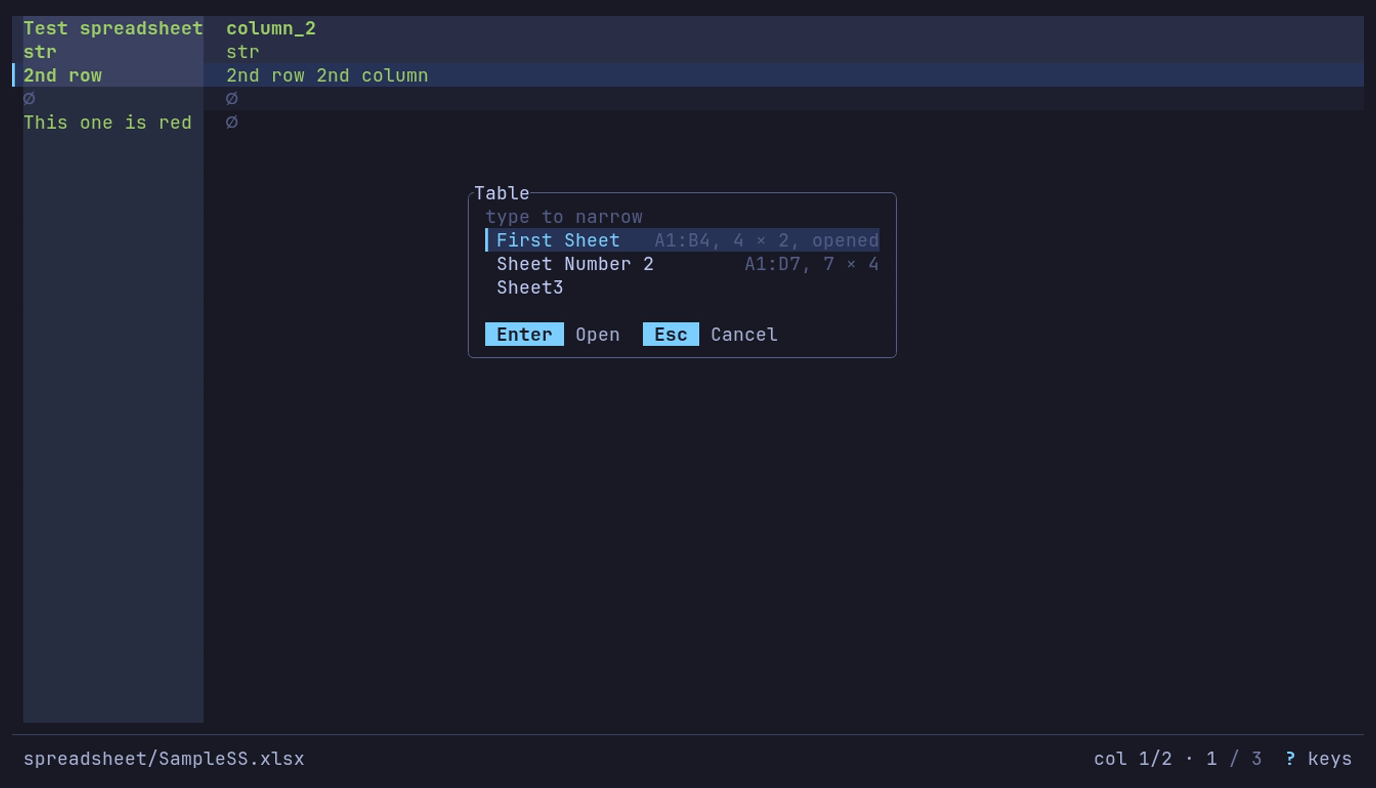
What else is in the workbook? T: three worksheets, each with its range and size; Enter opens one.
Databases and arrays
SQLite databases and NumPy arrays are read where they are, a page of rows at a time, and a file of several tables lists them like a directory.
SQLite
make_shop_db.py
import sqlite3

db = sqlite3.connect("shop.db")
db.execute("CREATE TABLE orders (id INTEGER PRIMARY KEY, customer TEXT, amount REAL)")
db.execute("CREATE TABLE customers (name TEXT, city TEXT)")
db.executemany("INSERT INTO orders (customer, amount) VALUES (?, ?)", [("ana", 9.5), ("bo", 3.25)])
db.executemany("INSERT INTO customers VALUES (?, ?)", [("ana", "Lima"), ("bo", "Oslo")])
db.commit()
db.close()
python3 make_shop_db.py
datui shop.db --table orders
datui shop.db/orders
cat shop.db | datui --table orders
Continuing from above, a database of several tables opens the home screen inside it:
datui shop.db
| Extensions | .db, .sqlite, .sqlite3, .db3; any other name by its first bytes, SQLite format 3 |
| Read | lazy, in place; downloaded first from a bucket or over HTTP(S) |
--table | A table or view by name, or shop.db/orders |
| Info tab | SQLite: page size, schema and user versions, text encoding, and each table’s columns and the rows ANALYZE stored. No table is counted |
| Not read | A compressed database (shop.db.gz): decompress it first |
| The database | What happens |
|---|---|
| One table or view of its own | Opens it |
| Several | Opens the home screen inside the database: a row per table and view, like a directory of tables. Enter opens one; q comes back to the list |
| Several, downloaded or piped in | Refused with the names of its tables; --table picks one |
SQLite’s own tables (sqlite_master, sqlite_sequence, the sqlite_stat
tables, a full-text index’s shadow tables) are hidden until
Ctrl+A; --table opens them by name. The home screen
labels a database with its tables (3 tables).
T at the table lists the database’s tables and views, each with its
kind, columns and the rows ANALYZE stored, and opens another; so does
Enter on a table of the SQLite tab. Nothing is counted to list them.
A table is read in place; nothing is copied.
| How | |
|---|---|
| The rows on screen | Read from SQLite a page at a time, by the table’s rowid (or primary key), so the first rows show at once and End costs what the top does |
| Row count | SQLite’s count(*), in the background |
| Sort and filters from the sidebar | Run in SQLite as ORDER BY and WHERE, so an index on the column serves them. Ties keep the table’s order and nulls sort last, as for any other file |
| A query, analysis, Data Quality, a chart, an export | Read the columns they use from SQLite a batch at a time; what they hold is in memory, as for a JSON or Excel file. A query’s simple comparisons run in SQLite |
| Leaving the table (Ctrl+O, quit) | Stops whatever SQLite is running for it |
A view is paged by position and cannot be reversed with r in SQLite (Polars does it). A sort on a column without an index has SQLite sort the rows for each page; SQLite may use temporary files in the temp directory to do so.
Columns are typed by what they declare:
| Declared | Column |
|---|---|
INTEGER, INT, BIGINT, anything with INT | i64 |
REAL, FLOAT, DOUBLE | f64 |
TEXT, VARCHAR(n), CLOB | str |
BLOB | binary |
nothing, NUMERIC, DECIMAL, BOOLEAN, DATE | by the values in the first 1,000 rows: whole numbers i64, numbers f64, blobs binary, text str |
SQLite lets a column hold values of any type. A column whose first 1,000 rows
hold values of several types is read as text, numbers as SQLite writes them and
blobs as X'0A1B'. After the open, one pass over the table checks the rest: a
value further on that is not a number, in a number column, reads as null, and
the Info panel’s Notes tab says how many. Dates stay text, as SQLite stores
them.
The database is only read:
| Opened | Read only, with query_only and defensive mode. Extensions cannot be loaded, and reading a table runs no trigger |
A WAL database with a -wal file | Read through it, so what another program has committed is seen. SQLite creates the -shm index beside it if it is missing |
A WAL database without a -wal file | Read as the file stands (SQLite’s immutable), writing nothing and taking no lock. A program that starts writing it during the read can make the read fail or come out wrong |
A -wal without its -shm, in a directory datui cannot write to | An error: read without the WAL, it would lack what was committed there |
A -journal left by a program that stopped mid-write | An error: datui does not roll it back. Opening the database once with the sqlite3 tool does |
| A program writing the database meanwhile | datui waits up to 2 seconds for its lock. Without WAL, the program cannot commit while datui reads, which is a page at a time except for a whole-table read |
| Not a SQLite database, or damaged | An error |
NumPy
make_arrays.py writes prices.npy and run.npz:
import ctypes
import zipfile


class Preamble(ctypes.LittleEndianStructure):
    _layout_ = "ms"
    _pack_ = 1  # no padding between fields
    _fields_ = [
        ("magic", ctypes.c_char * 6),
        ("major", ctypes.c_uint8),
        ("minor", ctypes.c_uint8),
        ("header_len", ctypes.c_uint16),
    ]


def npy(descr, shape, values):
    """An .npy file: the preamble, a header padded to 64 bytes, then the values."""
    header = repr({"descr": descr, "fortran_order": False, "shape": shape}).encode()
    header += b" " * (63 - (10 + len(header)) % 64) + b"\n"
    return bytes(Preamble(b"\x93NUMPY", 1, 0, len(header))) + header + bytes(values)


def f8(*values):  # little-endian float64, as "<f8" says
    return (ctypes.c_double.__ctype_le__ * len(values))(*values)


def f4(*values):  # little-endian float32, "<f4"
    return (ctypes.c_float.__ctype_le__ * len(values))(*values)


with open("prices.npy", "wb") as f:
    f.write(npy("<f8", (3,), f8(1.5, 2.5, 4.0)))
with zipfile.ZipFile("run.npz", "w") as z:
    z.writestr("weights.npy", npy("<f4", (2, 2), f4(1, 2, 3, 4)))
    z.writestr("bias.npy", npy("<f4", (2,), f4(0.5, -0.5)))
python3 make_arrays.py
datui prices.npy
datui run.npz --table weights
datui run.npz/weights
| Extensions | .npy, .npz; any other name by its first bytes, \x93NUMPY |
| Read | lazy, from a map of the file. An array saved with np.savez_compressed is decompressed to the temp directory first, and removed when the dataset closes |
--table | An array of an .npz archive by name, or run.npz/weights |
| Several arrays | datui run.npz opens the home screen inside the archive, a row per array in the order saved. Downloaded or piped in, it is refused with the arrays’ names |
| Info tab | NumPy: shape, type, order and format version, and each field’s type and offset |
| The array | Columns |
|---|---|
| 1-D | One, named for the file (prices.npy is prices) or the archive’s array |
| 2-D | One per index, 0 to n-1; more than 1,024 make one Array column, values |
Structured ([('ts', '<u8'), ('px', '<f8')]) | One per field; a nested field is outer.inner, a subarray field an Array column |
| 0-D | One row |
| 3-D or more | An error that gives the shape |
dtype | Column |
|---|---|
b1 | bool |
i1 to i8, u1 to u8 | The integer of that width |
f2, f4 | f32 |
f8 | f64 |
c8, c16 | An Array of two floats: real, imaginary |
S | str, NUL padding trimmed |
U | str, from UTF-32 |
V | binary |
M8[ns], M8[us], M8[ms] | datetime in that unit |
M8[s], M8[m], M8[h] | datetime[ms] |
M8[D] | date |
m8[...] | duration, by the same units |
M8 and m8 in months, years or finer than ns | i64, the count as stored |
O | An error: Python objects are pickled, and datui does not unpickle |
-
NaTis null. -
Big-endian (
>i4) and little-endian fields mix in one array. -
Fortran (column-major) order reads the same as C order.
-
Padding fields (
align=True) are left out, and fields at offsets (offsets,itemsize) are read where they are. -
A file shorter than its shape says shows the rows it holds; the Notes tab says so.
-
A file named without
.npyis known by its first bytes,\x93NUMPY. -
NaTis null. -
Big-endian (
>i4) and little-endian fields mix in one array. -
Fortran (column-major) order reads the same as C order.
-
Padding fields (
align=True) are left out, and fields at offsets (offsets,itemsize) are read where they are. -
A file shorter than its shape says shows the rows it holds; the Notes tab says so.
Model files
A SafeTensors or GGUF file opens as a table of its tensors, one row each, read from its header without reading the weights.
make_tiny_safetensors.py
import ctypes
import json

# One tensor, `w`: 2 x 2 float32, at bytes 0 to 16 of the data.
header = json.dumps({"w": {"dtype": "F32", "shape": [2, 2], "data_offsets": [0, 16]}}).encode()
weights = (ctypes.c_float.__ctype_le__ * 4)(1, 2, 3, 4)

with open("tiny.safetensors", "wb") as f:
    f.write(len(header).to_bytes(8, "little"))  # the header's length, u64
    f.write(header)
    f.write(bytes(weights))
python3 make_tiny_safetensors.py
datui tiny.safetensors
datui https://huggingface.co/TheBloke/TinyLlama-1.1B-Chat-v1.0-GGUF/resolve/main/tinyllama-1.1b-chat-v1.0.Q2_K.gguf
datui https://huggingface.co/Qwen/Qwen2.5-7B/resolve/main/model.safetensors.index.json
| SafeTensors | GGUF | |
|---|---|---|
| Extensions | .safetensors, model.safetensors.index.json | .gguf |
| Columns | name, dtype, shape, params, bytes, offset_start, offset_end | name, type, shape, params, bytes, offset |
| Rows | In data order | In file order |
| Read | in memory, from the header; never asked about | the same |
| Info tab | Model | Model |
shapeis a list;paramsis its product.- GGUF
typeis the quantization type (Q4_K,Q8_0,F16).bytesis null for a type datui does not know the size of.shapelists dimensions as the file does, fastest-varying first. - Offsets are as the file records them, from the start of the tensor data.
- A sharded checkpoint opens from its
model.safetensors.index.jsonor its directory, with afilecolumn first. Several model files named together open the same way. - A
.binor a file with no extension opens when its first bytes say SafeTensors or GGUF. GGUF versions 2 and 3 are read, in either byte order. - A header that is corrupt, or a tensor that reaches past the end of the file (a download cut short), is refused with an error.
The Model tab (i) gives the parameter count, the size, the dtype or
quantization mix, and the header’s metadata (__metadata__, or GGUF’s key and
value pairs); see Info panel.
Remote model files
Only the headers are fetched, with ranged requests; the weights are never downloaded.
| Source | Read |
|---|---|
| An HTTP(S) URL, or an S3, GCS or Azure object | SafeTensors: the first 64 KiB, which holds most headers whole, then the rest of a longer one. GGUF: growing ranges until the tensor list ends |
model.safetensors.index.json | The index, then each shard’s header beside it, eight shards at a time |
| An S3, GCS or Azure prefix | Every SafeTensors or GGUF file directly under it, as a directory on disk. The listing stops at 10,000 objects; the Notes tab says when it did |
A server that sends no byte ranges gets the download question instead, which says why, and the file is downloaded whole. Shards named by an index cannot be downloaded this way, and the open says so.
Signals and logs
Recordings, captures and logs open as tables: audio, MIDI, waveforms, GPS tracks, flight and CAN logs, FIX sessions, molecule files, ELF symbol tables and the systemd journal.
| Format | Extensions | Read | --table | Info tab |
|---|---|---|---|---|
| Audio | .wav, .wave, .bwf, .rf64, .aif, .aiff, .aifc | lazy | Audio | |
| MIDI | .mid, .midi, .smf, .kar, .rmi | in memory | MIDI | |
| VCD | .vcd | converted to Arrow | VCD | |
| NMEA, GPX | .nmea, .gpx | converted to Arrow | NMEA: fixes, GGA, RMC, VTG, GSA, GSV, GLL, ZDA, sentences | GPS |
| ULog, DataFlash | .ulg; DataFlash by content | lazy | a topic, a message type | ULog, DataFlash |
| candump | by content | lazy | frames, signals, a message | CAN |
| FIX | by content | converted to Arrow | FIX | |
| SDF | .sdf, .sd | converted to Arrow | SDF | |
| ELF | .elf, .axf | in memory | symbols, sections | ELF |
| systemd journal | by content | in memory | Journal |
How each format is read says what lazy scan,
converted to Arrow and in memory mean. A file of several tables opens the home
screen inside it, a row per table; downloaded or piped in, it is refused with
the tables’ names, and --table picks one.
Audio
make_take_wav.py writes one second of a tone on the left channel:
import ctypes
import math
import wave


class Frame(ctypes.LittleEndianStructure):
    _fields_ = [("left", ctypes.c_int16), ("right", ctypes.c_int16)]


frames = b"".join(bytes(Frame(int(8000 * math.sin(i / 20)), 0)) for i in range(48000))
with wave.open("take.wav", "wb") as w:
    w.setnchannels(2)
    w.setsampwidth(2)  # bytes a sample
    w.setframerate(48000)
    w.writeframes(frames)
python3 make_take_wav.py
datui take.wav
datui -c read.audio_float=true take.wav
An uncompressed audio file opens as a table with one row per sample frame:
frame, seconds from the start, and one column per channel.
The file is mapped and only the frames on screen are decoded, so a recording
of many gigabytes opens at once and scrolls to any point as fast as to the
first. The row count comes from the file’s size.
| Containers | Samples |
|---|---|
WAV, Broadcast WAV, RF64/BW64, WAVE_FORMAT_EXTENSIBLE | 8-, 16-, 24- and 32-bit integer; 32- and 64-bit float |
AIFF, AIFF-C (NONE, twos, sowt, fl32, fl64, in24, in32) | The same |
- Channels are
ch1,ch2, … An extensible file’s channel mask names them instead:L,R,C,LFE,BL,BR,SL,SR, and so on. - Integer samples stay integer: 24-bit is
i32, and 8-bit WAV, stored unsigned, is shown signed.[read] audio_floatshows them asf32in [-1, 1]; float samples are never rescaled. - A data size of 0 or a placeholder, as a recorder writes until it stops, is read as everything to the end of the file. A size past the end of the file is cut to what the file holds, and the Audio tab says so. A plain WAV past 4 GiB, whose 32-bit data size wrapped, is read to its whole length.
- Files are recognized by their first bytes too, so a WAV or AIFF with any name opens.
- Compressed audio (A-law, mu-law, ADPCM, MP3, FLAC) is refused with its name.
Press i for the Audio tab: the format,
sample rate, length, the Broadcast WAV (bext), iXML and LIST INFO
fields, and the cue /MARK markers with their labels.
A line chart of a long recording draws each step’s lowest and highest sample (Charting), and a full Data Quality run reports clipping, runs of zeros and DC offset.
MIDI
printf 'MThd\0\0\0\6\0\0\0\1\1\340MTrk\0\0\0\26\0\220\74\100\203\140\200\74\0\0\220\100\100\203\140\200\100\0\0\377\57\0' > song.mid
datui song.mid
A Standard MIDI File opens as a table with one row per event, track by track in file order.
| Column | Holds |
|---|---|
track | The track, from 1 |
tick | Ticks from the start of the track |
seconds | Seconds from the start, through the tempo map |
kind | note_on, note_off, cc, program, pitch_bend, poly_aftertouch, channel_aftertouch, sysex, sysex_escape, or a meta event: tempo, time_signature, key_signature, track_name, instrument, lyric, marker, cue, text, copyright, end_of_track, …; or a system message a file should not hold but some do: clock, start, stop, song_position, … |
channel | 1-16, as a sequencer numbers them |
note, note_name | The note number and its name, middle C (60) as C4 |
velocity | For note_on and note_off |
controller | The controller number of a cc |
value | The cc value, program, pressure, pitch bend (-8192 to 8191), tempo in microseconds per quarter, key signature in sharps (negative for flats), a sysex’s length, or a system message’s data |
length | On a note_on, the seconds until its note_off; null for a note that never ends |
text | Meta text, tempo as 120 bpm, 6/8, D major, or sysex bytes in hex |
- A
note_onat velocity 0 is anote_off, as the specification says. - Formats 0 and 1 share one tempo map, from tempo events in any track; each
format 2 track keeps its own. With SMPTE timing,
secondsfollows the frame rate and tempo events do not change it. - Meta text is read as UTF-8, or as Latin-1 when it is not.
- Files are recognized by their first bytes too, so a MIDI file with any name
opens, and so does one in a RIFF MIDI (
.rmi) wrapper. - A track that runs past the end of the file, an event cut short, or fewer tracks than the header says is refused with an error. Of a directory, a file that cannot be read is left out; the Notes tab says so and the MIDI tab lists each one with why.
channel,note,velocityandcontrollerareu8,trackisu16, andvalueisi32.- A file over 64 MiB is refused, or left out of a directory. An open of more than 10 million events in all is refused.
- A real-time byte in a track keeps running status, as on the wire; a sysex, meta or system common message cancels it, as the specification says.
Press i for the MIDI tab: format, timing, length, tempo, meter, key and each track’s name, events, notes and channels. Notes that never end are counted on the Notes tab.
VCD
counter.vcd
$timescale 1 ns $end
$scope module tb $end
$var wire 1 ! clk $end
$var wire 4 " count [3:0] $end
$upscope $end
$enddefinitions $end
#0
0!
b0000 "
#5
1!
b0001 "
#10
0!
#15
1!
b0010 "
datui counter.vcd
A VCD file from an HDL simulator or logic analyzer opens as a long table, one row per value change of each signal, read once into a temporary Arrow IPC file.
| Column | Holds |
|---|---|
time | The change’s time: a Duration in nanoseconds for a timescale of 1 ns or coarser; for ps and fs, an integer count of them (a Notes line says which) |
signal | The dotted scope path and name with its bit range: tb.dut.count[3:0] |
value | The value as written, a short vector padded to the signal’s width (b1 of a 4-bit signal is 0001; bx is xxxx); a real’s text |
int | The value as an integer, when it is binary with no x or z and fits 64 bits |
width | The signal’s width from its $var |
- A file with another name opens when it starts with a VCD section, such as
$dateor$timescale. - An identifier declared at two paths (an alias) gives a row for each.
- Press i for the VCD tab: timescale, date, version, comments, the number of value changes and their time span, and each signal’s type, width and identifier. The Notes tab counts tokens that are not VCD and changes to undeclared identifiers.
- A token is at most 1 MiB, and a header holds at most 1,048,576 signals, 256 scopes deep.
The wide table, one row per time and one column per signal, each carried
forward from its last change, is this SQL query on counter.vcd above; for
another dump, replace the signal names tb.clk and tb.count[3:0] and the
columns named for them. It runs on a copy shipped with the docs,
counter.vcd:
SELECT time,
       MAX(clk) OVER (PARTITION BY clk_n) AS clk,
       MAX(count) OVER (PARTITION BY count_n) AS count
FROM (
  SELECT *, COUNT(clk) OVER (ORDER BY time) AS clk_n,
            COUNT(count) OVER (ORDER BY time) AS count_n
  FROM (
    SELECT time,
           MAX(CASE WHEN signal = 'tb.clk' THEN value END) AS clk,
           MAX(CASE WHEN signal = 'tb.count[3:0]' THEN value END) AS count
    FROM df GROUP BY time
  )
)
ORDER BY time
The inner GROUP BY is the pivot: one row per time, null where a signal did not
change. Each COUNT(...) OVER numbers the runs between changes, and MAX over a
run fills it with the change that starts it. Without the fill,
Pivot (p) with Index time, Columns signal,
Values value and Aggregate last gives the same table with nulls between
changes.
GPS logs
make_drive_nmea.py writes three seconds of fixes, each an RMC and a GGA
sentence:
def sentence(body):
    """$BODY*CS, where CS is the XOR of the body's bytes, in hex."""
    checksum = 0
    for c in body:
        checksum ^= ord(c)
    return f"${body}*{checksum:02X}\n"


with open("drive.nmea", "w") as f:
    for second in range(3):
        t = f"1200{second:02d}.00"
        f.write(sentence(f"GPRMC,{t},A,4042.6142,N,07400.4168,W,10.5,90.0,010324,,,A"))
        f.write(sentence(f"GPGGA,{t},4042.6142,N,07400.4168,W,1,08,0.9,10.0,M,-34.0,M,,"))
ride.gpx
<?xml version="1.0"?>
<gpx version="1.1" creator="docs"><trk><name>ride</name><trkseg>
<trkpt lat="40.71" lon="-74.00"><ele>10</ele><time>2024-03-01T12:00:00Z</time></trkpt>
<trkpt lat="40.72" lon="-74.01"><ele>12</ele><time>2024-03-01T12:00:05Z</time></trkpt>
</trkseg></trk></gpx>
python3 make_drive_nmea.py
datui drive.nmea
datui --table GGA drive.nmea
datui ride.gpx
An NMEA 0183 log or a GPX file is read once into a temporary Arrow IPC file,
then scanned; memory stays at one batch of rows however long the log. Several logs, named together or as a directory of
them, open as one table with a file column first; a column one file lacks is
null in its rows, and the Notes tab counts across the files. A file with another name, such as capture.log,
opens when its first complete line is an NMEA sentence or its first element is <gpx.
.nmea.gz and the other compressions are read as they are decompressed.
NMEA opens as one row per fix, merged from each second’s GGA, RMC, VTG and GLL sentences:
| Column | Holds |
|---|---|
time | UTC. NMEA dates only RMC and ZDA; every other time of day takes the last date, a day on when it passes midnight |
lat, lon | Decimal degrees, negative south and west |
alt | Meters above mean sea level (GGA) |
speed, course | Meters per second; degrees true |
sats, hdop | Satellites used and horizontal dilution (GGA) |
fix | none, gps, dgps, pps, rtk, rtk float, estimated, manual or simulated |
gap | Seconds since the fix before; see the gap column |
checksum_ok | Every sentence of the fix matched its checksum; null when none had one |
--table opens one sentence type instead, with all its fields: GGA, RMC,
VTG, GSA, GSV (a row per satellite), GLL, ZDA, or sentences (every
sentence as written, with its line number, vendor sentences included).
On the home screen, Enter on a log opens its fixes and → lists
these tables (drive.nmea/GSV). The Info panel’s GPS tab
gives the time span, the bounds and the count of each sentence type.
Lines that are not NMEA are skipped; the Info panel’s Notes tab counts them,
and the sentences that fail their checksum. When the log has sentence types the
table on screen does not show, such as GSV beside the fixes, the Schema tab
names the other tables with how many sentences each has.
A time of day is dated by the last RMC or ZDA before it. Rows read before the
first one are dated back from it when it comes within the first 65,536 rows;
when it comes later, those rows keep a null time. A log with neither sentence
has no dates, and time is null throughout.
GPX opens as one row per trkpt, rtept and wpt:
| Column | Holds |
|---|---|
time, lat, lon, ele | The point’s time (UTC), position and elevation |
kind | track, route or waypoint |
track, track_name | The track or route, numbered from 0 in each kind, and its name |
segment | The track segment, numbered from 0 in its track |
gap | Seconds since the point before in the same track segment; see the gap column |
| the rest | The point’s other fields (name, sym, sat, hdop…) and each leaf of its <extensions> by its name without the namespace (hr, cad, atemp), as numbers when every value is one |
A file cut off mid-element opens with the points before the cut, and says so in Notes.
The gap column
gap is not in the file: datui adds it so a dropout can be sorted and checked.
It is the seconds from the row before (the fix before, or the point before in
the same GPX track segment) to this one.
gap is | When |
|---|---|
| null | The first fix or point; one without a time |
| null | Time steps back more than 5 seconds: a receiver reset, or logs joined together |
| null | NMEA not yet dated and more than an hour passed: whole days could be hidden in it |
| negative, down to -5 | Time steps back a little, as a receiver’s clock settles |
| across midnight | An undated NMEA time earlier than the one before, within the hour, is taken as past midnight |
To look at a track:
| To see | Do |
|---|---|
| A rough map | Chart, XY, Scatter, X axis lon, Y series lat |
| Dropouts | Sort by gap, largest first; or in Data Quality declare a range for gap, such as at most 2, and each dropout is Out of range |
| Speed spikes | The same for speed; Analysis also counts its outliers |
Flight logs
Replace <LOG> with a PX4 ULog or ArduPilot DataFlash log:
datui <LOG>.ulg
datui <LOG>.ulg --table vehicle_status
datui <LOG>.BIN/GPS
Both formats describe their own messages; no format spec is needed. One pass indexes the log, then each table is decoded from a map of the file where it is shown. q at a table comes back to the log’s list of tables without reading the log again.
PX4 ULog (.ulg) | |
|---|---|
| A table per topic | Named for the topic; sensor_accel.0, sensor_accel.1 when it has several instances. timestamp is a duration since boot; nested types are outer.inner, outer[0].inner for an array of them; a number array is an Array column, a char array text. _padding fields are left out |
logged_messages | timestamp, level (error, warning, info, …), tag, message |
parameters | name, type, value, and the timestamp of a change made in flight (null for the value the log started with) |
| Info tab | The version, dropouts, info messages (sys_name, ver_hw, …) and each parameter’s starting value |
ArduPilot DataFlash (.bin) | |
|---|---|
| A table per message type | Named for the type (GPS, ATT, PARM, …), a column per label, typed by its format character |
TimeUS, TimeMS | A duration since boot |
c, C, e, E | Hundredths, as a float |
L | Degrees (latitude, longitude), as a float |
a | An Array of 32 i16 |
| Units | From FMTU and UNIT, on the Info panel’s Schema tab; an integer field FMTU gives a multiplier (MULT) is scaled by it |
| Info tab | Message types and their record counts, formats and lengths |
- A ULog file is known by its first bytes. A DataFlash log is known by its first
record, an
FMTthat definesFMT, whatever it is called. - A damaged stretch is passed over to the next ULog sync marker or DataFlash record header; a log cut off mid-message keeps what it holds. The Notes tab says how many bytes were passed over.
- ULog appended data (written after a crash) is read with the rest.
- At most 67,108,864 messages are indexed in one log.
CAN logs
candump.log
(1706689000.100000) can0 123#A00F000000000000
(1706689000.200000) can0 123#B80B000000000000
(1706689000.300000) can0 456#01
vehicle.dbc
VERSION ""

BO_ 291 Engine: 8 ECU
 SG_ rpm : 0|16@1+ (0.25,0) [0|16383.75] "rpm" Vector__XXX
datui candump.log
datui candump.log --dict vehicle.dbc --table Engine
One pass indexes the log, then each frame is read from its line where it is
shown. A candump log opens by its content, whatever it is called:
(1706689000.123456) can0 123#DEADBEEF as candump -l and -L write it (##
for CAN FD, #R for a remote request), or can0 123 [4] DE AD BE EF as
candump prints it, with or without a timestamp in front.
frames | |
|---|---|
ts | The timestamp: a datetime for wall-clock time (-l, -ta), a duration for time since the start; null when the line has none |
iface | The interface: can0, vcan0 |
id | The id in hex: three digits standard, eight extended |
ext | Whether the id is extended |
dlc | The data length code |
data | The data bytes |
fd, flags | Whether it is a CAN FD frame, and its flags (BRS, ESI) |
kind | data, remote or error |
With a dictionary that names the log’s messages, the log opens the home screen
inside it, like a directory: a table per message with frames, frames, and
signals.
| Table | Columns |
|---|---|
| A message, by its DBC name | ts and a column per signal: factor and offset applied, an integer while they keep it one; value names (VAL_) as text; a multiplexed signal null in the frames its multiplexer does not select. Units are on the Info panel’s Schema tab |
signals | One row per decoded value: ts, message, signal, value (a float) and unit, in time order |
Signals in Intel and Motorola byte order, signed and unsigned, and floats
(SIG_VALTYPE_) are read; a signal past the end of a short frame is null.
Extended multiplexing (SG_MUL_VAL_) is not; the Notes tab says so.
CAN log dictionaries
DBC dictionaries are found where format specs are: the formats
directory of the config directory, $DATUI_FORMATS_PATH, and [formats] path.
A DBC dictionary there applies to every interface. A TOML file names one for an
interface: replace <DBC_FILE> with the dictionary’s name, beside the TOML
file or a full path, and <INTERFACE> with the interface:
kind = "dbc"
file = "<DBC_FILE>"
[match]
interface = "<INTERFACE>"
They are read in that order, then --dict FILE; where two name a message of the
same id, the later one is read. Press i for the CAN tab: frames,
interfaces, the dictionaries read and the frames none of them names, and each
message’s id, frames, signals and comment.
FIX logs
session.log
2024-03-01 12:00:00.001 OUT 8=FIX.4.4|9=65|35=D|49=BUYSIDE|56=BROKER|11=ord1|55=MSFT|54=1|38=100|40=2|44=410.5|10=000|
2024-03-01 12:00:00.020 IN 8=FIX.4.4|9=70|35=8|49=BROKER|56=BUYSIDE|11=ord1|55=MSFT|54=1|150=0|39=0|14=0|10=000|
datui session.log
A log of FIX tag=value messages, delimited by SOH, | or ^A, opens as one row
per message, read once into a temporary Arrow IPC file. A file of any name opens
when a line in its first 4 KiB holds 8=FIX, a delimiter and 9=; messages may
be one per line or back to back.
| Column | Holds |
|---|---|
prefix | The text before 8=FIX on the line, such as a log timestamp; only when a line has one |
direction | in or out, from a word in the prefix: IN, OUT, <, >, RECV, SENT and the like |
session | A session in the prefix: FIX.4.4:SENDER->TARGET |
| a column per tag | Named from the dictionary (35 is MsgType, 55 is Symbol), in the order the tags first appear; a tag no dictionary names keeps its number |
<name>_code | Beside an enumerated tag: the code, where the tag’s column shows its name (54=1 is Buy) |
<name>_rest | Beside a tag repeated within a message, as a repeating group’s tags are: a list of its later values; the tag’s column keeps the first |
body_length_ok | Tag 9 matches the message’s length; null for a message cut short of tag 10 |
checksum_ok | Tag 10 matches the message’s checksum; null for a message cut short |
- Prices, quantities and amounts are numbers, integers and sequence numbers
i64, UTC timestamps (52,60) datetimes, dates dates andY/Nbooleans, when every value of the tag reads as one; otherwise text. - A length-tagged value (
95/96RawData,90/91,93/89,212/213XmlData and the encoded text fields) is read by its length, so it may hold the delimiter or a newline. - A bad message stays: its checks are false, and the Notes tab counts them, the lines with no message, and messages cut short.
- A message is at most 1 MiB and holds at most 4,096 fields; at most 4,096 tags become columns.
- Press i for the FIX tab: messages per BeginString, the dictionaries read with the log, and each column’s tag number and the names the dictionaries give it.
- Binary FIX encodings (SBE, FAST) are not read.
FIX log dictionaries
The built-in dictionary is FIX 4.2, 4.4 and 5.0 SP2 together, the newest
version’s names winning. Venues and brokers add their own tags (5000-9999 and
10000 up), so dictionaries can be added: on the
format search path, or with
--dict FILE.
| Form | |
|---|---|
QuickFIX XML (.xml) | A QuickFIX or QuickFIX/J data dictionary, read as it is: its fields, types and enums. It applies to the messages of its version’s BeginString |
TOML (.toml, kind = "fix") | As below |
Continuing from the FIX example above, a TOML dictionary for the broker’s messages, checked against the log:
broker.toml
name = "acme.fix.broker-x"
kind = "fix"
match = { sender = "BROKER", begin_string = "FIX.4.4" }
tags = { 9001 = "AlgoName", 9002 = { name = "Urgency", type = "int", enum = { 1 = "Low", 2 = "High" } } }
datui formats check ./broker.toml session.log
datui --dict broker.toml session.log
| Key | |
|---|---|
name | A namespaced name, such as acme.fix.broker-x |
match | Optional. sender (49), target (56), begin_string (8): the dictionary applies only to messages with these values |
tags | Tag number to a name, or to name, type (int, float, price, qty, string, char, timestamp, date, bool, length, data), enum (code to name) and, for a length tag, data (the tag it sizes) |
The built-in dictionary comes first, then each matching dictionary on the search
path in order, then --dict; a later one renames a tag or adds to its enums.
One log can hold two counterparties that name tag 9001 differently: each
message is read with its own, the column falls back to the tag number, and the
FIX tab shows both names. datui formats lists dictionaries beside the
format specs, and datui formats check NAME [LOG] checks one, and with a log
says how many messages it matches and which of its tags they hold.
The built-in dictionary is generated from QuickFIX’s data dictionaries. This product includes software developed by quickfixengine.org (http://www.quickfixengine.org/).
SDF
datui https://raw.githubusercontent.com/rdkit/rdkit/bfc98b529561d11e4a20a64f272c5f6900393cb2/Docs/Book/data/solubility.train.sdf
An SDF (structure-data) file of molecules, as PubChem, ChEMBL and screening
libraries publish them, opens as one row per record ($$$$), read once into a
temporary Arrow IPC file. The atom and bond blocks are passed over, never held.
| Column | Holds |
|---|---|
name | The molecule’s name, the record’s first line; null when blank |
atoms, bonds | From the counts line, or a V3000 COUNTS line |
| a column per data item | Each > <FIELD> (also > <FIELD>, > <FIELD> (ID), > 25 <FIELD>, > DT12), in the order first seen; null in a record without it. Integers or floats when every value is one, text otherwise |
- A value of several lines keeps them, joined by newlines.
- A record that names a field twice keeps the first; the Notes tab counts the rest.
- A line or value is at most 1 MiB, and a file has at most 4,096 fields.
- Press i for the SDF tab: the record count, and each field’s type and how many records hold it.
- Aqueous solubility (SDF) in the home screen’s
example datasets is one to try: 1,025
molecules with
SOLas a float andSOL_classificationas text. Sort bySOL, or filterSOL_classificationto(C) high.
ELF
On Linux, /bin/sh is an ELF file:
datui /bin/sh
datui /bin/sh --table sections
On the home screen, Enter on an ELF file opens its symbols and → lists both tables.
| Column | Holds |
|---|---|
name | The symbol’s name; a Rust name demangled, without its hash. C++ names stay mangled |
addr | Its address (u64) |
size | Its size in bytes |
kind | func, object, section, file, common, tls, ifunc or notype |
bind | local, global, weak or unique |
section | The section it is in; UND for undefined, ABS for absolute, COMMON |
region | flash when its section is loaded and not written (code, constants), ram when it is written (.data, .bss); null for what is not loaded |
The sections table has name, addr, size, flags (as readelf writes
them: W write, A alloc, X execute, …), kind and region.
- Sort by
sizeand group bysectionorregionto see what fills flash and RAM. - The symbol table is
.symtab, or.dynsymfor a stripped library. .elfand.axffiles open by name; any file that starts with\x7fELFopens too when named on the command line.- At most 10 million symbols are read; the Notes tab says how many more there are.
Press i for the ELF tab: class, machine, type, entry point, the bytes in flash and in RAM, and each section’s address, size and flags.
systemd journal
journalctl -o json output is read as the journal, from a pipe or a file:
journalctl -o json -n 1000 | datui
jd() { journalctl -o json "$@" | datui; }
jd -n 100 -p info
Live, as entries are written:
journalctl -o json -f | datui -f -
| Column | What |
|---|---|
time | __REALTIME_TIMESTAMP as a UTC datetime |
level | PRIORITY as emerg, alert, crit, err, warning, notice, info, debug, ordered by severity: select where level <= "err" keeps errors and worse, and a sort puts emerg first |
_SYSTEMD_UNIT | The unit, or SYSLOG_IDENTIFIER when no entry has one |
_PID, MESSAGE | Then the rest of the fields as they came, and bookkeeping (__CURSOR, __SEQNUM, _BOOT_ID, …) last |
- Every field is a column, one first seen late in the journal included. Values
stay text as journalctl writes them;
PRIORITYis kept besidelevel. - A
MESSAGEjournalctl wrote as bytes (not UTF-8, or with control characters) is shown as text, lossily; the Info panel says how many. - The Info panel’s Journal tab gives the time span, the entries, and the units, boots and hosts, with the entries per unit.
- From a pipe, the entries show as they arrive, as for any pipe; a field first seen after the table opened joins as a column when the stream ends, and the Journal tab is read again over every entry.
- A journal file is read whole into memory. Narrow a large journal with
--since,-uor-b. - Copy as Python reads a journal file with
pl.scan_ndjsonand derives the same columns.
Format specs
A format spec is a TOML file that describes a binary format, or a family of delimited text files, so datui opens it as a table.
l2feed.toml
name = "acme.l2feed"
description = "Level 2 capture"
match = { glob = ["*.l2"], magic = "L2FD" }
endian = "le"

[header]
fields = [{ name = "magic", type = "str", size = 4 }, { name = "count", type = "u1" }]

[records]
count = "header.count"
fields = [
  { name = "ts",     type = "u8", time = "ns" },
  { name = "symbol", type = "str", size = 8 },
  { name = "side",   type = "u1", enum = { 1 = "BUY", 2 = "SELL" } },
  { name = "price",  type = "u4", scale = 4, null = "max" },
]
make_day_l2.py writes day.l2, a file in that format:
import ctypes


class Header(ctypes.LittleEndianStructure):
    _layout_ = "ms"
    _pack_ = 1  # no padding between fields
    _fields_ = [
        ("magic", ctypes.c_char * 4),
        ("count", ctypes.c_uint8),
    ]


class Record(ctypes.LittleEndianStructure):
    _layout_ = "ms"
    _pack_ = 1
    _fields_ = [
        ("ts", ctypes.c_uint64),  # nanoseconds since 1970
        ("symbol", ctypes.c_char * 8),
        ("side", ctypes.c_uint8),  # 1 BUY, 2 SELL
        ("price", ctypes.c_uint32),  # in ten-thousandths; the largest value is null
    ]


records = [
    Record(1709294400000000000, b"MSFT", 1, 4105000),
    Record(1709294400000500000, b"AAPL", 2, 0xFFFFFFFF),
]
with open("day.l2", "wb") as f:
    f.write(bytes(Header(b"L2FD", len(records))))
    for record in records:
        f.write(bytes(record))
python3 make_day_l2.py
datui formats check ./l2feed.toml day.l2
datui --format ./l2feed.toml day.l2
mkdir -p formats
cp l2feed.toml formats/
DATUI_FORMATS_PATH=formats datui day.l2
DATUI_FORMATS_PATH=formats datui formats
| Command | Does |
|---|---|
datui formats check ./l2feed.toml day.l2 | Checks the spec and prints the file’s header and first rows |
datui --format ./l2feed.toml day.l2 | Reads the file with that spec file |
datui --format acme.l2feed day.l2 | Reads it with the spec of that name, from the search path |
datui day.l2 | Reads it with the spec whose match it fits, from the search path |
datui formats | Lists the specs and dictionaries on the search path |
A spec reads fixed-size records, records that carry their length, several
message types in one stream, or compressed blocks; a kind = "delimited" spec
reads CSV-like text with lines above its header. Specs are
data: no scripts or expressions, and every size read from a file is bounded.
--format also takes a spec’s http(s)://, s3://, gs:// or az:// URL,
fetched once as the open starts; a spec file is at most 1 MiB.
A spec
l2feed.toml above is a whole spec.
Its table has the columns ts (a datetime), symbol, side and price (a
decimal with four places, null where the field holds its largest value), one
row per record. Format spec reference lists
every field type and key.
| Key | What it says |
|---|---|
name | The format’s name, namespaced: acme.l2feed. --format takes it |
description | Shown by datui formats and the Documentation view |
documentation | An https:// link to the format’s own documentation, for the Documentation view |
match | Which files are this format: glob (a pattern or a list), magic (a string or a list of bytes) at magic_offset (default 0), where (header values) |
endian | le (default), be, or auto: big-endian when the magic (at least two bytes) reads reversed. For fields without their own suffix |
layout | rows (default): one file of records. columns: a directory with one file per field |
[header] fields | Fields read once from the start of the file. Later parts refer to them |
[header] size | The header’s size when it is more than its fields; a number or a header field |
[records] fields | The fields of one record, in order |
[records] size | The record’s size, at least the fields’ sum (the default); the rest is skipped |
[records] count | How many records there are, such as "header.count" or "footer.n" |
[records] framing | fixed (default), length_prefixed, variant or sync: see records of different sizes |
[records] ring | A ring buffer of fixed records: the oldest record’s index, such as "header.write_idx"; rows start there and wrap |
[records] checksum | A checksum in each record: see checks |
[[variants]] | Record layouts a type field picks: see variants |
[footer] | Fields at the end of the file: see footer |
[blocks] | Records in blocks, each compressed on its own: see blocks |
[sections.NAME] | A part of the file, offset and size from the header, that string_at fields point into |
[capture] | Records in the UDP payloads of a pcap or pcapng capture: see captures |
[files] | A directory tree of the format’s files as one table: see a tree of files |
Where specs live
Datui reads every *.toml in these places, in order. The first spec of each name
wins, as with PATH.
| Place | |
|---|---|
~/.config/datui/formats/ | Your own specs |
$DATUI_FORMATS_PATH | Directories separated by : (; on Windows), such as a checked-out repository of a team’s specs |
[formats] path in config | More directories. Lists add up across imported config files |
datui formats lists each spec, what it matches (magic L2FD · version 3 · glob *.l2, or no match), the file it came from, any copy of the same name it
overrides, and the files that could not be read, with the
line and column of each problem. The same places hold
FIX log dictionaries: QuickFIX XML files and TOML
files of kind = "fix", listed after the specs.
datui formats check SPEC [FILE] checks one spec, by name or file. With a file,
it prints the warnings and the first ten rows. Given a QuickFIX dictionary, it checks
that, and with a FIX log says how many messages it matches and which of its tags
they hold. It exits non-zero on an error, so
a repository of specs can run it in CI.
Which spec reads a file
| First that applies | |
|---|---|
--format FILE: a path (it has a / or ends .toml), or an http(s)://, s3://, gs:// or az:// URL fetched once as the open starts | That spec, whatever the file is called |
--format NAME | The spec of that name |
A name datui already reads (.csv, .parquet) | Read as it is, as before, unless a delimited spec matches a .csv, .tsv or .psv |
A glob matches | That spec |
A magic matches, in a file whose bytes are no format datui reads (such as Parquet) | That spec |
A spec with match.where matches only a file whose header holds those values,
so one spec per version can share a glob and a magic. In a spec, in place of
its match line:
match = { glob = "*.l2", magic = "L2FD", where = { "header.version" = 3 } }
When two specs match the same way, the first on the search path reads the file.
The bar shows 2 formats match, and the Notes tab names the others. A file no
spec matches opens as it does without specs; a local file no reader takes
either opens in the hex view, where B reads it with a
spec and r lines the bytes up in records while you write one.
T on a file of several record types lists the whole file, then each
type with its column count, and opens the one picked (day.itch/add), clearing
the query, filters and sort.
b on the table picks another spec and reads the file again with it,
clearing the query, filters and sort. The list starts with the spec the file
was read with, then the others that matched it the same way, then every other
spec on the search path for a file (or for a directory of column files).
The Notes tab of i says which spec read the file and why (matched by magic L2FD · version 3), the header’s values, and any bytes left out.
The home screen and its search name a file the same way. A file whose name
says nothing (no extension, or .bin) is matched by magic and where against
the first 4 KiB the listing reads from it anyway, up to 256 files a directory;
nothing more is read. Its row reads the spec’s name, and its details:
| Field | Says |
|---|---|
kind | acme.l2feed file |
spec | The spec’s file, cut in the middle to fit: ~/…/formats/l2feed.toml |
match | What named the file, a chip per condition: [magic L2FD] [version 3] when the magic and the header did, [glob *.l2] when the glob did |
schema | 3 columns (spec) and each column’s type, when the spec alone says them (fixed records, no size from the header); otherwise on open |
records | For a spec with variants: 2 types (spec) and each record type’s column count (add 5 · cancel 3). → lists the record types |
A chip with several values ([glob *.l2 *.lvl2]) takes any of them. The
listing names a file by its glob without reading it, so a glob-named row shows
no where values; the open still checks them. Chips are drawn without brackets
where the header tint shows. Text values are quoted where it does not
([kind "A"]), and a magic that is not text is hex (7f 45 4c 46).
Delimited text
Loggers and instruments write a metadata line and a units line above a padded
header. A spec of kind = "delimited" holds the CSV options
for such a family of files, so they open with no flags: from the command line,
from the home screen, compressed, or as a directory.
instrument.toml
name = "acme.instrument-log"
kind = "delimited"
match = { magic = "#device_info" }
comment = "#"
skip_initial_space = true
header_rows = { name = 3, unit = 2 }
metadata_line = 1

[columns]
time = { from = ["Lcl Date", "Lcl Time", "UTCOfst"], as = "datetime" }
bus1volts = { description = "Main bus voltage" }
flight.csv
#device_info, log_version="1.03", model="Unit 7, rev B", serial="123"
#yyyy-mm-dd, hh:mm:ss, hh:mm, degrees, volts, deg F
  Lcl Date, Lcl Time, UTCOfst,     Latitude, bus1volts, T1 Temp
          ,         ,        ,             ,      25.1,   187.2
2024-03-01, 10:00:00,  -05:00,    40.100000,      25.0,   180.0
datui formats check ./instrument.toml flight.csv
datui --format ./instrument.toml flight.csv
A delimited spec takes the keys of the config’s [csv],
plus match, kind, the layout keys, [columns], description and
documentation.
| Key | What it says |
|---|---|
kind | delimited. Default binary |
match | glob and magic, as for other format specs. magic compares the start of the first line |
delimiter | One character, "tab", "\t" or a code such as "0x1f", as --delimiter takes. Default ,, or the one the file’s name implies |
comment | Lines that start with it are skipped wherever they are |
skip_initial_space | true: ignore the spaces after a delimiter |
header_rows | { name = N, unit = M }: the line that names the columns and the line that gives their units. name may be a list of lines, joined with header_join (default a space). A number or a list is name alone. A header line is never data |
header_join | What joins the pieces of a name from several lines |
metadata_line | A line of key="value" or key=value pairs, separated by commas, for the Info panel. It must not be data: above the last header line, within skip_lines, or a comment line |
null_values | A value, or a list, read as null: "NA", or "COL=-999" for one column |
skip_lines | Lines to pass over before the header |
[columns] | Column types and derived columns, below, and what columns mean: description and unit |
Lines count from 1 at the top of the file. Each option the spec sets replaces
the config’s; a flag typed on the command line (--delimiter,
--comment, --skip-initial-space, --header-rows, --skip-lines)
wins over the spec. The options the spec does not set keep theirs.
datui --delimiter ';' formats check SPEC FILE reads the file as an open with
those flags would, and names the flags that override the spec. The header lines
and the metadata line are the only lines read apart from the CSV reader.
Units
A unit sits beside its column’s type on the table’s type row
(f64 · deg F), in a Unit column on the Info panel’s Schema tab, and in
chart axis titles (T1 Temp (deg F)). A filter, sort or drill keeps them, and
so does a query, pivot or melt for each column it carries unchanged, renamed or
not. A column a query computes has no unit, even under the name of one that had.
Metadata
The Info panel’s Metadata tab lists the metadata line’s pairs, under its
leading item when it has one (device_info). A line that is not pairs is shown
as it is. For a directory, the first file’s line is shown.
Column types
A column of the file takes a type, beside its unit and description:
typed.toml
name = "acme.typed-log"
kind = "delimited"
match = { magic = "#device_info" }
comment = "#"
skip_initial_space = true
header_rows = { name = 3, unit = 2 }
metadata_line = 1

[columns]
"Lcl Date" = { type = "date", format = "%Y-%m-%d" }
Latitude = { type = "f64", description = "GPS latitude" }
bus1volts = { type = "f64", unit = "V" }
typed.csv
#device_info, log_version="1.03"
#yyyy-mm-dd, degrees, volts
  Lcl Date,     Latitude, bus1volts
2024-03-01,    40.100000,      25.0
2024-03-01,             ,      n/a
datui formats check ./typed.toml typed.csv
type | Reads |
|---|---|
str | Text as it is, never typed by read.infer_types: 02134 keeps its zero |
bool | true/false or 1/0, in any case |
i8 i16 i32 i64 | Signed integers |
u8 u16 u32 u64 | Unsigned integers |
f32 f64 | Decimals. f32 keeps about 7 significant digits |
date time datetime | With format, a strftime format; without, the format is inferred |
duration | 1d, 2h30m, -1w2d |
Use i64 and f64 unless a narrower type is wanted for an export or to hold
values to a range. A value is trimmed first, and one that does not fit the type,
or is out of an integer type’s range, is null. The first time the Info panel
opens, one pass counts them, and the Notes tab says how many per column:
RPM: 2 values out of range for u8, read as null. A typed column the file does
not have is a note, not an error, since the files of a family differ. A typed
column is the same type in every file read together, and read.infer_types
leaves it alone. type beside from or as is refused: a derived column
takes its type from as. The same types, and the derived columns, are on hand
in the table: Column types.
Derived columns
as | from | Column |
|---|---|---|
datetime | a date and a time, and optionally a UTC offset such as -05:00, +0530 or -5; or one column of text | A datetime. With an offset it is in UTC |
date | one column | A date |
time | one column | A time of day |
A column of the file takes description and unit alone
(bus1volts = { description = "Main bus voltage" }), and a derived one takes
them beside from and as. They show in the
Documentation view. A unit
there is documentation only: the type row shows the units line’s.
format = "%Y-%m-%d %H:%M:%S" gives the strftime format of the text, a date
and a time joined with a space; without it the format is inferred. A value that
does not parse is null. The column goes before the first column it is made
from, which stays; one named after a column it is made from replaces that
column, and its unit. There is no expression language: anything more is a
query.
Matching
A delimited spec matches a file whose name says no format datui reads, or says
.csv, .tsv or .psv, compressed or not. A directory, or a glob such as
'logs/log_*.csv', is read through the spec its first file with text matches.
H on the Info panel’s Schema tab reads the file without a header,
and without its derived columns.
Several files
Files read together through a spec are matched by column name, so logs from different writer versions stack:
| When | Then |
|---|---|
| A file lacks a column | The column is null in its rows |
| A column is blank in the first rows a file’s types are inferred from | It takes the type the other files give it. A value further on that is not of that type stops the read, naming the file and the column |
| One file’s column holds integers and another’s decimals | The column is f64 |
| A file’s column holds text where another’s holds numbers | The column is text |
| Files give a column different units | The first file’s unit; a note lists the units seen |
The Notes tab lists the columns not every file has. Columns keep the order the files first have them in.
Garmin TXi logs
Garmin and TXi are trademarks of Garmin Ltd. or its subsidiaries; datui is not affiliated with or endorsed by Garmin.
The repository’s contrib/formats/garmin-txi.toml reads the data logs a Garmin
TXi writes: the airframe line as metadata, the units line, time in UTC, and
each column typed. Copy it into ~/.config/datui/formats/ to open the logs, or
a directory of them, with no flags. A twin fills the E2 columns and a single
leaves them blank. A log written before a GPS fix has blank date and GPS cells.
garmin-log.csv
#airframe_info, log_version="1.03", airframe_name="Example 182", tail_number="N12345", system_id="0000EXAMPLE", unit="GDU1",
#yyy-mm-dd, hh:mm:ss,   hh:mm,  ident,      degrees,      degrees,  ft msl,     kt,    rpm,   deg F,   deg F,  bool,      #
  Lcl Date, Lcl Time, UTCOfst, AtvWpt,     Latitude,    Longitude,  AltMSL,    IAS, E1 RPM, E1 CHT1, E1 EGT1, OnGrnd, LogIdx
          ,         ,        ,       ,             ,             ,        ,    0.0,  980.0,   210.0,  1105.0,      1,      1
2024-05-04, 09:12:01,  -04:00,   KXYZ,   41.0000000,  -74.0000000,   350.0,    0.0, 1000.0,   215.0,  1120.0,      1,      2
2024-05-04, 09:12:02,  -04:00,   KXYZ,   41.0000100,  -74.0000100,   350.0,   12.5, 1800.0,   230.0,  1250.0,      0,      3
datui formats check contrib/formats/garmin-txi.toml garmin-log.csv
Checks
| Problem | What happens |
|---|---|
| A field, size or key the spec gets wrong | The spec is refused, with its line and column |
| The magic does not match | The open fails, showing the bytes found |
| A file that ends partway through a record | The whole records open; a note shows the bytes left over |
| A header count larger than the file | The whole records open, with a note |
| A record whose length or type cannot be read | The records before it open; a note says where the rest was left out |
checksum in [records] | A checksum_ok column, true or false for each record, rather than an error |
| A spec for a file in a bucket or at a URL | The file is downloaded first, then read |
In a spec’s [records]:
checksum = { algo = "crc16-ccitt", field = "crc", from = "len", to = "crc" }
A record checksum covers the bytes from the from field (default: the record’s
start) up to the to field (default: the checksum’s own field). algo is
crc16-ccitt, crc16-xmodem, crc16-modbus, crc16-arc, crc32, crc32c,
sum8 or xor8; a footer checksum takes the same names.
Compressed files
day.l2.zst, .gz, .bz2 and .xz are decompressed to a temporary file before
they are read: the loading screen says Decompressing, then Reading records,
and Esc stops either. The glob matches the name without the compression suffix,
and magic is read from the decompressed bytes.
Large files
A spec’s file is read as a lazy scan, or
from a decompressed copy when compressed. It is memory-mapped, and only the columns and rows on screen are decoded.
Records that are not all one size, and blocks, are indexed by one pass when the
file opens. That pass keeps where each record starts (5 bytes a record, up to
64M records), so a query reads every column from there rather than walking the
records again, and a file opened again with the same spec is not walked again.
Scrolling to the last row of a gigabyte file reads only the rows shown. A sort,
filter, query, chart or analysis reads every row of the columns it uses, a batch
at a time on the streaming engine ([performance] streaming, on by
default).
A table holds at most 4,294,967,295 rows; records past that are not shown, and
the dataset’s notes say so.
A file that grows while it is open keeps the rows it had; open it again to read the rest. A file cut short by another program is refused at the next read rather than read past its end.
Command-line options
datui --help prints these; datui COMMAND --help a command’s own.
Usage: datui [OPTIONS] [PATH]... [COMMAND]
Arguments
| Option | Description |
|---|---|
[<PATH>]... | Files, directories, globs or URLs to open; files of one shape are one table. - reads standard input, as does no PATH when data is piped in. No PATH opens the home screen |
Open
| Option | Description |
|---|---|
-F, --format <FMT> | File format, when the extension does not say: parquet, csv, tsv, psv, json, jsonl, arrow, avro, orc, excel, safetensors, gguf, nmea, gpx, audio, midi, sqlite, vcd, fix, sdf, numpy, elf, ulog, dataflash, candump, text, journal; or a format spec: its name (datui formats lists them), its file (a path with a / or ending .toml), or its http(s), s3, gs or az URL (at most 1 MiB) |
-t, --table <NAME> | Table to open from a file that holds several. Excel: a worksheet by name, or by 0-based index when no worksheet is so named. NMEA: fixes (default), GGA, RMC, VTG, GSA, GSV, GLL, ZDA or sentences. SQLite: a table or view by name. NumPy: an array of an archive (.npz) by name. ELF: symbols (default) or sections. ULog: a topic. DataFlash: a message type. candump: frames (default), signals, or a message a dictionary names. Hugging Face cache and DatasetDict directories: a split (default train) |
--hive | Read a glob as one partitioned table, or force partition columns on a directory whose layout does not say so. Ignored for a single file |
--compression <C> | Compression, when the extension does not say: gzip, zstd, bzip2 or xz |
--dict <FILE> | A dictionary to decode with, over those on the format search path: QuickFIX XML (.xml) for FIX logs, DBC (.dbc) for CAN logs, or TOML with kind = “fix” or “dbc”. Repeatable |
-f, --follow | Follow the file as it grows, as tail -f does: a local CSV, TSV, PSV or NDJSON file or Arrow IPC stream, or standard input (-). t pauses and resumes; Esc stops |
--tee <FILE> | Record standard input to FILE while viewing it. With -, pass it on to standard output, as tee does, and draw on the terminal |
--tee-raw | With –tee: keep FILE exactly as the bytes came. Otherwise a stream that left its header’s sizes blank has them filled in when it ends |
--force | With –tee: replace FILE if it is there |
--hex | Open in the hex view, whatever the file holds |
--hex-width <N> | Bytes a row of the hex view holds, so records line up (default: 8, 16, 32 or 64, as many as fit) |
--view <NAME> | Apply a saved view by name once the data is on screen |
--temp-dir <DIR> | Directory for decompression temp files. Unset: the system’s. [config: read.temp_dir] |
Delimited text
| Option | Description |
|---|---|
--delimiter <C> | Column separator: one character, tab, \t or a code such as 0x1f (default: , for .csv, tab for .tsv, | for .psv) |
--no-header | Read the first row as data; columns are named column_1, column_2, … |
--header-rows <N[,M...]> | The line, or comma-separated lines, holding the header, counted from 1 before anything is skipped. Several are joined per column ([csv] header_join); the data starts after the last |
--footer-rows <N> | Skip this many rows at the end, such as a footer. Reads the whole file to count rows |
--skip-rows <N> | Skip this many rows at the start; the header is read after them. Quote-aware, unlike –skip-lines |
--skip-lines <N> | Skip this many raw lines at the start, split on newlines alone: a newline inside quotes counts |
--comment <PREFIX> | Lines starting with this are comments, before the header and among the data. [config: csv.comment] |
--skip-initial-space[=<BOOL>] | Ignore the spaces after a delimiter, so padded numbers are numbers and a cell of spaces is null. [config: csv.skip_initial_space] |
--null <VAL> | Values read as null: VAL in every column, COL=VAL in column COL only. –null is repeatable and replaces this list. [config: csv.null_values] |
--infer-types[=<COLS|off>] | Read string columns as dates, times, durations or numbers where every value parses, after trimming: true for all, false for none, or a list of columns. CSV, and dates in JSON. A column with a leading zero (02134) stays text; a later value that does not parse is null, and the Notes tab counts them. [config: read.infer_types] |
--infer-rows <N> | Rows read to infer column types. [config: csv.infer_rows] |
--ignore-errors[=<BOOL>] | Skip rows that do not parse instead of failing. [config: csv.ignore_errors] |
Display
| Option | Description |
|---|---|
--row-numbers[=<BOOL>] | Number rows on the left by their place in the source, kept through a sort or filter (# toggles). auto: for text and logs; true or false: for all of them. [config: display.row_numbers] |
--number-format <F> | Digit grouping: none, thousands, european, si, swiss, indian, underscore or system, or a [display.number_format] table (, toggles). [config: display.number_format] |
--mouse[=<BOOL>] | Take the mouse: the wheel scrolls, a click selects. false leaves it to the terminal. [config: display.mouse] |
--sample-rows <N> | Rows an analysis samples from a larger table, spread across all of it; 0 reads every row. [config: analysis.sample_rows] |
Config
| Option | Description |
|---|---|
-c, --config <KEY=VALUE> | Set a config key for this run, as in the file: -c display.row_numbers=true. Repeatable; a flag of the key’s own still wins. datui config keys lists them |
Logging
| Option | Description |
|---|---|
--log-file <PATH> | Where the log goes. Unset: datui.log in the cache directory. [config: log.file] |
--log-level <LEVEL> | How much the log says (default warn). DATUI_LOG beats a config file’s; -c and –log-level beat DATUI_LOG. [config: log.level] |
-h, --help prints help; -V, --version the version.
Commands
| Command | Does |
|---|---|
datui formats | List the format specs and dictionaries (FIX, DBC) on the search path: each one’s name, what it matches, its file, and the copies it overrides |
datui formats check SPEC [FILE] | Check a format spec or a dictionary (QuickFIX XML, DBC or TOML), by name or by file; with FILE, print its first decoded rows, or what a dictionary names in the log. Exits non-zero on an error |
datui config | Write the default config file, list the files read, or list every key |
datui config init | Write the default config file, every key commented out at its default |
datui config path | Print the config files read, lowest precedence first |
datui config keys | List every key: its type, default, the value in effect and what set it |
datui catalog | Show the catalogs of named datasets on the home screen, or check a catalog file |
datui catalog show [NAME] | With NAME, print that catalog’s file (examples is the one datui ships); without, list the catalogs: id, label, datasets and file |
datui catalog check FILE | Check a catalog file and list its datasets; a mistake is named by its line, with the fix, and exits non-zero |
datui theme | List the themes, built in and in the config directory’s themes/, or print one as a file to start from |
datui theme list | List the themes: name, the mode it is set for, where it comes from and its description |
datui theme show NAME | Print a theme as a file with every slot, to save into themes/ and edit |
datui cache | Clear the cache: recents, history, schemas and copies |
datui cache clear | Delete the cache directory’s contents, or with –recents only the recent datasets |
datui views | List or remove saved views |
datui views list | List the saved views: name, what files they match, when last used |
datui views rm NAME | Remove one saved view by name |
datui views clear | Remove every saved view |
datui completions | Print the shell completion script for SHELL |
datui man | Show a manual page, list them, or write them all under a directory |
Examples
| Command | Does |
|---|---|
datui | Open the home screen. Example datasets lists the catalog that comes with datui |
datui https://vincentarelbundock.github.io/Rdatasets/csv/palmerpenguins/penguins.csv | Palmer penguins from the web |
datui s3://noaa-ghcn-pds/parquet/by_year/YEAR=2024/ELEMENT=TMAX/ | NOAA daily highs for 2024, one table from public S3 |
datui --hive 's3://noaa-ghcn-pds/parquet/by_year/YEAR=2024/ELEMENT=T*/*.parquet' | A glob, read as one partitioned table: every 2024 element starting with T |
datui abfss://release@overturemapswestus2.dfs.core.windows.net/ | Overture Maps releases in public Azure storage, listed on the home screen |
datui https://huggingface.co/openai-community/gpt2/resolve/main/model.safetensors | A model’s tensors, read from its header without downloading the weights |
printf 'id,amount\n1,9.50\n2,3.25\n' | datui | Data piped in; the format is read from its first bytes |
journalctl -o json -n 1000 | datui | The last 1,000 systemd journal entries, a column per field |
(echo time,value; while sleep 0.2; do echo "$(date +%s),$RANDOM"; done) | datui -f - | Rows as they arrive; t pauses, Esc stops following |
datui --hex /bin/sh | A file’s bytes in the hex view |
datui -c display.row_numbers=true https://vincentarelbundock.github.io/Rdatasets/csv/palmerpenguins/penguins.csv | Any config key, for this run |
datui config init | Write the config file, every key commented out at its default |
datui formats | List the format specs and dictionaries datui finds |
datui man keys | The keys of every screen, as a manual page |
datui catalog show examples | Print the catalog datui ships, the worked example of the format |
Manual pages
datui’s manual pages, as man shows them once datui is installed from a
package or the release archive. After cargo install, datui man shows them,
and datui man --dir ~/.local/share/man installs them where man finds them.
| Page | What it covers |
|---|---|
| datui(1) | terminal UI for tabular data |
| datui-config(1) | write the default config file, list the files read, or list every key |
| datui-catalog(1) | show the catalogs of named datasets on the home screen, or check a catalog file |
| datui-theme(1) | list the themes, built in and in the config directory’s themes/, or print one as a file to start from |
| datui-cache(1) | clear the cache |
| datui-views(1) | list or remove saved views |
| datui-formats(1) | list the format specs and dictionaries (FIX, DBC) on the search path |
| datui-completions(1) | print the shell completion script for SHELL |
| datui-man(1) | show a manual page, list them, or write them all under a directory |
| datui-config(5) | the datui configuration file |
| datui-keys(7) | the keys of every datui screen |
| datui-query(7) | the q syntax of the datui command line |
| datui-formats(7) | the formats datui reads, and format specs |
Keyboard shortcuts
? or F1 shows the keys of the screen you are on, grouped
by task; F1 works in text fields too. In the help, /
narrows the keys to those whose text matches, and Enter closes the
help and presses the key on the selected line. datui man keys prints this
page. The tables below hold every screen’s keys, with the longer description
where the help shows one line.
Every screen
These keys work on every screen.
| Key | Action |
|---|---|
? / F1 | This screen’s keys. In a text field ? types, and F1 opens the help |
Ctrl+O | The home screen, on the dataset left, its filter kept and selected (typing replaces it); abandons a load |
Ctrl+Q / Ctrl+C | Quit from anywhere; Ctrl+C quits from a text field too, where Alt+W copies |
Click a field | Focus a form’s field and act as Space: a checkbox flips, a choice steps, a picker opens, a button runs; a text field takes the cursor. A row of a list (a sort, a filter, a column) takes focus on the first click and acts on the second. A click on a picker’s line chooses it, on a tab switches to it, and on a key in the footer presses it. A click outside a dialog does nothing. The mouse is the terminal’s with display.mouse = false (or –mouse false); in most terminals Shift+drag selects text either way |
Right-click a field | Step a choice back, as ← does; else focus it |
Help
? or F1.
| Key | Action |
|---|---|
↑ / ↓ (j/k) | Move between the keys |
Enter | Close the help and press the key on the line, where help was opened |
/ | Narrow to the keys whose text matches |
Esc | Clear the filter, then close |
Table
Where a dataset opens.
Table · Explore
| Key | Action |
|---|---|
↑ / ↓ (j/k) | Move the row cursor |
← / → (h/l) | Move the column cursor, frozen columns included; the columns scroll only when it would leave the screen |
Shift+← / Shift+→ | A page of columns left or right, the cursor on the page’s first column |
{ / } | First column, last column |
PgUp / PgDn | A page up or down (Ctrl+B / Ctrl+F too) |
Ctrl+D / Ctrl+U | Half a page down or up |
Home / End | First or last row (G = End) |
: | The command line: digits go to that row (the prefix says row:), anything else runs as SQL or q, as the prefix says; Ctrl+T switches. With a query in effect it opens on the query’s text |
g | Go to a column by name |
/ (f) | Find text, a regex, or letters in order in the view; matches on screen light up as you type, and Enter takes the cursor, column cursor and all, to the first at or after its row. f opens it too |
n / N | Next / previous match from the cursor’s cell, wrapping round the view |
Enter | On a row of a by query or a SQL GROUP BY, drill down to its rows (Esc comes back); elsewhere, inspect the row |
Space | Inspect the row: every field, each value whole and exact (Esc or Space closes) |
Table · Shape
| Key | Action |
|---|---|
[ / ] | Sort by the cursor’s column, [ ascending and ] descending, replacing the sort in effect; the same key again on that column removes it. The s sidebar adds secondary sorts |
s | Open the Sort & Filter sidebar (tabs: Columns, Filters), on the cursor’s column |
+ / - | Filter on the cursor’s cell: + keeps the rows with its value, - drops them (a null cell: the nulls). Each adds a filter to the Sort & Filter sidebar, joined with “and”; the value is the cell’s exactly as stored |
r | Reverse sort order (sorted columns carry a direction mark in the header); with no sort, reverse the row order |
H / L | Move the cursor’s column one place left or right, the cursor with it; a frozen column moves among the frozen ones. R puts the order back |
p | Pivot or melt |
S | Draw a sample of the source into memory: the step under the query, filters and sort, which then run over it. The rows show as they arrive (Esc stops, keeping them); the footer says sample 100,000 of 36.8M. Analysis, charts and export read the sample. S again edits it; Method No sample, or R, takes it away |
R | Reset table: clear the sample, query, filters, sort, column order, hidden columns and widths, frozen columns, pivot/melt, drill-down and the applied view |
Table · Analyze
| Key | Action |
|---|---|
F | Value counts of the cursor’s column: each value’s rows, percent and a bar, with a summary |
a | Open Analysis. In a Data Quality evidence drill a is disabled; Esc returns to the observation |
c | Chart the view |
i | Open the Info panel (tabs: Schema, Resources, Partitions, Notes). H on its Schema tab reads a CSV’s first row as data, or as column names |
Table · Output
| Key | Action |
|---|---|
e | Export the view to a file |
y | Copy to the clipboard (cell, row, view or table); a cell is the cursor’s |
v | The saved views list |
V | Apply the best-matching view (or open the list) |
Table · Display
| Key | Action |
|---|---|
# | Row numbers on or off: each row’s place in the source, kept through a sort or a filter (a text file’s line numbers). On for text and logs; display.row_numbers sets it |
, | Number formatting (digit grouping) on or off |
D | The type row under the headers on or off |
< / > | The cursor’s column 4 cells narrower or wider |
= / w | Fit the cursor’s column to the rows on screen; w puts it back to automatic width |
b | A binary file read through a format spec: read it again with another spec. Clears the query, filters and sort |
T | A file of several tables (a workbook’s worksheets, a database’s tables, a format spec’s record types, a Hugging Face cache’s splits): pick another to open in place of this one, as –table names it. Clears the query, filters and sort; a saved view for the table applies. On a file of one table, says so |
t | Follow the file as it grows (CSV, TSV, PSV, NDJSON). Reads it again, so the query, filters and sort are cleared; while following, t pauses and resumes, and Esc stops |
Table · Go
| Key | Action |
|---|---|
q | Back to the home screen when the dataset was opened from it; otherwise quit |
Q | Quit |
Esc | Leave a drill-down; stop a find, a sample being drawn (its rows so far stay) or a follow |
Table · Mouse
| Key | Action |
|---|---|
Click | The cursor to the cell; on a header, its column |
Double-click | Enter on the row |
Double-click a header | Double-click a column’s header to sort by it, as [ and ] do: ascending, then descending, then back to no sort, replacing the sort in effect |
Double-click a header's edge | Double-click the gap right of a column’s header to fit the column to the rows on screen, as = does; the column cursor moves to it, and nothing is sorted |
Wheel | ↑ / ↓, three rows a notch; the same in help, the inspector and the sidebars |
Shift+wheel | ← / →, the column cursor (a sideways wheel too) |
Click a key | Press a key the footer shows; a click on the filters and sort presses s, on query presses : |
Drag a header | Drag a column’s header onto another column to move it there, as H / L do; a rule on the header marks where it lands |
Drag a header's edge | Drag the gap right of a column’s header to set its width by hand, as < / > do, from 4 to 240 cells |
Right-click | Right-click a cell: the cursor goes there and a menu lists the keys that act on it (+, -, F, [, ], y, Space), each with its key. ↑ / ↓ and Enter, or a click, run a line as its key does; Esc or a click elsewhere closes it |
Home screen
datui with no path, or Ctrl+O from anywhere.
Home screen · Explore
| Key | Action |
|---|---|
↑ / ↓ | Move the selection (Ctrl+P / Ctrl+N too) |
Ctrl+↑ / Ctrl+↓ | Previous or next section |
PgUp / PgDn | A screenful, stopping at the first and last |
Home / End | The first or last row. The filter has no cursor to move: it is edited at its end |
← / → | Fold or unfold a section; → on a directory or a file of tables goes inside it, and on a file a format spec reads as record types lists them, one row each |
Space | While the filter is empty: fold or unfold the section header under the cursor. With a filter typed, it types |
Tab | Cycle the sort; the footer names the order in effect when it has room |
Home screen · Go
| Key | Action |
|---|---|
Enter | What the footer says on this row: “Open all” reads a whole directory as one table, “Inside” steps into it, “Open” loads a file, “Look” finds out first. A catalog bookmark, indented under its dataset, opens whole. On a section header, fold or unfold it; on the More row, show the rest; on the hidden-files row, show them |
Backspace | Delete a filter character; on an empty filter, up a level (from a bucket, back to its cloud source; from the top of a catalog’s remote dataset, back here) |
Esc | Back out one layer: the path prompt, the filter (onto the first dataset), the directory (back to the row it was entered from), then to the open table |
Home screen · Find
| Key | Action |
|---|---|
(type) | Narrow by name or column; fuzzy, so “sal” finds “sales”. What you open often ranks first. Typing also searches below the directory you are inside and the listed bucket names; matches appear under “Found” |
~ | While the filter is empty: type a path or URL by hand. The list shows the directory being typed, narrowed by the name after the last /. The prompt is a plain editor: characters, Backspace, Ctrl+U clears, The first name that matches is picked. Tab completes the one name left or what the names share, or a name picked further down; ↑ / ↓ pick a name, and ↑ from the first takes the path as typed; Enter opens the picked name or the typed path: a file opens, a directory is gone inside; Esc closes. s3://, gs:// and az:// complete from buckets and prefixes already known. With a filter typed, ~ types into it |
Ctrl+U | Clear the filter or path input |
Ctrl+R | List again what is on screen |
Home screen · Manage
| Key | Action |
|---|---|
Ctrl+A | Show or hide files datui cannot read; inside a SQLite database, its internal tables |
Ctrl+X | Show the local file under the cursor as bytes, in the hex view, whatever datui would read it as |
Ctrl+D | Add the dataset or directory under the cursor to catalog.toml, listed under My datasets; on a row from catalog.toml, forget it. A heading stands for the directory it lists. Only catalog.toml is written; another catalog is hidden with home.hide |
Ctrl+E | Open the Documentation view of a catalog row, of a place inside one, or of a file whose format spec documents it: description, publisher, license, links, record types, columns with units and value legends, bookmarks. A catalog’s description, link and column notes stand over the spec’s. Ctrl+E here is not readline’s end of line: the filter is edited at its end |
Delete | Forget the highlighted recent entry, or a whole place after confirming, or a row from catalog.toml, or hide a cloud source. On the Example datasets heading, hide them until datui cache clear, after confirming |
Shift+Delete | Forget every recent entry, after confirming |
Home screen · Mouse
| Key | Action |
|---|---|
Click | Select the row; double-click is Enter |
Wheel | Move the selection three rows, stopping at the ends |
Documentation
Ctrl+E on the home screen, on a catalog row or a file a format spec documents.
Documentation · Read
| Key | Action |
|---|---|
↑ / ↓ (j/k) | Move the cursor a line |
PgUp / PgDn | A page |
g / G | The first or last line (Home / End too) |
Enter / Space / → | Open or close the value legend of the column under the cursor: a catalog’s values, or a spec’s enum |
o | Open the link on the cursor’s line in the system browser. Only http and https links open, and only after a question showing the whole URL (Enter opens, Esc does not). Off over SSH or without a display: y copies the link instead |
y | Copy the link or value on the cursor’s line, whole, however it is cut on screen |
Esc / q / ← | Back to the home screen |
Command line
: at the table.
Command line · Run
| Key | Action |
|---|---|
(digits) | Digits alone go to that row, and the prefix says row: (:0 Enter is the top) |
Enter | Go to the row, or run the query as the prefix says, sql: or q:. Reopened with a query in effect, the line holds its text, selected: typing replaces it, arrows edit it |
Ctrl+J | Run, the same as Enter |
Ctrl+T | Switch between SQL and q, keeping what is typed; the choice is remembered. [query] default_mode sets the first |
Esc | Close |
Command line · Edit
| Key | Action |
|---|---|
Tab | Complete a column name, or df in SQL; again for the next match. The line under the input lists the names that fit |
Alt+Enter | SQL: start a new line |
↑ / ↓ | Earlier and later queries from the history (Ctrl+P / Ctrl+N too; SQL and q keep their own). In SQL over several lines, they move between lines first |
Ctrl+U / Ctrl+K | Delete to the start or end of the line |
Ctrl+Z / Ctrl+R | Undo, redo |
Find
/ (or f) at the table.
Find · Find
| Key | Action |
|---|---|
(text) | What to find: text (any case until a capital is typed), a regex with Ctrl+R, or letters in order with Ctrl+T. Matches in the rows on screen light up as you type, and the line says how many are on screen |
Enter | Find: the cursor, column cursor and all, goes to the first match at or after its row, reading past the rows on hand when it must (the footer counts the rows read; Esc stops). On an empty field, clear the find |
Ctrl+G | Keep only the rows with a match, as a filter: the footer and the Sort & Filter sidebar show it, and removing it there (or R) brings the rows back |
Ctrl+R | Regex on or off |
Ctrl+T | Letters in order on or off: smth finds Smith |
Ctrl+L | Only the column cursor’s column, or every column shown |
↑ / ↓ | Earlier patterns (Ctrl+P / Ctrl+N too) |
Esc | Cancel |
Find · At the table
| Key | Action |
|---|---|
n / N | Next / previous match from the cursor’s cell. Past the last match the find comes round to the first, and the footer says so. Each one typed while a find reads runs in turn; Esc stops them all |
/ | Find again, the last pattern ready to edit |
Esc | Clear the find (or stop one still reading) |
Go to column
g at the table.
Go to column · Go
| Key | Action |
|---|---|
(type) | Narrow to the names that contain it |
↑ / ↓ | Move |
Enter | Go. The column cursor moves to it. A column already whole on screen stays where it is; another becomes the first after the frozen ones, or lands on the last page when it is there |
Backspace | Delete a character (Ctrl+W a word, Ctrl+U all) |
Esc | Close without moving |
Inspector
Space at the table.
Inspector · Fields
| Key | Action |
|---|---|
↑ / ↓ (j/k) | Move between fields |
Home / End | First and last field |
PgUp / PgDn | A page of fields |
← / → (h/l) | Previous and next row; the table’s cursor moves with it |
Tab / Shift+Tab | Into the value, to scroll and find in it. Nothing moves: the panes are split by what they hold, not by where the cursor is |
Enter | On a group’s row, its rows, as at the table. Else open a struct, a list, or text holding a JSON object or array; or read a field the table’s rows do not hold (hidden and binary columns) |
r | On a group’s row, read a field the rows do not hold |
/ | Find a field by name, then by value: type to narrow, Enter or ↓ keeps the list narrowed, Esc clears it |
f | Nulls: shown or hidden (null and empty fields); comparing, only the fields that differ |
s | Order: the table’s, A-Z, or nulls last |
c | Compare: a column for the next row, or the pinned one |
m | Pin this row to compare others with; again to unpin |
Esc / Space | Close. Esc backs out one level at a time: a find first, then Compare, then the inspector |
Inspector · Output
| Key | Action |
|---|---|
y | Copy the value as its view shows it |
Y | Copy the whole row as one JSON object |
e | The value’s next view, where it has more than one |
w | Word wrap or hard wrap for long text |
o | Open the value in another program |
Inspector · Value
| Key | Action |
|---|---|
↑ / ↓ (j/k) | Scroll a line |
PgUp / PgDn | Scroll a page |
Home / End | Top and end, at once however long the value |
/ | Find in the value; n and N go to the next and last place |
e, w, y, o | As in the fields |
Esc / Tab | Back to the fields (Shift+Tab too); Esc clears a find first |
Inspector · Nested
| Key | Action |
|---|---|
Enter / → (l) | Open the focused item |
Tab / Shift+Tab | Into the item’s value; not in an empty level |
Esc / ← (h) | Up a level; at the row, Esc closes |
y | Copy the focused item: text as itself, a JSON object or array indented |
Info panel
i at the table.
Info panel · Panel
| Key | Action |
|---|---|
← / → (h/l) | Previous or next tab, from anywhere in the panel; Shift+Tab and Tab do the same. The panel is a viewer, not a form: its body always has the keys |
↑ / ↓ (j/k) | Schema, Notes or Documentation tab: move the cursor. Model, Audio, MIDI, Metadata and format tabs: scroll the list |
PgUp / PgDn | Model, Audio, MIDI, Metadata and format tabs: scroll the list a page |
Home / End | Model, Audio, MIDI, Metadata and format tabs: the top or the end of the list |
Enter | Schema tab: change the column’s type, with the names and formats a format spec’s type takes. Notes tab: take the offer on the note, where it has one. Documentation tab: open or close the value legend of the column under the cursor. Excel or SQLite tab: open the worksheet or table under the cursor in place of this one, as T does |
o | Documentation tab: open the link on the cursor’s line in the system browser. Only http and https links open, and only after a question showing the whole URL. Off over SSH or without a display |
y | Documentation tab: copy the link or value on the cursor’s line, whole, however it is cut on screen |
H | Schema tab, CSV, TSV, PSV: read the first row as data, under column_1, column_2, …; again to read it as column names. Reads the file again, so the query, filters and sort are cleared, and the panel closes |
c | A dataset of more files than read.exact_count_files shows a row count estimated from a sample of its footers; c reads every footer for the exact count. The footer shows how far it has got, and Esc at the table stops it |
x | Show the file’s bytes in the hex view |
Esc / i | Close the panel |
Value counts
F at the table.
Value counts · Explore
| Key | Action |
|---|---|
↑ / ↓ (j/k) | Move |
PgUp / PgDn | A page |
Home / End | First and last row |
← / → (h/l) | The previous or next column; the table’s column cursor moves with it |
Enter | The rows holding the value, as a drill-down; Esc there comes back here |
s | Sort by count or by value |
c | Between a number column’s histogram, binned from the counts, and the listing of its values. A number opens as its histogram |
a | Count every row, when the counts are of a sample |
t | While following a file, count again with the rows that arrived since; the bar says how many |
Value counts · Output
| Key | Action |
|---|---|
y | Copy the counts as TSV: every value, its count, percent and cumulative percent |
e | Export the counts to a file |
Esc | Back to the table; while every row is being counted, stop that and keep the sample |
Sort and filter
s at the table.
Sort and filter · Sidebar
| Key | Action |
|---|---|
Tab / Shift+Tab (↑ / ↓) | Next or previous field, wrapping; a field the form does not offer right now is skipped. The arrows move from the moment the dialog opens |
← / → | On the tab bar: switch Sort & Filter / Columns. On a sort: flip its direction. On a filter: and / or. On a column: step its sort (none, ascending, descending). h/l too |
Space | On a sort: flip its direction. On a filter: edit it (column, operator, value). On “add sort”: pick a column to sort by, last and ascending. On “add filter”: a new filter, starting on the table’s column cursor. On a column: step its sort |
Enter | Apply everything staged and close, from any row (in the filter editor Enter takes the step; Ctrl+J applies) |
Ctrl+J | Apply from anywhere, including mid-edit (the row in progress is saved). Ctrl+Enter does the same, on a terminal that tells it from Enter |
Esc | Close an open picker or filter editor; otherwise cancel and close, discarding what is staged. Reopening shows what is applied |
Sort and filter · In effect
| Key | Action |
|---|---|
[ / ] | Move the focused sort earlier or later in the sort order, or the focused filter in the list |
d / Del | Remove the sort or filter |
C | Remove every sort and filter |
Sort and filter · Columns
| Key | Action |
|---|---|
(type) | Narrow the column list, when the find field is focused. ↓ from find goes to the list, on the table’s column cursor |
PgUp / PgDn, Home / End | A page of columns, or the first or last; ↓ stops at the last column |
Space | Cycle the column’s sort: none → ascending → descending (← steps back). Each column carries its own direction |
1-9 | Put the column at that place in the sort order; 0 removes it (a digit past the end of the order says so) |
Del | Remove the column from the sort |
[ / ] | Earlier or later in the sort order |
+ / - (= / _) | Move the column’s display position |
L | Freeze this column and every column up to it at the left edge; on a column already frozen, pull the boundary back |
v | Show or hide the column (it keeps its place, dimmed) |
< / > (, / .) | Make the column 4 cells narrower or wider. A number column is never narrower than its numbers |
f | Fit the column to the rows on screen, its name up to the automatic limit |
w | Back to the automatic width |
C | Clear the staged sort, order, locks, hidden columns and widths |
Sort and filter · Filter editor
| Key | Action |
|---|---|
(type) | Narrow the column or operator list. The operators are those the column’s type takes |
Enter | Pick the column (type to narrow, Enter chooses), the operator the same way, then type the value and Enter saves the row. Tab, → and Space also choose at the column and operator steps; Shift+Tab steps back; ↑ / ↓ move in the lists |
Esc | End the edit, and only the edit |
Pivot and melt
p at the table: the form on the left, a live preview of the result on the right (above and below on a narrow terminal).
Pivot and melt · Form
| Key | Action |
|---|---|
Tab / Shift+Tab (↑ / ↓) | Next or previous field, wrapping; a field the form does not offer right now is skipped. The arrows move from the moment the builder opens |
← / → | On the first row: switch Pivot and Melt. On the aggregation, strategy or type: the previous or next value. On a single column row: the previous or next column. In a text field: move the cursor. h/l too, outside text fields. The preview follows each change |
Space | On a column row: open its picker, scoped to that row; typing narrows it. On a choice: its next value, wrapping |
Enter | Apply the reshape the preview shows, to the whole view, from any field |
Esc | Close without applying; while a pivot is computed, stop it and keep the builder |
Pivot and melt · Picker
| Key | Action |
|---|---|
(type) | Narrow the column list |
↑ / ↓ | Move; typing narrows |
Enter | Choose; on a several-choice row, done |
Space | Choose; toggle a column on a several-choice row |
Esc | Back out of the picker; the toggles made since it opened are undone (Enter keeps them) |
Chart
c at the table: a chart chosen from the cursor column’s type.
Chart · Shelves
| Key | Action |
|---|---|
1-7 | Switch the chart type directly: Line, Scatter, Bar, Histogram, Box, KDE, Heatmap ([ / ] step). The shelves keep what the new type takes. On Rows, digits type a sample size instead |
[ / ] | Previous or next chart type |
Tab / Shift+Tab (↑ / ↓) | Next or previous row of the panel, wrapping (j/k too). A shelf the type does not use is dimmed and skipped |
Space / Enter | On X, Y or Color: open its picker. On the line under Color: pick the values that get a series, by rows. On an option: toggle it or take its next value. The panel applies as it changes, so Enter acts as Space does, except on Rows: Space switches between Sample and Every row, and Enter reads what the row says |
← / → (h/l) | Step the type, the time bucket (day, week, month, quarter, year), the aggregate (count, distinct, sum, mean, median, stdev, quantile, min, max, first, last) and a quantile’s percentile, cumulative, bins, range or order; on Rows, switch between Sample and Every row (read on Enter); on a shelf that takes one column, the previous or next column; on the line under Color, turn Other (every value without a series) on or off; flip a toggle |
+ / - | Bins or bandwidth |
0-9 | On Rows: type a sample size, like 50000, 50,000, 50k, 250k or 2m. Backspace edits, Enter reads it, Esc puts the row back as it was. A size of at least the table’s rows is Every row. Nothing is read until Enter or focus leaves the row |
g | Grid on or off at the labeled ticks: Line, Scatter, Histogram, Box and KDE. [analysis] chart_grid sets where it starts |
Esc | Back to the table; on Rows with a change waiting, put the row back first |
Chart · Plot
| Key | Action |
|---|---|
x | Line and Scatter: the plot takes the keys, and a crosshair reads out x and every series’ value under the plot. ← / → (h/l) step to the next point or column, Home/End go to the ends; x, Tab or Esc hand the keys back to the panel. A click on the plot puts the crosshair there |
e | Export the chart to PNG, SVG or PDF, with a title, notes and source. Needs the chart’s shelves filled first |
t | While following a file, draw again with the rows that arrived since; the bar says how many |
Chart · Picker
| Key | Action |
|---|---|
↑ / ↓ | Move; typing narrows |
Enter / Space | Choose; on a line or scatter chart’s Y and on the Color values, Space toggles one in or out (up to 10, fewer on a terminal of fewer colors) |
Tab / Shift+Tab | Choose and move to the next or previous row |
Esc | Back out of the picker alone |
Chart · Export dialog
| Key | Action |
|---|---|
Tab / Shift+Tab (↑ / ↓) | Next or previous field: Path, Format, Style, Size, Width, Height, Legend, the marks (Opacity and Point size for a scatter, Line width for a line, Y from zero for a line), Title, Description, Notes, Source, Byline, Recipe |
← / → | Step the format (PNG, SVG, PDF), the style (Light, Dark, Transparent), the size (Slide 16:9, Document, Square, Single column, Double column, Custom), the legend (line ends, a corner, off), a scatter’s point opacity (Auto, 100%, 50%, 20%) and size (Small, Medium, Large), a line’s width (Thin, Normal, Bold), Y from zero, or the recipe (Include, Omit). Typing a width or height makes the size Custom |
Ctrl+P / Ctrl+N | Earlier or later paths in the path field |
Enter | Export, from anywhere in the dialog. A path ending .png, .svg or .pdf takes that format; any other gets the format’s extension after it. An existing file asks Overwrite / No, starting on No; ←/→ (h/l) or Tab pick, Enter confirms, and declining returns to the filled dialog |
Esc | Back to the chart |
Analysis: Describe
a at the table.
Analysis: Describe · Explore
| Key | Action |
|---|---|
Tab / Shift+Tab | Between the results and the tools |
↑ / ↓ (j/k) | Rows, or the sidebar’s tools |
← / → (h/l) | Scroll the statistics; the header counts those out of view |
Home / End | First or last row |
PgUp / PgDn | A page |
Enter | Open the sidebar’s tool and move into its pane. The first run on a dataset starts in the Sample form, where Enter runs it; later tools reuse that sample. Results last until the view changes: closing and reopening shows them again |
Esc | Cancel a run in progress; otherwise from the results back to the tools, and from the tools close the analysis view |
Analysis: Describe · Sample
| Key | Action |
|---|---|
s | Choose the sample every tool reads: which rows, how they are picked, how many (typed, like 50000, 50k or 2m), the seed. Enter applies the form |
v | View the sample’s rows as a table; Esc comes back |
r | Draw another sample (when the result is a sample) |
a | Read every row instead, after confirming |
t | While following a file, read again with the rows that arrived since the results were read |
Analysis: Distribution
Distribution in the Analysis sidebar.
Analysis: Distribution · Explore
| Key | Action |
|---|---|
↑ / ↓ (j/k) | Rows, or the sidebar’s tools |
← / → (h/l) | Scroll the statistics; the header counts those out of view |
Home / End | First or last row |
PgUp / PgDn | A page |
Tab / Shift+Tab | Between the results and the tools |
Enter | Open detail view for selected column (shows Q-Q plot and histogram); with the sidebar focused, open a tool |
Esc | Cancel a run in progress; otherwise from the results back to the tools, and from the tools close the analysis view |
Analysis: Distribution · Sample
| Key | Action |
|---|---|
s | Choose the sample every tool reads: which rows, how they are picked, how many (typed, like 50000, 50k or 2m), the seed. Enter applies the form |
v | View the sample’s rows as a table; Esc comes back |
r | Draw another sample (when the result is a sample) |
a | Read every row instead, after confirming |
t | While following a file, read again with the rows that arrived since the results were read |
Analysis: Distribution detail
Enter on a column in Distribution.
Analysis: Distribution detail · Detail
| Key | Action |
|---|---|
↑ / ↓ (j/k) | Compare the values with another family |
Home / End | The first or last family |
s | Histogram scale: linear or log |
Esc | Back to the distribution table |
Analysis: Correlation
Correlation Matrix in the Analysis sidebar.
Analysis: Correlation · Explore
| Key | Action |
|---|---|
Tab / Shift+Tab | Between the matrix and the tools |
↑ / ↓ (j/k) | Matrix rows, or the sidebar’s tools |
← / → (h/l) | Matrix columns |
Home / End | Jump to the first pair (the first row’s second column) or the last (the last row’s next-to-last column); the matrix opens on the first |
PgUp / PgDn | A page |
Enter | Open pair detail view (on a cell) or open a tool (sidebar); does nothing on a diagonal cell |
m | Method: Pearson r or Spearman ρ, named in the title (both come from the one run, so it reads nothing) |
Esc | Cancel a run in progress; otherwise from the matrix back to the tools, and from the tools close the analysis view |
Analysis: Correlation · Sample
| Key | Action |
|---|---|
s | Choose the sample every tool reads: which rows, how they are picked, how many (typed, like 50000, 50k or 2m), the seed. Enter applies the form |
v | View the sample’s rows as a table; Esc comes back |
r | Draw another sample (when the result is a sample) |
a | Read every row instead, after confirming |
t | While following a file, read again with the rows that arrived since the results were read |
Analysis: Correlation detail
Enter on a pair in the correlation matrix.
Analysis: Correlation detail · Detail
| Key | Action |
|---|---|
m | Pearson or Spearman |
Esc | Return to the correlation matrix. Resampling (r) works from the matrix, not from inside this detail |
Analysis: Data Quality
Data Quality in the Analysis sidebar.
Analysis: Data Quality · Setup
| Key | Action |
|---|---|
↑ / ↓, Tab | Move between rows |
← / → | Change a short list’s choice |
Space | Open the row: the Sample form, a list (type to narrow), Time roles, Intervals, Column intent or Expected |
s | The Sample form; its Enter applies to Setup and returns there |
p | The access plan: what a run reads |
d | Release the rows runs kept and a full scan’s local copy, named on the Read rule; the next run that would reuse them reads again |
Enter | Run, from any row. A full read asks first; the report on screen or in the session cache is shown, not read again |
Esc | Discard every staged edit |
Analysis: Data Quality · Setup lists
| Key | Action |
|---|---|
↑ / ↓ | Time roles: choose the role. Intervals: choose the pair. Column intent: choose the column. Expected: Windows, From, Before (Tab too) |
← / → | Time roles: choose the role’s column. Expected: choose the windows. Intervals: measure the pair or not |
Space | Intervals: measure the pair or not. Column intent: declare the column’s intent in a form |
Enter | Done |
Esc | Put the list back as it was |
Analysis: Data Quality · Report
| Key | Action |
|---|---|
← / → (h/l) | Previous or next page |
1 - 5 | Overview, Columns, Segments, Trends, Intervals |
↑ / ↓ (j/k) | Move, or scroll a tall finding |
PgUp / PgDn | Page; Home/End jump to either end |
Enter | Open a finding, then its rows. On an empty page, open the setting it needs |
c / t | Overview: only one column’s or one type’s findings |
o | Overview: ranked, by rows, by rate |
e | Setup |
s | Setup, with the Sample form open |
v | View the sample’s rows; Esc returns |
p | The access plan: what a run reads |
r | On a sample, run again with a new seed |
x | Export the report to JSON or Markdown; nothing is read |
Tab / Shift+Tab | Between the result and the tools |
Esc | Back one level: all findings again, then the tools, then close |
Analysis: Data Quality · Segments
| Key | Action |
|---|---|
Enter | A segment’s columns beside the one it is compared with, largest change first |
o | Largest change first, or back in order |
b | Compare with the highlighted segment |
Analysis: Data Quality · Trends
| Key | Action |
|---|---|
Enter | A line’s bars: span, segments, rows sampled of counted, rate, 95% interval, and the bar before. ↑ / ↓ there: the next bar |
m | Next measure |
w | Stage a coarser window in Setup, for segments the sample reached thinly or not at all |
g | The expected windows with no rows: empty by exact count, not sampled, or out of scope |
Esc | Back to Trends |
Analysis: Data Quality · Intervals
| Key | Action |
|---|---|
Enter | An interval’s detail: its ends, the rows with both, missing and unread ends, negative and zero durations, percentiles and breaches. Enter there shows the rows behind the count under the cursor: a sample’s from the rows the run kept |
Esc | Back to the list |
Export
e at the table.
Export · Form
| Key | Action |
|---|---|
Tab / Shift+Tab (↑ / ↓) | Next or previous field, wrapping; the fields follow the format. The dialog opens on Path, and the arrows move from there |
← / → | On Format or Compression: the previous or next value, along the Format row (h/l too). On Header or Source file: toggle. In Path and Delimiter: move the cursor |
Space | Toggle a checkbox (Header, Source file); on Format or Compression, the next value, wrapping |
Ctrl+P / Ctrl+N | In the path field: the paths exported to before, earlier or later (↑ and ↓ move between fields) |
Enter | Export, from anywhere in the form. On a blank path the form says “Enter a file path.” instead of exporting |
Esc | Close without exporting |
Export · File exists
| Key | Action |
|---|---|
← / → (h/l) | Pick Overwrite or No (Tab too) |
Enter | Confirm the one picked |
Esc | Decline: back to the filled form |
Copy
y at the table.
Copy · Form
| Key | Action |
|---|---|
Tab / Shift+Tab (↑ / ↓) | Next or previous row |
← / → | The previous or next scope, column or format (h/l too); on Header: toggle |
Space | On Scope or Format: the next value, wrapping. On Column: open its picker. On Header: toggle |
Enter | Copy, from anywhere in the form. On the Cell scope with no column picked, Enter re-accents the spec line instead of copying |
Esc | Close a picker, then the dialog, without copying |
Copy · Picker
| Key | Action |
|---|---|
(type) | Narrow the list |
↑ / ↓ | Move the cursor (j/k narrow the picker; only ↑/↓ move there) |
Enter / Space | Choose |
Tab / Shift+Tab | Choose and move on |
Views
v at the table.
Views · List
| Key | Action |
|---|---|
↑ / ↓ (j/k) | Move in the list |
Enter | Apply the selected view |
s | Save the current state as a view (an untouched table has nothing to save, and s says so) |
e | Edit the selected view |
d | Delete the selected view, after confirming |
i | Show how the selected view’s score was computed (Esc closes the score view) |
Esc | Close |
Views · Save and edit
| Key | Action |
|---|---|
Tab / Shift+Tab (↑ / ↓) | Next or previous row. In the description ↑ / ↓ move between its lines, and leave it from the first or last |
Enter | Save, from any row. In the description Enter types: Ctrl+J saves from there |
Ctrl+J | Save from anywhere, the description included; so does Ctrl+Enter, on a terminal that tells it from Enter |
PgUp / PgDn | Five lines in the description |
Space | Expand or collapse Matching; toggle schema match |
Esc | Back to the list, discarding edits |
Views · Delete
| Key | Action |
|---|---|
← / → (h/l) | Pick Delete or No (Tab too); it starts on No |
Enter | Confirm the one picked |
Esc | Keep the view |
Format picker
b at a table read through a format spec.
Format picker · Pick
| Key | Action |
|---|---|
(type) | Narrow to the names that contain it |
↑ / ↓ | Move |
Enter | Read the file again with the spec chosen. The query, filters and sort are cleared |
Backspace | Delete a character (Ctrl+W a word, Ctrl+U all) |
Esc | Close and keep the format |
Column type
Enter on the Info panel’s Schema tab, or Change type in the cell menu.
Column type · Pick
| Key | Action |
|---|---|
(type) | Narrow the list to the names that contain it. In the format list, a strftime format typed that no line holds is the format |
↑ / ↓ | Move |
Enter | The type: the column reads as it at once, a value that does not fit null. A date, time or datetime asks its format next, each line showing what it makes of the column’s first value. as read takes the type away |
Backspace | Delete a character (Ctrl+W a word, Ctrl+U all) |
Esc | Back to the types, or close |
Combine into datetime
Combine into datetime in the cell menu, on a text, date or time column.
Combine into datetime · Fields
| Key | Action |
|---|---|
Tab / Shift+Tab (↑ / ↓) | Next or previous field |
Space | Pick a column, or step the kind |
← / → | Step the kind: datetime, date or time |
Enter | Make the column, before the first column it is made from, as a format spec’s derived column is: a date and a time, and a UTC offset, make a datetime in UTC |
Esc | Cancel |
Table picker
T at a table of a file of several.
Table picker · Pick
| Key | Action |
|---|---|
(type) | Narrow to the names that contain it |
↑ / ↓ | Move |
Enter | Open the table chosen in place of this one. The query, filters and sort are cleared |
Backspace | Delete a character (Ctrl+W a word, Ctrl+U all) |
Esc | Close and keep the table |
Sample
S at the table.
Sample · Form
| Key | Action |
|---|---|
Tab / Shift+Tab (↑ / ↓) | Next or previous row |
← / → | Step Rows from, Method and Per value of; Method’s No sample takes the view’s sample away |
(type) | Type into the focused row: the size (50000, 50k, 2m), the seed, a row range, partition values or file numbers |
Enter | Draw the sample: the table shows its rows as they arrive, and the query, filters and sort run over them. When the estimate is more than the memory available now (or analysis.sample_memory_limit), the form says so; Enter again draws anyway |
Esc | Close; the view’s sample stays as it was |
Hex view
datui --hex FILE, Ctrl+X on the home screen, or x in the Info panel.
Hex view · Explore
| Key | Action |
|---|---|
← / → (h/l) | A byte |
↑ / ↓ (j/k) | A row |
w / b | The next group of four, or back one |
0 / $ | The start or end of the row |
g / G | The start or end of the file (Home and End too) |
PgUp / PgDn | A page (Ctrl+B/F too; Ctrl+U/D half a page) |
: | Go to an offset: 4096 or 0x1000; +16 or -16 from the cursor; e-8 for the eighth byte from the end |
Hex view · Find
| Key | Action |
|---|---|
f | Find bytes. Text is found as its UTF-8 bytes (Ctrl+U in the prompt: as UTF-16 little-endian). 0x1acffc1d, or two or more hex pairs (de ad be ef), is a byte pattern, where ?? matches any byte. Text in double quotes is text, even when it looks like hex. A match may span rows |
n / N | The next or previous match, round the end of the file |
R | When the matches after the one found are all the same distance apart, make that the bytes per row |
Esc | Stop a find that is reading |
Hex view · Display
| Key | Action |
|---|---|
r | Bytes per row, so that records line up; empty goes back to as many as fit. –hex-width N sets it on the command line |
# | Offsets in decimal or hex |
i / Enter | Show or hide the byte inspector. Beside the bytes when there is room for it and 16 bytes a row, over them when there is not |
v | Mark from the cursor; move to mark a range, and the status line counts it. v again, or Esc, unmarks |
Hex view · Go
| Key | Action |
|---|---|
B | Read the file with a format spec instead |
Esc | Back to the table, when opened from the Info panel; back home, when opened from there |
q | Home, when opened from there; else quit |
Text fields
Every text field, from the command line to a file path, edits the same way, with two simpler exceptions: a picker’s type-to-narrow filter takes characters and Backspace, plus Ctrl+W to drop a word and Ctrl+U to clear; and the home screen’s ~ path prompt takes characters, Backspace, Ctrl+U, Tab to complete, ↑ ↓ to pick from the list, Enter and Esc.
A default a form fills in, such as a new view’s name, melt’s variable
and value, or a sample’s seed, is selected while the field has focus:
typing or pasting replaces it, Backspace, Delete or a
deletion key in the table below clears it, and a cursor key, Enter
or Tab keeps it. Editing a saved view opens its values unselected.
| Key | Action |
|---|---|
| ← → Home End | Move the cursor |
| Ctrl+← Ctrl+→ or Alt+B Alt+F | Move a word |
| Ctrl+A Ctrl+E | Start and end of line |
| Ctrl+W Alt+D | Delete the word before or after the cursor |
| Ctrl+U Ctrl+K | Delete to the start or the end of the line |
| Ctrl+Y | Paste the last deletion |
| Ctrl+Z Ctrl+R | Undo, redo |
| Ctrl+J | The same as Ctrl+Enter, on every terminal: saves a view from its description and applies Sort & Filter. In the command line and the find prompt it submits, like Enter |
| Ctrl+C | Copy the selection (does not quit while a text field is focused) |
| F1 | Help |
Help overlay
| Key | Action |
|---|---|
| ↑ ↓ or j k | Scroll |
| PgUp PgDn | A page |
| Home End | Top and bottom |
| Esc or ? | Close |
Keys while busy
A spinner in the footer means datui is busy. While it is, at the plain table q, Q, ← → (h l, Shift for a page), { }, #, ,, D, the width keys, ? and F1 act at once, as do ↑ ↓ (j k) inside the rows already read while all that is awaited is more rows; and Ctrl+Q, Ctrl+C and Ctrl+O act from anywhere. Other keys are queued and replayed in order once the work is done — except a bare Esc, or an Enter that would drill, which is dropped; an Enter that would inspect the row waits as Space. At most 32 keys are held, and held keys die with the screen they were typed at. At the loading screen nothing is held: the allowed keys act, the rest are dropped. While a view is being applied, Esc stops it and keeps the table as it was.
Mouse
The mouse is a shortcut to the keys: it never does what no key does.
| Action | Effect |
|---|---|
| Wheel | ↑ ↓ three rows a notch, in whatever has the keys: the table, help, the inspector, a sidebar. On the home screen it moves the selection and stops at the first and last row |
| Shift+wheel, or a sideways wheel | ← →: the column cursor, at the table only |
| Click a cell | Puts the cursor on its row and column; on a header, its column |
| Click a home row | Selects it |
| Click a chart’s plot | XY: the crosshair on the point nearest, as x and ← → would |
| Double-click | Enter on the row: inspect or drill at the table, open on the home screen |
| Click a key in the footer | Presses it |
In a text field the wheel does nothing, so it cannot recall history.
Mouse input is never queued. While datui is busy, the sideways wheel and the footer’s keys act as their keys would; the wheel down and a click on the table are dropped, as is a click behind keys already queued.
To select text with the mouse while datui has it, see Mouse and text selection.
Dialogs
Every dialog and sidebar with fields takes the same keys: Export, Copy, Sort & Filter, Pivot & Melt, the chart’s options and its export, Save View, and the analysis forms (Sample, Expected, a column’s intent).
| Key | Does |
|---|---|
| ↓ ↑ or Tab Shift+Tab | Next or previous field, wrapping. They work from the moment the dialog opens |
| ← → | Change a choice (a format, a compression, a tab); move the cursor in a text field |
| Space | Act on the field: toggle a checkbox, take a choice’s next value (wrapping), open a picker |
| Enter | Apply, from any field; in an open picker, choose |
| Esc | Close an open picker; otherwise close the dialog without applying |
| Ctrl+P Ctrl+N | Earlier or later entries of a text field’s history (the export paths) |
- A field the dialog does not offer right now (a delimiter for Parquet, a pattern for a melt by type) is skipped.
- h j k l work as the arrows on a field that does not take typing.
- A multiline field (a view’s description) types Enter, and ↑ ↓ move between its lines, leaving it from the first or last; Ctrl+J applies from there.
- In a picker, typing narrows the list, ↑ ↓ move, Space chooses (or toggles, where several can be chosen) and Tab chooses and moves to the next field.
- The chart’s options apply as they change, so Enter there acts as Space does.
- A dialog that cannot do what Enter asked says why on its last line: a blank path, or an export that could not write. The dialog stays as you left it, to fix and press Enter again.
Every question (overwrite a file, delete a view, run a full scan, read every row) is one dialog with two named choices:
| Key | Does |
|---|---|
| ← → (h l) or Tab | Pick a choice. One that destroys something starts on No |
| Enter | Confirm the one picked |
| Esc | Decline |
| ↑ ↓ (k j) | Scroll a long question |
An error says what went wrong; Enter or Esc closes it.
The Info panel is a viewer, not a dialog: ← → and Tab Shift+Tab switch its tabs.
Settings
Set these in config.toml (datui config init writes one with every key
commented out), or for one run with -c KEY=VALUE:
printf 'a,b\n1,2\n' | datui -c display.row_numbers=true
A flag beats -c, which beats the config files, which beat the defaults.
datui config keys lists every key with its value in effect and where it was
set. See Configure datui for where the file
lives, imports, the theme and troubleshooting.
| Type | Written as |
|---|---|
| size | A number and a unit: 512MiB, 2GiB, 100KiB (MB, GB are powers of 1000). 0 needs none |
| duration | A number and a unit: 250ms, 1.5s, 2m |
| list | In a file, a TOML array; with -c, a,b or the array |
| color | A name (red, bright_blue, default), #rrggbb or indexed(0-255) |
Top level
| Key | Type | Default | Flag | Description |
|---|---|---|---|---|
import | list | [] | Config files merged in before this one, in order; this file’s own values win. Paths may be relative to this file, or use ~ and $VAR. | |
catalogs | list of path | { path, id, label } | [] | Catalog files elsewhere, listed on the home screen after catalog.toml and the config directory’s catalogs/*.toml, each a section; see Catalogs. Each is a path, or { path, id, label } to give it another id or label. Paths may be relative to this file. Adds up across imports. |
Read
[read] How files are read. A file’s own layout (delimiter, header, rows to skip) is a flag for that file, not a setting.
| Key | Type | Default | Flag | Description |
|---|---|---|---|---|
read.infer_types | bool | list of columns | true | --infer-types | Read string columns as dates, times, durations or numbers where every value parses, after trimming: true for all, false for none, or a list of columns. CSV, and dates in JSON. A column with a leading zero (02134) stays text; a later value that does not parse is null, and the Notes tab counts them. |
read.parquet_schema | union | first | "union" | A partitioned Parquet dataset’s schema: union is every column any file has, from their footers; first lets Polars take one file’s. | |
read.decompress_in_memory | bool | false | Decompress a compressed CSV, TSV or PSV into memory instead of to a temp file. | |
read.temp_dir | path | unset | --temp-dir | Directory for decompression temp files. Unset: the system’s. |
read.follow_interval | duration | "250ms" | With –follow, how often the file is checked for new rows, or on Linux the least time between two reads, 10ms to 1m. Appends within one interval are one refresh. | |
read.exact_count_files | integer | 50000 | A dataset of more files than this shows a row count estimated from a sample of its footers until c in the Info panel counts it; 0 always counts. | |
read.memory_warning | size | "1GiB" | Ask before reading more than this of a file whole into memory (JSON, Avro, ORC, Excel and the other formats read in memory); 0 never asks. | |
read.audio_float | bool | false | Show integer audio samples as float in [-1, 1]. |
CSV
[csv] CSV, TSV and PSV. A delimited format spec takes these keys too.
| Key | Type | Default | Flag | Description |
|---|---|---|---|---|
csv.comment | string | unset | --comment | Lines starting with this are comments, before the header and among the data. |
csv.header_join | string | " " | Joins a column’s names when –header-rows names several lines. | |
csv.skip_initial_space | bool | false | --skip-initial-space | Ignore the spaces after a delimiter, so padded numbers are numbers and a cell of spaces is null. |
csv.null_values | list | [] | --null | Values read as null: VAL in every column, COL=VAL in column COL only. –null is repeatable and replaces this list. |
csv.infer_rows | integer | 1000 | --infer-rows | Rows read to infer column types. |
csv.ignore_errors | bool | false | --ignore-errors | Skip rows that do not parse instead of failing. |
Display
[display]
| Key | Type | Default | Flag | Description |
|---|---|---|---|---|
display.unicode | auto | always | never | "auto" | Box-drawing and arrow glyphs, or plain ASCII. auto uses them when the locale is UTF-8. | |
display.row_numbers | “auto” | bool | "auto" | --row-numbers | Number rows on the left by their place in the source, kept through a sort or filter (# toggles). auto: for text and logs; true or false: for all of them. |
display.row_numbers_start | integer | 1 | The number of the source’s first row. | |
display.cell_padding | “comfortable” | “compact” | integer | "comfortable" | Space between columns: comfortable (2 cells), compact (1) or a number of cells. | |
display.column_colors | bool | true | Color cells by column type. | |
display.type_row | bool | true | A second header row naming each column’s type (D toggles). | |
display.notes_accent | bool | true | Accent the i key when datui has noticed something about the data. | |
display.mouse | bool | true | --mouse | Take the mouse: the wheel scrolls, a click selects. false leaves it to the terminal. |
display.sidebar_width | integer | unset | Width of every sidebar, in cells. Unset: each sidebar’s own. | |
display.right_align_numbers | bool | true | Right-align numeric columns and their headers. | |
display.number_format | preset | table | "none" | --number-format | Digit grouping: none, thousands, european, si, swiss, indian, underscore or system, or a [display.number_format] table (, toggles). |
Performance
[performance] The rows the table buffers between reads, and the engine.
| Key | Type | Default | Flag | Description |
|---|---|---|---|---|
performance.pages_ahead | integer | 3 | Pages of rows buffered ahead of the screen. | |
performance.pages_behind | integer | 3 | Pages of rows buffered behind the screen. | |
performance.max_buffered_rows | integer | 100000 | Most rows the table buffers between reads; 0 for no limit. | |
performance.max_buffered | size | "512MiB" | Most memory the buffered rows may take, estimated from the schema; 0 for no limit. Rounded up to whole MiB. | |
performance.streaming | bool | true | Use the Polars streaming engine where it applies. |
Analysis
[analysis] Analysis, Data Quality and charts.
| Key | Type | Default | Flag | Description |
|---|---|---|---|---|
analysis.sample_rows | integer | 100000 | --sample-rows | Rows an analysis samples from a larger table, spread across all of it; 0 reads every row. |
analysis.chart_rows | integer | 10000 | Rows a chart reads; a larger table is sampled across all of it. | |
analysis.chart_grid | bool | false | Start charts with a grid at the major ticks (g toggles). | |
analysis.quality_local_copy | size | "2GiB" | Most a Data Quality full scan of a remote dataset copies into the cache to read once; 0 never copies. | |
analysis.sample_memory_limit | size | unset | Most memory a view’s sample may take. Unset: the memory available now decides; 0 never warns or stops. |
Chart
[chart] Charts exported to a file (e in the chart view).
| Key | Type | Default | Flag | Description |
|---|---|---|---|---|
chart.export_recipe | bool | true | Embed how an exported chart was made (source path, query, chart, sample) in its PNG, SVG or PDF. The export dialog’s Recipe row starts from it. |
Home
[home] The home screen.
| Key | Type | Default | Flag | Description |
|---|---|---|---|---|
home.desktop_recents | bool | true | Also list directories from the desktop’s recently-used files; never the file names. | |
home.show_unreadable | bool | false | List files datui cannot read, dimmed (Ctrl+A toggles). | |
home.hide | list | [] | Catalogs not shown, by id: mine (catalog.toml), examples, or a listed file’s name; one entry as catalog/id, such as examples/nyc-taxis. Adds up across imports. | |
home.preview_max | size | "64MiB" | Largest local file whose first rows the home screen previews; 0 turns the preview off. |
Home search
[home.search] Searching below the working directory as you type on the home screen.
| Key | Type | Default | Flag | Description |
|---|---|---|---|---|
home.search.enabled | bool | true | Search below the working directory as you type. | |
home.search.max_depth | integer | 8 | How many directories deep the search goes. | |
home.search.max_results | integer | 1000 | Matches listed; the rest are counted. | |
home.search.time_budget | duration | "1500ms" | How long the search walks before keeping what it found. | |
home.search.cross_filesystems | bool | false | Descend into other filesystems, network mounts included. | |
home.search.follow_gitignore | bool | false | Skip what .gitignore ignores. | |
home.search.skip | list | ["node_modules", "target", "build", "dist", "vendor", "site-packages", "__pycache__", "venv", "env"] | Directory names never searched. Replaces the defaults; skip_extra adds to them. | |
home.search.skip_extra | list | [] | Directory names never searched, besides skip. | |
home.search.extensions | list | [] | Extensions searched for; empty means those of the formats datui reads. |
Cloud
[cloud] See Cloud sources for [[cloud.connections]].
| Key | Type | Default | Flag | Description |
|---|---|---|---|---|
cloud.connections | tables | unset | Cloud stores to list on the home screen; see Cloud sources. | |
cloud.hide | list | [] | Cloud source IDs not shown on the home screen. Adds up across imports. | |
cloud.use_azure_account_keys | bool | true | Read an Azure account with its access keys when a sign-in has no data role, as the Portal does. | |
cloud.env_files | list | [] | Files to read cloud variables from, relative to the working directory, such as .env. Adds up across imports. | |
cloud.instance_identity | bool | false | Use the identity of the cloud VM datui runs on (EC2, GCE, Azure). | |
cloud.discover | bool | “all” | “none” | list | unset | Logins found on this machine that become home-screen sources: all (unset), none, or kinds from s3, gcs, azure. | |
cloud.list_on_start | bool | false | List every source’s buckets when the home screen opens, not when one is entered. |
HTTP
[http] Every request datui makes: HTTP(S) files, cloud stores and their sign-ins.
| Key | Type | Default | Flag | Description |
|---|---|---|---|---|
http.user_agent | string | "" | The User-Agent header on every request. Empty sends datui/VERSION (+https://github.com/derekwisong/datui), which names datui and its version and nothing about you. |
Query
[query]
| Key | Type | Default | Flag | Description |
|---|---|---|---|---|
query.history_limit | integer | 1000 | Queries remembered. | |
query.history | bool | true | Remember queries. | |
query.default_mode | sql | q | "sql" | The language : starts in, until Ctrl+T picks another. |
Views
[views]
| Key | Type | Default | Flag | Description |
|---|---|---|---|---|
views.auto_apply | bool | false | Apply the best-matching view when a file opens. |
Clipboard
[clipboard] How the copy dialog (y) reaches the system clipboard.
| Key | Type | Default | Flag | Description |
|---|---|---|---|---|
clipboard.backend | auto | native | osc52 | "auto" | auto: the display server where one answers, osc52 elsewhere (SSH). osc52 is an escape sequence the terminal applies. | |
clipboard.osc52_limit | size | "100KiB" | Longest osc52 copy to attempt, as base64. Terminals cap what they accept. |
Formats
[formats] Where format specs and dictionaries are found.
| Key | Type | Default | Flag | Description |
|---|---|---|---|---|
formats.path | list | [] | Directories of format specs and dictionaries, searched after ~/.config/datui/formats and $DATUI_FORMATS_PATH. Adds up across imports. |
Log
[log]
| Key | Type | Default | Flag | Description |
|---|---|---|---|---|
log.file | path | unset | --log-file | Where the log goes. Unset: datui.log in the cache directory. |
log.level | error | warn | info | debug | trace | off | unset | --log-level | How much the log says (default warn). DATUI_LOG beats a config file’s; -c and –log-level beat DATUI_LOG. |
Theme
[theme]
| Key | Type | Default | Flag | Description |
|---|---|---|---|---|
theme.mode | auto | dark | light | unset | Which mode’s theme to use: theme.dark or theme.light. auto follows the terminal’s answer about its background, else its last answer, then COLORFGBG, then dark; it asks again when the terminal regains focus. | |
theme.dark | string | "night-market" | The theme used when the terminal is dark: night-market, day-market, or a file’s name in the config directory’s themes/. A name that cannot be used falls back to night-market, with a warning when dark is in use. | |
theme.light | string | "day-market" | The theme used when the terminal is light: night-market, day-market, or a file’s name in the config directory’s themes/. A name that cannot be used falls back to day-market, with a warning when light is in use. |
Colors
[theme.colors] Each slot takes a name (red, bright_blue, default), #rrggbb or indexed(0-255). They lie over the theme in use, theme.dark or theme.light, in either mode; a whole theme of your own goes in a file in themes/.
| Key | Dark | Light | Description |
|---|---|---|---|
theme.colors.chip_key | #7dcfff | #2e7de9 | Keys named in the footer, dialogs, the breadcrumb and the correlation matrix. |
theme.colors.chip_label | #a9b1d6 | #3760bf | Labels beside keys in the footer, and the footer’s status. |
theme.colors.throbber | #7dcfff | #2e7de9 | The busy spinner. |
theme.colors.success | #9ece6a | #587539 | Success. |
theme.colors.error | #f7768e | #f52a65 | Errors. |
theme.colors.warning | #e0af68 | #8c6c3e | Warnings. |
theme.colors.dimmed | #565f89 | #848cb5 | Dimmed text, nulls and axes. |
theme.colors.background | default | default | Main background. |
theme.colors.surface | default | default | Dialog background. |
theme.colors.controls_bg | #262a3f | #d0d5e3 | Count chips and dialogs’ key chips. |
theme.colors.text_primary | default | default | Text. |
theme.colors.text_secondary | #737aa2 | #6172b0 | Secondary text. |
theme.colors.text_inverse | #1a1b26 | #e1e2e7 | Text on a key chip. |
theme.colors.table_header | #c0caf5 | #3760bf | Header text. |
theme.colors.table_header_bg | #2b3047 | #c4c8da | Header fill. |
theme.colors.table_row_numbers | #565f89 | #848cb5 | The row-number column. |
theme.colors.table_column_separator | #3b4261 | #a8aecb | The rule after frozen columns and beside section titles. |
theme.colors.table_selected | #283457 | #b6bfe2 | Tint under the current row; reversed swaps text and background instead. |
theme.colors.table_column_cursor | #292e42 | #cbd3f2 | Tint under the column cursor’s cells. |
theme.colors.table_cell_cursor | #3b4261 | #a0aef0 | The column cursor’s header and the current cell. |
theme.colors.sidebar_border | #565f89 | #6172b0 | Sidebar and dialog borders. |
theme.colors.modal_border_active | #7dcfff | #2e7de9 | The focused dialog’s border. |
theme.colors.modal_border_error | #f7768e | #f52a65 | An error dialog’s border. |
theme.colors.distribution_normal | #9ece6a | #587539 | Analysis: a normal distribution. |
theme.colors.distribution_skewed | #e0af68 | #8c6c3e | Analysis: a skewed distribution. |
theme.colors.distribution_other | #c0caf5 | #3760bf | Analysis: other distributions. |
theme.colors.outlier_marker | #f7768e | #f52a65 | Analysis: outliers. |
theme.colors.input_cursor | default | default | The text caret; default reverses the text under it. |
theme.colors.input_cursor_text | default | default | Text under the caret block; default picks black or white by contrast. |
theme.colors.table_alternate_row | #1e2030 | #dcdfea | Every other row; default turns the stripe off. |
theme.colors.type_str | #9ece6a | #587539 | String columns. |
theme.colors.type_int | #7aa2f7 | #2e7de9 | Integer columns. |
theme.colors.type_float | #2ac3de | #007197 | Float columns. |
theme.colors.type_bool | #e0af68 | #8c6c3e | Boolean columns. |
theme.colors.type_temporal | #bb9af7 | #9854f1 | Date, time and datetime columns. |
theme.colors.type_binary | #565f89 | #848cb5 | Binary columns’ placeholder. |
theme.colors.chart_1 | #7dcfff | #2e7de9 | Chart series 1; also histogram bars, bar charts and Q-Q points. |
theme.colors.chart_2 | #bb9af7 | #9854f1 | Chart series 2. |
theme.colors.chart_3 | #9ece6a | #587539 | Chart series 3. |
theme.colors.chart_4 | #e0af68 | #8c6c3e | Chart series 4. |
theme.colors.chart_5 | #7aa2f7 | #007197 | Chart series 5. |
theme.colors.chart_6 | #f7768e | #f52a65 | Chart series 6. |
theme.colors.chart_7 | #ff9e64 | #b15c00 | Chart series 7. |
theme.colors.chart_8 | #1abc9c | #118c74 | Chart series 8. |
theme.colors.chart_9 | #ff5fd2 | #d1188c | Chart series 9. |
theme.colors.chart_10 | #f4ef8a | #24357a | Chart series 10. |
theme.colors.chart_grid | #3d4785 | #70aabf | The chart grid, a shade dimmer than dimmed. |
theme.colors.accent | #7dcfff | #2e7de9 | Key chips, focused titles and the selection rail. |
theme.colors.accent_bright | #a4daff | #1a6cd0 | The section the cursor is in. |
theme.colors.gradient_start | #7aa2f7 | #2e7de9 | The wordmark’s first stop. |
theme.colors.gradient_end | #bb9af7 | #9854f1 | The wordmark’s last stop. |
theme.colors.find_match | #e0af68 | #f0c35a | Behind the cell a find landed on. |
theme.colors.hex_null | #565f89 | #848cb5 | Hex view: the byte 0x00. |
theme.colors.hex_printable | #7dcfff | #007197 | Hex view: printable ASCII. |
theme.colors.hex_whitespace | #9ece6a | #587539 | Hex view: whitespace bytes. |
theme.colors.hex_control | #bb9af7 | #9854f1 | Hex view: other control bytes. |
theme.colors.hex_high | #e0af68 | #8c6c3e | Hex view: 0x80 to 0xFE. |
theme.colors.hex_ff | #f7768e | #f52a65 | Hex view: the byte 0xFF. |
Glyphs
[glyphs]
| Key | Type | Default | Flag | Description |
|---|---|---|---|---|
glyphs.* | string | list | unset | A glyph slot from glyphs.rs, replaced when the Unicode set is active. Keeps the width of the glyph it replaces. |
The environment variables datui reads are in Environment variables.
Environment variables
The variables datui reads.
datui
| Variable | What it does |
|---|---|
DATUI_CONFIG_DIR | The config directory, in place of the platform’s (~/.config/datui on Linux). Saved views and format specs live there too |
DATUI_CACHE_DIR | The cache directory, in place of the platform’s (~/.cache/datui on Linux) |
DATUI_FORMATS_PATH | Directories of format specs and dictionaries, separated as PATH is, searched before [formats] path |
DATUI_LOG | The log level: error, warn, info, debug, trace or off. Beats log.level in a file; -c and --log-level beat it |
DATUI_DEBUG | 1 shows the debug overlay |
DATUI_GCP_PROJECT | The Google Cloud project to list when projects cannot be searched, as GOOGLE_CLOUD_PROJECT |
DATUI_TRACE_FIRST_ROWS | A file to write the time to, in Unix nanoseconds, once the first rows are drawn. For benchmarks |
Terminal
| Variable | What it does |
|---|---|
NO_COLOR | Set to anything: no colors, the terminal’s own for everything |
COLORTERM, TERM, FORCE_COLOR | How many colors the terminal draws: 24-bit, 256 or 16. Theme colors are brought down to fit |
COLORFGBG | With theme.mode = "auto", says whether the background is light or dark, for a terminal that does not answer when asked |
TERM_PROGRAM | With theme.mode = "auto", names the terminal whose last answer about its background picks the first frame’s theme; TERM when unset |
LC_ALL, LC_CTYPE, LANG | With display.unicode = "auto", the first one set says whether the terminal takes UTF-8; when it does not, glyphs are ASCII |
WT_SESSION, TERM_PROGRAM | Windows only: Windows Terminal, or VS Code’s terminal (TERM_PROGRAM=vscode), draws Unicode glyphs whatever the code page |
Programs datui starts
| Variable | What it does |
|---|---|
VISUAL, EDITOR, PAGER | The inspector’s o opens text in the first one set, else less (on Windows, the system’s opener) |
Cloud logins
Read as each provider’s own tools read them; a variable set but empty counts as unset. Connect to cloud storage says which login wins, and [cloud] env_files can read them from .env files.
| Variable | What it does |
|---|---|
AWS_PROFILE | The AWS profile for s3://, else default |
AWS_ACCESS_KEY_ID, AWS_SECRET_ACCESS_KEY, AWS_SESSION_TOKEN | AWS keys, and the token of temporary ones |
AWS_REGION, AWS_DEFAULT_REGION | The AWS region |
AWS_ENDPOINT_URL_S3, AWS_ENDPOINT_URL, AWS_ENDPOINT | An S3-compatible endpoint (MinIO, R2, Ceph); the first one set |
AWS_CONFIG_FILE, AWS_SHARED_CREDENTIALS_FILE | The AWS config and credentials files, in place of ~/.aws/config and ~/.aws/credentials |
GOOGLE_APPLICATION_CREDENTIALS, GOOGLE_SERVICE_ACCOUNT, GOOGLE_SERVICE_ACCOUNT_PATH, GOOGLE_SERVICE_ACCOUNT_KEY | A Google Cloud service account or credentials file for gs:// |
GOOGLE_CLOUD_PROJECT, GCLOUD_PROJECT, CLOUDSDK_CORE_PROJECT, GCP_PROJECT | The Google Cloud project to list buckets in, after DATUI_GCP_PROJECT; the first one set |
CLOUDSDK_CONFIG | The gcloud configuration directory, in place of ~/.config/gcloud |
AZURE_STORAGE_CONNECTION_STRING | An Azure storage connection string, with AccountKey or SharedAccessSignature |
AZURE_STORAGE_ACCOUNT_NAME, AZURE_STORAGE_ACCOUNT_KEY, AZURE_STORAGE_SAS_TOKEN | An Azure storage account and its key or SAS token |
AZURE_TENANT_ID, AZURE_CLIENT_ID, AZURE_CLIENT_SECRET, AZURE_FEDERATED_TOKEN_FILE | An Azure service principal, or AKS workload identity |
AZURE_CONFIG_DIR | The Azure CLI’s directory, in place of ~/.azure |
Query syntax
The grammar of q on the command line (:, then q:): a subset of the
q language, evaluated right to left. Query data
walks through it. Every example below runs on the public dataset its block
names; open that dataset from Example datasets on the home screen.
q and kdb+ are trademarks of KX Systems. datui is not affiliated with or endorsed by KX.
Structure of a query
Each part in brackets is optional; replace it with a list of expressions:
select [columns] [by group_columns] [where conditions]
| Clause | Role |
|---|---|
select | Required. Alone it means all columns; otherwise a comma-separated list of column expressions |
by | Optional. Grouping and aggregation |
from df | Optional. The table on screen, as in q and like SQL’s FROM df; no other name |
where | Optional. Filtering |
Use clauses in the order shown, at most once each. Misplaced or repeated clauses and extra tokens after an expression are errors.
The : assignment (aliasing)
name : expression names an expression. The left side is the new column or
group name, an identifier (total) or col["name with spaces"]; the right
side is any expression (column reference, literal, arithmetic, function call).
select carrier, flight, gain: dep_delay - arr_delay
select route: dest, flight
select flights: count flight by airline: carrier, long: distance > 1000
Assignment works in both select and by. In by it defines computed group keys or renames.
Columns with spaces in their names
Identifiers cannot contain spaces. For columns (or aliases) with spaces, use
col["..."] with a quoted string, or col[identifier] for a name without
spaces. The same syntax works in select, by and where.
select col["Team 1"], col["Team 2"], FT
select home: col["Team 1"]
A column named like a function (count, log, var) is read as the
function when something follows it, so select log + 1 is log(+1). Write
col["log"] + 1.
Right-to-left expression parsing
There is no operator precedence. Expressions are parsed right-to-left: the leftmost binary operator is the root, and everything to its right is parsed first as a unit.
a + b * c→a + (b * c)a * b + c→a * (b + c), not(a * b) + c(a + b) * 2 > 100→(a + b) * (2 > 100); write the comparison first,100 < (a + b) * 2
Put the operation you want done first on the right, or use () to override
grouping:
select gain: (dep_delay - arr_delay) * 60
select carrier, flight where (dep_delay > 60) | (arr_delay > 60)
Parentheses also matter for , and | in where: splitting on comma and pipe
respects nesting, so you can wrap ORs in () and combine them with commas.
See Where clause.
Select clause
select— all columns, no expressionsselect a, b, c— those columns or expressions, in order, separated by,select a, b: x + y, c— columns and aliased expressionsselect distinct carrier, origin— only the distinct rows of the result;select distinctalone drops duplicate rows. A column nameddistinctiscol["distinct"], or plaindistinctbefore,:.or an operator
By clause (grouping and aggregation)
by origin, dest— group by those columns; non-group columns become list columns, and the UI supports drill-downby carrier, long: distance > 1000— group by a column and a computed expressionselect avg dep_delay, min dep_delay by carrier— aggregations per group; Enter on a row drills down to the rows behind it
By uses the same comma-separated list and name : expression rules as
select. Aggregation functions (avg, min, max, count, sum, std,
med, nunique, var, dev) can be written fn[expr] or fn expr;
brackets are optional. wavg goes between its operands: w wavg x.
An unaliased aggregate of a single column is named {fn}_{column}, so
select avg dep_delay, max dep_delay by carrier yields avg_dep_delay and
max_dep_delay; an explicit alias (total: sum[distance]) overrides it.
Where clause: , and |
The where clause combines conditions with two separators:
,— AND. Each comma-separated segment is one ANDed condition.|— OR. Within one segment,|separates alternatives that are ORed.
The where part is split on , first (respecting () and []), then each
segment on |, so , has broader scope than |:
| Written | Means |
|---|---|
where a > 10, b < 2 | (a > 10) AND (b < 2) |
where a > 10 | a < 5 | (a > 10) OR (a < 5) |
where a > 10 | a < 5, b = 2 | (a > 10 OR a < 5) AND (b = 2) |
A, B | C | A AND (B OR C) |
A | B, C | D | (A OR B) AND (C OR D) |
The where clause takes conditions only: no name: expression assignment.
For more complex logic, wrap OR subexpressions in () — parentheses keep |
inside one AND term — and separate the groups with ,.
Operators and literals
| Kind | Syntax |
|---|---|
| Arithmetic | + - * / % (/ and % both divide; % is not modulo, mod is) |
| Equal, not equal | =, !=, <> (same as !=) |
| Ordering | < > <= >= |
| Coalesce | ^ — first non-null, left to right; a^b^c = coalesce(a, b, c), binding right-to-left as a^(b^c) |
| Numbers | 42, 3.14 |
| Strings | "hello", \" for an embedded quote |
| Date literals | 2021.01.01 (YYYY.MM.DD) |
| Timestamp literals | 2021.01.15T14:30:00.123456 (YYYY.MM.DDTHH:MM:SS[.fff…]); fractional-second digits set precision: 1–3 = ms, 4–6 = μs, 7–9 = ns |
A timestamp literal compared with a column that has a time zone is read as a clock time in that zone. A clock time repeated when clocks fall back means its first instant.
Quoted text is a string, never a date: where d = "2024.01.01" on a date
column is an error that names the literal to write, here 2024.01.01. Time and
duration columns have no literal; compare t.hour, t.minute or t.second
with a number.
Either side of a comparison can be a column, a literal or an expression:
where a = 10, where created_at.date > other_date_col.
Word operators
q’s infix words, parsed right-to-left like every other operator.
| Operator | Result | Example |
|---|---|---|
x in [a, b, c] | True where x equals one of the values; the right side is a bracketed list | select total: sum n by name where name in ["Emma", "Jennifer", "Olivia"] |
x like "pattern" | True where the whole value matches: * is any run of characters, ? one character; case-sensitive | select restaurant, item where item like "*Chicken*" |
size xbar x | x rounded down to a multiple of size, for buckets; a whole-number size keeps integers integral | select trips: count fare_amount by b: 5 xbar fare_amount |
x mod n | Remainder, with the sign of n (-7 mod 3 is 2) | select dep_time, minute: dep_time mod 100 |
w wavg x | Average of x weighted by w, an aggregate; pairs where either is null are skipped | select delay: distance wavg arr_delay by carrier |
Because evaluation is right-to-left, x mod 2 in [1] is x mod (2 in [1]).
Write (x mod 2) in [1] or 1 = x mod 2. not name in ["Mary"] negates the
whole test.
The words are operators only between two operands. A column named in or
mod still works on its own or at the start of an expression, and
col["in"] always does.
Date and datetime accessors
For columns of type Date or Datetime (with or without timezone), dot notation
extracts components: column_ref.accessor.
| Accessor | Result | Description |
|---|---|---|
date | Date | Date part (year-month-day); Datetime only |
time | Time | Time part (Polars Time type); Datetime only |
year | Int32 | Year |
month | Int8 | Month (1–12) |
week | Int8 | Week number |
quarter | Int8 | Quarter (1–4) |
day | Int8 | Day of month (1–31) |
doy | Int16 | Day of year (1–366) |
dow | Int8 | Day of week (1=Monday … 7=Sunday, ISO) |
hour | Int8 | Hour (0–23); Datetime and Time |
minute | Int8 | Minute (0–59); Datetime and Time |
second | Int8 | Second (0–59); Datetime and Time |
month_start | Date/Datetime | First day of month, at midnight for Datetime |
month_end | Date/Datetime | Last day of month |
format["fmt"] | String | Format as string (chrono strftime, e.g. "%Y-%m") |
String accessors
Apply to String columns:
| Accessor | Result | Description |
|---|---|---|
len | Int32 | Character length |
upper | String | Uppercase |
lower | String | Lowercase |
starts_with["x"] | Boolean | True if the string starts with x |
ends_with["x"] | Boolean | True if the string ends with x |
contains["x"] | Boolean | True if the string contains x |
part[sep, n] | String | Split on sep and take piece n, counting from 0; negative counts from the end; past the last piece is null |
slice[start, len] | String | len characters from start (0-based; negative counts from the end); without len, to the end |
replace[from, to] | String | Every from replaced with to, literally |
strip | String | Leading and trailing whitespace removed |
to_date["fmt"] | Date | Parse with a chrono format such as "%Y%m%d"; without a format, Polars infers it |
to_datetime["fmt"] | Datetime | As to_date, for date and time: "%Y-%m-%d %H:%M" |
part, slice, replace, strip, to_date and to_datetime also work on
number and date columns, read as their text: NOAA’s DATE parses whether it
was read as 20240101 text or as an integer. A value that does not parse
becomes null.
Number and conversion accessors
| Accessor | Result | Description |
|---|---|---|
round[n] | Number | Round to n decimals, halves away from zero; round alone rounds to a whole number |
int | Int64 | Convert; text that is not a whole number becomes null |
float | Float64 | Convert; text that is not a number becomes null |
str | String | Convert to text |
Accessors chain left to right: FT.part["–", 0].int. Arguments are
literals, quoted text or numbers, and a wrong number of them is an error
naming the accessor. To apply an accessor to an aggregate or an expression,
wrap it in parentheses: (avg dep_delay).round[1].
An accessor result is automatically aliased to {column}_{accessor}, so
timestamp.date becomes timestamp_date.
Examples
time_hour in NYC flights is a UTC datetime:
select day: time_hour.date
select time_hour.date, time_hour.year
select flight, time_hour.time
select time_hour, time_hour.month, time_hour.dow by time_hour.year
select delay: arr_delay^dep_delay
select tailnum.len, tailnum.upper, time_hour.format["%Y-%m"]
select where time_hour.date > 2013.06.30
select where time_hour.month = 12, time_hour.dow = 1
select where dest.ends_with["A"]
select where null dep_time
select where not null dep_time
tpep_pickup_datetime in NYC yellow taxis is a datetime with no time zone:
select where tpep_pickup_datetime > 2025.01.15T14:30:00.123456
Functions
Functions are used for aggregation (typically in select with by) and for
logic in where. Write fn[expr] or fn expr; brackets are optional.
Aggregation functions
| Function | Aliases | Description | Example |
|---|---|---|---|
avg | mean | Average | select avg[dep_delay] by carrier |
min | — | Minimum | select min[dep_delay] by origin |
max | — | Maximum | select max[distance] by carrier |
count | — | Count of non-null values | select count[dep_time] by origin |
sum | — | Sum | select sum[distance] by month |
first | — | First value in group | select first[dep_time] by day |
last | — | Last value in group | select last[dep_time] by day |
std | stddev, dev | Standard deviation (sample) | select dev dep_delay by origin |
var | — | Variance (sample) | select var dep_delay by origin |
nunique | — | Count of distinct values | select planes: nunique tailnum by carrier |
wavg | — | Weighted average, written w wavg x | select delay: distance wavg arr_delay by carrier |
med | median | Median | select med[air_time] by dest |
len | length | String length (chars) | select len[tailnum] |
Logic functions
| Function | Description | Example |
|---|---|---|
not | Logical negation | where not[origin = "JFK"], where not dep_delay > 10 |
null | Is null | where null dep_time, where null[dep_time] |
not null | Is not null | where not null dep_time |
Scalar functions
| Function | Description | Example |
|---|---|---|
len / length | String length | select len[tailnum], where len[tailnum] > 5 |
upper | Uppercase string | select upper[tailnum], where lower[origin] = "jfk" |
lower | Lowercase string | select lower[carrier] |
abs | Absolute value | select abs[dep_delay] |
floor | Numeric floor | select floor[distance % 100] |
ceil / ceiling | Numeric ceiling | select ceil[distance % 100] |
sqrt | Square root | select sd: sqrt var dep_delay by origin |
log | Natural logarithm | select year, log_n: (log n).round[2] where name = "Emma" |
exp | e raised to the value | select exp[1] |
var, dev and std divide by n − 1, where q’s var and dev divide by n.
Examples on the built-in datasets
NYC yellow taxis:
select trips: count VendorID by tpep_pickup_datetime.hour
select trips: count fare_amount by b: 5 xbar fare_amount where fare_amount > 0, fare_amount < 100
Premier League:
select home: FT.part["–", 0].int, away: FT.part["–", 1].int
select d: Date.replace["(P)", ""].strip.to_date["%a %b %d %Y"]
select matches: count Round by m: Date.replace["(P)", ""].strip.to_date["%a %b %d %Y"].month
US baby names:
select total: sum n by name where name in ["Emma", "Jennifer", "Olivia"]
select total: sum n by decade: 10 xbar year where name = "Jennifer"
select year, log_n: (log n).round[2] where name = "Emma"
NYC flights:
select mean_delay: (avg dep_delay).round[1] by hour
select distinct carrier, origin
select planes: nunique tailnum by carrier
select delay: distance wavg arr_delay by carrier
select dep_time, minute: dep_time mod 100
select sd: sqrt var dep_delay by origin
Food nutrition:
select items: count item by restaurant where item like "*Chicken*"
select restaurant, item where item like "*Chicken*"
Palmer penguins:
select mean_mass_g: avg body_mass_g by species
select species, island, bill_ratio: (bill_length_mm % bill_depth_mm).round[2] where not null bill_length_mm
Format spec reference
Every field type and key a format spec takes.
Each example below is a whole spec; datui formats check ./spec.toml checks one.
Field types
Type names follow Kaitai Struct. Widths are in bytes.
| Type | Value |
|---|---|
u1 to u8, s1 to s8 | Unsigned and signed integers of 1 to 8 bytes, u3 and s6 included |
f2, f4, f8 | Floats; f2 is a half float |
bf2 | A bfloat16 |
vu, vs | LEB128 varints, vs zigzag-encoded. Records only |
bool | One byte, nonzero is true |
str | Text of size bytes, its NUL and space padding trimmed |
strz | Text up to a NUL, at most size bytes when given. Records only |
bytes | Raw bytes of size |
pad | size bytes skipped, no column |
A le or be suffix (u4be, s2le, bf2be) overrides the spec’s endian.
Field keys
| Key | Example | What it does |
|---|---|---|
name | "price" | The column’s name. Every field but pad has one |
size | 8, "header.len", "len", "rest" | Bytes of a str, strz, bytes or pad: a number, a header or footer field, an earlier field of the record, or rest, what is left of the record |
size_adjust | -4 | Added to a size read from a field |
encoding | "latin1" | Of a str or strz: utf8 (default), latin1, utf16le or utf16be |
count | 10 | That many values side by side: one Array column |
flatten | true | With count (up to 1024), columns name_0 to name_9 instead of an Array |
null | "min", "max", "nan", -1 | A stored value that means no value: the type’s smallest or largest value, a NaN, or this number, which the type must be able to hold |
scale | 4 | Implied decimal places: the integer becomes a Decimal |
factor, offset | 0.1, -40.0 | value * factor + offset, as a float |
enum | { 1 = "BUY", 2 = "SELL" } | Codes and labels; an unlisted code reads as its number |
time | "ns" | A count of days, s, ms, us or ns: a datetime, or a date for days. A float counts fractions too |
epoch | 2000-01-01 | What the count is since. Default 1970-01-01 |
date | "yyyymmdd" | An integer such as 20240102, as a date |
of_day | true | With time, a count since midnight: a time of day |
date with of_day | "header.trade_date" | The day those times are on, from a header field that reads as a date (date = "yyyymmdd", time = "days"), a datetime, or text such as 2024-01-02: a datetime |
file | "px.dat" | In the columns layout, the file in the directory holding the field. Default: its name |
offset | "header.px_off" | In the columns layout, where the column starts in one file: see columns layout |
lookup | { file = "../sym", format = "lines" } | An integer indexes a list of symbols in a file beside the data: a categorical. format is lines (default), nul or str:N |
description | "Limit price" | What the column means, for the Documentation view. Not read |
unit | "USD" | The column’s unit, for the Documentation view. Not read |
These keys are for record fields only:
| Key | Example | What it does |
|---|---|---|
delta | true, "block" | Each value is the change from the record before; the running sum is shown. "block" starts the sum again in each block |
bits | [{ name = "valid", bit = 0 }, { name = "mode", bit = 4, width = 3, enum = { 0 = "IDLE" } }] | Bit fields of an integer, each its own column. A width of 1 is a bool |
group | { count = "n_levels", fields = [...] } | A counted run of items: a List of Structs. Takes no type |
string_at | "strings" | An unsigned offset into a [sections.strings] part of the file, where NUL-terminated text is |
A field takes at most one of time (or date), scale, factor and enum.
A field refers to an earlier one by name, never by an expression. In the header,
size = "len" reads an earlier header field; anywhere, header.NAME and
footer.NAME do. In a record, "len" reads an earlier field of the same
record. A record whose own field gives its size is length_prefixed.
Records of different sizes
name = "acme.messages"
match = { glob = "*.msg" }

[records]
framing = "length_prefixed"
size = "len"          # the field that holds each record's length
size_adjust = 2       # the length leaves out its own two bytes
fields = [{ name = "len", type = "u2" }, { name = "msg", type = "str", size = "rest" }]
framing | How one record is told from the next |
|---|---|
fixed | Every record takes size, or what its fields take |
length_prefixed | A field of the record gives its size: size = "len", with size_adjust |
variant | The variant the type field picks gives the size: its size, or what its fields take |
sync | Each record starts with the sync marker ("1ACFFC1D", "0xEB90" or a list of bytes); bytes between records are skipped and counted in a note |
| Key | What it does |
|---|---|
length_suffix | true: the length is written again after the record, as Fortran unformatted files do. Needs size = "len" |
align | Each record starts at a multiple of this (1 to 65536), counted from the first: align = 2 for IFF and RIFF chunks |
Records that are not all one size are walked once when the file opens, and the start of every 1024th is kept, so a scroll anywhere reads from the nearest one.
Variants
name = "acme.orders"
match = { glob = "*.ord" }

[records]
framing = "length_prefixed"
size = "len"
size_adjust = 2
fields = [{ name = "len", type = "u2" }, { name = "kind", type = "str", size = 1 }]
type = "kind"

[[variants]]
name = "add"
when = "A"
fields = [{ name = "ref", type = "u8" }, { name = "shares", type = "u4" }, { name = "price", type = "u4", scale = 4 }]

[[variants]]
name = "exec"
when = ["E", "C"]
fields = [{ name = "ref", type = "u8" }, { name = "shares", type = "u4" }]
fields (or [records.common] fields) are the fields every record starts with.
type names the common field that picks the variant: an integer, or text,
compared with its padding trimmed. type = { field = "kind", type = "u1" }
declares it in place.
| Variant key | What it says |
|---|---|
name | Shown in the type column |
when | The type value, or a list of them, that picks it |
fields | The fields after the common ones |
size, size_adjust | The whole record’s size, when more than its fields take |
description | What a record of this type is, for the Documentation view |
All records make one table, with a type column naming each one’s variant. A
column of a field one variant lacks is null in that variant’s rows. A record of
a type no variant names shows as ?X when its size is known
(length_prefixed); otherwise the read stops there, with a note.
A field name two variants share is one column, so it must be the same field in
both: the same type, count, encoding, bits and group, and the same time,
scale, factor or enum. Otherwise the spec is refused: variants: `px` is a different field in two variants; one column has one type, so name them apart. A variant’s field cannot take a common field’s name either (a second field named `kind` ), nor be named type.
datui --table add day.ord opens one variant as its own table: only its
records and its columns.
On the home screen, each variant of a file a spec reads is a record type: its
details read records 2 types (spec) and each type’s column count
(add 5 · exec 4). Enter opens every record; → lists the record types, one row
each at day.ord/add, and Enter on one opens it alone. That path opens the
record type on the command line too, and is what recents record.
Documentation
A spec says what its files mean with the words a catalog uses. Ctrl+E on a file the spec reads, and the Info panel’s Documentation tab once it is open, show it in the Documentation view. None of it changes how a file is read.
name = "acme.quotes"
description = "Quotes and trades from the Acme feed"
documentation = "https://example.com/acme-feed.pdf"
match = { glob = "*.acq" }

[records]
framing = "variant"
type = "kind"
fields = [{ name = "kind", type = "u1" }, { name = "ts", type = "u8", time = "ns", description = "When the exchange sent it" }]

[[variants]]
name = "quote"
when = 1
description = "The best bid and offer"
fields = [{ name = "bid", type = "u4", scale = 4, unit = "USD" }, { name = "ask", type = "u4", scale = 4, unit = "USD" }]

[[variants]]
name = "trade"
when = 2
description = "A trade on the book"
fields = [
  { name = "px", type = "u4", scale = 4, description = "Trade price", unit = "USD" },
  { name = "side", type = "u1", enum = { 1 = "BUY", 2 = "SELL" }, description = "The aggressor's side" },
]
| Key | Where | Says |
|---|---|---|
description | The spec, a variant, a field | What the format, the record type, the column or the header or footer field is |
documentation | The spec | An https:// link to the format’s own documentation |
unit | A field | The column’s, or the header or footer field’s, unit |
enum | A record field | Its codes and labels are the column’s value legend |
A flattened field’s note goes to each of its columns, bid_0, bid_1 and on.
Named [header] and [footer] fields with a description or unit are listed
in sections of their own.
A delimited spec takes
description and unit in [columns], for a column of the file or a derived one:
temp = { description = "Air temperature", unit = "deg F" }. A column’s declared
type shows beside its unit: Latitude f64 · deg GPS latitude.
Each text is trimmed, and an empty one is refused. Where a catalog lists the
same file, its description and its documentation link stand over the spec’s.
Where both note a column, each of the catalog’s description, unit and
values stands over the spec’s when the catalog gives it, and the spec’s fills
the rest. The spec’s other notes and its record types stay.
Footer
name = "acme.counted"
match = { glob = "*.cnt" }

[records]
count = "footer.n"
fields = [{ name = "v", type = "u2" }]

[footer]
fields = [{ name = "n", type = "u4" }, { name = "crc", type = "u4" }]
checksum = { algo = "crc32", field = "crc" }
The footer is read from the end of the file, so its fields’ sizes are written in
the spec, or it gives size. Later parts refer to its fields as footer.NAME:
a record count, or a block index’s offset. checksum checks the bytes before
the footer against a footer field; a mismatch is a note.
Blocks
name = "acme.blocks"
match = { glob = "*.blk" }

[blocks]
header = [{ name = "clen", type = "u4" }, { name = "rawlen", type = "u4" }]
size = "clen"
compression = "zstd"
uncompressed = "rawlen"

[records]
fields = [{ name = "v", type = "u4", delta = "block" }]
The data after the file’s header is a run of blocks: a block header, then
size bytes of records. The records’ framing applies inside each block.
| Key | What it says |
|---|---|
header | The fields at the start of each block |
size, size_adjust | The bytes after the block header: a number or a block header field |
compression | none (default), gzip, deflate, zlib, zstd, lz4, lz4_block, snappy, snappy_framed, brotli, bzip2 or xz. Or a code in the block header: { field = "codec", values = { 0 = "none", 1 = "zstd" } } |
uncompressed | The block header field with the decompressed size. Required for lz4_block |
records | The block header field counting its records; missing records are null |
index | { at = "footer.index_off", count = "footer.n_blocks", fields = [...] }: a block index read instead of walking the blocks. Its entries need an integer offset, and may give rows |
Only the block headers are read when the file opens. A block is decompressed when its rows are first read, up to 256 MiB each, and the last few are kept. A block that will not decompress is left out, with a note.
Captures
name = "acme.multicast"
match = { glob = "*.pcap" }

[capture]
header = [{ name = "session", type = "str", size = 10 }, { name = "seq", type = "u8" }, { name = "count", type = "u2" }]
count = "count"
time = "captured"

[records]
fields = [{ name = "price", type = "u4" }]
The file is a pcap or pcapng capture, told apart by its magic. Each UDP
payload holds the records, after the payload header; count names the
header field counting them, and time adds a column with each packet’s capture
time. Packets that are not UDP are left out and counted in a note. A capture
spec has no [header], [footer] or [blocks].
A tree of files
name = "acme.trades"
match = { glob = "*.bin" }

[files]
path = "{date:%Y%m%d}/{venue}/trades.bin"

[records]
fields = [{ name = "price", type = "f8" }]
datui --format acme.trades store/ reads every file under store/ that the
pattern matches as one table, with a column for each part: a date for a part
with a format, text otherwise. A file whose part does not parse as its date is
left out, with a note.
Columns layout
name = "kdb.trades"
layout = "columns"
endian = "be"

[records]
fields = [{ name = "price", type = "f8" }, { name = "size", type = "s8" }]
With it, datui --format kdb.trades db/trades/ reads db/trades/price and
db/trades/size as two columns of one table, as kdb+ splays a table. A
[header] describes the start of each file. A glob in a columns spec matches
the directory.
When the header lists where each column starts in one file, every field gives
offset and the spec reads that one file:
name = "acme.packed"
layout = "columns"

[header]
fields = [{ name = "n", type = "u4" }, { name = "px_off", type = "u4" }]

[records]
count = "header.n"
fields = [{ name = "px", type = "f8", offset = "header.px_off" }]
Catalogs
A catalog is one TOML file of named datasets, local or remote. The home screen lists each catalog as a section under its label, one row per dataset, wherever the data lives. Logins are in Cloud connections.
datui catalog show examples
| Catalog | File | Written by |
|---|---|---|
Yours, My datasets | catalog.toml in the config directory | You, and Ctrl+D on the home screen |
| A team’s or a project’s | Any *.toml in catalogs/ in the config directory, or a file elsewhere that catalogs in the config lists | You; datui only reads it |
Example datasets | Comes with datui; datui catalog show examples prints it | datui |
| Command | Does |
|---|---|
datui catalog show | List the catalogs: id, label, datasets, where each comes from, and its file |
datui catalog show NAME | Print a catalog’s file: mine, examples, or another catalog’s file name |
datui catalog check FILE | Check a file and list its datasets; a mistake is named by its line, with the fix |
datui config init | Write the config file, an empty catalog.toml and the catalogs/ directory; an existing catalog.toml is kept |
A catalog file
The top level holds label and description. Every other table is one
dataset: its key is a short id (lowercase letters, digits and -), and name
is its row:
label = "My datasets"

[sales]
name = "Sales"
path = "~/datasets/sales.parquet"
description = "Monthly sales"
columns.region = { description = "Sales region", values = { NE = "Northeast", W = "West" } }
columns.amount = { description = "Net of returns", unit = "USD" }

[weather]
name = "Weather"
url = "s3://noaa-ghcn-pds/parquet/"
auth = "anonymous"
bookmarks."Daily highs, 2024" = "by_year/YEAR=2024/ELEMENT=TMAX/"

[penguins]
name = "Penguins"
url = "https://vincentarelbundock.github.io/Rdatasets/csv/palmerpenguins/penguins.csv"
size = 16480

[nas]
name = "NAS data"
path = "/mnt/nas/data"
A dataset in a private store names the
connection that reads it; replace <BUCKET>
and <CONNECTION> with yours:
[orders]
name = "Orders"
url = "s3://<BUCKET>/orders/"
connection = "<CONNECTION>"
| Top-level key | Meaning |
|---|---|
label | The section’s title. Default: My datasets for catalog.toml, else the id |
description | What the catalog is for |
| Dataset key | Meaning |
|---|---|
name | Required. The row’s name, unique in the catalog |
path | A local file or directory. ~ and $VAR expand; a relative path is relative to the catalog file |
url | An s3://, gs:// or Azure file or directory, or an http:// or https:// data file |
auth | Object-store url only: auto (the default) or anonymous |
connection | Object-store url only: the [[cloud.connections]] entry whose login reads it |
description, publisher, license | Shown in the details pane and the Documentation view |
homepage, documentation | Links: the dataset’s page, and an https:// link to the publisher’s documentation of its columns |
size | HTTP(S) url only: about how many bytes the file is, shown as ~33 MB until datui measures it |
columns.NAME | What a column means; see Columns |
bookmarks."Name" | A place inside a directory to start from, relative to the dataset’s path or object-store url |
A dataset has exactly one of path and url. No two datasets in a catalog
share a name or a location.
| Location | Enter | Read with |
|---|---|---|
| Local file | Opens it | |
| Local directory | Steps inside | |
| Object-store file | Opens it | auth or connection |
| Object-store directory | Steps inside. Backspace at its top comes back to the list | auth or connection |
| HTTP(S) file | Downloads it, after asking, and opens it; a public file under 50 MB is downloaded without asking, and asks if it passes 50 MB | No login |
| Reading | Means |
|---|---|
auth = "auto" | As the URL typed at ~ would be: the login found for that cloud, unsigned when there is none or it is refused |
auth = "anonymous" | No credentials and no signature, whatever login the machine has |
connection = "<name>" | That connection’s login and nothing else. Its kind must match the URL, and an Azure connection’s account the URL’s account |
HTTP(S) is always read with no login, and its URL must name a file datui reads:
a web server has no listing to browse. Name a connection with connection, not
in the URL: s3://onprem@bucket/ is refused.
A catalog holds references, not data. Nothing is read until a dataset is opened
or entered, so a remote directory’s row says dataset until then; a web file’s
row sends one HEAD when it is selected, to show its real size. A local path
with nothing there stays listed and says missing.
Columns
A dataset can say what its columns mean. The home screen’s details pane lists them, Ctrl+E shows them in the Documentation view, and once the data is open the Info panel and the inspector explain each one. Write a column on one line; give a long legend a table of its own:
[weather]
name = "GHCN daily"
url = "s3://noaa-ghcn-pds/parquet/"
auth = "anonymous"
documentation = "https://www.ncei.noaa.gov/pub/data/ghcn/daily/readme.txt"

columns.DATA_VALUE = { description = "Data value for ELEMENT", unit = "per ELEMENT" }
columns.Q_FLAG.description = "Quality flag; blank is normal"

[weather.columns.Q_FLAG.values]
"" = "did not fail any quality assurance check"
S = "failed spatial consistency check"
| Column key | Meaning |
|---|---|
description | What the column holds. Shown in Info’s About column and under the inspector’s value |
unit | Its unit or format, shown after the description: tenths of mm, YYYYMMDD |
values | Code to meaning. The inspector shows the meaning of the value under the cursor; "" is what a blank or null value means. Codes match exactly, case included |
A column with its own [id.columns.NAME.values] table is written with dotted
keys, columns.NAME.description = "...". Written as an inline table,
columns.NAME = { ... }, TOML closes it, and the values table after it is an
error; datui catalog check names the line and the fix.
A bookmark is listed under its dataset. Enter on it opens the place whole, as one table; → steps inside.
Your catalog
Ctrl+D on a home row adds it to catalog.toml: a file, a
directory, an object-store place, or a heading’s directory, under the row’s
name, with an id made from the name. A row from another catalog is copied with
its location, login and description. Ctrl+D or
Delete on a row of catalog.toml forgets it: its table, and the
tables under it, go; the rest of the file, comments included, stays as written.
datui never writes any other catalog file.
Directories that Ctrl+D kept before 0.4.0 move into
catalog.toml the first time the home screen opens.
Team catalogs
Drop a catalog file into catalogs/ in the config directory
(~/.config/datui/catalogs/ on Linux, beside catalog.toml): every *.toml
there is a catalog, read in file-name order, and other files are ignored.
A catalog file elsewhere, such as a team’s on a share, is listed in the config;
a relative path is relative to the config file that lists it, so a team’s
shared config can list its catalog beside it. Replace <CATALOG_FILE> with the
file’s path:
catalogs = ["<CATALOG_FILE>"]
A file you cannot rename or edit is listed as a table, path and an id or a
label of its own. Replace <CATALOG_FILE> with the file’s path:
catalogs = [{ path = "<CATALOG_FILE>", id = "acme", label = "ACME" }]
| Key | Meaning |
|---|---|
path | Required. The file |
id | The catalog’s id, in place of the file’s name: what [home] hide names, and what decides a public catalog |
label | The section’s title, in place of the file’s own label |
A catalog file’s name, without .toml, is its id. A listed file that is not
there is skipped with a warning, as a missing import is.
A catalog file with a mistake, catalog.toml included, is left out rather than
stopping datui: its file:line: message goes to standard error and the log, and
its section on the home screen reads ▲ acme.toml:3 ... in place of its rows.
Two files of one id, wherever they are, or one named mine.toml, are such a
mistake, naming both. Ctrl+D never writes a catalog.toml
it cannot read; datui catalog check names the mistake and exits non-zero.
catalogs adds up across
imported files,
imports first. The sections follow My datasets: catalogs/ in file-name
order, then the listed files, then Example datasets.
| To | Do |
|---|---|
| Replace the example datasets | A catalog file named examples.toml, in catalogs/ or listed: it replaces the whole catalog; nothing bundled is merged in |
| Rename a catalog you cannot edit | List it as { path = "...", id = "acme", label = "ACME" }: a shared catalog.toml or examples.toml then takes neither role |
| Hide a catalog, or one entry | [home] hide = ["acme", "examples/nyc-taxis"]: a catalog by its id, an entry as catalog/id; hides add up across files, and a name that hides nothing is warned about (public, the id before 0.4.0, says it is now examples). datui catalog show marks a hidden catalog (hidden by home.hide) |
| Edit the example datasets | datui catalog show examples > examples.toml, move examples.toml into the config directory’s catalogs/ (~/.config/datui/catalogs/ on Linux), then edit it. Written there directly, the shell empties the file before datui reads it |
Catalogs are apart from RECENT. Whatever you open goes into RECENT whether
or not a catalog names it.
The example datasets
This is the catalog that comes with datui, as datui catalog show examples prints it: a worked
example of every key.
The bundled
examplescatalog: data its publishers host and maintain, read with no login. These are remote links, not bundled data: object-store roots browse, HTTP(S) files open directly, and nothing is fetched until an entry is opened.Each entry is labeled with its actual scope, and must be readable without credentials or requester-pays access. An HTTP(S) file gives its
sizein bytes, as measured when it was added: its row shows it, and one under 50 MB is downloaded without asking. A rolling file’s size is a typical one.An entry may carry
documentation: the publisher’s documentation of its columns, andcolumnsnotes taken from it, never from memory.bookmarksnames places inside a directory dataset to start from; each must list with no login.A raw.githubusercontent.com link names a commit, not a branch, so a push upstream can’t move, rename or change the file under its
size.The weekly
Example datasetsworkflow checks every entry and every bookmark.
label = "Example datasets"
description = "Data its publishers host and maintain, read with no login"

[nyc-flights]
name = "NYC flights (2013)"
url = "https://vincentarelbundock.github.io/Rdatasets/csv/nycflights13/flights.csv"
size = 33206996
description = "Departures from JFK, LaGuardia and Newark; delays in minutes"
publisher = "BTS / nycflights13; CSV hosted by Rdatasets"
license = "CC0 (nycflights13)"
homepage = "https://nycflights13.tidyverse.org/reference/flights.html"
documentation = "https://nycflights13.tidyverse.org/reference/flights.html"

columns.dep_time = { description = "Actual departure time, local", unit = "HHMM or HMM" }
columns.arr_time = { description = "Actual arrival time, local", unit = "HHMM or HMM" }
columns.sched_dep_time = { description = "Scheduled departure time, local", unit = "HHMM or HMM" }
columns.sched_arr_time = { description = "Scheduled arrival time, local", unit = "HHMM or HMM" }
columns.dep_delay = { description = "Departure delay; negative is an early departure", unit = "minutes" }
columns.arr_delay = { description = "Arrival delay; negative is an early arrival", unit = "minutes" }
columns.carrier = { description = "Two letter carrier abbreviation" }
columns.air_time = { description = "Time spent in the air", unit = "minutes" }
columns.distance = { description = "Distance between airports", unit = "miles" }
columns.hour = { description = "Hour of the scheduled departure" }
columns.minute = { description = "Minute of the scheduled departure" }

[fast-food]
name = "Food nutrition (fast food)"
url = "https://vincentarelbundock.github.io/Rdatasets/csv/openintro/fastfood.csv"
size = 44271
description = "515 menu items; nutrients per item, not per 100 g"
publisher = "OpenIntro; CSV hosted by Rdatasets"
license = "GPL-3 (OpenIntro package)"
homepage = "https://www.openintro.org/data/index.php?data=fastfood"

[baby-names]
name = "US baby names (1880-2017)"
url = "https://raw.githubusercontent.com/rfordatascience/tidytuesday/8bfa9d9a7279192cb41cab041f426f2aacefde91/data/2022/2022-03-22/babynames.csv"
size = 48788378
description = "Published name counts by year and sex; counts below five are suppressed"
publisher = "SSA / babynames; CSV hosted by TidyTuesday"
license = "CC0 / public domain"
homepage = "https://github.com/rfordatascience/tidytuesday/tree/main/data/2022/2022-03-22"

[noaa]
name = "NOAA daily weather (GHCN-D)"
url = "s3://noaa-ghcn-pds/parquet/"
auth = "anonymous"
description = "Worldwide weather station observations, by year and by station"
publisher = "NOAA"
license = "CC0"
homepage = "https://registry.opendata.aws/noaa-ghcn/"
documentation = "https://www.ncei.noaa.gov/pub/data/ghcn/daily/readme.txt"

columns.ID = { description = "Station identification code; ghcnd-stations.txt in the bucket lists each station" }
columns.STATION = { description = "Station identification code, from the by_station partition" }
columns.YEAR = { description = "Year, from the by_year partition" }
columns.DATE = { description = "Date of the observation", unit = "YYYYMMDD" }
columns.ELEMENT.description = "Element type: what DATA_VALUE measures, and in what unit. The readme lists every code"
columns.DATA_VALUE = { description = "Data value for ELEMENT, in the unit its ELEMENT code gives; often tenths", unit = "per ELEMENT" }
columns.M_FLAG.description = "Measurement flag; blank (null) is normal: no measurement information applicable"
columns.Q_FLAG.description = "Quality flag; blank (null) is normal: the value did not fail any quality assurance check"
columns.S_FLAG.description = "Source flag: where the value came from"
columns.OBS_TIME = { description = "Time of observation, from NOAA/NCEI's station history where available (primarily U.S. Cooperative Observers); blank (null) otherwise", unit = "HHMM, 0700 = 7:00 am" }

bookmarks."Daily highs, 2024" = "by_year/YEAR=2024/ELEMENT=TMAX/"
bookmarks."Central Park, NY" = "by_station/STATION=USW00094728/"

[noaa.columns.ELEMENT.values]
PRCP = "Precipitation (tenths of mm)"
SNOW = "Snowfall (mm)"
SNWD = "Snow depth (mm)"
TMAX = "Maximum temperature (tenths of degrees C)"
TMIN = "Minimum temperature (tenths of degrees C)"
TAVG = "Average daily temperature (tenths of degrees C)"
TOBS = "Temperature at the time of observation (tenths of degrees C)"
ADPT = "Average Dew Point Temperature for the day (tenths of degrees C)"
ASLP = "Average Sea Level Pressure for the day (hPa * 10)"
AWDR = "Average daily wind direction (degrees)"
AWND = "Average daily wind speed (tenths of meters per second)"
EVAP = "Evaporation of water from evaporation pan (tenths of mm)"
MDPR = "Multiday precipitation total (tenths of mm; use with DAPR and DWPR, if available)"
DAPR = "Number of days included in the multiday precipitation total (MDPR)"
PGTM = "Peak gust time (hours and minutes, i.e., HHMM)"
PSUN = "Daily percent of possible sunshine (percent)"
RHAV = "Average relative humidity for the day (percent)"
TSUN = "Daily total sunshine (minutes)"
WDF2 = "Direction of fastest 2-minute wind (degrees)"
WDF5 = "Direction of fastest 5-second wind (degrees)"
WESD = "Water equivalent of snow on the ground (tenths of mm)"
WESF = "Water equivalent of snowfall (tenths of mm)"
WSF2 = "Fastest 2-minute wind speed (tenths of meters per second)"
WSF5 = "Fastest 5-second wind speed (tenths of meters per second)"
WSFG = "Peak gust wind speed (tenths of meters per second)"
WT01 = "Weather type: fog, ice fog, or freezing fog (may include heavy fog)"
WT03 = "Weather type: thunder"
WT08 = "Weather type: smoke or haze"
WT16 = "Weather type: rain (may include freezing rain, drizzle, and freezing drizzle)"
WT18 = "Weather type: snow, snow pellets, snow grains, or ice crystals"

[noaa.columns.M_FLAG.values]
"" = "no measurement information applicable"
B = "precipitation total formed from two 12-hour totals"
D = "precipitation total formed from four six-hour totals"
H = "represents highest or lowest hourly temperature (TMAX or TMIN) or the average of hourly values (TAVG)"
K = "converted from knots"
L = "temperature appears to be lagged with respect to reported hour of observation"
O = "converted from oktas"
P = "identified as \"missing presumed zero\" in DSI 3200 and 3206"
T = "trace of precipitation, snowfall, or snow depth"
W = "converted from 16-point WBAN code (for wind direction)"

[noaa.columns.Q_FLAG.values]
"" = "did not fail any quality assurance check"
D = "failed duplicate check"
G = "failed gap check"
I = "failed internal consistency check"
K = "failed streak/frequent-value check"
L = "failed check on length of multiday period"
M = "failed megaconsistency check"
N = "failed naught check"
O = "failed climatological outlier check"
R = "failed lagged range check"
S = "failed spatial consistency check"
T = "failed temporal consistency check"
W = "temperature too warm for snow"
X = "failed bounds check"
Z = "flagged as a result of an official Datzilla investigation"

[noaa.columns.S_FLAG.values]
"" = "No source (i.e., data value missing)"
0 = "U.S. Cooperative Summary of the Day (NCDC DSI-3200)"
1 = "CF6 (form F6) daily climate summaries from the U.S. National Weather Service"
2 = "Synoptic Summary of the Day (SSOD) \"version 2\", the successor to GSOD (source 'S')"
6 = "CDMP Cooperative Summary of the Day (NCDC DSI-3206)"
7 = "U.S. Cooperative Summary of the Day -- Transmitted via WxCoder3 (NCDC DSI-3207)"
A = "U.S. Automated Surface Observing System (ASOS) real-time data (since January 1, 2006)"
a = "Australian data from the Australian Bureau of Meteorology"
B = "U.S. ASOS data for October 2000-December 2005 (NCDC DSI-3211)"
b = "Belarus update"
C = "Environment Canada"
D = "Short time delay US National Weather Service CF6 daily summaries provided by the High Plains Regional Climate Center"
d = "Short time delay US National Weather Service Daily Summary Message (DSMs) provided by the High Plains Regional Climate Center"
E = "European Climate Assessment and Dataset (Klein Tank et al., 2002)"
F = "U.S. Fort data"
G = "Official Global Climate Observing System (GCOS) or other government-supplied data"
H = "High Plains Regional Climate Center real-time data"
I = "International collection (non U.S. data received through personal contacts)"
K = "U.S. Cooperative Summary of the Day data digitized from paper observer forms (from 2011 to present)"
M = "Monthly METAR Extract (additional ASOS data)"
f = "Data provided courtesy of the Fiji Met Service"
m = "Data from the Mexican National Water Commission (Comision National del Agua -- CONAGUA)"
N = "Community Collaborative Rain, Hail,and Snow (CoCoRaHS)"
Q = "Data from several African countries that had been \"quarantined\", that is, withheld from public release until permission was granted from the respective meteorological services"
R = "NCEI Reference Network Database (Climate Reference Network and Regional Climate Reference Network)"
r = "All-Russian Research Institute of Hydrometeorological Information-World Data Center"
S = "Global Summary of the Day (NCDC DSI-9618); use with caution, particularly for precipitation"
s = "China Meteorological Administration/National Meteorological Information Center/Climatic Data Center"
T = "SNOwpack TELemtry (SNOTEL) data obtained from the U.S. Department of Agriculture's Natural Resources Conservation Service"
U = "Remote Automatic Weather Station (RAWS) data obtained from the Western Regional Climate Center"
u = "Ukraine update"
W = "WBAN/ASOS Summary of the Day from NCDC's Integrated Surface Data (ISD)"
X = "U.S. First-Order Summary of the Day (NCDC DSI-3210)"
Z = "Datzilla official additions or replacements"
z = "Uzbekistan update"

[premier-league]
name = "Premier League (2020-21)"
url = "https://raw.githubusercontent.com/footballcsv/england/de3945297668d7114006a8ca1c4c3740010b111c/2020s/2020-21/eng.1.csv"
size = 17834
description = "Match rounds, dates, teams and full-time scores"
publisher = "OpenFootball / football.csv"
license = "CC0"
homepage = "https://github.com/footballcsv/england"

[nyc-taxis]
name = "NYC yellow taxis (January 2025)"
url = "https://d37ci6vzurychx.cloudfront.net/trip-data/yellow_tripdata_2025-01.parquet"
size = 59158238
description = "One original monthly trip file; fares, distances and congestion fees"
publisher = "NYC Taxi and Limousine Commission"
license = "NYC Open Data terms"
homepage = "https://www.nyc.gov/site/tlc/about/tlc-trip-record-data.page"
documentation = "https://www.nyc.gov/assets/tlc/downloads/pdf/data_dictionary_trip_records_yellow.pdf"

columns.VendorID.description = "The TPEP provider that provided the record"
columns.tpep_pickup_datetime = { description = "When the meter was engaged" }
columns.tpep_dropoff_datetime = { description = "When the meter was disengaged" }
columns.trip_distance = { description = "Elapsed trip distance reported by the taximeter", unit = "miles" }
columns.RatecodeID.description = "The final rate code in effect at the end of the trip"
columns.store_and_fwd_flag.description = "Whether the trip record was held in vehicle memory before sending to the vendor, because the vehicle had no connection to the server"
columns.PULocationID = { description = "TLC Taxi Zone in which the taximeter was engaged" }
columns.DOLocationID = { description = "TLC Taxi Zone in which the taximeter was disengaged" }
columns.payment_type.description = "How the passenger paid for the trip"
columns.fare_amount = { description = "The time-and-distance fare calculated by the meter" }
columns.extra = { description = "Miscellaneous extras and surcharges" }
columns.mta_tax = { description = "Tax that is automatically triggered based on the metered rate in use" }
columns.tip_amount = { description = "Tip amount, populated automatically for credit card tips; cash tips are not included" }
columns.tolls_amount = { description = "Total amount of all tolls paid in trip" }
columns.improvement_surcharge = { description = "Improvement surcharge assessed trips at the flag drop, levied since 2015" }
columns.total_amount = { description = "The total amount charged to passengers; does not include cash tips" }
columns.congestion_surcharge = { description = "Total amount collected in trip for NYS congestion surcharge" }
columns.Airport_fee = { description = "For pick up only at LaGuardia and John F. Kennedy Airports" }
columns.cbd_congestion_fee = { description = "Per-trip charge for MTA's Congestion Relief Zone, starting Jan. 5, 2025" }

[nyc-taxis.columns.VendorID.values]
1 = "Creative Mobile Technologies, LLC"
2 = "Curb Mobility, LLC"
6 = "Myle Technologies Inc"
7 = "Helix"

[nyc-taxis.columns.RatecodeID.values]
1 = "Standard rate"
2 = "JFK"
3 = "Newark"
4 = "Nassau or Westchester"
5 = "Negotiated fare"
6 = "Group ride"
99 = "Null/unknown"

[nyc-taxis.columns.store_and_fwd_flag.values]
Y = "store and forward trip"
N = "not a store and forward trip"

[nyc-taxis.columns.payment_type.values]
0 = "Flex Fare trip"
1 = "Credit card"
2 = "Cash"
3 = "No charge"
4 = "Dispute"
5 = "Unknown"
6 = "Voided trip"

[earthquakes]
name = "Earthquakes (past month)"
url = "https://earthquake.usgs.gov/earthquakes/feed/v1.0/summary/all_month.csv"
size = 2153157
description = "Rolling month of worldwide earthquakes; magnitudes, depth and location"
publisher = "USGS"
license = "Public domain"
homepage = "https://earthquake.usgs.gov/earthquakes/feed/v1.0/csv.php"
documentation = "https://www.usgs.gov/programs/earthquake-hazards/magnitude-types"

columns.magType.description = "How mag was measured: the magnitude type"

[earthquakes.columns.magType.values]
mww = "Moment W-phase: from a centroid moment tensor inversion of the W-phase; about 5.0 and larger"
mwc = "Centroid: from a centroid moment tensor inversion of the long-period surface waves; about 5.5 and larger"
mwb = "Body wave: from moment tensor inversion of long-period body waves (P- and SH); about 5.5 to 7.0"
mwr = "Regional: from moment tensor inversion of the whole seismogram at regional distances; about 4.0 to 6.5"
mb = "Short-period body wave: from the amplitude of 1st arriving P-waves at periods of about 1 s; about 4.0 to 6.5"
mfa = "Felt-area magnitude: an estimate of mb from the size of the area over which the earthquake was felt"
ml = "Local: the original magnitude relationship defined by Richter and Gutenberg in 1935 for local earthquakes; about 2.0 to 6.5"
mb_lg = "Short-period surface wave: from the amplitude of the Lg surface waves, for regional earthquakes; about 3.5 to 7.0"
md = "Duration: from the duration of shaking as measured by the time decay of the amplitude; about 4 or smaller"
me = "Energy: from the seismic energy radiated by the earthquake; about 3.5 and larger"
mi = "Integrated p-wave: from the integral of the displacement of the P wave on broadband instruments; about 5.0 to 8.0"
mwp = "Integrated p-wave: from the integral of the displacement of the P wave on broadband instruments; about 5.0 to 8.0"
mh = "Non-standard magnitude method, generally used when standard methods will not work"
mint = "Intensity magnitude: estimated from the maximum reported intensity"

[space-launches]
name = "Space launches (1957-2018)"
url = "https://raw.githubusercontent.com/rfordatascience/tidytuesday/4557eb755d1a6a6f21bbf6d9009e21e363167c4c/data/2019/2019-01-15/launches.csv"
size = 430817
description = "Historical launch records and agencies; includes failed attempts"
publisher = "Jonathan McDowell / The Economist; CSV hosted by TidyTuesday"
license = "MIT (The Economist extract); credit Jonathan McDowell"
homepage = "https://github.com/TheEconomist/graphic-detail-data/tree/master/data/2018-10-20_space-launches"

[penguins]
name = "Palmer penguins"
url = "https://vincentarelbundock.github.io/Rdatasets/csv/palmerpenguins/penguins.csv"
size = 16480
description = "344 penguins: species, island, bill, flipper length and body mass"
publisher = "Palmer Station LTER / palmerpenguins; CSV hosted by Rdatasets"
license = "CC0; credit Horst, Hill and Gorman (2020)"
homepage = "https://allisonhorst.github.io/palmerpenguins/"

[solubility]
name = "Aqueous solubility (SDF)"
url = "https://raw.githubusercontent.com/rdkit/rdkit/bfc98b529561d11e4a20a64f272c5f6900393cb2/Docs/Book/data/solubility.train.sdf"
size = 1376487
description = "1,025 molecules: measured solubility (log mol/L), a low, medium or high class, and SMILES"
publisher = "Huuskonen (2000); SDF from the RDKit book's data"
license = "BSD-3-Clause (RDKit)"
homepage = "https://github.com/rdkit/rdkit/tree/master/Docs/Book/data"

[blockchain]
name = "Bitcoin and Ethereum"
url = "s3://aws-public-blockchain/v1.0/"
auth = "anonymous"
description = "Blocks and transactions, partitioned by date"
publisher = "AWS Public Blockchain Data"
license = "AWS sample-code license"
homepage = "https://registry.opendata.aws/aws-public-blockchain/"

[overture]
name = "Overture Maps"
url = "abfss://release@overturemapswestus2.dfs.core.windows.net/"
auth = "anonymous"
description = "Places, buildings, addresses, roads and boundaries, by release"
publisher = "Overture Maps Foundation"
license = "ODbL; places CDLA Permissive 2.0 and Apache 2.0"
homepage = "https://docs.overturemaps.org"
Cloud connections
The [cloud] settings and the [[cloud.connections]] tables: which stores the
home screen lists and how each logs in. Logging in is in
Connect to cloud storage; named lists of datasets
are catalogs; every [cloud] key and its default is in
Settings.
[cloud]
env_files = [".env"]
discover = ["s3", "gcs"]
list_on_start = false
An S3-compatible endpoint, its keys and region come from AWS_* variables or a
connection below, never from keys in this file.
Connections
Add one [[cloud.connections]] table per account or endpoint. Each is a row under
CLOUD, and a dataset in a catalog can name one with
connection. Replace <ENDPOINT> with your server’s URL and <BUCKET> with a
bucket the keys can read; the keys come from the variables named:
[[cloud.connections]]
name = "onprem"
label = "On-prem MinIO"
kind = "s3"
endpoint_url = "<ENDPOINT>"
region = "us-east-1"
addressing = "path"
access_key_id_env = "ONPREM_KEY"
secret_access_key_env = "ONPREM_SECRET"
buckets = ["<BUCKET>"]
| Field | Kinds | Meaning |
|---|---|---|
name | all | Required. Lowercase letters, digits and -, at most 40 characters. Used in s3://<name>@bucket/key |
label | all | Shown instead of the name |
kind | all | Required. s3, gcs or azure |
buckets | s3, gcs | Bucket names to show when the keys can read but not list |
endpoint_url | s3 | An S3-compatible server. Without it, the source is AWS |
region | s3 | Region to sign for |
addressing | s3 | path or virtual. Default: path with an endpoint, virtual without |
access_key_id_env, secret_access_key_env, session_token_env | s3 | Names of the environment variables holding the keys |
profile | s3 | An AWS profile to take the keys, endpoint and region from, instead of the *_env keys |
account | azure | Required, except with connection_string_env. The storage account |
account_key_env, sas_env, connection_string_env | azure | The environment variable holding the account key, a SAS token, or a connection string. At most one; with none, az or Azure PowerShell signs in |
secret_command | s3, azure | A program that prints the secret: the S3 secret access key (with access_key_id_env), or the Azure account key (with account). Instead of secret_access_key_env or account_key_env |
credentials_file | gcs | A service account key or application-default login file, absolute or under ~. Its project is listed first |
configuration | gcs | A gcloud configuration whose login to use. Without it, the application-default login |
project | gcs | The project listed first, and the one listed when projects cannot be searched |
Secrets from files and commands
A password manager or vault can supply a secret without it touching the config or
the environment. Replace <ENDPOINT> with your server, <SECRET_COMMAND> with
the command that prints the secret (pass show minio/onprem,
op read op://vault/minio/secret) and <KEY_FILE> with the path of a service
account key:
[[cloud.connections]]
name = "onprem"
kind = "s3"
endpoint_url = "<ENDPOINT>"
access_key_id_env = "ONPREM_KEY"
secret_command = "<SECRET_COMMAND>"

[[cloud.connections]]
name = "analytics"
kind = "gcs"
credentials_file = "<KEY_FILE>"
secret_command runs the program directly, split into arguments like a shell would
but with no shell, so |, $VAR and globs mean nothing. It runs once, the first
time the source is used, with a 30-second limit. What it prints is kept in memory
for the session and never written, logged or shown; when it fails, only its error
output is reported. On Windows, a .cmd or .bat wrapper works.
env_files reads variables from files such as a project’s .env, relative to the
directory datui starts in (or under ~). Only cloud variable names are taken: the
AWS_*, GOOGLE_* and AZURE_* ones datui reads, MC_HOST_<alias>, and the
names [[cloud.connections]] point at with *_env. Anything else in the file, a
database password for one, is ignored. A variable already set in the environment
wins, and nothing is exported, so no program datui starts sees them. No .env file is read unless it is listed in env_files.
The home screen says what
discover and list_on_start change there. -c cloud.discover=none overrides
discover for one run.
instance_identity = true lets datui ask the cloud VM it runs on for credentials:
an EC2 instance role, a GCE service account, an Azure VM’s managed identity. Off by default: outside those VMs the metadata request waits for a timeout. Cloud Run and Cloud Functions, and
Azure App Service, Functions and Container Apps, set variables that say an identity
is there (K_SERVICE, IDENTITY_ENDPOINT, MSI_ENDPOINT), and are used without
the setting.
A secret written directly into a source (secret_access_key = "...") is refused,
and so is any key datui does not recognize, with the key named. A variable that is
named but not set is reported when the source is used; the source never falls back
to other keys in the environment.
Detected sources
Sources appear when datui finds a supported login or an explicit configuration. Listing a bucket does not guarantee permission to read every object inside it.
| Source | ID | Appears when |
|---|---|---|
Amazon S3, or the AWS_ENDPOINT_URL endpoint | s3-default | AWS_ACCESS_KEY_ID, an ECS or Fargate task role, an EKS web identity, AWS_PROFILE, or a ~/.aws directory |
| Each other AWS profile that can log in | aws-<profile> | Keys, credential_process, SSO or a role in the profile |
| Each MinIO client alias | mc-<alias> | An alias with keys in mc’s config.json (~/.mc/, ~/.mcli/, or MC_CONFIG_DIR), or MC_HOST_<alias> in the environment, which wins |
| s3cmd’s server | s3cfg | Keys in the [default] section of ~/.s3cfg (%APPDATA%\s3cmd.ini on Windows, or S3CMD_CONFIG) |
| Azure | az | The Azure CLI has been used (~/.azure, or AZURE_CONFIG_DIR), or Azure PowerShell signed in (~/.Azure/AzureRmContext.json). Its rows are storage accounts, found across your subscriptions. With az on PATH or the Az.Accounts module installed and neither signed in, the row says not signed in |
| Azure from the environment | azure-env | AZURE_STORAGE_CONNECTION_STRING, AZURE_STORAGE_ACCOUNT_NAME with a key or SAS token, or a service principal (AZURE_TENANT_ID, AZURE_CLIENT_ID, and AZURE_CLIENT_SECRET or AZURE_FEDERATED_TOKEN_FILE) |
| Google Cloud | gcs-default | GOOGLE_SERVICE_ACCOUNT, GOOGLE_SERVICE_ACCOUNT_PATH, GOOGLE_SERVICE_ACCOUNT_KEY, GOOGLE_APPLICATION_CREDENTIALS, the file written by gcloud auth application-default login, or else the active gcloud configuration’s login. Its rows are projects |
Each other gcloud configuration with a different account | gcloud-<configuration> | An account in configurations/config_<name> under ~/.config/gcloud (%APPDATA%\gcloud on Windows, or CLOUDSDK_CONFIG) |
Each [[cloud.connections]] entry | its name | Always |
To show only some kinds of login found on the machine, or none:
[cloud] discover | -c cloud.discover= | Shows |
|---|---|---|
unset, true or "all" | all | Every login found |
false or "none" | none | None |
["gcs"], "s3,azure" | gcs, s3,azure | Those kinds. s3 covers AWS profiles, mc, s3cmd, and s3-default its keys from AWS_* |
[[cloud.connections]] entries appear whatever it says.
A source in the config with the same name as one of these replaces it. The same
server with the same key found in several places is one row; its note lists
every place. mc’s placeholder aliases and its public play server are left
out. Connect to cloud storage
has worked examples of [[cloud.connections]].
Google Cloud lists every project the login can find, the one named in the
environment or the active gcloud configuration first — and alone when
searching for projects is refused. A profile that needs the AWS CLI shows
needs the AWS CLI when it is not installed, and an expired SSO login shows
the CLI’s message; see AWS profiles. A cloud
VM’s identity is not discovered unless [cloud] instance_identity = true, above.
Data quality metrics
What each Data Quality finding, count and measure means, and what an exported report holds. Check data quality is the guide; the sample every run reads is in Analysis, and its keys in Keyboard shortcuts.
Findings
A problem is above every note; a column with neither is clean.
| Finding | Tier | Means |
|---|---|---|
| NaN or infinite | Problem | Float values that are NaN or ±infinity; one NaN makes a sum or mean NaN |
| Empty text / Blank text | Problem | Text that is "" or only whitespace: looks filled in, carries nothing |
| Mixed spellings | Problem | Values equal after trimming and lowercasing, such as "West" and "west " |
| Duplicate rows | Problem | Rows identical in every column |
| Always missing | Problem | A column with no value in any row checked |
| Missing in files / Type mismatch | Problem | Files without the column, or holding it in a type the dataset cannot read |
| Mostly missing | Note | Columns with no value in more than half the rows checked, listed above other missing values |
| Missing together | Note | Columns only ever null together: no row misses one without the others, so one cause is likely |
| Missing values | Note | Nulls, as one finding with each column’s rate inside it, highest first |
| Numbers as text / Dates as text | Note | At least 95% of a text column parses as numbers or ISO dates |
| Codes as text | Note | Whole numbers with leading zeros or a fixed width: a code, fine as text |
| Nearly unique | Note | A whole-number or text column at least 95% unique whose values still repeat; a duplicate if it is a key |
| Clipping | Problem | Audio: runs of 3 or more samples at full scale, the waveform cut flat at the limit |
| Runs of zeros | Note | Audio: runs of exact zeros 10 ms or longer (16 samples at least): dropouts, or digital silence at the ends |
| DC offset | Note | Audio: a channel whose mean is 1% of full scale or more from zero |
| Unparsed times | Problem | Text read as time whose values the chosen format does not read; Enter opens their rows |
| Single value | Note | One value in every row checked |
| Repeated key | Problem | Rows sharing a value of the declared key; see Column intent |
| Incomplete key | Problem | Rows with no value in some part of the declared key |
| Required, missing | Problem | Rows with no value in a column declared required |
| Not allowed | Problem | Values outside a column’s declared allowed set |
| Out of range | Problem | Values below a column’s declared minimum or above its maximum |
| Unparsed numbers | Problem | Text declared to read as a number that does not |
What a finding counts
Enter on a finding opens these rows. A finding over several columns
counts Rows with any of them: the largest column’s count when that is all of
them, otherwise a range from it to their sum. Missing together columns are
null on the same rows, so their count is the rows.
| Finding | Rows it opens | Count shown | Examples in the detail |
|---|---|---|---|
| Duplicate rows | Every row equal to another in every column; copies together, most copied first | Rows with a copy | The three most copied rows, with their copies |
| Numbers, Dates or Codes as text | Non-null text the reading does not parse | Non-null values less those that parse | Up to three values that do not parse |
| Unparsed times | Text the chosen time format does not read | Unparsed values | Up to three of them |
| Nearly unique | Every row whose value repeats | Rows beyond one per value; more open | The most repeated value |
| Missing in files, Type mismatch | Every row of the named files | Rows of those files | The files and the values a conflict hides |
| Repeated key | Every row whose declared key another row also holds | Rows sharing a key value | |
| Clipping, Runs of zeros | Every sample at full scale, or every exact zero, in the channel | Samples in the runs | Each channel’s runs |
| Any other | Rows matching the check | The finding’s rows, or a range for grouped columns |
Coverage
Under the verdict, every report says how far it reaches:
| Coverage line | Says |
|---|---|
| Checks | The ten checks, and Column intent when any is declared, by what they read: exact (every row in scope), sampled (the sample), metadata (file footers); then skipped, with nothing in the data to look at (no float column, one file), and unavailable, which apply but this run could not answer (values not read, no rows in the scope, or a sample where the answer needs every row). A scope with no rows calls no column clean: its verdict is No rows to check |
| Rows | Rows read of the total: 100,000 of 36,839,175 sampled (0.27%), all 1,204 read, exact, none: the scope has no rows, or none read, file metadata only; up to 500 per value for an Equal per value sample; then the rows the run’s reads passed through, summed over every pass, when the reads counted them: 36,839,175 traversed, at least … when some read could not count, no source read when the run used rows already read; and passes read a local copy, fetched once (16.5 MiB) or … fetched earlier when a full scan read one |
| Limits | Why each unavailable check did not run; segments with fewer than 30 sampled rows (4 of 31 segments under 30 sampled rows); segments the scope has rows in and the sample drew none of (3 segments with rows, none sampled); footers of 200 of 5,000 files read on a dataset too large to read every footer, where the file checks cover only those; time roles form no interval; key repeats among 10,000 sampled rows only for a declared key on a sample; intent on code: not in scope |
Data-quality metric definitions
| Metric | Formula and read |
|---|---|
| Null rate | Null values ÷ evaluated rows; reads the selected column |
| Empty / whitespace rate | Exact empty or trim-to-empty strings ÷ evaluated rows; reads string values |
| NaN / infinity | Separate counts for NaN, positive infinity and negative infinity; reads floating-point values |
| Distinct | Distinct non-null values observed in the evaluated rows; sampled runs do not claim dataset-wide uniqueness |
| Dominant share | Count of the most frequent non-null value ÷ evaluated non-null rows |
| Range / length | Minimum and maximum value, character length for text, or element count for lists |
| Parse share | Values accepted by the named integer, decimal, ISO-date or ISO-datetime parser ÷ evaluated non-null text values; a text column is reported at 95% or more, once, as its most specific reading |
| Shared missing rows | For columns with the same null count, the rows null in all of them; equal to the count means the same rows |
| Duplicate groups | Groups of identical complete evaluated rows; extra rows is Σ(group size − 1), rows involved is Σ(group size) |
| Category variants | Original text values that become equal after outer-whitespace removal and lowercase normalization |
| Nearly unique | Non-null rows − distinct values, on exact profiles of whole-number and text columns only, reported when distinct values are at least 95% of non-null rows and at least one value repeats. That counts rows beyond one per value; the drill-down opens every row that shares one, which is always more |
| Absent values | Rows held by files whose footer has no such column ÷ rows in the loaded source; read from footers, not values |
| Type conflicts | Rows held by files that store the column in a type the scan cannot read ÷ rows in the loaded source; read from footers, not values |
| Clipping, runs of zeros, DC offset | Audio files only, on a full run over the whole source or an untouched view: one more pass reads every sample of the file. A run at full scale is 3 or more samples at the most positive or negative value the valid bits allow, or at ±1.0 for float; a run of zeros is 10 ms or longer and at least 16 samples; the offset is the channel’s mean ÷ full scale |
| Segment null rate | Null cells ÷ (evaluated rows × profiled logical columns) in that segment |
| Trend bar rate | Σ count ÷ Σ denominator over the bar’s segments with sampled rows; rows per segment is Σ rows ÷ segments, a segment the sample missed counting zero sampled rows |
| 95% interval | Wilson score interval at z = 1.96 on a bar’s count of its denominator: centre (p + z²/2n) ÷ (1 + z²/n), half-width z·√(p(1−p)/n + z²/4n²) ÷ (1 + z²/n). It assumes a simple random sample; seeded runs of one file are clustered, so read it as a floor on the uncertainty there |
| Bar change | Against the previous bar, or the baseline’s: clear at 1 pp or more and, on a sample, the two-proportion z-test at 4 or more standard errors; a distinct share is shown, not judged, as on Segments |
| Largest change | Against the compared segment: a row count that halved or doubled, else the biggest percentage-point move in any column’s null, empty, blank or NaN rate, named when it reaches 1 pp and, on a sample, when a two-proportion z-test puts it at 4 or more standard errors; on an exact profile with no such move, the first column whose minimum or maximum moved |
| Lifecycle latency | End role timestamp − start role timestamp per row, on rows with both ends present and read; each end’s missing count is of all rows (a row can miss both, so both ends is counted, not derived), text the format does not read is counted apart from missing, and negative values are retained |
| Negative / zero / breach | Durations below zero, of exactly zero, and above the threshold (duration > threshold, strictly) ÷ rows with both ends; compared on the exact difference, so half a second early is negative |
| Unparsed times | Non-null text values the chosen format does not read ÷ non-null values of the column; counted in the pass that profiles the columns |
| Repeated key | Rows whose complete key value another row also holds ÷ rows checked; groups are key values held by more than one row, extra rows Σ(group size − 1). Rows missing part of the key are left out and counted as Incomplete key |
| Required, missing | Null values ÷ rows checked |
| Not allowed | Non-null values not exactly equal to one in the set ÷ non-null values; text compared as stored, so case and spaces count; whole numbers as numbers |
| Out of range | Values < minimum or > maximum ÷ values read; a bound is inclusive. Times compare as instants in UTC, a time with no zone read as UTC |
| Unparsed numbers | Non-null text that does not cast to the declared number ÷ non-null values, as Numbers as text parses |
Lifecycle percentiles use the evaluated duration values in sorted order. Date values are interpreted at midnight; datetime values retain their physical time unit. The role mapping is a user assertion and is included in the visible plan.
A nearly unique column is reported only from an exact profile. A null rate measured on a sample stands for the whole; a distinct count does not, and an identifier that repeats ten times in a billion rows is unique in every sample of it.
Setup rows
| Row | Choices |
|---|---|
| Sample | The shared sample: scope, method, rows and seed |
| Text as time | Text columns read as a date or datetime through a chosen format, for this study only |
| Time roles | Event, effective/as-of, period end, created, published, received, processed, valid from, and valid to |
| Intervals | Which starts and ends are measured, from every pair the assigned roles make; offered once two roles are assigned |
| Column intent | What columns must hold: the key, and per column required, allowed values, a range, or text read as a number. See Column intent |
| Grain | Whole dataset; by file, when the dataset has several; by each partition column; by hour, day, week or month of any date or time column, or text read as time (hours only where there are times); or in chunks of 100,000 or 1,000,000 rows |
| Expected | With a time-window grain: none, every window, or weekdays only (hours and days); From and Before, a date or UTC timestamp each, blank for the first and last window found. See Expected windows and gaps |
| Compare | None, the segment before (partitions and files in the order their names count), or a baseline segment |
| Values | Read, or metadata only (footers, no values); whether a read is sampled or every row is the sample’s method |
| Latency over | None, 1 hour, 1 day or 1 week; offered once there is an interval. A breach is duration > threshold, strictly |
| Window by | With a time-window grain and an interval: the grain’s column, each interval’s start, or each interval’s end, which puts a delay across midnight on the day it ended |
Time roles and intervals
| Valid from to valid to | A validity period: a missing end is open, and an end before its start ends first. Overlaps and gaps between periods need an entity key and consecutive rows, which a sample does not hold, so they are not counted |
| Window by | Only with a time-window grain. By their start or end, intervals are grouped once per column they start or end on; on a full scan each grouping is a pass, and Read says how many before Run |
| Time zones | A datetime with a zone, or text read with an offset, is its instant in UTC. A date or datetime with no zone is read as if it were UTC, and Setup says so when it meets a zoned one. Windows start on UTC boundaries |
Text as time
The formats text can be read as: %Y-%m-%d %H:%M:%S,
%Y-%m-%dT%H:%M:%S, with fractional seconds, with an offset
(%Y-%m-%dT%H:%M:%S%.f%#z and %Y-%m-%d %H:%M:%S%.f%#z, which read Z,
+05:00, -0500 and +05), %Y-%m-%d %H:%M,
%m/%d/%Y %H:%M:%S, %m/%d/%Y %I:%M:%S %p, %d/%m/%Y %H:%M:%S,
%d.%m.%Y %H:%M:%S, and the dates %Y-%m-%d, %Y%m%d, %m/%d/%Y,
%d/%m/%Y, %d.%m.%Y.
| Applies to | Grain and time roles. Every other check, and the column’s own findings, see the stored text |
| Time zone | With an offset format, each value is its instant in UTC; without one, a time with no zone, read as UTC beside a zoned one |
| Values it does not read | Counted per column as Unparsed times, a problem, apart from missing values; in intervals, as unparsed starts and ends; in a time-window grain, with the rows that have no time |
| Not applied to | The sample’s time range and an equal-per-value sample, which read date and time columns as stored |
Grains
| Dataset grain | The whole sample is one segment |
| File, partition, chunk, window grain | The sample’s rows, split by the segment each came from. A Random sample gives each segment its share, so a small one gets few rows; Equal per value of the partition column gives every segment the same number. Choosing Equal per value sets the grain to that column when no grain is set. A segment’s total comes from what is already known (a file’s rows from its footer when whole files are in scope, a row chunk’s size, the rows an Equal per value sample counted while it read), from the count a streamed sample takes of the grain’s column in its one pass, from a finer window’s count summed, and otherwise from one count of the grain’s column, kept with the rows |
| Row chunks | Use the selected scope’s physical order; sampled rows keep their original chunk labels |
| Time windows | By hour, day, week or month of a date or time column, starting on the calendar boundary for their width (weeks start on Monday) and named by where they start (2024-01-31, week of 2024-01-29, 2024-01); a zoned column is cut and named in UTC; a window is cut at the same place whether sampled or scanned |
| File mapping | Available on source scopes and on views that preserve source-row provenance; otherwise Segments says it is unavailable |
| Remote sources | Read-only; the access plan always reports zero remote writes. A full scan may copy the objects locally first: see Local copy of a remote source |
Expected windows and gaps
A window with no rows is a gap only against Expected: every window, or Monday to Friday’s hours or days, from From to before Before. Weekend windows under weekdays only are counted apart, never as gaps. At most 20,000 windows are checked; a longer range is refused whole. Windows are cut in UTC.
| Gap | When |
|---|---|
| empty | Not among the run’s segment counts: no rows in the scope. Only where the counts are exact: every row read, or every window counted |
| not sampled | The count has rows in it and the sample drew none; the rows are given. With no count, every window without a sampled row is this, said as not counted |
| out of scope | The scope is a time range on the grain’s column, and the window is not wholly inside it |
Read plans
Setup’s Read line says what Run will read before it reads:
| Read | When |
|---|---|
| Report on screen: this setup · no read; Session cache: this setup · no read | The setup is the report’s, or the session cache holds it |
| Changed: Compare, Expected · no read | The setup differs from the report on screen only in its comparison or expected windows; Run compares the segments the report holds, and checks the windows against its counts, after a full scan too |
| Rows: from an earlier run · no source read | A sampled setup whose sample (scope, method, size, seed), dataset and view match rows a run read this session; any grain, role or format |
| Seeded runs of the file | A random sample of one Parquet or IPC file: the whole source, or a view with no filter, query or reshape (a sort is fine); a few dozen short reads |
| 1 streaming pass over every eligible row | Any other random or equal-per-value sample; the pass counts the scope too |
| Released since last read · read again | Those rows were read this session and released, by d or the memory budget: Run reads them again |
| Segment totals: exact, counted by the grain’s column in that pass | A partition or time-window grain on a streamed sample: exact segment totals from the one pass |
| Segment totals: from an earlier count · no read | The same grain was counted before, with these rows |
| Segment totals: summed from earlier hourly or daily counts | A coarser window of the same column: hours sum into days, weeks and months, days into weeks and months |
| +1 count of the grain’s column · exact segment totals, kept | A partition or time-window grain that nothing has counted: seeded runs or first rows, a new grain on rows already read, or a finer window; kept for later runs |
| Too many segments … to count | The grain had more than 1,000,000 keys; a coarser grain is needed |
| Every eligible row · up to N passes over the scope, 1 per check | A full scan of a local source: one collect per check, and one more to count an unknown scope |
| 1 fetch of N objects (size) to a local copy · up to N passes over it | A full scan of a remote dataset that can be copied: see Local copy of a remote source |
| Local copy kept for later full scans · d releases | Said with the fetch |
| Released since last copy · fetched again | The copy was released by d: Run fetches it again |
| Every eligible row · up to N passes over the local copy (size) · no source read | A full scan of a dataset whose copy a run fetched this session |
| Every eligible row · up to N passes over the source | A full scan of a remote dataset with no copy, with the reason on the next line, No local copy: and one of: size over the limit, more than the free disk, free disk unknown, the scope reads part of the source, object sizes unknown when it opened, a copy fetched this session that did not read as the source, or local copies off |
| Window by each interval’s start or end: N of those passes, 1 per column | A full scan whose intervals start or end on more than one column: one grouping each |
| File metadata only | Values set to metadata only |
| Column intent: on the rows read · no extra read | Intent declared on a sampled run: measured on the sample’s rows in memory |
| Key: repeats among the N sampled rows only | A declared key on a sample smaller than the scope |
| Column intent: in the profile pass · key adds 1 pass | A full scan with a declared key: one more pass, counted among the passes |
| Column intent: not checked, needs values | Intent declared with Values set to metadata only |
| Expected windows: from the segment counts · no read | Expected is set: gaps come from the counts the run takes anyway |
Local copy of a remote source
A full scan of an S3, GCS or Azure dataset fetches each object once into the cache directory and makes every pass over that copy when all of these hold:
| Condition | Why |
|---|---|
| The scope is the whole source, or a view with no filter, query, reshape or drill-down that shows every column | A narrower scope’s passes may read less than the whole objects |
| No binary column | Binary columns are never read, and a copy would fetch them |
| Every object’s size is known from the listing or the footer read that opened it | The budget is checked before Run, with no request |
The total fits [analysis] quality_local_copy ("2GiB" by default; 0 never copies) and the free disk in the cache directory | The copy never takes more than either |
| Requests | One GET per object, streamed to disk; no list or head |
| Disk | The objects’ listed sizes, under quality-copies in the cache directory |
| Kept | For later full scans of the dataset: any edit, a new role or grain included, reads the copy and nothing from the source |
| Released | By d in Setup (the Read rule names it, as local copy · 16.5 MiB), by opening the dataset again or another one, and when datui exits. A run still reading the copy keeps it until the run ends |
| Cancel or failure | The fetch stops at its next chunk, and the objects copied so far are removed |
| Left behind | A copy left by a datui that did not exit cleanly, or quit while a run read it, is removed by the next copy any datui makes |
| An object changed since it opened | A size or ETag that differs from the listing’s fails the run: open the dataset again |
| A local write fails | A full disk, or two keys that name one file on a disk that ignores case, fails the run; quality_local_copy = 0 reads the source instead |
| Still read from the source | The values a type conflict hides, read per file as before |
Trends and intervals
A Trends bar’s detail:
| Row | Says |
|---|---|
| Span | Calendar range of the bar’s windows, inclusive (2024-01-29 to 2024-02-25), with rows that have no time said apart; on other grains its first and last segment |
| Segments | Segments pooled, how many not sampled, how many under 30 sampled rows |
| Rows | 412 sampled of 3,210 (12.8%), or every row read |
| The measure | Count of its denominator (rows, or values for a distinct or parse share) and the rate; on a rows line, rows per segment: the mean, the smallest and the largest |
| 95% interval | The Wilson interval of the rate on a sample, said to rest on under 30 rows when it does; none needed when every row was read, and none for a distinct share |
| Previous bar, Baseline bar | Against the bar before, or with a baseline, the bar holding it: before and now, the move in points, and a clear change, within sampling noise or under a point, judged as Segments judges a change (a distinct share is not judged) |
An interval’s detail:
| Row | Counts |
|---|---|
| Start, End | The role and its column, and whether it is text read as time |
| Segment | The segment and the grain that cut it, by the window clock |
| Rows | Rows in the segment |
| Both ends | Rows with both ends present and read: the denominator below |
| Missing start, Missing end | Null in the source, of the segment’s rows |
| Unparsed start, Unparsed end | Text the format did not read, of the segment’s rows; only for text read as time |
| Negative, Zero | End before start, and end at start, of the rows with both ends |
| p50, p90, p95, p99, Maximum | Durations, in whole seconds |
| Threshold, Over | duration > threshold, strictly, of the rows with both ends |
Column intent
What columns must hold, declared in Setup’s Column intent row. Every rule is optional.
| Rule | Takes | Offered for |
|---|---|---|
| Key | The columns whose values together name one row, in any number | Every column |
| Required | Every row has a value | Every column |
| Read as | Whole number or decimal: text read as a number for the range, and text that does not read is counted | Text; text read as time takes its reading from Text as time |
| Allowed | Values separated by commas, outer spaces dropped, up to 100. A value in double quotes is kept as typed: "a, b" holds a comma, " open" a space, and "" is a quote inside one | Text, whole numbers, true/false |
| Minimum, Maximum | A number; a date 2024-01-31; or a date and time 2024-01-31 08:00:00. On a date and time column, a date alone as the maximum takes in its whole day | Numbers, dates and times, and text read as either |
A declared key with no repeat says:
| Run | A key with no repeat says |
|---|---|
| Every row | The key is unique in the scope |
| A sample | No repeat among the sampled rows. Sampled rows are distinct rows, so a repeat found is a repeat in the data, but rows outside the sample are not checked; the coverage says key repeats among N sampled rows only |
| Metadata only | Nothing: the check is unavailable, values not read |
Out of range names the lowest value below the range and the highest above it. A one-column key replaces the Nearly unique note on that column.
Exported report
x on a report page writes the report on screen, from memory: nothing is read.
| Format | Holds |
|---|---|
| JSON | Every measurement below, versioned |
| Markdown | The source, rows measured, the verdict, coverage, each finding with its headline and evidence, the checks, the intervals, the gaps and the setup |
The JSON is one object. format is always datui-data-quality-report, and
version is 1. A field may be added within a version; one removed, renamed or
changed in meaning is a new version.
| Field | Holds |
|---|---|
format, version | datui-data-quality-report, 1 |
datui_version | The datui that wrote it |
exported_at | When the file was written, RFC 3339 in UTC; not when the data was read |
source | location (the URL as opened, or the local path made absolute), remote, format, files and up to 100 file_names for a dataset of several files, bytes and modified (RFC 3339, UTC) of a local file as the run that read the rows began (a report remade from rows a run kept keeps that run’s), and view: the query (q, SQL or Text), filters and reshape a view scope measured. No content hash: that would be a read. null for a report no run labeled |
setup | scope, values (sample, full or metadata), sample (method, rows, seed), grain, comparison, baseline_segment, time_formats (column, kind, format), time_roles (role, column), intervals, window_by, latency_threshold_seconds, intent (key, and per column column, required, allowed, min, max, read_as), and expected (weekdays, from, before, as typed), null when no windows are stated |
run | precision (exact, sampled or metadata), total_rows, evaluated_rows, per_value, source_files, footers_read, and reads (source_reads, counted, rows_traversed, and local_copy (bytes, objects, fetched_by_this_run) when a full scan’s passes read one) when the run’s reads were watched |
verdict | The headline, as on screen |
coverage | exact, sampled, metadata, skipped, unavailable (reason, checks), rows, limits |
checks | Per check: name, looks_for, applies_to, outcome (passed, found, skipped, unavailable), detail, basis |
findings | Per finding: severity (problem, note, clean), title, columns, affected_rows, evaluated_rows, summary, headline, evidence |
columns | Per column: name, dtype, evaluated_rows, null_count, distinct_count, empty_count, whitespace_count, nan_count, positive_infinity_count, negative_infinity_count, min, max, dominant_value, dominant_count, min_length, max_length, and the integer, decimal, date and datetime parse counts |
duplicates | groups, extra_rows, rows_involved, evaluated_rows |
segments | Per segment: label, total_rows, evaluated_rows, null_cells, null_rate, compared_with, largest_change |
intervals | Per interval and segment: interval, segment, start_column, end_column, rows, both_ends, missing_start, missing_end, unparsed_start, unparsed_end, negative, zero, p50_seconds to p99_seconds, max_seconds, threshold_seconds, over_threshold |
intent | null when nothing is declared; otherwise measured, precision, evaluated_rows, key (columns, missing, groups, extra_rows, rows_involved), per column column, dtype, values, missing, unparsed, outside, compared, below, above, lowest, highest, and absent |
gaps | null when no windows are stated; otherwise status (checked, no_values, no_windows, too_many), column, every, cadence, windows_in_range (for too_many), and when checked from and before (UTC), expected, weekend, with_rows, empty, not_sampled, out_of_scope, counted, runs (kind, first, last, span, windows, rows) and more_runs |
A number not measured is null, never 0. With the setup, the source and the
seed, the same datui draws the same sample and measures the same numbers from
data that has not changed.
Missing columns and type conflicts
Absent columns and type conflicts come from the footers datui read when the dataset opened, not from values, so they are reported whatever the sample reads, even with values not read, and counted over the whole loaded source. The finding names the files by number, as the Sample form’s Files list numbers them, and Enter opens the rows those files contributed. Where footers were sampled, both counts are a floor, and the measured fact says how many footers were read. A full scan also reads the first five values each conflicting file holds at the type it wrote; the access plan’s Conflict values row states how many extra reads that costs. The Info panel notes report the same facts at open time and offer to read a conflicting column as text.
Python API
datui.view() opens a file, a URL or a Polars frame in the terminal, and can
hand the final view back. Use datui from Python
is the guide.
import polars as pl
import datui

df = pl.DataFrame({"city": ["Oslo", "Lima", "Pune"], "temp_c": [4.5, 19.0, 27.5]})
result = datui.view(df, capture=True, row_numbers=True)
if result is not None:
    print(result.collect())
datui.view
The signature; data is the one argument it needs:
datui.view(data, *, capture=False, options=None, **kwargs) -> polars.LazyFrame | None
| Parameter | Takes |
|---|---|
data | A polars.LazyFrame or polars.DataFrame; a path or URL as str or pathlib.Path; or a list or tuple of them, read as one table as on the command line |
capture | True returns the final view on a normal quit |
options | A datui.DatuiOptions |
**kwargs | Any option by name. With options too, a keyword wins over the same option there |
A path or URL is read as the command line reads it (s3://, gs://,
abfss://, http(s)://, globs), and the open’s options apply. A frame is
handed over as its serialized plan, and only display options apply to it.
An az://container/path URL takes its account from the Azure environment
variables or from the config’s one Azure connection.
Return value
None, unless capture=True and a dataset was open at quit. Then a
polars.LazyFrame: the applied query, filters, sort, drill-down, reshape and
column order, over every matching row. It is a plan, not the rows datui
showed: collecting it runs the plan again with Python’s Polars, rereading
files that must still exist.
Errors
| Raised | When |
|---|---|
TypeError | data is not a frame, path or list of paths; a keyword is not an option |
ValueError | An empty list of paths; an option value the flag or key would refuse (format="cvs", max_buffered="512", an unknown config key); a frame plan this wheel’s Polars cannot read, naming the Polars release it is built for |
FileNotFoundError | A path that does not exist. A glob is not checked |
PermissionError | A path that cannot be read |
RuntimeError | No terminal (a notebook, piped output); the terminal UI failing; a captured view over a file datui downloaded or decompressed into a temporary file, which is removed at quit; a captured view your Polars cannot read |
datui.DatuiOptions
The same options as keywords, made once and passed as options=. A value is
checked when it is made, with the errors above.
import datui

with open("readings.csv", "w") as f:
    f.write("# exported 2024-03-01\nsensor;value\na;1.5\nb;2.0\n")
opts = datui.DatuiOptions(delimiter=";", comment="#")
datui.view("readings.csv", options=opts)
| Name | What it is |
|---|---|
datui.OPTION_NAMES | The option names, as a tuple: the table below |
datui.PAIRED_POLARS | The Python Polars release the wheel’s plans are written for, such as "1.43" |
datui.CompressionFormat | Gzip, Zstd, Bzip2, Xz. The compression option takes their names as strings |
A value is written as the flag or key takes it: True or False, a number, a
string, a list of strings, or a pathlib.Path. delimiter also takes the
character’s code (ord(";")).
Options
| Keyword | Takes | Command line | What it does |
|---|---|---|---|
format | string | --format | File format, when the extension does not say: parquet, csv, tsv, psv, json, jsonl, arrow, avro, orc, excel, safetensors, gguf, nmea, gpx, audio, midi, sqlite, vcd, fix, sdf, numpy, elf, ulog, dataflash, candump, text, journal; or a format spec: its name (datui formats lists them), its file (a path with a / or ending .toml), or its http(s), s3, gs or az URL (at most 1 MiB) |
table | string | --table | Table to open from a file that holds several. Excel: a worksheet by name, or by 0-based index when no worksheet is so named. NMEA: fixes (default), GGA, RMC, VTG, GSA, GSV, GLL, ZDA or sentences. SQLite: a table or view by name. NumPy: an array of an archive (.npz) by name. ELF: symbols (default) or sections. ULog: a topic. DataFlash: a message type. candump: frames (default), signals, or a message a dictionary names. Hugging Face cache and DatasetDict directories: a split (default train) |
hive | bool | --hive | Read a glob as one partitioned table, or force partition columns on a directory whose layout does not say so. Ignored for a single file |
compression | gzip | zstd | bzip2 | xz | --compression | Compression, when the extension does not say: gzip, zstd, bzip2 or xz |
dict | list | --dict | A dictionary to decode with, over those on the format search path: QuickFIX XML (.xml) for FIX logs, DBC (.dbc) for CAN logs, or TOML with kind = “fix” or “dbc”. Repeatable |
view | string | --view | Apply a saved view by name once the data is on screen |
delimiter | string | --delimiter | Column separator: one character, tab, \t or a code such as 0x1f (default: , for .csv, tab for .tsv, | for .psv) |
no_header | bool | --no-header | Read the first row as data; columns are named column_1, column_2, … |
header_rows | list | --header-rows | The line, or comma-separated lines, holding the header, counted from 1 before anything is skipped. Several are joined per column ([csv] header_join); the data starts after the last |
footer_rows | integer | --footer-rows | Skip this many rows at the end, such as a footer. Reads the whole file to count rows |
skip_rows | integer | --skip-rows | Skip this many rows at the start; the header is read after them. Quote-aware, unlike –skip-lines |
skip_lines | integer | --skip-lines | Skip this many raw lines at the start, split on newlines alone: a newline inside quotes counts |
infer_types | bool | list of columns | --infer-types | Read string columns as dates, times, durations or numbers where every value parses, after trimming: true for all, false for none, or a list of columns. CSV, and dates in JSON. A column with a leading zero (02134) stays text; a later value that does not parse is null, and the Notes tab counts them. |
parquet_schema | union | first | -c read.parquet_schema=... | A partitioned Parquet dataset’s schema: union is every column any file has, from their footers; first lets Polars take one file’s. |
decompress_in_memory | bool | -c read.decompress_in_memory=... | Decompress a compressed CSV, TSV or PSV into memory instead of to a temp file. |
temp_dir | path | --temp-dir | Directory for decompression temp files. Unset: the system’s. |
audio_float | bool | -c read.audio_float=... | Show integer audio samples as float in [-1, 1]. |
comment | string | --comment | Lines starting with this are comments, before the header and among the data. |
header_join | string | -c csv.header_join=... | Joins a column’s names when –header-rows names several lines. |
skip_initial_space | bool | --skip-initial-space | Ignore the spaces after a delimiter, so padded numbers are numbers and a cell of spaces is null. |
null_values | list | --null | Values read as null: VAL in every column, COL=VAL in column COL only. –null is repeatable and replaces this list. |
infer_rows | integer | --infer-rows | Rows read to infer column types. |
ignore_errors | bool | --ignore-errors | Skip rows that do not parse instead of failing. |
row_numbers | “auto” | bool | --row-numbers | Number rows on the left by their place in the source, kept through a sort or filter (# toggles). auto: for text and logs; true or false: for all of them. |
row_numbers_start | integer | -c display.row_numbers_start=... | The number of the source’s first row. |
column_colors | bool | -c display.column_colors=... | Color cells by column type. |
right_align_numbers | bool | -c display.right_align_numbers=... | Right-align numeric columns and their headers. |
number_format | preset | table | --number-format | Digit grouping: none, thousands, european, si, swiss, indian, underscore or system, or a [display.number_format] table (, toggles). |
pages_ahead | integer | -c performance.pages_ahead=... | Pages of rows buffered ahead of the screen. |
pages_behind | integer | -c performance.pages_behind=... | Pages of rows buffered behind the screen. |
max_buffered_rows | integer | -c performance.max_buffered_rows=... | Most rows the table buffers between reads; 0 for no limit. |
max_buffered | size | -c performance.max_buffered=... | Most memory the buffered rows may take, estimated from the schema; 0 for no limit. Rounded up to whole MiB. |
streaming | bool | -c performance.streaming=... | Use the Polars streaming engine where it applies. |
sample_rows | integer | --sample-rows | Rows an analysis samples from a larger table, spread across all of it; 0 reads every row. |
config | dict | -c KEY=VALUE | Any config key to its value, as -c sets it: config={"display.row_numbers": True} |
Performance
Time to first rows and peak memory, measured with scripts/bench/startup.py on a
release build.
| Measure | Meaning |
|---|---|
| First rows | From launch to the first drawn frame that shows the file’s rows |
| Peak RSS | The process’s resident high-water mark (VmHWM), from launch until 2 s after the first rows |
| Warm | The file is already in the page cache |
| Cold | The file is dropped from the page cache first (posix_fadvise DONTNEED) |
Results
datui 0.4.0-dev, median of 5 runs (remote: 3). Terminal 120×30, default
settings: the terminal does not answer the background color query of
theme.mode = "auto", and nothing waits for it.
| File | Cache | First rows | Peak RSS |
|---|---|---|---|
| Parquet, 1M rows (13 MB) | warm | 9 ms | 69 MiB |
| Parquet, 1M rows (13 MB) | cold | 12 ms | 69 MiB |
| CSV, 1M rows (58 MB) | warm | 16 ms | 180 MiB |
| CSV, 1M rows (58 MB) | cold | 17 ms | 179 MiB |
| Parquet, 10M rows (132 MB) | warm | 9 ms | 69 MiB |
| Parquet, 10M rows (132 MB) | cold | 10 ms | 69 MiB |
| CSV, 10M rows (586 MB) | warm | 12 ms | 695 MiB |
| CSV, 10M rows (586 MB) | cold | 14 ms | 696 MiB |
| Parquet, 30M rows (397 MB) | warm | 9 ms | 70 MiB |
| Parquet, 30M rows (397 MB) | cold | 13 ms | 69 MiB |
| CSV, 30M rows (1,779 MB) | warm | 12 ms | 1.43 GiB |
| CSV, 30M rows (1,779 MB) | cold | 14 ms | 1.38 GiB |
| NYC yellow taxis, Jan 2025 (HTTPS, 59 MB Parquet) | remote | 638 ms | 86 MiB |
NOAA GHCN-D 2023 TMAX (s3://noaa-ghcn-pds/parquet/by_year/YEAR=2023/ELEMENT=TMAX/, 9 files) | remote | 541 ms | 86 MiB |
- Only the rows on screen are read before the first frame, so first rows does not grow with the file.
- CSV peak RSS grows with the file: the row count in the status bar reads the whole CSV in the 2 s after the first rows. A Parquet footer holds the count.
- The HTTPS row includes downloading the file and answering the download question. The S3 row reads the footers and the first row group in place.
- Remote rows depend on the network and the server.
Machine
| CPU | AMD Ryzen 7 9800X3D, 8 cores, 16 threads |
| Memory | 62 GiB |
| Disk | Samsung 990 PRO NVMe, btrfs with zstd compression |
| OS | Arch Linux, kernel 7.2.8 |
| Date | October 5, 2026 |
Run benchmarks says how these are measured.
Glossary
One word per concept, in the interface, the help (?), these docs, the
command line, the config file and Python.
| Use | Not | Means |
|---|---|---|
| view (saved view) | template | A saved query, filters, sort, column layout and reshape, matched to files (v, V, --view, [views]) |
| query | search | SQL or q run on the command line |
| command line | query prompt, query bar | : at the table: a row number (row:), or a query (sql:, q:) |
| footer | control bar, bottom bar, status bar | The line under the thin rule at the bottom: what is in effect, the position, the mode’s keys and ? keys |
| find | search, locate | Move to a match without changing the rows: / (or f), n, N, find in the hex view and the inspector |
| filter | narrow, search | Keep only the matching rows: Sort & Filter (s), + - on a cell, a find kept with Ctrl+G, a query |
| narrow | filter | Shrink a picker or a list by typing: pickers, the home screen’s filter |
| search | find | On the home screen only: look below the current directory for files |
| catalog | collection, sources, remembered directory | A file of named datasets the home screen lists as a section: catalog.toml (yours; Ctrl+D adds to it), the files in catalogs/ and those catalogs lists, and the Example datasets |
| Example datasets | Public datasets, public catalog | The catalog that comes with datui, id examples: data its publishers host, read with no login. An examples.toml of your own replaces it |
| theme | color scheme | A named set of colors, one per slot: night-market, day-market, or a file in themes/; theme.dark and theme.light pick one per mode |
| bookmark | suggested place | A place inside a catalog dataset to start from: bookmarks."Name" = "path/" |
| documentation | codebook, data dictionary, column notes | What a catalog says of its dataset and its columns, or a format spec of its files: documentation, columns, a field’s description and unit; the details pane’s COLUMNS notes on the home screen, the Documentation view (Ctrl+E) and Info’s Documentation tab |
| Info (the Info panel) | Dataset Info | i: facts about the dataset |
| inspector | row inspector, detail | One row’s values (Space) |
| byte inspector | inspector | The hex view’s decoder of the bytes at the cursor |
| table | sheet, variant, split, topic, member, array | One table inside a file: --table, “3 tables” on the home screen |
| format spec | binary spec, spec file | A TOML file that describes a format (--format) |
| record type | table | One layout of a format spec’s records, a [[variants]] table in the spec: “2 types” on the home screen; --table NAME opens one |
| dictionary | dict, DBC file, FIX dictionary | Field or signal definitions a log is decoded with (--dict), in QuickFIX XML, DBC or TOML |
| home screen | browse files, start screen | Where datui with no path, q and Ctrl+O go |
| cloud source | cloud browser, remote | A store listed on the home screen. Remote only as an adjective for files not on this machine |
| recent | history | A dataset opened before. History is only the prompts’ history |
| sample | limit, row limit | The rows an analysis reads from a larger table |
| export / copy / save | To a file (e) / to the clipboard (y) / a view (s in the views list). Never “save” for an export | |
| Analysis | statistics, Statistical Analysis | a: Describe, Distribution, Correlation, Data Quality |
| value counts | count values, Value Count | F: how often each value of a column occurs |
| drill down (verb), drill-down (noun) | drill into | Open the rows behind a group’s row (Enter) |
| row | line | A row of the table; : and digits go to a row. Line only for raw text, as in --skip-lines |
How a file is read
The details pane, the Info panel’s Resources tab and the formats table name a read with these terms and no others:
| Term | Not | Means |
|---|---|---|
| lazy scan | lazy, streamed | Scanned where it is; only the rows shown, and what a query needs, are read |
| decompressed copy | converted once, unpacked | Decompressed whole to a temporary file of the same format, then scanned; removed on quit |
| converted to Arrow | converted once, cached | Read whole into a temporary Arrow IPC file, then scanned; removed on quit, not kept between sessions |
| in memory | loaded, eager | Read whole into memory before the table appears |
| download → | downloaded, then | A remote file copied to the temp directory first, then read as the term after the arrow says |
| schema | columns (for what a file declares) | The columns and their types. on open when only opening the file reads them, not read when nothing has looked yet |
Pane wording
A pane or status line is a label value pair: the value is a term or a
number, not a clause. The only free-standing line is a one-line callout behind
▲ (ASCII !) for something that will surprise, such as ▲ footer unreadable.
Why something is so belongs in these docs.
Troubleshooting
What to do when datui does not do what you expect. Each row links to the page that explains it.
Terminal
| Problem | What to do |
|---|---|
| F1 does nothing in Alacritty | Alacritty binds it in ~/.config/alacritty/alacritty.toml; unbind it there. ? opens help outside text fields |
| The mouse cannot select text | Shift+drag (Option+drag in iTerm2), or give the mouse back with --mouse=false: Mouse and text selection |
Boxes, arrows and rails show as ? or garbage | The terminal does not take UTF-8, or its font lacks the glyphs: Glyphs or ASCII |
| Header and row stripes near-black on a light background | Set theme.mode = "light": Light and dark |
| Everything monochrome, or colors off | NO_COLOR is set, or the terminal does not take 24-bit color: Configure datui |
| Header or chips garbled in VS Code’s terminal | Configure datui |
Opening data
| Problem | What to do |
|---|---|
| datui asks before reading a file into memory | JSON, Avro, ORC, Excel and some others are read whole; past read.memory_warning (1 GiB) datui asks first. How each format is read says which; Parquet, CSV and Arrow IPC are read lazily |
| datui asks before downloading | A web file, and a bucket object of a format not read in place, is copied to the temp directory first: How each format is read |
| A sort, query or analysis is slow on a large file | It reads every row the operation needs, not just the screen: Large datasets |
| The first row of a CSV is data, or the header is | --no-header, or H on the Info panel’s Schema tab: Delimited text |
| A file has no extension, or the wrong one | --format NAME; datui --help lists the names: Formats |
| A file datui cannot read opens as bytes | No reader and no format spec takes it: Hex view, and Format specs to describe it |
Config and cache
| Problem | What to do |
|---|---|
| datui stops on a config error | Fix the line it names, or move the file aside to start from the defaults; datui config init then writes a fresh one: Configure datui |
| Odd home-screen state: recents, folded sections, a hidden source | datui cache clear resets the cache, never your data or config: Configure datui |
Cloud logins
A cloud source’s row on the home screen says why it lists nothing; its details pane gives the whole message. Cloud sources lists every row status.
| Row or error | What to do |
|---|---|
403 | The login cannot list buckets. Open an object by its URL: datui s3://<BUCKET>/<KEY> |
not logged in | No usable credentials reached the store: Connect to cloud storage |
no project | Set GOOGLE_CLOUD_PROJECT or DATUI_GCP_PROJECT: Google Cloud Storage |
needs gcloud, needs the AWS CLI | The login goes through that tool, which is not installed |
not signed in | Run az login or Connect-AzAccount: Azure Blob Storage |
not configured | A variable a [[cloud.connections]] entry names is not set: Cloud connections |
| An expired AWS SSO login | aws sso login --profile <PROFILE>: AWS profiles |
Windows
| Problem | What to do |
|---|---|
| Another program cannot replace a file datui has open | datui reads files through memory maps, which Windows will not let another program truncate, rename or delete. Close the dataset first: Windows |
| 16 colors only | “Use legacy console” is checked in the console’s properties: Windows |
| Temporary files left behind | A file still mapped cannot be removed; datui tries again as it quits: Temporary files |
Report a problem
Errors, warnings and backtraces go to datui.log in the cache directory:
The log. File an issue at
https://github.com/derekwisong/datui/issues with the log, the command and,
for public data, the dataset.
Development overview
datui is Rust: Ratatui draws it, Polars reads and computes, the book is mdBook and the demos are recorded with VHS.
git clone https://github.com/derekwisong/datui.git
cd datui
cargo build
cargo run -- --help
cargo build writes the debug binary to target/debug/datui;
cargo build --release builds the one that is packaged, slower to build and
faster to run. Install Rust with rustup.
Workspace
| Package | Path | Role |
|---|---|---|
datui | repository root | The binary: src/main.rs parses the arguments and runs datui_lib::run |
datui-lib | crates/datui-lib | Everything else: the app, its screens, the readers, config |
datui-cli | crates/datui-cli | The clap Args, the option registry, the format descriptors, and gen_docs, which writes the generated docs |
datui-pyo3 | crates/datui-pyo3 | The Python bindings. Not a workspace member; see Build Python bindings |
cargo build --workspace and cargo test --workspace cover the first three.
Guides
| Page | Covers |
|---|---|
| Set up and contribute | The setup script, pre-commit hooks, what a pull request needs |
| Run tests | Choosing tests, fixtures, the heavy-run queue |
| Build documentation | The book, its generated pages and its checked code blocks |
| Check the examples | The numbers the guides quote |
| Record demos | The GIFs, screenshots and theme gallery |
| Add configuration options | The option registry |
| Add a format | A descriptor and a reader |
| Run benchmarks | Time to first rows and peak memory |
| Build Python bindings | The extension and its tests |
| Build and publish packages | deb, rpm, AUR, PyPI, WinGet |
| Security checks | cargo-deny and zizmor |
| Fuzzing | The fuzz targets |
| Check glyph coverage | Symbols and their ASCII twins |
Set up and contribute
From a checkout, with Rust and Python installed:
python scripts/setup_dev.py
It creates .venv, installs scripts/requirements.txt (and the wheel-building
tools on Linux and macOS), installs the pre-commit hooks and the mdBook version
CI uses, generates the test fixtures and builds the docs. It can be rerun. For
the Rust tests’ fixtures alone, run ./scripts/dev/setup-test-data.sh.
Set up by hand
python -m venv .venv
.venv/bin/pip install -r scripts/requirements.txt
.venv/bin/pre-commit install
.venv/ is gitignored, and the test harness and scripts find
.venv/bin/python on their own, so it need not be activated.
Pre-commit hooks
CI rejects unformatted code and any clippy warning; the hooks run the same
checks before each commit. .venv/bin/pre-commit run --all-files runs them by
hand.
| Hook | Runs | On failure |
|---|---|---|
cargo-fmt | cargo fmt --check | Run cargo fmt, stage the changes |
cargo-clippy | cargo clippy --workspace --all-targets --locked -- -D warnings | Fix the warnings; never add an #[allow] |
check-added-large-files, trailing-whitespace | pre-commit’s own | As it says |
Before opening a pull request
cargo fmt
./scripts/dev/test.sh preflight
preflight checks formatting and runs workspace clippy, as CI does. Then:
| Changed | Also |
|---|---|
| A behavior | Its tests, chosen as Run tests says |
| A parser or matcher | ./scripts/dev/test.sh integration fuzz_corpus_test |
| Keys or a screen | The screen’s entries in the key registry, crates/datui-cli/src/keys.rs, then cargo run -p datui-cli --bin gen_docs -- write |
| A flag, setting, format or environment variable | gen_docs write, which rewrites the reference pages (Build documentation) |
| A config option | Add configuration options |
| The docs | scripts/docs/doc_examples.py and lint_docs.py (Build documentation) |
| Something users should hear about | A line in release-notes/v<next>.md |
Run ./scripts/dev/test.sh full for cross-cutting changes. Otherwise run the
scoped checks, let CI cover the workspace, and say in the PR what ran. Keep
commit and PR text terse.
Workflow timeouts
Every job sets timeout-minutes, and every apt step its own 5-minute limit, so
a hang fails fast instead of holding a required check. Size a job’s limit at
1.5× its slowest recent run or more (gh run list --workflow FILE --limit 50,
then gh run view RUN_ID --json jobs).
Reporting
Bugs and feature requests go to the issue tracker. A suspected vulnerability does not: see SECURITY.md.
datui is MIT licensed, and contributions are accepted under the same terms.
Run tests
./scripts/dev/setup-test-data.sh   # once: creates .venv and generates the fixtures
./scripts/dev/test.sh full         # cargo test --workspace --locked --no-fail-fast
./scripts/dev/test.sh --help       # the scoped commands
cargo test alone runs only the root package. --workspace adds datui-lib
and datui-cli. CI runs the same tests with
cargo nextest run --workspace --locked --no-fail-fast, one process per test,
then cargo test --doc --workspace --locked. The Python bindings are tested
separately; see Build Python bindings.
Select the checks
Run ./scripts/dev/test.sh check while editing, then select the relevant test
target. A name filter selects tests to execute; it does not by itself restrict
the executables Cargo builds.
| Command | Scope |
|---|---|
./scripts/dev/test.sh check | Check datui-lib without linking |
./scripts/dev/test.sh unit data_quality:: | Library test executable; only data-quality tests execute |
./scripts/dev/test.sh integration integration_test test_data_quality | App integration executable; matching quality tests execute |
./scripts/dev/test.sh integration home_test | Home integration executable |
./scripts/dev/test.sh integration statistics_test | Analysis integration executable |
./scripts/dev/test.sh cli | CLI library tests |
./scripts/dev/test.sh preflight | Formatting (workspace and fuzz targets) and workspace clippy with all targets |
./scripts/dev/test.sh features | Clippy on datui and datui-lib, all targets, with no default features and then each feature alone |
./scripts/dev/test.sh features none sql | Only the listed combinations; none is no features |
./scripts/dev/test.sh features --test | The same, then datui-lib’s library tests in each combination |
./scripts/dev/test.sh full | Full workspace tests, including doctests; ignored tests remain opt-in |
./scripts/dev/test.sh --print full | Print the command without running it |
The script works from any directory and returns the underlying command’s exit
status. Apart from features, it keeps the current feature set. It does not
install dependencies or prepare fixtures ahead of tests, and leaves ignored
tests opt-in. Existing tests can still generate missing fixtures through their
fallback helper. Clippy checks all targets, but does
not execute tests or link their executables. The existing pre-commit hooks
still run formatting and clippy.
Run features after gating code or tests on a feature, and features --test
after changing behavior a feature decides. Each combination is a separate
Polars build, so the first run is slow. CI runs features none (clippy only)
on every pull request; the Nightly workflow runs features --test, then the
root crate’s tests with cargo test --no-default-features.
During an edit, run the changed behavior’s regression and related tests. Before
submission, broaden to related targets and run formatting/clippy for Rust
changes. Run the full suite for cross-cutting App/event-loop, LazyFrame,
loading/schema, shared configuration, dependency/feature, and harness/layout
changes. For isolated changes, CI supplies full-workspace coverage; report
which checks were local. Documentation-only changes need the
documentation checks, not Rust tests.
Replay the fuzz corpus for parser or matcher changes
(./scripts/dev/test.sh integration fuzz_corpus_test). Do not rerun an unchanged
broad check merely because another small scoped check finished.
Select multiple affected targets explicitly when needed:
cargo test --locked -p datui --test statistics_test --test distribution_detection_test
For changes to the binary itself, also run cargo check --locked -p datui and
exercise the changed CLI behavior. CLI definition tests do not replace this.
Keep existing build artifacts for the edit loop. Changing compiler flags,
toolchains or features can cause rebuilds; cargo clean is not a routine test
step. tests/ORGANIZATION.md in the repository proposes structural changes to
reduce linking and harness overhead.
Heavy runs queue
Waiting for one of 2 heavy test runs to finish (/run/user/1000/datui-test-heavy*.lock)...
unit, integration, preflight, features, full, and any command given
--release take one of DATUI_TEST_HEAVY_SLOTS locks (default 2), shared by
all of the user’s checkouts and worktrees on the machine, so only that many run
at once instead of exhausting memory together. A run that has to wait prints a
line once, then starts when a slot frees. check, cli and --print do not take it.
| Case | Behavior |
|---|---|
| Lock file | $XDG_RUNTIME_DIR/datui-test-heavy.lock, or /tmp/datui-test-heavy-<uid>.lock without XDG_RUNTIME_DIR |
| Held | Until the command exits, by Ctrl-C or a crash too; never by a daemon it starts, such as sccache’s server |
test.sh inside a heavy run | Runs under the outer run’s lock (DATUI_TEST_LOCK_HELD is set) |
No flock (macOS without util-linux) | Runs unlocked and says so |
When several agents or people share a machine, run full suites, workspace
clippy and release builds through test.sh rather than cargo directly, so
they queue.
Fixtures
The statistics, distribution-detection and pivot/melt tests read sample files
that are too large to commit. scripts/dev/setup-test-data.sh creates .venv,
installs scripts/requirements.txt (which pins Polars, NumPy, pyarrow, fastavro
and openpyxl in scripts/requirements-fixtures.txt) and generates them, using uv when
it is installed and python -m venv otherwise. It is safe to re-run;
--force regenerates from scratch.
The test harness looks for .venv/bin/python (.venv\Scripts\python.exe on
Windows) and falls back to the system Python, so the environment does not need
to be activated. If the fixtures are missing when the tests start, they run the
generator themselves.
To regenerate by hand:
.venv/bin/python scripts/generate_sample_data.py
The fixtures are not regenerated automatically once they exist.
CI’s linux job caches tests/sample-data under a key built from every input
to the generator:
| Key part | Input |
|---|---|
scripts/generate_sample_data.py | The generator; it reads no other file |
scripts/requirements-fixtures.txt | Every package it imports, and their dependencies, at exact versions |
| Python version | As setup-python resolved it |
| Runner OS and arch | |
sample-data-v1 | Schema version; bump it in ci.yml to discard every entry |
A restored copy is checked against the SHA-256 manifest saved with it, and
regenerated if anything differs. Only runs on main save an entry. If the
generator starts reading another file or importing another package, add the
file to the key or the package to requirements-fixtures.txt.
Tests only read tests/sample-data. Another test process may have its files
memory-mapped, and rewriting one kills that process with SIGBUS. A test that
writes its own data writes it elsewhere:
| Tests | Write to |
|---|---|
| Integration tests | common::fixture_dir(): a fresh directory, removed when the process exits |
| Unit tests | tempfile::tempdir() |
scripts/dev/test.sh fails a test run that wrote into tests/sample-data,
unless that run generated the fixtures. The generator rewrites every fixture in
place, so do not run it while tests are running.
Cache and config isolation
Tests never read or write the developer’s own cache or config. Each test
process points DATUI_CACHE_DIR and DATUI_CONFIG_DIR at scratch directories,
removed when it exits.
| Tests | Isolation |
|---|---|
| Unit tests | Automatic: CacheManager::new and ConfigManager::new call cache::isolate_cache() under cfg(test) |
| Integration tests | Take the runtime from common::test_runtime(), or call common::isolate_cache(), before building an App, a CacheManager or a ConfigManager |
A test binary that reaches either manager without the variables panics with
DATUI_CACHE_DIR is not set or DATUI_CONFIG_DIR is not set. Under
cargo test a test that forgot can still pass, because an earlier test in the
same process set them. cargo nextest run --workspace runs each test in its
own process, so it fails any test that depends on another having run first.
Run it after adding tests that build an App or touch the cache or config.
Layout
| Path | Tests |
|---|---|
tests/integration_test.rs | Load, query, display, end to end; remote_quality:: (in tests/quality/remote.rs) counts Data Quality’s requests at an in-process S3 bucket (tests/common/fake_s3.rs) |
tests/quality_spill_test.rs | What a full Data Quality scan leaves on disk. Its own process: it sets Polars’ spill directory before Polars reads it |
tests/quality_bench_test.rs | Data Quality’s cost: time, requests, bytes, peak memory and spill. Ignored; scripts/dev/quality_bench.py BEFORE_REF runs it here and at an earlier commit |
tests/statistics_test.rs, tests/distribution_detection_test.rs | Analysis |
tests/pivot_melt_backend_test.rs | Reshaping |
tests/view_store_test.rs | Saved views on disk and their scoring |
tests/home_test.rs, tests/search_test.rs, tests/locality_test.rs | Home screen, recursive search, filesystem detection |
tests/config_test.rs, tests/config_integration_test.rs, tests/theme_application_test.rs | Configuration and themes |
tests/startup_test.rs | The binary in a pseudo-terminal (Linux): a silent terminal, stalled settings, keys typed before the app exists, startup errors |
tests/fuzz_corpus_test.rs | Every committed fuzz corpus input through its target’s body in fuzz/src/; see Fuzzing |
tests/cloud_live_test.rs | Against a real object store. Ignored by default; run with DATUI_LIVE_GCS=1 or DATUI_LIVE_S3=<endpoint> and --ignored |
tests/wording_test.rs | Retired words (glossary) and “opens anything” claims, in the UI strings, the key registry, docs, --help and the manpages. A real use goes in its ALLOWED list |
crates/datui-cli/src/docgen.rs | the_generated_docs_are_current: the generated pages match the code (Build documentation) |
crates/datui-lib/src/tests/doc_queries_tests.rs | The docs’ q blocks parse, and their sql and q blocks run on the datasets they name |
tests/common/ | Shared helpers |
Unit tests live beside the code they test.
Wait for completion
Tests that drive an App wait on the work, never on a quiet channel. The
shared helpers in tests/common/:
| Helper | Waits for |
|---|---|
pump_open_until_loaded(app, rx, paths, options) | An open’s whole event chain, then work_pending to clear |
drain_events(app, rx) | Every queued event and each event it chains to, until work_pending clears |
next_event(app, rx) | One queued event, or one that pending work still owes; None once nothing is owed |
work_pending(app) | is_busy(), row_count_pending(), or a footer pass still reading the schema |
A wait returns as soon as the work is done. One that runs past HANG_GUARD
(300 s) fails the test, naming the wait’s location and what was still owed,
rather than falling through to asserts on the previous state.
work_pending ignores abandoned work: a cancelled analysis or a stale worker
can keep running after the app stops waiting on it. Tests about those
(cancellation, stale results, chart preparation, background discovery) wait on
their own condition, as integration_test.rs does with pump_until and
ticks(). Library unit tests use crate::tests::work_pending, which also
covers the buffer collect.
Startup timing
cargo build --release
scripts/dev/first_frame_probe.py before=/path/to/old/datui after=target/release/datui --runs 20
| Column | Meaning |
|---|---|
| first frame | Spawn to the first output that draws a screen |
| first rows | Spawn to the first output holding the fixture’s first row |
| idle CPU, wakeups/s, bytes | All threads, over a window after the rows are drawn |
It runs each binary in a 120×30 pseudo-terminal with isolated config and cache,
on 1,000-row CSV and Parquet fixtures, and prints p50/p95 as a Markdown table.
--silent never answers the keyboard-protocol query and --reply-delay MS
answers it late; a build that never asks is unaffected. Linux only. The
numbers depend on the machine: they belong in a PR description, not in a test.
Build documentation
The book is mdBook, built from docs/. Parts of it are generated from the
code, and every code block in it is checked.
python3 scripts/docs/build_single_version_docs.py preview
python3 scripts/docs/rebuild_index.py
python3 -m http.server 8000 --directory book
Open http://localhost:8000 for the landing page and the book. Install the
prerequisites first:
cargo install mdbook --version 0.5.2 --locked
python3 -m pip install -r scripts/requirements.txt
The scripts find mdBook on PATH or in ~/.cargo/bin/.
Where to edit
| File | Purpose |
|---|---|
docs/SUMMARY.md | Sidebar order and page titles |
docs/getting-started/ | Start: install, quick start |
docs/user-guide/ | Use datui: one page per task |
docs/formats/ | Formats: the overview, then one page per family |
docs/reference/ | Reference: options, keys, settings, syntax, Python API |
docs/for-developers/ | Contribute |
book.toml | mdBook settings, and a redirect for every moved page and heading |
README.md, python/README.md | The GitHub and PyPI pages |
scripts/docs/index.html.j2 | The landing page at the site root |
docs/night-market.css | Colors and layout |
Style
| Rule | |
|---|---|
| Title | The H1 is the page’s title in SUMMARY.md, in sentence case |
| Lead | One sentence, then the command or the key, then a table |
| Prose | Only for what a table cannot say. No design rationale in user pages |
| One home per fact | Sampling, what gets read, light and dark, cloud logins: one page says it, the others link to it |
| Length | About 250 lines for a guide page; a reference page of tables may run longer |
| Words | The glossary; tests/wording_test.rs fails on a retired word |
| Claims | Verified against the code. No speed claim that was not measured |
| Links | Relative, with .md. Never to plans/ or another unpublished path |
A moved page or heading gets a redirect in book.toml, and the README and
landing page links move in the same change.
Generated pages
Do not edit these by hand. Change the code they come from, then write them:
cargo run -p datui-cli --bin gen_docs -- write
| Page or region | From |
|---|---|
reference/command-line-options.md | The clap Args and examples.toml in crates/datui-cli |
reference/settings.md | The option registry, SETTINGS in crates/datui-cli/src/settings.rs |
reference/environment.md | ENVIRONMENT in the same file |
reference/keyboard-shortcuts.md, region keys | The key registry, crates/datui-cli/src/keys.rs |
formats/index.md, region formats | The format descriptors in crates/datui-cli/src/formats.rs |
Region format-count in formats/index.md | The same: how many formats, and their names |
Region pitch in introduction.md and README.md | site::PITCH in crates/datui-cli/src/docgen/site.rs |
reference/python-api.md, region options | The registry’s Python keywords |
Region install in README.md and the landing page; install-script, install-table and install-apt in getting-started/installation.md | scripts/docs/install.toml, one entry per install channel |
Region formats in the landing page | The format descriptors: the formats strip by family |
The package descriptions: description in Cargo.toml and python/pyproject.toml, the deb’s extended-description, Homebrew’s desc, the desktop entry’s Comment | site::summary and site::description in crates/datui-cli/src/docgen/site.rs |
reference/manual-pages.md, region pages | The list of manpages, PAGES in crates/datui-cli/src/man/mod.rs |
crates/datui-cli/man/* (the manpages) | All of the above, plus long_about.txt, query-syntax.md, formats/index.md and the format-spec pages (Build and publish packages) |
GENERATED in crates/datui-cli/src/docgen.rs lists them. A region sits
between two comments, which mdBook and GitHub hide; the text around it is
written by hand:
<!-- generated: keys -->
<!-- end generated: keys -->
In the landing page the comments are Jinja’s, {# generated: NAME #}; in TOML,
Ruby and desktop files, # generated: NAME.
the_generated_docs_are_current (scripts/dev/test.sh cli) fails while a
committed copy differs. gen_docs with no argument prints the command-line
reference; with settings, environment or keys, that page.
Code blocks
Every fenced block in docs/, the READMEs and the next release’s notes is one
of three kinds, named in its info string. On the landing page every <pre>
names it in data-example (<pre data-example="bash,network">), and the runner
checks and runs those the same way:
| Kind | Info string | Checked |
|---|---|---|
| Runnable | bash, toml, python, sql, q, … | Run, as a reader would paste it on a fresh install |
| Shape to fill in | bash,template, toml,template | Not run. Placeholders are <UPPER_CASE>, and the sentence before the block says what to replace. Its flags must exist; TOML must parse once filled in |
| Output | text, console | Not run: what a command prints, or a screen |
Code shown from the source (rust, yaml, json) is not run. More
attributes go after the language, comma-separated:
| Attribute | Means |
|---|---|
network | Reads public data; runs in the Nightly job |
interactive | Its producer never ends; stopped once the first rows show |
continue | Runs in the directory the page’s previous block ran in |
expect=rows, screen or exit | What its datui command must do: show rows (the default with a path), stay up (the home screen, the hex view), or print and exit |
spec | A TOML format spec, checked with datui formats check |
catalog | A catalog file, checked with datui catalog check |
dataset=NAME | A sql or q block’s data, from scripts/docs/doc_datasets.toml |
rows=N | The rows a sql or q block returns |
repo | Run from a checkout of this repository; its scripts/ paths must exist, and it is not run |
install | Installs datui; test-install.yml covers it |
file=NAME | A file the page’s next runnable block uses by name; written into its directory before it runs, not run itself |
A runnable block stands alone: it uses the built-in catalog’s public data,
real commands (seq, printf, journalctl), or the file blocks above it.
Files an example needs are titled file blocks, never heredocs; sample-data
generators are readable scripts. Each file is its own block, its name in bold
on the line above, and the command block runs it by name:
**`make_day_l2.py`**

```python,file=make_day_l2.py
...
```

```bash
python3 make_day_l2.py
datui day.l2
```
The lint fails a heredoc or a python -c in a shell block, and a file block
the next runnable block does not name. A binary generator lays out its records
with ctypes.LittleEndianStructure (_pack_ = 1, _layout_ = "ms"), a field
per field of the format. A bash or toml block never starts a line
with a # comment; say it in the text, or at the end of a command.
The examples datui --help, the manpages and the command-line reference show
are crates/datui-cli/examples.toml: each entry’s command, description,
test (run, network or interactive), an optional expect, and the
pages whose EXAMPLES show it (datui.1 when not given; datui COMMAND --help
shows those of datui-COMMAND.1). Every command page needs one. Files a command reads are a files list ([{ name, text }]): the runner writes them and the pages show each under its name, never a printf into a file. Each runs with
HOME set to its own directory, so an example may install into ~.
Run the checks
| Command | Checks |
|---|---|
.venv/bin/python scripts/docs/doc_examples.py --lint | Every block’s label, placeholders and flags. Needs no binary |
.venv/bin/python scripts/docs/doc_examples.py --bin target/debug/datui | Runs the runnable shell and TOML blocks, and examples.toml’s entries, that need no network |
... --bin target/debug/datui --network | The network ones instead |
.venv/bin/python scripts/docs/doc_examples.py --python | The python blocks, with the wheel installed (Build Python bindings) |
... -k quick-start | Only the blocks whose file:line or text holds the word |
scripts/dev/test.sh unit doc_queries | Every q block parses; sql and q blocks on data that ships with the docs run |
python3 scripts/docs/lint_docs.py | H1s against SUMMARY.md, headings in sentence case, links, redirects |
python3 scripts/docs/lint_manpages.py | The manpages: no mandoc -T lint or groff -ww warning at 78 or 60 columns, and a NAME line lexgrog reads. Skips a tool that is missing; CI passes --require |
./scripts/docs/check_doc_links.sh book/preview | Every link in the built book, with lychee; --online adds external URLs |
A shell block runs in an empty directory with its own DATUI_CONFIG_DIR and
DATUI_CACHE_DIR. scripts/docs/datui_shim.py stands in for the reader: it
runs datui on a pseudo-terminal, passes once the table shows rows, answers a
download question, and otherwise fails with the screen’s last text. A failure
names the file and line.
The queries on public data run once the datasets are downloaded:
.venv/bin/python scripts/docs/doc_examples.py --fetch-datasets ~/tmp/doc-data
DATUI_DOC_DATA=~/tmp/doc-data cargo test -p datui-lib --lib doc_queries -- --ignored
CI runs the lints and the local blocks on every pull request. Nightly runs the network blocks, the network Python blocks and the queries on public data. Check the examples covers the numbers the guides quote.
Build choices
| Command | Output |
|---|---|
python3 scripts/docs/build_single_version_docs.py | The current checkout, under its branch name |
python3 scripts/docs/build_single_version_docs.py preview | The current checkout, to book/preview/; the argument only names the output |
python3 scripts/docs/build_single_version_docs.py vX.Y.Z | Checks out the tag, builds it, restores the checkout; use a clean worktree |
python3 scripts/docs/build_all_docs_local.py | Every tag in temporary worktrees, then latest/ and the landing page |
python3 scripts/docs/rebuild_index.py | Only the landing page, from the books already built |
python3 -m unittest discover -s scripts/docs -p 'test_*.py' | The build scripts’ tests |
A branch build writes the command-line reference into a temporary copy; a tag build uses the one committed with the tag. The landing page lists release and development books. It stays a landing page; it does not redirect into a book. Check it in light and dark, at phone and desktop widths, with the keyboard and with JavaScript off.
Publishing
| Path | Contents | Built |
|---|---|---|
/ | Landing page, from scripts/docs/index.html.j2 | Every deploy |
/latest/ | A copy of the newest tagged book | On a v* tag (release.yml) |
/vX.Y.Z/ | That tag’s book | On its tag, then from cache by the tag’s SHA |
/dev/ | main’s book | On every push to main that touches the docs (build-and-publish-docs.yml), and on a release |
A deploy replaces the whole site, so both workflows build every tag (from
cache), /latest/ and /dev/. A merged docs change shows at /dev/ within
minutes and reaches /latest/ with the next release. Build and publish
docs can also be run by hand. A tag’s cached book is marked by
book/<tag>/.built_sha; remove the marker to rebuild it locally.
Check the examples
The numbers the guides quote from the Example datasets that come with datui are checked by one script; that every command and query runs is the doc-example runner’s job.
.venv/bin/python scripts/docs/check_examples.py
Run it before a release, before recording demos, and after a change to anything an example touches.
The script reruns each documented query on the frozen datasets through Polars
SQL and compares the numbers with the text. It downloads about 140 MB on the
first run and keeps the files in ~/.cache/datui-doc-examples (--cache moves
it; -k food runs one check). It needs the network, so CI does not run it.
| Check | Dataset | Numbers it holds the docs to |
|---|---|---|
penguins-species, penguins-counts | Palmer penguins | Species means and counts, r = 0.871 over 342 pairs |
flights-jfk, flights-carriers, flights-days | NYC flights (2013) | JFK delay by hour, carrier ranking and AS’s route, 365 days and the worst one, jfk sea |
food | Food nutrition | Restaurant summary, chicken and chkn counts, the 30 heavy chicken items, missing vitamins |
names | US baby names | The three-name pivot, its nulls and Jennifer’s peak, name totals |
football | Premier League (2020-21) | The goals query’s first rows, the 12 postponed dates |
launches | Space launches | The count pivot |
taxis | NYC yellow taxis (January 2025) | Trips by pickup hour |
By hand
The runner opens what each command names and runs each query; what a key does
on screen, and the numbers a sampled analysis or a remote dataset shows, still
need a person. Build a release binary, run it with a throwaway cache and config
(DATUI_CACHE_DIR, DATUI_CONFIG_DIR), and open each dataset from the home
screen.
| Page | Do | Expect |
|---|---|---|
| Quick start | Every step | The numbers in the page; Gentoo drills to 124 rows |
| Query data | Each query, the drill-downs, the q table | Results as written; AS drills to 714 flights, taxi hour 4 to 20,033 |
| Sort, filter and arrange columns | The five steps | 30 of 515, 2,430 calories first, vit_a and vit_c hidden |
| Pivot and melt | Names pivot, melt, launches count | 138, 414 and 62 rows |
| Make a chart | Every row of the examples table | The shapes and labels described |
| Analysis | Taxis with seed 1; penguins without rownames | Describe and Distribution values; r = 0.871 |
| Check data quality | Food; taxis with seed 1 | The findings table; 16,000 rows missing together |
| Copy | The Markdown copy, under tmux with set-clipboard on and [clipboard] backend = "osc52" | tmux show-buffer prints the table in the page |
| Export | goals.csv | 381 lines, the three shown first |
| Views | Save on 2024, apply on 2023; --view on 2022 | 366, 365 and 365 rows |
| Remote data | NOAA 2024, its element counts, Bitcoin 2024 | 38,466,379 rows; PRCP first; 12 months |
| Python | The capture example, with the wheel built as in Build Python bindings | The three-row summary |
Earthquakes change daily, and Bitcoin gains a partition a day: their pages quote no counts. A number that no longer matches is a docs fix or a datui bug; file the bug with the dataset and the steps.
Record demos
cargo build --release
python3 scripts/demos/capture.py --bin target/release/datui
python3 scripts/demos/capture.py --publish
Run from the repository root. The first command builds the binary to record,
the second records every tape with VHS
into a scratch directory, and the third copies the outputs, once reviewed,
into demos/.
Prerequisites
| Tool | For |
|---|---|
vhs, ttyd, ffmpeg | Recording; VHS’s installation guide |
| Chromium or Chrome | VHS’s renderer |
The font in scripts/demos/header.tape | It must pass scripts/code/audit_glyphs.py (glyph audit) |
| A network connection | Every tape opens the built-in catalog’s public data |
Options
| Command | Does |
|---|---|
capture.py --list | Lists the tapes: kind, expected length, where each is used |
capture.py teaser shots-food | Records only the tapes named |
capture.py --out DIR | Writes to DIR; the default is ~/tmp/datui-captures |
capture.py --dry-run | Shows each take’s fixture, datui command, scrubbed variables and outputs |
capture.py --cache-dir DIR | Shares one datui cache across takes, warm after the first; each take starts cold otherwise |
capture.py --network-note TEXT | Records the connection for captions |
capture.py --keep-fixtures | Keeps each take’s scratch HOME, config and cache |
capture.py --publish | Copies the outputs in --out into demos/; records nothing |
Tapes and outputs
| Path | What |
|---|---|
scripts/demos/header.tape | The settings every take shares: 120 × 32 cells at 18 px, font, terminal colors |
scripts/demos/teaser.tape, noaa-cloud.tape | The two GIFs: NAME.gif, NAME.webm, and a poster, NAME.png, from the last frame |
scripts/demos/shots-*.tape | Screenshots, one per Screenshot line, in screenshots/; review/ holds each take’s WebM and last frame |
scripts/demos/theme-gallery.tape | One screen per theme in themes/, and theme-gallery.png, two by two |
NAME.json beside each output | The datui version and commit, hardware, network, cold or warm cache, time and length, for captions |
A tape holds keys, waits and Screenshot lines; no Set, Output or
Source. Setup goes inside Hide/Show; waits for the network stay on
camera, as Wait+Screen. A number in a rolling dataset (NOAA, earthquakes) is
never a wait’s pattern.
Isolation
Each take runs in its own fixture, removed afterward:
HOME, the XDG directories,DATUI_CONFIG_DIRandDATUI_CACHE_DIRin scratch; the working directory is an empty~/demo.- No cloud credentials:
AWS_,AZURE_,GOOGLE_,GCP_,CLOUDSDK_and the other login variables are unset, and so areNO_COLORandDATUI_settings. - No shell history; the prompt is
$. datuion the take’sPATHadds-c cloud.discover=falseand the theme, and downloads into the take’s temp directory.
Look at every output at its published size before --publish: no paths
outside the fixture, no account details, no stray dialogs.
Add configuration options
Every config key is one entry in SETTINGS in
crates/datui-cli/src/settings.rs:
#![allow(unused)]
fn main() {
s("display.notes_accent", Bool, Value("true"), "Accent the i key when datui has noticed something about the data."),
}| Part | What it is |
|---|---|
| Key | section.name, matching the field’s place in AppConfig |
| Kind | How -c and the reference read the value: Bool, Count, Text, Path, List, Choice(&[..]), Size, Duration, Color, Toml(shape), Tables |
| Default | Value("…") as TOML; Unset("example") when there is none; Color { dark, light } for a theme slot |
| Doc | One or two sentences. It is the generated config’s comment, the reference’s description and the flag’s help |
.flag("name") | The dedicated flag, only when one invocation needs it. Anything else is reachable with -c |
.kwarg("name") | The keyword Python’s datui.view() takes for it, when it has one |
Then add the field it fills to the section’s struct in
crates/datui-lib/src/config.rs, with its value in the section’s Default, and
read the merged setting where the behavior lives.
From the entry, without more code:
| Generated | From |
|---|---|
-c KEY=VALUE | Override parses the value for the kind; unknown keys get the nearest ones |
datui config init | generate_default_config writes every entry, commented, at its default |
docs/reference/settings.md | render_settings_markdown |
The keyword table of docs/reference/python-api.md | render_python_options_markdown in docgen.rs |
Write the generated pages, which the_generated_docs_are_current compares with
the registry:
cargo run -p datui-cli --bin gen_docs -- write
the_registry_and_the_config_structs_agree in config.rs fails when a key the
defaults serialize is not registered, or a registered default differs from the
struct’s.
Merge and validation rules
Each config file is a ConfigLayer: the TOML keys it wrote, nothing filled in.
Layers merge in import order, then the -c layer, then AppConfig::from_layers
applies the defaults once. Flags are applied after. A new key needs no merge code.
| Key | Across layers |
|---|---|
| Any value | The last layer that writes it wins, even when it writes the default |
| Table | Merged key by key |
COMBINED_KEYS lists | Added up (Union) or matched by name (ByName) |
CLOUD_BLANK_IS_UNSET | A blank string is no value |
theme.colors | Laid over the palette for the resolved theme.mode |
Add a key to COMBINED_KEYS only when it is a list that should add up or a
named array of tables. Add range or format checks to AppConfig::validate.
Test an omitted field, an explicit value, an explicit default over an imported
value, and invalid or boundary values where relevant.
Add a flag
A flag exists when one invocation needs it: what to open, how to read this
file, what to do at start. Give the entry .flag("name"), add the field to Args
in crates/datui-cli/src/lib.rs, apply it after config loading in
startup::apply_args or OpenOptions::from_args_and_config, and test that it
beats -c. gen_docs write, as above, rewrites the command-line reference
too.
Add a color
Add the color(...) entry with both defaults, and the field to ColorConfig,
ColorConfig::dark, ColorConfig::light, ColorConfig::validate and
Theme::from_config. Use the theme slot in rendering code; never a hardcoded
color in a widget. Name it for its purpose, such as modal_border_active.
Check the change
scripts/dev/test.sh cli
scripts/dev/test.sh unit config::
scripts/dev/test.sh integration config_test
Add a format
A format is a descriptor in datui-cli, which says what is true of it without a
file, and a reader in datui-lib, which holds the code. Both are matched
exhaustively, so a format missing one does not compile.
| Step | Where |
|---|---|
| A variant | FileFormat in crates/datui-cli/src/formats.rs, and its place in FileFormat::ALL |
| A descriptor | A const beside the others, spread from BASE, DELIMITED, READ_INTO or MODEL, and its line in FileFormat::descriptor |
A parser and a READER | A module of its own in crates/datui-lib/src/; a format Polars reads goes in readers/polars.rs |
| Its line in the registry | readers::of in crates/datui-lib/src/readers/mod.rs |
| Its docs page | A heading for it on a family page in docs/formats/, and its line in format_page in crates/datui-cli/src/docgen.rs |
| Generated docs | cargo run -p datui-cli --bin gen_docs -- write: the format table, the format count, --format’s and --table’s help |
A descriptor, read by the open, the home screen, --help and the docs:
#![allow(unused)]
fn main() {
const ELF: Descriptor = Descriptor {
    name: "elf",
    title: "ELF",
    extensions: &["elf", "axf"],
    tables: Some(Tables {
        opens: Some("its symbols"),
        by_name: false,
        help: "symbols (default) or sections",
    }),
    summary: Summary::Tab("ELF"),
    ..BASE
};
}| Field | Says |
|---|---|
name | What --format takes and the home screen counts (12 parquet). The dataset cache stores it: never rename one |
title | Its name in a sentence and in the docs |
extensions, name_endings | The names that say it. An extension may say one format only |
read, compressed, stream | How a local file is read: Lazy, Converted or InMemory; what a compressed one does |
http, bucket_object, bucket_prefix | How a remote file, object or prefix is read |
many_files | Whether several files of it are one table |
lines | For text read a line at a time: what --follow reads |
tables | The tables a file of it holds, and what --table takes |
summary | Its Info panel tab, or why it has none |
declares_types, conversion | Whether its columns’ types are known; the loading screen’s words while it converts |
The reader, which starts from readers::BASE:
#![allow(unused)]
fn main() {
pub(crate) const READER: crate::readers::Reader = crate::readers::Reader {
    scan,
    signatures: &[crate::readers::Signature {
        says: |head, _| looks_like(head),
        kind: crate::readers::Kind::Magic,
        trusted: crate::readers::EVERYWHERE,
    }],
    tables: Some(|_| Ok(tables())),
    ..crate::readers::BASE
};
}| Field | Holds |
|---|---|
scan | Opens the files: a frame, or a Scan the load turns into one |
convert | Reads a format the scan answers with Scan::ReadInto into files of its own |
signatures | The first bytes that say it, how (Magic, Structure, Text), and where they are believed (Trusted: pipes, unnamed files, listings, files of tables) |
tables, table_schema | The tables and their columns the home screen lists |
facts, preview | What the Info panel and the home preview read cheaply |
python, export | Copy as Python’s Polars call; the export default |
The module docs of readers/mod.rs list where a format is still named outside
its own module, and why.
Tests that catch a miss
| Test | Fails when |
|---|---|
every_format_is_listed (datui-cli) | A variant is missing from ALL |
names_and_extensions_say_one_format | Two formats claim an extension or a name |
help_and_refusals_come_from_the_descriptors | --format’s or --table’s help leaves it out |
conversions_say_what_they_read | A format read into files of its own has no words of its own |
read_mode_by_format_and_storage (datui-cli) | Its read modes are not the ones the test lists; update the list deliberately |
readers_agree_with_their_descriptors (datui-lib) | The reader lists tables, converts or scans a prefix where the descriptor says otherwise |
the_docs_tab_table_agrees_with_the_descriptors | docs/user-guide/dataset-info.md’s table of tabs has no row for it |
the_copy_docs_name_each_format_s_reader | docs/user-guide/copying.md’s reader table has no row for it, in --format’s order |
the_generated_docs_are_current | gen_docs write was not run |
A hand-written parser of untrusted bytes also gets a fuzz target and a seed corpus; see Fuzzing. Give the format’s page an example on a public file or one the block makes, so the doc-example runner opens it.
scripts/dev/test.sh cli
scripts/dev/test.sh unit readers::
Run benchmarks
scripts/bench/startup.py measures time to first rows and peak memory, as
Performance reports them.
./scripts/dev/setup-test-data.sh
cargo build --release --locked -p datui
.venv/bin/python scripts/bench/startup.py table --datui target/release/datui --data ~/tmp/datui-bench --remote --compare
setup-test-data.sh makes the .venv with Polars and NumPy, once.
| Option | Default | Effect |
|---|---|---|
--rows | 1M,10M,30M | File sizes to generate; each writes one Parquet and one CSV file |
--runs | 5 | Runs per viewer and case; remote cases run at most 3 |
--remote | off | Add the two public-catalog files on the Performance page |
--compare | off | Add VisiData and tabiew when installed; never installs them |
--settle | 2 | Seconds kept open after the first rows, inside the peak RSS window |
--json FILE | Write every run |
The generated files are seeded (seed 561) and written once under --data. The
default sizes take about 3 GB of disk. Linux only. On a platform without
posix_fadvise the table has warm rows only.
The first-rows hook
DATUI_TRACE_FIRST_ROWS=FILE makes datui write the wall-clock time, in Unix
nanoseconds, to FILE as one line, right after the first frame that shows rows
is drawn, then never again. Unset, it does nothing. The script compares it with
the time it started datui; the doc-example runner
uses it to know an example opened.
Regression check
The Nightly workflow’s Startup guard job runs:
.venv/bin/python scripts/bench/startup.py guard --baseline baseline/datui --candidate target/release/datui --data ~/tmp/datui-bench
| Rule | Value |
|---|---|
| Files | Generated 5M-row Parquet and CSV, warm cache |
| Runs | 7 per build, baseline and candidate interleaved, alternating which goes first; peak RSS through 3 s after the first rows |
| Baseline | The build from the last Nightly on main whose guard passed and whose build is still kept; the latest release before there is one |
| Fails when | The candidate’s median first rows is 2× the baseline’s and 100 ms slower, or its median peak RSS is 2× and 128 MiB larger, or the hook writes nothing |
Both builds run on the same runner in the same job, so the runner’s speed cancels out. Both are timed from the terminal output, because the baseline may predate the hook.
Accept a new baseline
A failing night is never a baseline, so an intended slowdown keeps the guard
failing. Accept it by running Nightly on main with accept_baseline; on any
other branch the input is ignored.
gh workflow run nightly.yml --ref main -f accept_baseline=true
| Measures | As usual; the table is in the run’s summary |
| Passes | Despite a slower or larger candidate, which is reported as a warning. A candidate that shows no rows, or whose hook writes nothing, still fails |
| Becomes | The baseline for the following nights |
| Record | The run’s log: a notice naming who accepted it, and the summary’s last line. Nothing is checked in |
Build Python bindings
The extension, crates/datui-pyo3, builds with maturin from python/. It is
not a member of the Cargo workspace. For the installed package, see
Use datui from Python and the
Python API.
Set up
python -m venv .venv
.venv/bin/pip install maturin "polars==1.43.*" "pytest>=7.0"
It also needs Rust and the Python headers (python3-dev on Debian and Ubuntu).
The setup script installs these into .venv too.
Build and test
The datui command the wheel installs runs a bundled binary, found beside the
package rather than on PATH. Build it, copy it in, then build the extension:
cargo build
mkdir -p python/datui_bin
cp target/debug/datui python/datui_bin/
cp LICENSE python/LICENSE
cd python && ../.venv/bin/maturin develop && cd ..
.venv/bin/pytest python/tests/ -v
On Windows, copy target/debug/datui.exe. Add --release to maturin develop
for an optimized build. The tests cover imports, options, invalid input and
serialized plans; where there is a pseudo-terminal, they also open the TUI and
check that a captured frame outlives it, and that the
Python API page lists every keyword.
Run
import polars as pl
import datui

datui.view(pl.DataFrame({"a": [1, 2, 3], "b": ["x", "y", "z"]}))
q closes the view. The docs’ Python blocks run with
.venv/bin/python scripts/docs/doc_examples.py --python, with this build
installed.
Polars compatibility
Python frames cross into the extension as serialized LazyFrame plans. Rust
Polars 0.55 is paired with Python Polars 1.43. The wheel declares
polars>=1.38 with no upper bound, so installing it does not prove every plan
reads. Use the paired version when debugging a plan that does not.
The bridge checks the plan’s DSL version and replaces its per-commit schema hash with the receiver’s; capture does the same in reverse. That handles differing build hashes; it does not translate incompatible plans.
When the Rust Polars moves, change these together:
| File | Setting |
|---|---|
python/pyproject.toml | The lowest Python Polars supported |
python/datui/__init__.py | PAIRED_POLARS |
scripts/requirements-fixtures.txt | The development and test Polars pin |
Run the Python tests after changing either side of the bridge.
Build and publish packages
scripts/packaging/build_package.py builds a Debian/Ubuntu .deb, a
Fedora/RHEL .rpm, the release tarball, or the tarball and the Arch Linux
AUR package’s PKGBUILD, from the repository root:
python3 scripts/packaging/build_package.py deb
python3 scripts/packaging/build_package.py rpm
python3 scripts/packaging/build_package.py tarball
python3 scripts/packaging/build_package.py aur
It runs cargo build --release, stages the manpages and shell completions in
target/dist (below), runs the packaging tool and prints where the package
went. The tarball and the PKGBUILD need no tool; the others:
cargo install cargo-deb
cargo install cargo-generate-rpm
| Option | Effect |
|---|---|
--no-build | Skip cargo build --release; target/release/datui must exist. The release puts its glibc 2.28 build there (below) |
--repo-root PATH | The repository root, when not the one git finds |
Linux builds and glibc
A binary built on a machine needs that machine’s glibc or newer, so one built on
the Ubuntu 24.04 runner failed on Ubuntu 22.04, Debian 12, RHEL 9 and Amazon
Linux 2023. The release builds the Linux binaries with
cargo-zigbuild: zig links them
against glibc 2.28 (--target x86_64-unknown-linux-gnu.2.28), the oldest a
supported distribution ships (Debian 10, Ubuntu 20.04, RHEL 8), whatever the
runner has. liblzma is compiled in (xz2‘s static feature), as zstd, bzip2,
zlib and SQLite already were, so the binary needs nothing beyond glibc. The
wheels’ extension is built the same way, as manylinux_2_28 wheels, for x86_64
and arm64. scripts/requirements-release.txt pins zig, cargo-zigbuild and
maturin; the Nightly workflow builds the same way, so its cache serves the
release. To build one yourself:
pip install -r scripts/requirements-release.txt
cargo zigbuild --release --locked -p datui --target x86_64-unknown-linux-gnu.2.28
install -D target/x86_64-unknown-linux-gnu/release/datui target/release/datui
python3 scripts/packaging/build_package.py deb --no-build
scripts/packaging/check_linux_release.py is the release gate, which publish
waits on. symbols BINARY... fails on any GLIBC_ symbol version above 2.28,
or a NEEDED library beyond glibc and libgcc_s, in the tarball’s binary, the
wheel’s copy of it and the wheel’s extension. smoke DIR runs the tarball’s
binary and installs the .deb or .rpm on Ubuntu 20.04 and 22.04, Debian 11
and 12, Rocky 8 and 9 and Amazon Linux 2023, in docker, on x86_64 and arm64
runners; datui --version, then datui formats check over a CSV, which reads
the file and exits.
The .deb states Depends: libc6 (>= 2.28) in Cargo.toml and the .rpm takes
its Requires from ldd (libc.so.6(GLIBC_2.28)), so the package managers refuse
an older system instead of installing a binary that cannot load. The .deb does
not use $auto: dpkg-shlibdeps maps the pthread and dl symbols, which moved into
libc in 2.34, to libc6 (>= 2.34), and Ubuntu 20.04 and Debian 11 refuse it.
The archives are named by target triple, datui-vX.Y.Z-TRIPLE.tar.gz and
.zip, with datui at the root; [package.metadata.binstall] in Cargo.toml
tells cargo binstall so. install.sh, the Homebrew formula, the PKGBUILD,
publish-packages.yml’s winget regex and Nightly’s startup guard all read these
names; change them together.
Release runs by hand (Actions → Release → Run workflow) as a dry run from any
branch: every build and the gate, no fuzz replay, no docs, and nothing
published. Run one before a tag depends on a change to the builds.
Manpages and completions
The manpages are rendered from the sources the docs are (clap’s definitions, the
option, environment and key registries, the format descriptors,
examples.toml, the query and format-spec references) by gen_docs write, and
committed in crates/datui-cli/man/. Committed, they need no build step: a
crates.io build cannot read the docs, and every channel ships
the same files. the_generated_docs_are_current fails while one is stale;
crates/datui-cli/src/man/tests.rs checks their sections and that every flag,
command, key, setting, variable and exit status appears; CI’s
scripts/docs/lint_manpages.py --require runs mandoc and groff over them. Their
date is crates/datui-cli/release-date.txt, which bump_version.py sets.
cargo run -p datui-cli --bin gen_docs -- dist DIR stages them for a package:
DIR/man/manN/ and DIR/completions/ (datui.bash, _datui, datui.fish,
_datui.ps1, datui.elv).
| Channel | Manpages | Completions | Staged by |
|---|---|---|---|
| deb | /usr/share/man/man{1,5,7}, gzipped | bash, zsh (vendor-completions), fish | build_package.py (target/dist) |
| rpm | /usr/share/man/man{1,5,7}, gzipped | bash, zsh (site-functions), fish | build_package.py |
| AUR | /usr/share/man/man{1,5,7} (makepkg gzips them) | bash, zsh, fish | PKGBUILD.in, from the Linux x86_64 tarball |
| Linux and macOS archives | man/manN/ | completions/ | build_package.py tarball and release.yml; install.sh installs the pages |
| Windows zip | man/manN/ | completions/ (_datui.ps1) | release.yml |
| Homebrew | man1, man5, man7 | bash, zsh, fish | the formula, from the macOS archive |
| PyPI wheel | <prefix>/share/man/manN/ | none | scripts/packaging/wheel_manpages.py (Linux and macOS wheels) |
cargo install | datui man, or datui man --dir ~/.local/share/man | datui completions SHELL | the binary |
| winget | none: Windows has no man | none |
The docs build (build_single_version_docs.py) renders the same pages to HTML
with mandoc (groff when mandoc is missing) into reference/man/, linked from
Manual pages.
License and metadata
All packages include the MIT license as required:
- deb:
[package.metadata.deb]setslicense-file = ["LICENSE", "0"]; cargo-deb installs it in the package. - rpm:
[[package.metadata.generate-rpm.assets]]includesLICENSEat/usr/share/licenses/datui/LICENSE. - aur:
scripts/packaging/PKGBUILD.ininstalls the tarball’sLICENSEat/usr/share/licenses/datui-bin/LICENSE. - desktop entry:
scripts/packaging/datui.desktopinstalls to/usr/share/applications/datui.desktopin all three package formats, putting datui in desktop launchers.tests/desktop_entry_test.rsvalidates the file and checks it is wired into every packager. - Python wheel:
python/pyproject.tomluseslicense = { file = "LICENSE" }andsdist-include = ["LICENSE"]. CI and release workflows copy the rootLICENSEintopython/LICENSE.
Output locations
| Package | Output Directory | Example Filename |
|---|---|---|
| deb | target/debian/ | datui_X.Y.Z-1_amd64.deb |
| rpm | target/generate-rpm/ | datui-X.Y.Z-1.x86_64.rpm |
| tarball | target/tarball/ | datui-vX.Y.Z-x86_64-unknown-linux-gnu.tar.gz, named for the host’s triple |
| aur | target/aur/ | PKGBUILD, filled in from scripts/packaging/PKGBUILD.in with the tarball’s sha256 |
CI and releases
| Workflow | Packages |
|---|---|
Nightly (nightly.yml) | Builds the .deb, .rpm, tarball, PKGBUILD and wheel from main, kept as the run’s artifacts |
Release (release.yml) | Attaches the .deb, .rpm, tarball, PKGBUILD and wheel for Linux x86_64 and arm64, the macOS tarballs and wheels, the Windows zip and wheel, and SHA256SUMS with its signature, to the GitHub release, once the Linux gate passes |
Release publishing requires every committed fuzz corpus to pass an AddressSanitizer replay on the tagged commit, regardless of the latest Nightly result.
Release notes
release.yml composes the release body before creating the release. It uses
release-notes/v<version>.md when that file is committed, and otherwise
generates a body from the commit subjects since the previous tag. The body is
therefore never empty, and hand-written notes are always optional.
Write notes before tagging: publish-packages.yml copies the release body into
the winget manifest. Editing the GitHub release afterward does not update winget.
To write notes for a release, run python scripts/bump_version.py notes and
commit the file with the release. tests/release_notes_test.rs checks the
wiring in CI, which runs on the release commit before the tag is pushed, and the
winget job refuses to run komac against an empty release body. See
the release-notes guide.
AUR by hand
The release does this itself (below). To do it by hand, from the release tag,
replacing <VERSION> and <AUR_REPO> (a clone of datui-bin from the AUR):
git checkout v<VERSION>
cargo build --release --locked
python3 scripts/packaging/build_package.py aur --no-build
cd target/aur
makepkg --printsrcinfo > .SRCINFO
cp PKGBUILD .SRCINFO <AUR_REPO>/
cd <AUR_REPO>
git add PKGBUILD .SRCINFO
git commit -m "Upstream update: <VERSION>"
git push
Use stable release tags only (v0.3.2): the package fetches the tarball from
the GitHub release.
Automated AUR updates
The release workflow calls publish-packages.yml to push PKGBUILD and .SRCINFO to the AUR after creating the release. It publishes to the datui-bin AUR package (per AUR convention for pre-built binaries). It uses KSXGitHub/github-actions-deploy-aur: the action clones the AUR repo, copies our PKGBUILD and tarball, runs makepkg --printsrcinfo > .SRCINFO, then commits and pushes via SSH.
Required repository secrets (Settings → Secrets and variables → Actions):
| Secret | Description |
|---|---|
AUR_SSH_PRIVATE_KEY | Your SSH private key. Add the matching public key to your AUR account (My Account → SSH Public Key). |
AUR_USERNAME | Your AUR account name (used as git commit author). |
AUR_EMAIL | Email for the AUR git commit (can be a noreply address). |
If these secrets are not set, the “Publish to AUR” step will fail. To disable automated AUR updates, change the publish-aur job in .github/workflows/publish-packages.yml.
PyPI
The release workflow builds Linux x86_64 and arm64 (manylinux_2_28),
Windows x86_64 and macOS ARM64/x86_64 wheels with maturin. Each contains the
Python extension and a bundled datui binary.
After the GitHub release is created, publish-packages.yml downloads the wheels
and uploads them with twine using PYPI_API_TOKEN. The workflow also accepts a
tag when run manually; a blank tag selects the latest release.
Use scripts/bump_version.py to keep Rust and Python versions in sync.
For local wheel development, see Python bindings.
WinGet releases
The publish-winget job in .github/workflows/publish-packages.yml uses
winget-releaser, which drives
komac to open a manifest PR against
microsoft/winget-pkgs from our fork at
derekwisong/winget-pkgs.
Required repository secret:
| Secret | Description |
|---|---|
WINGET_TOKEN | Classic PAT with public_repo scope. Fine-grained PATs do not work here — they cannot open a cross-fork PR against a repo you don’t own. |
WINGET_SYNC_TOKEN | Fine-grained PAT, repository access limited to derekwisong/winget-pkgs, with Contents: Read and write and Workflows: Read and write. It only syncs the fork. Optional, but without it a release can stop on a fork sync (below). |
At least one version of derekwisong.datui must already exist in winget-pkgs; the
action refuses to create a brand-new package.
komac copies ShortDescription and Description from the previous manifest, so
they change only by hand, in a manifest PR. Use the crate’s description for
ShortDescription and the deb’s extended-description for Description; both
are generated with the format count.
Recovering from “does not have the correct permissions to execute UpdateRef”
Before opening the PR, komac fast-forwards our fork from upstream. GitHub blocks any
ref update that touches .github/workflows/ unless the token carries workflow
scope, and upstream winget-pkgs edits its own workflows every few weeks — so the sync
fails once enough time has passed since the last release. The error names a
permissions problem, but WINGET_TOKEN is fine; do not rotate it.
We can’t just add the scope: GitHub’s classic-PAT UI force-selects full repo
(private repos included) whenever workflow is checked.
Without WINGET_SYNC_TOKEN, the preflight step attempts the sync with
WINGET_TOKEN and, when blocked, fails fast with these steps in the job log:
- Open https://github.com/derekwisong/winget-pkgs and click Sync fork → Update branch. A browser session has permissions the PAT doesn’t.
- Re-run just the failed job, replacing
<RUN_ID>with the run’s id:gh run rerun <RUN_ID> --failed. - Confirm the PR opened:
gh pr list --repo microsoft/winget-pkgs --author derekwisong.
Being a few commits behind upstream at job start is harmless — winget-pkgs merges manifest PRs constantly and those never touch workflow files.
With WINGET_SYNC_TOKEN set, none of this happens: the preflight syncs with that
token, which may update workflow files on the fork and touches nothing else, and
.github/workflows/winget-fork-sync.yml also syncs the fork every Monday (or on
demand: gh workflow run winget-fork-sync.yml).
To create it: GitHub → Settings → Developer settings → Fine-grained tokens →
Generate new token. Resource owner derekwisong, repository access Only select
repositories → winget-pkgs, permissions Contents and Workflows Read and
write. Then gh secret set WINGET_SYNC_TOKEN --repo derekwisong/datui.
Security checks
Reporting a vulnerability, rather than running the checks? See SECURITY.md, which also states what datui does and does not defend against.
Datui runs two automated security checks alongside the usual format and clippy
gates. Both are in the Security workflow, and both can be run locally.
Run them locally
Install the tools once:
cargo install cargo-deny --locked
uv tool install zizmor          # or: pipx install zizmor
Then:
./scripts/code/check_security.sh
What runs
cargo-deny checks Cargo.lock against the RustSec advisory
database, plus licenses, banned and duplicate crates, and the
registries dependencies come from. It runs against the root workspace and
against crates/datui-pyo3 and fuzz, both of which are excluded from the
workspace and would otherwise never be audited. Configuration is in deny.toml
at the repository root.
Nothing audits the Python dependencies in scripts/. They are development
tooling and never reach a datui user, but an advisory in them still reaches a
contributor’s machine, so a version floor with the advisory ids written beside
it is the current answer.
zizmor analyzes the GitHub Actions workflow files for the patterns that let
a pull request steal a secret or poison a build: unpinned actions, over-broad
token permissions, expressions interpolated straight into shell, and cache
poisoning. It fails the build on a high-severity finding and reports everything
else to the Security tab. Suppressions live in zizmor.yml, and each one has to
say what the risk is and what would clear it.
A third check, OpenSSF Scorecard, runs on a schedule in its own workflow. It scores the repository’s supply-chain posture and writes each check to the Security tab with a specific remediation. It never fails a build.
When cargo-deny fails
Most advisory failures are cleared by updating the lockfile:
cargo update
cargo deny check advisories
If an advisory cannot be cleared, because the fix is in a version some other
dependency will not accept, add it to the ignore list in deny.toml with two
things written down: why it is acceptable today, and the event that should clear
it. Both are required for an exception.
The current entries are all of that shape. The two quick-xml denial-of-service
advisories are the ones worth watching. They used to be reachable whenever datui
opened an .xlsx file, which is untrusted data; calamine 0.36 moved to
quick-xml 0.41 and closed that path. What is left is the copy object_store
uses to parse S3 and GCS responses, which polars pins, so reaching it needs an
object-store endpoint the user chose that answers with hostile XML.
Adding a new action to a workflow
Pin it to a full commit SHA, with the version tag in a trailing comment:
- uses: actions/checkout@fbc6f3992d24b796d5a048ff273f7fcc4a7b6c09 # v5.1.0
Tags can be moved; a commit SHA identifies the reviewed version. Dependabot proposes updates to pinned actions.
Resolve the SHA for a tag with:
gh api repos/actions/checkout/tags --jq '.[] | select(.name == "v5.1.0") | .commit.sha'
Fuzzing
Datui fuzzes the hand-written parsers and matchers that run on untrusted input, using
cargo-fuzz and libFuzzer. The targets live in fuzz/.
What is fuzzed
| Target | Surface | What it checks |
|---|---|---|
parse_query | query::parse_query | A tokenizer and recursive-descent parser that slices token vectors by index. Malformed input must return Err, never panic. |
sql_group_plan | sql_group::plan | Reads every SQL statement to decide whether a GROUP BY result drills: resolves keys by ordinal, alias and expression and writes a statement of its own. Any text must give a plan or None, never panic. |
number_format | numfmt::NumberFormat | width_* computes a display width arithmetically, write_* renders into a fixed 64-byte stack buffer and returns the width it produced. The two must agree, and both must equal the characters actually appended. Table columns are sized from these numbers, so a disagreement corrupts the layout instead of failing visibly. |
fuzzy_match | fuzzy::best_match | Returned positions must be valid, strictly ascending character indices into the haystack, one per needle character. The home screen highlights matches by indexing with them. |
glob_match | numfmt::Glob | A backtracking wildcard matcher, checked for hangs and for its wildcard-free fast path agreeing with equality. |
ipc_stream_head | ipc_stream::is_stream_head, stdin::sniff | Reads a length from a file’s first bytes and checks the flatbuffer it names is an Arrow schema message, on any file being opened and any pipe. Any bytes must give an answer, never a panic (Polars’ own schema reader panics on some column types), and a pipe that is a stream must be read as one. |
config_parse | config::AppConfig, config::ColorParser | Validation and merging of user TOML, and color strings that get sliced by byte offset after a byte-length check. |
audio_header | audio::read_header, audio::AudioSource | The WAV, RF64 and AIFF chunk walker, which slices by sizes, counts and offsets the file states, and the sample decoder, which reads at offsets worked out from the header. A corrupt header must be an error, never a panic or an allocation sized by the file; a header that parses must give frames inside the file, and decoding them must work. |
midi_file | midi::parse, midi::build | A hand-written Standard MIDI File parser that slices by chunk lengths, variable-length deltas and event lengths read from the file, and keeps running status between events. A corrupt file must be an error, never a panic or an allocation sized by the file; a file that parses must build its table, one row per event. |
model_header | model_files::read_safetensors, model_files::read_gguf, model_files::read_header_ranged_from | Hand-written readers for model file headers that allocate and skip by lengths read from the file. Every input goes to both; a corrupt header must be an error, never a panic or an allocation sized by the file, and a header that parses must build its table. Read again by range, in ranges of a few bytes, each finds the same header or fails as the file reader does. |
format_spec | formats::Spec, fixed_records | A binary format spec and a file it reads, split at the first NUL byte. A spec parses or fails with a line and column; a file reads or fails; every row the reader counts decodes, and a window of the rows matches the same rows read from the start. |
gps_parse | gps::nmea::NmeaReader, gps::gpx::GpxReader | Hand-written readers for GPS logs that take the file a piece at a time. The first byte picks the NMEA table and the size of the pieces, so every line, tag and entity is cut somewhere. Never a panic, a frame of another schema, or a coordinate off the globe; every length is bounded by the reader. |
vcd_parse | vcd::VcdReader | A hand-written reader of VCD tokens that takes the file a piece at a time, with token, header text, scope depth and signal bounds. The first byte picks the piece size. Never a panic or a batch of another schema; the rows add up and the header stays within its bounds. |
fix_parse | fix::FixReader | A hand-written reader of FIX messages a piece at a time: tag and value framing, length-tagged values read by the length they state, checksums and body lengths. The first byte picks the piece size. Never a panic; the rows add up to the messages, and the last batch renames and types into a frame that collects. |
fix_dict | fix::dict::Dictionary | QuickFIX XML data dictionaries, read by a hand-written scanner of tags and attributes, and the TOML form. Any text must parse or fail, never panic, and a dictionary that parses keeps its names within bounds. |
sdf_parse | sdf::SdfReader | A hand-written reader of SDF records a piece at a time, with line, value and field bounds. The first byte picks the piece size. Never a panic; the rows add up to the records and no value passes its bound. |
can_parse | dbc::parse, candump::index, candump::Decoded | A DBC dictionary and a candump log, split at the first NUL. DBC statements are read across lines with bounded counts and lengths; each line of the log is read as a frame; each message the dictionary names is decoded from its frames, Intel and Motorola bits, signed and multiplexed. Never a panic, and every decoded table has a row per frame. |
text_lines | lines::guess, lines::LineIndex, lines::Lines | What text no signature claims is (JSON, CSV or TSV on evidence, lines otherwise), from a head whole or cut anywhere, and the line index over it. Any bytes must give an answer, never a panic; the index has a row per line, the same whether built at once or read on as the bytes grow, and every row decodes. |
elf_symbols | elf::read, elf::demangle | ELF headers, section headers and symbol tables read by the object crate at offsets and sizes the file gives, and the rows and Info tab built from them. A corrupt file must be an error, never a panic or an allocation sized by the file; a file that reads gives its two tables. |
flight_log | ulog::index, dataflash::index, indexed::IndexedRecords | ULog and DataFlash logs walked by the sizes and type ids they give, their message types defined by their own format records; the first byte picks the reader. A corrupt log must be passed over or end the pass, never a panic or an allocation sized by the file, and every message the index records decodes. |
numpy_header | numpy::parse_literal, numpy::parse_header, numpy::open_in | The .npy header’s Python dict literal, parsed by hand, and the structured types in it, whose offsets, itemsizes and subarray shapes come from the file. A corrupt header must be an error, never a panic or an allocation sized by the file; a header that parses must give columns inside the bytes on hand, and its rows must decode. |
hex_input | hex_view::parse_offset, hex_view::parse_pattern, hex_view::find | The hex view’s offset and byte-pattern parsers and its search, on what was typed (up to the first NUL) and the file after it. An offset that parses is inside the file, a pattern that parses fits its bound, every match reported is one and the first is the one a plain scan finds, and the byte inspector reads any bytes without a panic. |
Layout
| Path | What |
|---|---|
fuzz/src/<target>.rs | The target’s body: run, its input type and every check |
fuzz/fuzz_targets/<target>.rs | libfuzzer-sys decodes the input and calls run |
tests/fuzz_corpus_test.rs | Replays fuzz/corpus/<target>/ through the same run, as an ordinary test |
The test decodes each input as libfuzzer-sys does (Arbitrary::arbitrary_take_rest
over Unstructured), runs the empty input as libFuzzer does, and fails on any panic,
even one the code catches, as the fuzzer’s panic hook does. Its decoding matches the fuzzer’s only while Cargo.lock and fuzz/Cargo.lock resolve the
same arbitrary; the test checks that too. Put new checks in run. A new target needs
a line in the test, which fails until its corpus is replayed.
Running
Replay every committed corpus input, without building the fuzzers:
./scripts/dev/test.sh integration fuzz_corpus_test
To fuzz, install the tool once:
cargo install cargo-fuzz --locked
Then, from the repository root:
./scripts/code/fuzz.sh list                       # the target names
./scripts/code/fuzz.sh build                      # build them all
./scripts/code/fuzz.sh replay                     # replay the committed corpus and exit
./scripts/code/fuzz.sh run parse_query            # fuzz until interrupted
./scripts/code/fuzz.sh run parse_query -- -max_total_time=60
replay loads every committed corpus input into the instrumented binaries, runs each
once, and generates no new test inputs. It checks the same inputs as the test above,
after a much longer build.
What CI does
Every pull request replays the corpus through tests/fuzz_corpus_test.rs, as part
of the test suite. It is a regression gate: it re-runs the inputs already known to be
interesting and fails if one of them starts crashing again. It does not look for new
bugs. The Fuzz targets job runs cargo check --manifest-path fuzz/Cargo.toml --locked
so the fuzz crate keeps compiling.
The Nightly workflow runs each target for ten minutes against fresh input, with AddressSanitizer on, as a matrix so one slow target does not consume another’s budget. Crashing inputs are uploaded as build artifacts.
Each target restores the previous coverage corpus before running and minimizes
it with cargo fuzz cmin afterward. Separate cache restore/save steps preserve
new inputs even when a target crashes.
Every release runs DATUI_FUZZ_SANITIZER=address ./scripts/code/fuzz.sh replay
over all committed corpora from the tag. Publishing requires this job to pass,
independently of Nightly. Failed replays upload crashing inputs as build artifacts.
The corpus
fuzz/corpus/ is committed, but it is a seed corpus, not the full coverage corpus.
The four targets that take text are seeded with inputs a person can read: parse_query
from the parser’s own unit tests and the query examples throughout docs/,
sql_group_plan from the planner’s unit tests, config_parse from the TOML blocks in
docs/, and format_spec from the specs in the format spec pages, each with a file after it. Anything named regression-* is an
input that once crashed a target, kept so the replay test notices if it ever crashes
again.
The other three take structured input that arbitrary decodes from raw bytes, so a
hand-written seed would mean nothing. Those directories hold a bounded sample of
minimized inputs from a real run, capped at 64 files each.
midi_file takes the bytes as they are. Its seeds are small files: format 0, 1 and
2 with running status, sysex and meta events, SMPTE timing, a RIFF MIDI wrapper, and
a track cut short.
model_header takes the bytes as they are. Its seeds are small model file headers:
SafeTensors with and without __metadata__, GGUF v3 in both byte orders with strings,
arrays and tensors of several types, and GGUF v2.
gps_parse takes the bytes as they are. Its seeds are a short NMEA log (every sentence
type it reads, a prefixed line, a vendor sentence, out-of-range coordinates) and a GPX
file (a DOCTYPE, CDATA, entities, namespaced extensions), each behind several first
bytes, and a nesting past the depth bound.
vcd_parse, fix_parse and sdf_parse take the bytes as they are, behind a first
byte that picks the piece size. Their seeds are a small dump (scopes, an alias,
vectors, a real, x and z), a picosecond timescale and a time past i64; FIX
messages with SOH, |, ^A and ; delimiters, a prefix, a repeating group, a
length-tagged value holding the delimiter, a bad checksum and a message cut short;
and SDF records with a blank name, V3000 counts, multi-line values and a missing
$$$$. fix_dict takes text: a QuickFIX XML dictionary, a TOML one, and a broken
one of each.
audio_header takes the bytes as they are too. Its seeds are tiny audio files: 16-bit
PCM, a Broadcast WAV with bext, iXML, cue and LIST chunks, extensible float with
a channel mask, RF64 with ds64, 8-bit with a placeholder data size, and AIFF and
AIFF-C (sowt, fl32) with a marker.
Commit a regression-* input for each fixed crash. Keep routine coverage inputs
in the fuzzing cache. Minimize any additional seeds before committing them:
./scripts/code/fuzz.sh cmin parse_query
When a target fails
libFuzzer writes the offending input to fuzz/artifacts/<target>/. Reproduce it by
passing that file instead of a corpus directory, replacing <HASH> with the
file’s:
./scripts/code/fuzz.sh run parse_query fuzz/artifacts/parse_query/crash-<HASH>
Fix the bug, then copy the input into fuzz/corpus/<target>/ so the replay test keeps it
fixed. A minimal reproducer usually deserves a unit test next to the code as well.
Sanitizer
Local runs omit the sanitizer by default. Enable AddressSanitizer when checking dependency memory errors or running a longer fuzzing session:
DATUI_FUZZ_SANITIZER=address ./scripts/code/fuzz.sh run parse_query
The Nightly and Release workflows run this configuration; pull requests do not.
Sanitizer builds use substantial memory. Nightly and Release limit parallel compilation to two jobs; use the same limit if your build is killed:
CARGO_BUILD_JOBS=2 DATUI_FUZZ_SANITIZER=address ./scripts/code/fuzz.sh run parse_query
Why these run on stable
cargo-fuzz reaches for -Z sanitizer, which is normally nightly-only, and
scripts/code/fuzz.sh sets RUSTC_BOOTSTRAP=1 to allow it on stable instead.
Polars currently enables an incompatible internal code path on nightly.
The wrapper uses stable with RUSTC_BOOTSTRAP=1 to compile the fuzz targets.
If a future Polars release fixes the nightly path, the flag can be dropped and the
scripts switched to cargo +nightly fuzz.
Check glyph coverage
scripts/code/audit_glyphs.py             # audit glyphs.rs against installed fonts
scripts/code/audit_glyphs.py --markdown  # the coverage table, for pasting
Every Unicode character datui draws is a slot in
crates/datui-lib/src/glyphs.rs, and every slot must pass this audit before
it ships. The script parses the UNICODE set, reads each font’s charset
through fontconfig (fc-list, fc-query), and exits non-zero on a violation.
The rules
| Rule | Why |
|---|---|
| Every codepoint exists in JetBrainsMono Nerd Font | Required coverage for the default set |
No Emoji=Yes, Emoji_Presentation=No codepoint missing from any floor font | A terminal whose font lacks one falls back to the color emoji font and renders a blank cell or a clipped blob — no user font choice fixes it |
| The ASCII set is pure ASCII | It is the floor a terminal without UTF-8 falls back to |
The plot marks are mostly ratatui markers rather than strings, so the script
sees only their column eighths; the the_ascii_plot_marks_are_ascii test in
glyphs.rs checks the rest of the ASCII set’s plot marks.
The floor fonts are JetBrainsMono Nerd Font, Liberation Mono and Noto Sans Mono. A non-emoji codepoint missing from the last two is reported but allowed: fontconfig substitutes another text font, which renders fine in one color. A wider list (Fira Code, Hack, Cascadia, Iosevka, Menlo, SF Mono, Consolas, DejaVu Sans Mono) is audited informationally wherever those fonts are installed.
Add a glyph
- Pick a codepoint and check it:
fc-list "<font>:charset=<hex>"per floor font, or just add it toglyphs.rsand run the script. - Give it an ASCII twin of a workable width; the width tests in
glyphs.rssay which slots must line up. - Run the audit. A failure names the slot, the codepoint and the font.
Users whose fonts carry more than the floor can override any slot with the
[glyphs] config section; see
Settings. The default set never
assumes more than the floor.