Columnar and JSON
Parquet and Arrow IPC files are scanned where they are; JSON, NDJSON, Avro, ORC and Excel are read whole into memory.
datui https://raw.githubusercontent.com/apache/parquet-testing/master/data/alltypes_plain.parquet
| Format | Extensions | Read | Several files as one table | Info tab |
|---|---|---|---|---|
| Parquet | .parquet | lazy | yes | Parquet |
| JSON | .json | in memory | yes | none |
| NDJSON | .jsonl, .ndjson | in memory | yes | none |
| Arrow IPC | .arrow, .arrows, .ipc, .feather | lazy scan; a stream converted to Arrow | yes | Arrow |
| Avro | .avro | in memory | yes | Avro |
| ORC | .orc | in memory | yes | ORC |
| Excel | .xlsx, .xlsm, .xlsb, .xls | in memory | no | Excel |
How each format is read says what lazy and
in memory mean, and how each is read from a URL or a bucket. A file read in
memory past read.memory_warning (1 GiB) asks first. None of these opens
compressed (.parquet.gz); decompress it first.
Parquet
datui s3://noaa-ghcn-pds/parquet/by_year/YEAR=2024/ELEMENT=TMAX/
- Only the footer and the rows shown are read; a query, sort or analysis may read every row of the columns it uses.
- A directory or glob of Parquet files is one table, its schema the union of
the files’ footers (files that disagree).
A
key=valuedirectory tree is a hive table. - In a bucket, a file and a prefix are read in place with ranged requests.
- The Parquet tab gives the row groups, the codecs, the writer and the footer’s metadata, and each column’s least and greatest value from its statistics.
JSON and NDJSON
printf '[{"id": 1, "tags": ["a", "b"]}, {"id": 2, "tags": []}]\n' > items.json
datui items.json
printf '{"id": 1, "ok": true}\n{"id": 2, "ok": false}\n' | datui
| JSON | NDJSON | |
|---|---|---|
| Holds | An array of objects | One object per line |
| Detected by content | [, or an object open past its first line | The first line a whole object |
--follow | no | yes |
| A bucket prefix | one object at a time | read in place, as one table |
- Each key is a column. A nested object is a struct column and an array a list column; the inspector shows them whole.
- Strings become dates or times when every value parses (dates and timestamps), never numbers.
journalctl -o jsonoutput is read as the systemd journal.
Arrow IPC
datui -F arrow https://raw.githubusercontent.com/apache/arrow-testing/master/data/arrow-ipc-stream/integration/1.0.0-littleendian/generated_primitive.arrow_file
datui -F arrow https://raw.githubusercontent.com/apache/arrow-testing/master/data/arrow-ipc-stream/integration/1.0.0-littleendian/generated_primitive.stream
These files’ names say no format, so -F arrow names it. An IPC file (Feather v2)
is scanned in place, from its footer. An IPC stream,
the format of a Hugging Face datasets cache, has no footer: it is told from a
file by its first bytes and converted to an IPC file in the temp
directory, then scanned. The loading screen shows how far the conversion has
got; Ctrl+O stops it. A stream larger than the temp
directory’s free space is refused before it is written. LZ4 and ZSTD buffers
are read and written out uncompressed.
To open a Hugging Face cache, replace <CACHE_DIR> with the dataset’s
directory under ~/.cache/huggingface/datasets/:
datui <CACHE_DIR>
datui --table test <CACHE_DIR>
| What | How it opens |
|---|---|
| A directory of stream shards | Converted together into one file, in name order; shards with different columns fail |
| IPC files among the streams | Scanned in place and stacked with the streams in name order |
A datasets cache directory (name-train.arrow, name-test-00000-of-00002.arrow) | One split: the one --table names, else train, validation, test, then the first by name. The Schema tab lists the others |
A DatasetDict saved with save_to_disk (dataset_dict.json and a directory per split) | One split’s directory, chosen the same way |
| A cache directory on the home screen | Its splits listed inside it (abc123/test), above its files |
cache-*.arrow files map() wrote | Left out; the Notes tab counts them |
dataset_info.json, state.json | Left aside as metadata; either one marks a cache directory |
--follow reads a stream’s record batches as they are written; a stream with
dictionary-encoded columns cannot be followed. The Arrow tab gives the record
batches, dictionaries, byte order and the schema’s and footer’s metadata.
Avro and ORC
datui https://raw.githubusercontent.com/apache/avro/main/share/test/data/weather.avro
datui https://raw.githubusercontent.com/apache/orc/main/examples/demo-12-zlib.orc
Both declare their columns’ types, which the Schema tab calls known. The Avro tab gives the record’s name, fields, codec and each field’s documentation; the ORC tab the rows, stripes, format version, compression and the writer’s metadata.
Excel
datui https://raw.githubusercontent.com/apache/poi/trunk/test-data/spreadsheet/SampleSS.xlsx
--table | Opens |
|---|---|
| none | The first worksheet |
--table Sales | The worksheet named Sales |
--table 0 | The worksheet at that 0-based index, when none is so named |
On the home screen, Enter on an
.xlsx or .xlsm workbook opens its first worksheet and → lists
its worksheets as tables (book.xlsx/Sales), read from the workbook’s
directory without its cells; a hidden worksheet shows with
Ctrl+A. An .xls or .xlsb workbook opens its first
worksheet. The Excel tab gives each worksheet’s range and size.
T at the table lists the worksheets with their ranges and sizes and
opens another, and Enter on a worksheet of the Excel tab does the
same. An .xls or .xlsb workbook is no different: the open has read its
worksheet names already, so listing them reads nothing more.
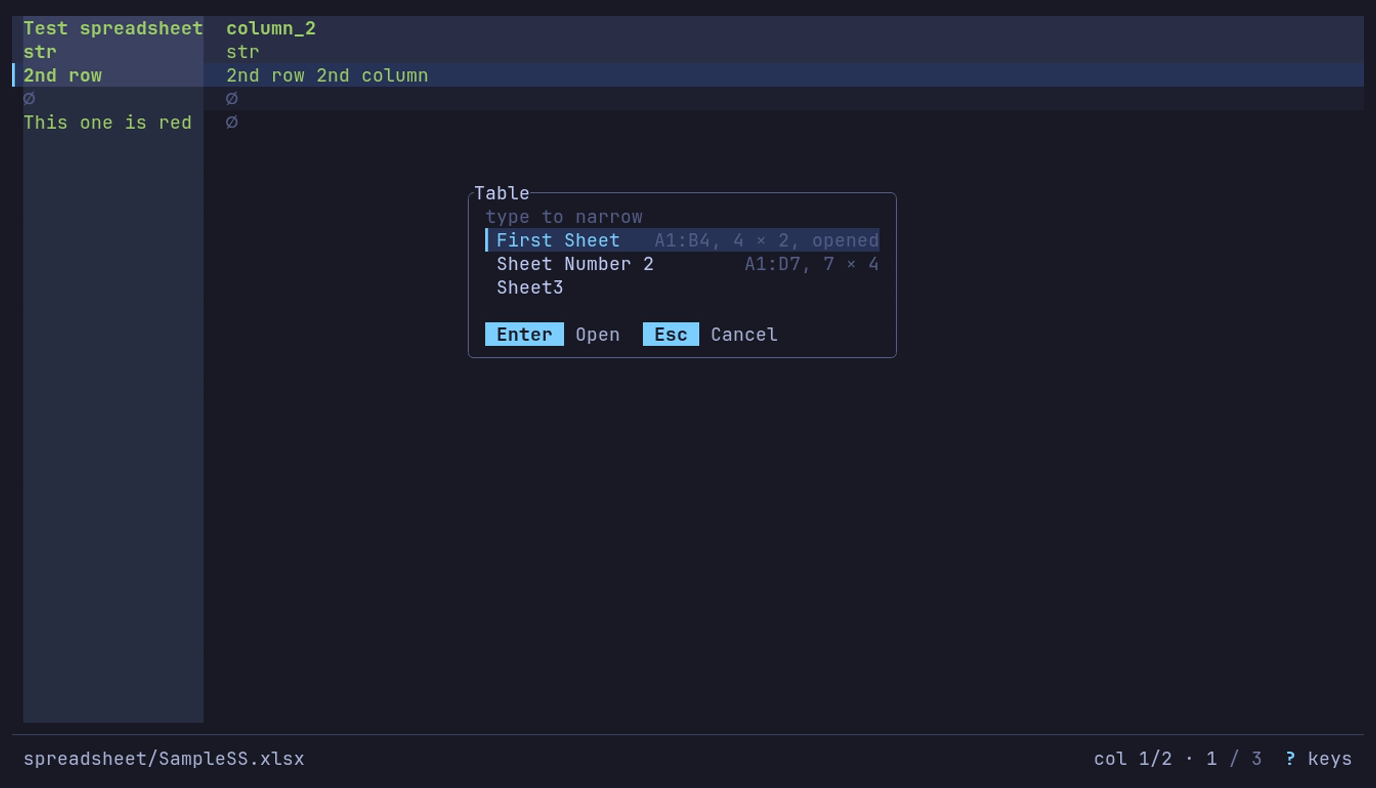
What else is in the workbook? T: three worksheets, each with its range and size; Enter opens one.