The table
A dataset opens in the table. ? lists its keys; Keyboard shortcuts lists every screen’s.
| Key | Moves |
|---|---|
| ↑ ↓ or j k | The row cursor |
| ← → or h l | The column cursor |
| PgUp PgDn (Ctrl+B Ctrl+F) | A page |
| Ctrl+U Ctrl+D | Half a page |
| Home End (G) | The first or last row |
| : | A row by number |
| [ ] | Sort by the cursor’s column, ascending or descending |
| / | Find |
| S | Sample the table into memory; the view works on the sample |
Only the table’s own keys act there: a letter with Ctrl or Alt held does nothing, beyond the paging keys above.
The footer
Under a thin rule at the bottom of every screen, one line says where you are and what is in effect, in pipeline order, with the cursor’s place at the right:
weather/daily.parquet › query › prcp > 0 · date ▼ 41,208 / 1,204,331 ? keys
| Part | Says |
|---|---|
weather/daily.parquet | The dataset: its file and the directory it is in |
sample 100,000 of 36.8M | The view is a sample, under the query; 1,234+ while it is drawn |
query | A query is in effect; : shows its text |
prcp > 0 · date ▼ | The filters, then the sort; 2 filters · sorted where the line is short |
41,208 / 1,204,331 | The cursor’s row of the view’s rows, led by col 3/40 when the table is wider than the screen |
? keys | Help: every key of the screen |
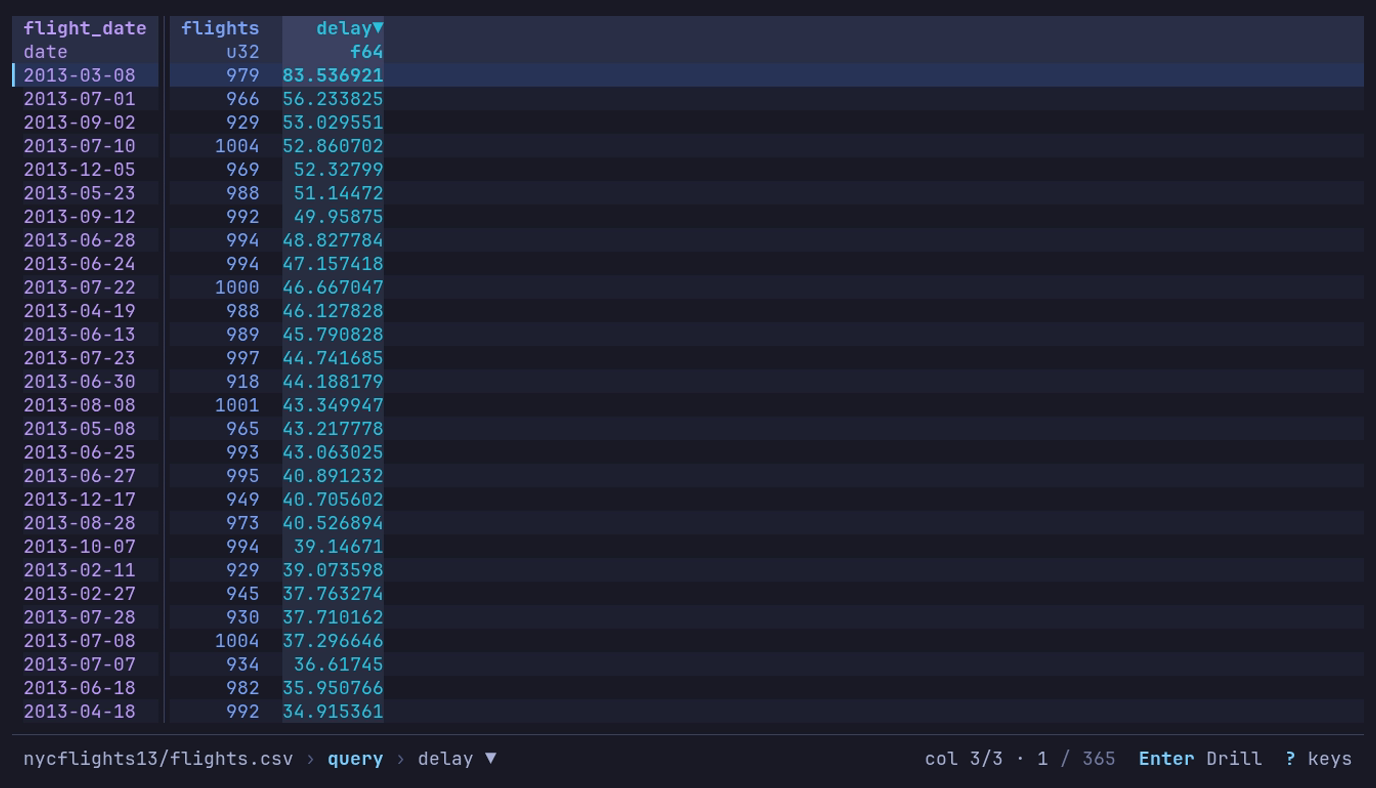
Which day of 2013 left latest? The daily query,
then ] on delay: 2013-03-08, at 83.5 minutes. The footer says
query › delay ▼; the header marks delay▼.
At rest only ? keys is offered. A mode shows its two or three keys while it
is active: after the column cursor moves, +/- Filter [/] Sort F Counts; with
a find in effect, n/N Next Esc Clear; while following a file, t Pause; on a
by view, Enter Drill. A message, such as Copied 3 rows, takes the room of
the dataset’s name for a moment and never adds a line. On a narrow terminal the
line gives up, in order: the dataset’s name (cut in the middle first), the
filters and sort (counted), background work (its spinner alone), the query, and
the position (41,208 / 1.2M). The mode’s keys and help stay.
The footer grows, up to three lines, only for something ongoing: a prompt being
typed (find, the command line) or a job with a count, such as a
find reading past the rows on hand (rows 1,200,000 / 3,475,226 with a bar and
Esc Stop). It takes the rows from the bottom of the table; the top stays put.
Go to a row
: opens the command line; digits alone make it
row:, and Enter goes there (0 is the top).
Another table of the file
T lists the other tables of the file on screen; Enter
opens the one picked in place of this one, as --table would.
| The file | Lists | Each row says |
|---|---|---|
| An Excel workbook | Its worksheets, hidden ones included | The range and size: A1:C13, 13 × 3 |
| A SQLite database | Its tables and views | Its kind, its columns, and the rows ANALYZE stored |
| A file a format spec reads as several record types | The whole file, then each type | Its columns |
| A Hugging Face cache | Its splits | split |
The one open is marked opened. Type to narrow, ↑ ↓ to
move, Esc to keep the table. The query, filters and sort stay with
the table they were on; recents record the new table, and a saved view for it
applies. The footer offers T only on a file of several tables; on
any other, T says Only one table here.
Row numbers
# shows or hides row numbers.
| What | Number |
|---|---|
| Text and logs | The line in the file, as less -N numbers it. On when they open |
| Other formats | The row’s place in the file or dataset. Off when they open |
| Under a sort or a filter | The row’s own number, which moves with it |
| A query, pivot or group’s rows | Their place in the result, which stands for no row of the source |
display.row_numbers turns them on or off whatever the format (true, false) or leaves
them to the format ("auto"); display.row_numbers_start is the first
row’s number. A sorted or filtered view of a scanned file numbers its rows
only while # is on, because the numbering keeps the filter from
being pushed into the scan. A dataset in a store, or of many files, is not
numbered that way at all: there # counts the view’s rows under a
sort or filter, and the footer says # counts the view.
Sort by a column
[ sorts by the cursor’s column ascending, ] descending,
replacing the sort in effect; the same key again on that column takes the sort
away. The header carries ▲ or ▼, and the footer names the sort. The
Sort & Filter sidebar adds secondary sorts.
Empty cells and marked columns
An empty cell shows which kind of empty it is: ∅ (ASCII ~) for a null,
· (ASCII .) for a column the row’s file does not have, ≠ (ASCII !)
for a column its file holds in another type. A column name marked * is not
in every file, or the files disagree on its type; the Info panel’s Schema tab
says where the schema came from. Files that disagree
has the details.
Long values, control characters and column widths: Column widths and In the table.
The mouse
| Mouse | Does |
|---|---|
| Click | Puts the cursor on the cell; on a header, the column cursor on its column |
| Double-click | Enter on the row |
| Wheel | ↑ ↓, three rows a notch; the same in help, the inspector and the sidebars |
| Shift+wheel, or a sideways wheel | ← →: the column cursor |
| Drag a header onto another column | Moves the column there, as H L do |
| Drag the gap right of a header | Sets the column’s width, as < > do |
| Right-click a cell | A menu of the cell’s keys: filter, counts, sort, copy, inspect |
| Click a key in the footer | Presses it; the filters press s, query : |
Dialogs, tabs and the cell’s menu: The mouse.
Shift+drag selects text in most terminals. mouse = false under
[display], or --mouse=false, leaves the mouse to the terminal:
Mouse and text selection.
Keys typed while datui works
While a load, query or other read runs, the footer shows a spinner, and keys typed meanwhile are held and replayed in order once the work is done.
| Key | While busy |
|---|---|
| Ctrl+Q, Ctrl+C | Quit at once |
| Ctrl+O | Goes home at once, abandoning a load |
| At the plain table: q Q, the column cursor (← →, h l, Shift+← →, { }), #, ,, D, the width keys (< > = w), ? and F1 | Act at once |
| ↑ ↓ (j k) | Act at once inside the rows already read, while all that is awaited is more rows |
| A bare Esc, or an Enter that would drill | Dropped |
| An Enter that would inspect | Held as Space |
| Esc while a view is applied | Stops it; the table stays as it was |
| Esc while a find reads | Stops it and the n N typed behind it; the cursor stays put |
| While a sample is drawn: moving, find, Space, i, and the find line, inspector and Info panel | Act at once; Esc stops the sample |
| Anything else | Held |
At most 32 keys are held, and held keys are dropped with the screen they were typed at. At the loading screen nothing is held: the keys above act, the rest are dropped. The mouse is never held: the wheel across, the footer’s keys and a width drag act as their keys do, and the wheel down, a click on the table, a dropped header and the cell’s menu are dropped.