Columnar and JSON
Parquet and Arrow IPC files are scanned in place. JSON, NDJSON, Avro, ORC and Excel files are read whole into memory.
datui https://raw.githubusercontent.com/apache/parquet-testing/master/data/alltypes_plain.parquet
| Format | Extensions | Read | Several files as one table | Info tab |
|---|---|---|---|---|
| Parquet | .parquet | lazy | yes | Parquet |
| JSON | .json | in memory | yes | none |
| NDJSON | .jsonl, .ndjson | in memory | yes | none |
| Arrow IPC | .arrow, .arrows, .ipc, .feather | lazy scan; a stream converted to Arrow | yes | Arrow |
| Avro | .avro | in memory | yes | Avro |
| ORC | .orc | in memory | yes | ORC |
| Excel | .xlsx, .xlsm, .xlsb, .xls | in memory | no | Excel |
How each format is read says what lazy and
in memory mean, and how each is read from a URL or a bucket. Before reading a
file larger than read.memory_warning (1 GiB) into memory, datui asks. None of
these formats opens compressed (.parquet.gz); decompress the file first.
Parquet
datui s3://noaa-ghcn-pds/parquet/by_year/YEAR=2024/ELEMENT=TMAX/
- Only the footer and the rows on screen are read. A query, sort or analysis may read every row of the columns it uses.
- A directory or glob of Parquet files opens as one table, with the columns of
every file’s footer combined (files that disagree).
A
key=valuedirectory tree is a hive table. - In a bucket, a file and a prefix are read in place with ranged requests.
- The Parquet tab gives the row groups, the codecs, the writer and the footer’s metadata, and each column’s least and greatest value from its statistics.
JSON and NDJSON
printf '[{"id": 1, "tags": ["a", "b"]}, {"id": 2, "tags": []}]\n' > items.json
datui items.json
printf '{"id": 1, "ok": true}\n{"id": 2, "ok": false}\n' | datui
| JSON | NDJSON | |
|---|---|---|
| Holds | An array of objects | One object per line |
| Detected by content | Starts with [, or with an object that runs past its first line | The first line is a whole object |
--follow | no | yes |
| A bucket prefix | one object at a time | read in place, as one table |
- Each key is a column. A nested object is a struct column and an array a list column; the inspector shows them whole.
- A string column becomes dates or times when every value parses as one (dates and timestamps). It never becomes numbers.
journalctl -o jsonoutput is read as the systemd journal.
Arrow IPC
datui -F arrow https://raw.githubusercontent.com/apache/arrow-testing/master/data/arrow-ipc-stream/integration/1.0.0-littleendian/generated_primitive.arrow_file
datui -F arrow https://raw.githubusercontent.com/apache/arrow-testing/master/data/arrow-ipc-stream/integration/1.0.0-littleendian/generated_primitive.stream
These URLs’ names give no format, so -F arrow names it. An IPC file
(Feather v2) is scanned in place, from its footer. An IPC stream, the format of
a Hugging Face datasets cache, has no footer. datui tells a stream from a file
by its first bytes, converts the stream to an IPC file in the temp directory,
then scans that. The loading screen shows the conversion’s progress;
Ctrl+O stops it. A stream larger than the temp
directory’s free space is refused before anything is written. LZ4 and ZSTD
buffers are written to the converted file uncompressed.
To open a Hugging Face cache, replace <CACHE_DIR> with the dataset’s
directory under ~/.cache/huggingface/datasets/:
datui <CACHE_DIR>
datui --table test <CACHE_DIR>
| What | How it opens |
|---|---|
| A directory of stream shards | Converted together into one file, in name order; shards with different columns fail |
| IPC files among the streams | Scanned in place and stacked with the streams in name order |
A datasets cache directory (name-train.arrow, name-test-00000-of-00002.arrow) | One split: the one --table names, else train, validation, test, then the first by name. The Schema tab lists the others |
A DatasetDict saved with save_to_disk (dataset_dict.json and a directory per split) | One split’s directory, chosen the same way |
| A cache directory on the home screen | Lists its splits (abc123/test) above its files |
cache-*.arrow files written by map() | Left out; the Notes tab counts them |
dataset_info.json, state.json | Skipped as metadata. Either one marks the directory as a cache |
--follow reads a stream’s record batches as they are written. A stream with
dictionary-encoded columns cannot be followed. The Arrow tab gives the record
batches, dictionaries, byte order and the schema’s and footer’s metadata.
Avro and ORC
datui https://raw.githubusercontent.com/apache/avro/main/share/test/data/weather.avro
datui https://raw.githubusercontent.com/apache/orc/main/examples/demo-12-zlib.orc
Both formats declare their column types, so the Schema tab marks the types as known. The Avro tab gives the record’s name, fields, codec and each field’s documentation. The ORC tab gives the rows, stripes, format version, compression and the writer’s metadata.
Excel
datui https://raw.githubusercontent.com/apache/poi/trunk/test-data/spreadsheet/SampleSS.xlsx
--table | Opens |
|---|---|
| none | The first worksheet |
--table Sales | The worksheet named Sales |
--table 0 | The worksheet at that 0-based index, when none is so named |
On the home screen, Enter on an
.xlsx or .xlsm workbook opens its first worksheet, and → lists
its worksheets as tables (book.xlsx/Sales) without reading any cells.
Ctrl+A shows hidden worksheets. Enter on an
.xls or .xlsb workbook opens its first worksheet. The Excel tab gives each
worksheet’s range and size.
At the table, T lists the worksheets with their ranges and sizes and
opens the one you pick. Enter on a worksheet in the Excel tab does
the same. This works for .xls and .xlsb too: their worksheet names were
read when the workbook opened, so listing them reads nothing more.
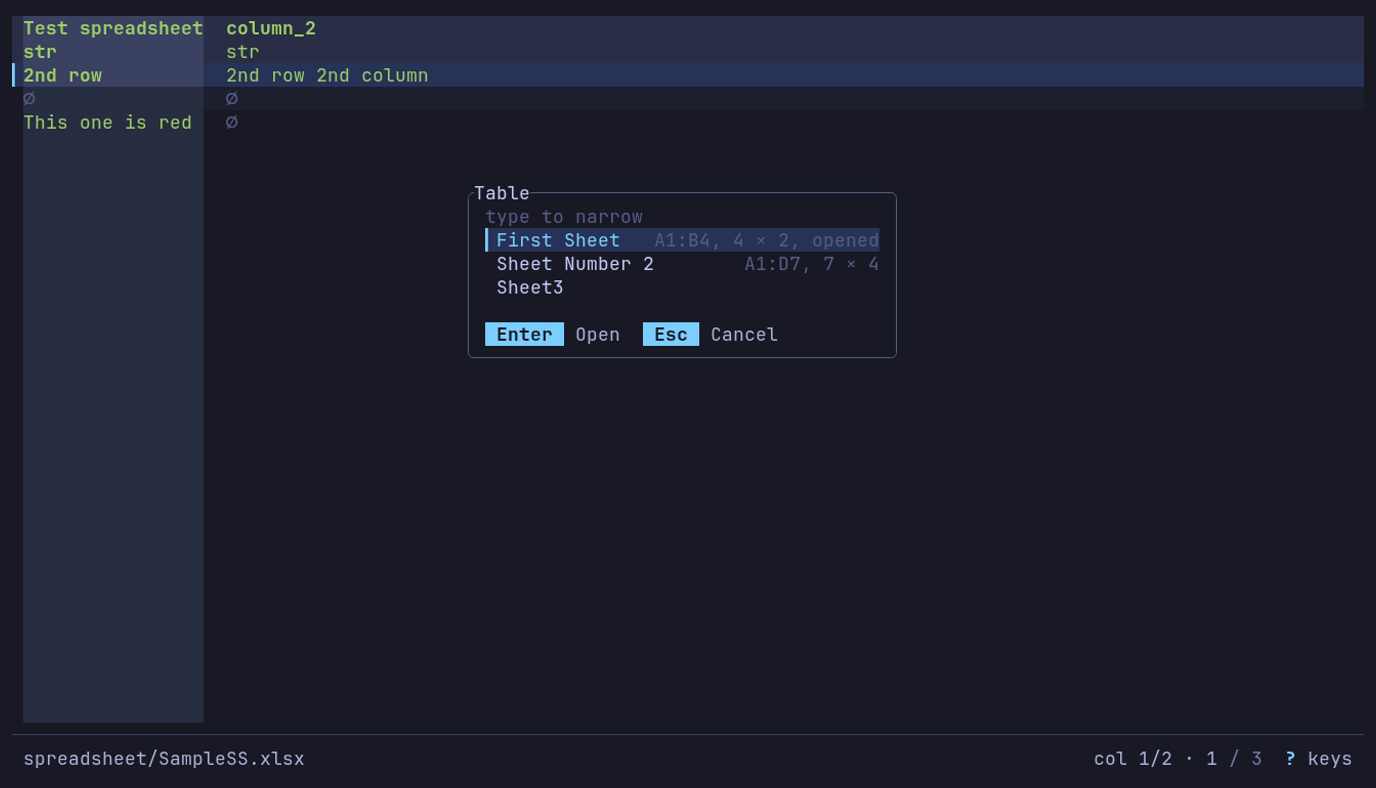
T shows what else is in the workbook: three worksheets, each with its range and size. Enter opens one.