Configure datui
datui reads its settings from one TOML file. Settings lists every key.
datui config init
This writes the file with every key commented out and set to its default. Uncomment what you want to change, then restart datui.
| OS | Config file |
|---|---|
| Linux | ~/.config/datui/config.toml |
| macOS | ~/Library/Application Support/datui/config.toml |
| Windows | %APPDATA%\datui\config.toml |
| Command | Does |
|---|---|
datui config init | Write the file. --force replaces an existing one |
datui config path | Print the files read, imports first |
datui config keys | List every key: its type, default, the value in effect and what set it |
DATUI_CONFIG_DIR changes the config directory. Environment variables
lists the other variables.
Set common defaults
[display]
row_numbers = true
number_format = "thousands"

[theme]
mode = "light"
This shows row numbers, groups digits, and uses the light theme. The datasets
and directories listed on the home screen are not set here. They go in your
catalog, catalog.toml, which datui config init
creates empty next to the config file.
Find a setting
| Change | Reference |
|---|---|
| Type inference, decompression, following | Read |
| CSV comments, nulls and inference rows | CSV |
| Number formatting, columns and row numbers | Display |
| Row buffers and the streaming engine | Performance |
| Analysis sample size or chart rows | Analysis |
| The home screen and its search | Home · Home search |
| Named datasets and directories, local or remote, and the example datasets | Catalogs |
| Cloud accounts and connections | Cloud connections |
| Clipboard over SSH | Clipboard |
| Colors and symbols | Colors · Glyph overrides |
| A theme from your desktop | Theme from your system |
Override a setting
-c KEY=VALUE sets any key for one run. You can repeat it; if one key is set
twice, the last value wins. A flag for the same setting, such as
--sample-rows, overrides -c:
printf 'a,b\n1,2\n' > data.csv
datui -c display.row_numbers=true data.csv
datui -c csv.comment='#' -c performance.streaming=false data.csv
datui --sample-rows 0 data.csv
The last command makes every analysis tool, including Data Quality, read every row. An unknown key is an error that suggests the closest key names.
| Precedence, lowest first | |
|---|---|
| Built-in defaults | |
| Imported files | In the order listed |
| Your config file | A key you write wins over an import, even when it equals the default |
| Environment | DATUI_LOG over log.level; cloud variables over [cloud] |
-c KEY=VALUE | |
| A flag for the same setting |
Import other config files
import lists TOML files to merge in before this file’s own settings, such as
a generated theme or a team’s shared file. Replace <FILE> with the file’s
path:
import = ["<FILE>"]

[display]
row_numbers = true
- Imports apply in the order listed, each over the one before. This file’s own values apply last.
- A file changes only the keys it sets. A key set to its built-in default
still overrides an import:
notes_accent = trueundoes an importedfalse. Tables such as[theme.colors]or[display.number_format]merge key by key. - These lists combine across files instead of replacing each other:
catalogs,[home] hide,[cloud] hide,[cloud] env_filesand[formats] path. A[[cloud.connections]]entry replaces an earlier one with the same name. Two entries with the same name in one file are an error. - TOML cannot unset a key, so a key with no default, such as
sidebar_width, stays set once an import sets it. Set it to the value you want instead. - An imported file can import others. A chain can be at most 8 files deep, and a cycle is an error.
- Paths may be absolute, relative to the importing file, or use
~and$VAR. - A missing import is skipped with a warning on stderr. An import that cannot be read or parsed stops datui and names the file, as a broken config file does. With no config file, datui uses the defaults.
Glyphs or ASCII
display.unicode = "auto" (the default) draws Unicode glyphs when the terminal
uses UTF-8, and the ASCII set otherwise. "always" and "never" skip
detection.
| Environment | Glyph set |
|---|---|
LC_ALL, LC_CTYPE or LANG set (first non-empty wins) | Unicode if it names UTF-8 (en_US.UTF-8), else ASCII (C) |
| None set, Windows | Unicode, whatever the code page |
| None set, anything else | ASCII |
A font without a glyph draws a box in its place. If the classic Windows
console shows boxes, pick a font such as Cascadia Mono, or set
unicode = "never".
Number formatting
display.number_format groups digits, so 248956422 reads 248,956,422.
, toggles it for the session.
| Preset | 1234567.89 becomes |
|---|---|
none (default) | 1234567.89 |
thousands | 1,234,567.89 |
european | 1.234.567,89 |
si | 1 234 567.89 (narrow no-break space) |
swiss | 1'234'567.89 |
indian | 12,34,567.89 |
underscore | 1_234_567.89 |
system | What LC_ALL, LC_NUMERIC or LANG says, else thousands |
For finer control, use a table:
[display.number_format]
grouping = "thousands"
group_separator = ","
decimal_separator = "."
floats = true
float_precision = 2
exclude_columns = ["year", "*_id", "zip"]
floats groups float columns too. float_precision rounds them; leave it out
to keep the file’s own decimals. exclude_columns takes glob patterns for
columns that are never grouped, such as numbers that are labels. Grouping
applies to every value in a column, however short, so a year column reads
2,024 unless it is excluded. Formatting changes only the display: exports,
queries, filters and views use the raw values.
Themes
[theme]
dark = "night-market"
light = "day-market"
A theme is a named set of colors, one per slot.
theme.dark is used when the terminal is dark and theme.light when it is
light. Two themes are built in, and they are the defaults:
| Theme | For |
|---|---|
night-market | Dark terminals: Tokyo Night with one cyan accent |
day-market | Light terminals: Tokyo Night’s day variant |
Each *.toml file in the themes/ directory of the config directory is also a
theme, named after the file (datui config path shows where the config
directory is). This one is themes/my-dusk.toml:
extends = "night-market"
description = "Night Market with a warm accent"
accent = "#e0af68"
chip_key = "#e0af68"
| Key | Means |
|---|---|
extends | The theme the unset slots come from. Without it, they come from night-market when the theme is used as theme.dark and from day-market when it is used as theme.light |
description | Shown by datui theme list |
| Any slot | The same slots and color forms as [theme.colors] |
The repository’s
contrib/themes/
has more themes, each crediting its palette: gruvbox-dark and high-contrast. Copy
one into themes/ to use it.
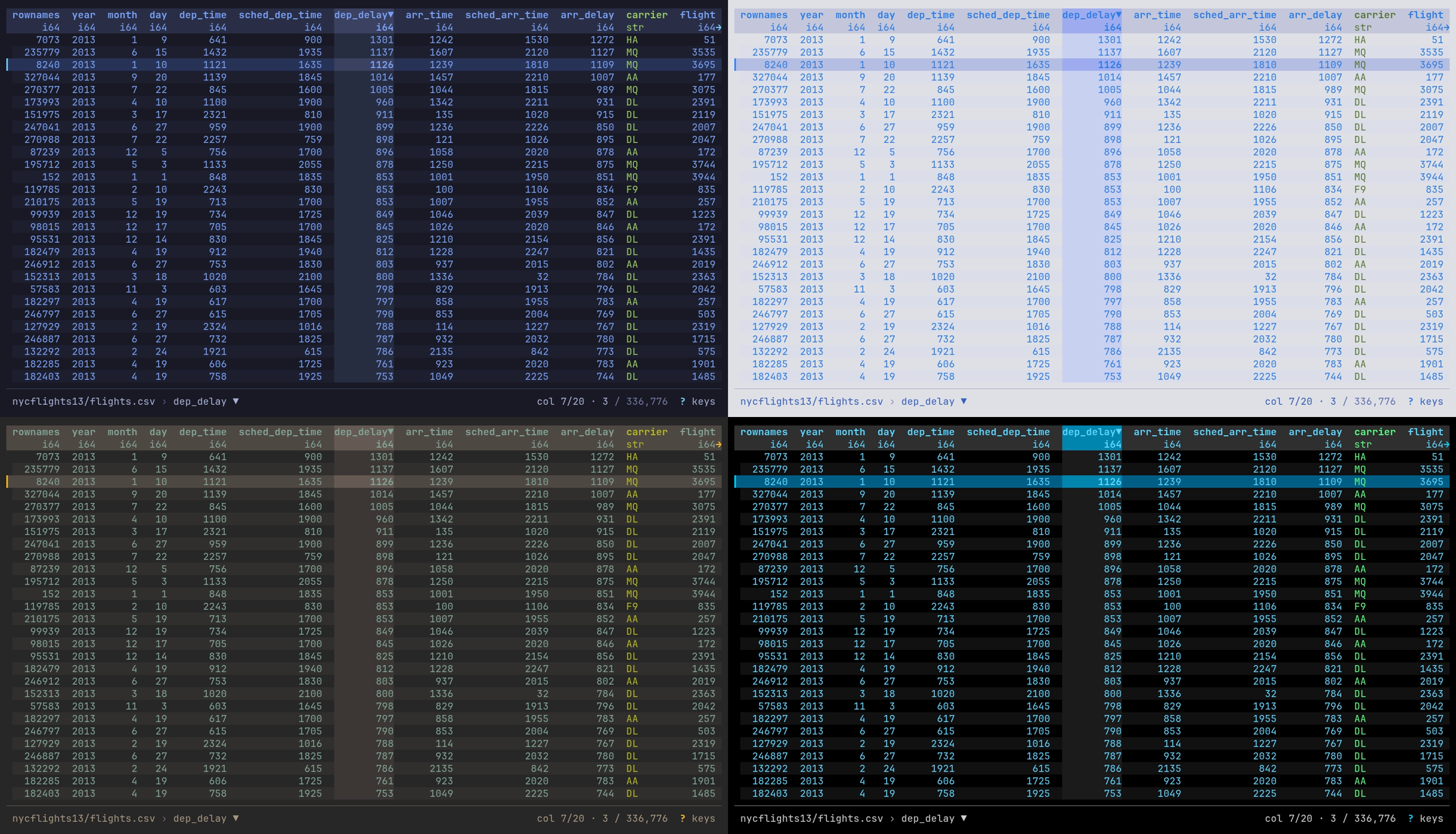
One table in each theme: night-market and day-market (top), gruvbox-dark
and high-contrast (bottom), sorted with ] on dep_delay.
datui -c theme.mode=light uses day-market for one run.
datui theme list lists the themes. datui theme show NAME prints a theme
with every slot, ready to save into themes/ and edit. A theme file with a
mistake is skipped with a warning. If a theme name cannot be used, datui falls
back to that mode’s built-in theme. It warns when that mode is in use: always
under auto, otherwise only for the mode theme.mode sets.
datui works out the colors in this order, each step over the one before:
| Step | Gives |
|---|---|
theme.mode, or the terminal under auto | Dark or light |
theme.dark or theme.light | The theme for that mode |
extends, theme by theme | Slots the theme leaves unset |
[theme.colors] | Your own slots, over the theme in either mode |
Light and dark
[theme]
mode = "light"
theme.mode picks the theme. auto (the default) follows the terminal,
dark always uses theme.dark, and light always uses theme.light. The
mode matters because the header fill, row stripes, borders and dim text are a
few shades off the terminal’s background, so a dark theme’s shades are
unreadable on a light background.
auto asks the terminal for its background color (OSC 11) at startup and
does not wait for the answer. The first frame uses the first of these that is
available:
| Source | When |
|---|---|
| The terminal’s answer | It is in before the first frame; light when black text reads better on it than white |
| The last answer from this terminal | One was given before; remembered in the cache by TERM_PROGRAM, else TERM |
COLORFGBG | The terminal sets it |
dark | None of these |
An answer that arrives after the first frame switches the theme if it differs. On a light terminal seen for the first time, that is one dark frame before the light theme.
Under auto, datui asks again each time the terminal window regains focus, and
switches between theme.dark and theme.light if the terminal’s background changed.
This needs a terminal that reports focus. In tmux, turn on
set -g focus-events on.
datui does not ask on Windows, on the Linux console (TERM=linux), or when
standard output is not a terminal. A terminal that never answers does not slow
startup; datui uses COLORFGBG or dark. On such a terminal, set mode
yourself.
Colors
[theme.colors] overrides a few slots of the theme in use, in both modes. To
change more than a few, write a theme file. Each color
slot takes a color written one of three ways:
| Form | Example | Shown |
|---|---|---|
| Hex | "#ff9e64" | Exactly on a true-color terminal; the nearest of 256 on xterm-256color; basic ANSI below that |
| Name | "bright_red" | black red green yellow blue magenta cyan white, bright_*, gray dark_gray light_gray, default (the terminal’s own) |
| Indexed | "indexed(236)" | An entry of the xterm 256-color palette |
Setting NO_COLOR, to any value, turns color off. Here is a Dracula theme,
saved as themes/dracula.toml and picked with theme.dark = "dracula":
description = "Dracula"
accent = "#bd93f9"
accent_bright = "#ff79c6"
gradient_start = "#8be9fd"
gradient_end = "#ff79c6"
chip_key = "#bd93f9"
chip_label = "#ff79c6"
background = "#282a36"
surface = "#44475a"
controls_bg = "#44475a"
text_primary = "#f8f8f2"
text_secondary = "#6272a4"
text_inverse = "#282a36"
table_header = "#f8f8f2"
table_header_bg = "#44475a"
table_selected = "#44475a"
table_alternate_row = "default"
table_column_separator = "#bd93f9"
type_str = "#50fa7b"
type_int = "#8be9fd"
type_float = "#bd93f9"
type_bool = "#f1fa8c"
type_temporal = "#ff79c6"
success = "#50fa7b"
warning = "#ffb86c"
error = "#ff5555"
dimmed = "#6272a4"
chart_1 = "#8be9fd"
chart_2 = "#ff79c6"
chart_3 = "#50fa7b"
chart_4 = "#f1fa8c"
chart_5 = "#bd93f9"
chart_6 = "#ff5555"
chart_7 = "#ffb86c"
Glyph overrides
[glyphs] replaces individual symbols, for when your font has better ones than
the default set, which every common terminal font carries. The keys are the slot
names in
glyphs.rs.
spinner, score_marks, mini_bars and bar_eighths take lists:
[glyphs]
in_object_store = "☁"
spinner = ["◐", "◓", "◑", "◒"]
- An override must have the same display width as the glyph it replaces. A wrong width is an error at startup that names the slot. Nerd Font icons work where the font has them.
- Overrides apply only to the Unicode set: under
display.unicode = "never", or when detection finds no UTF-8, the ASCII set is used. spinnertakes any number of frames,score_marksexactly 5, andmini_barsandbar_eighthsexactly 8. The wordmark cannot be overridden.
Mouse and text selection
datui uses the mouse by default: the wheel scrolls, a click selects, and a drag moves or sizes a column (The mouse). To select text in the terminal instead, hold the terminal’s bypass key as you drag:
| Terminal | Select text |
|---|---|
| Most (GNOME Terminal, Konsole, kitty, Alacritty, WezTerm, Windows Terminal, xterm) | Shift+drag |
| iTerm2 | Option+drag |
tmux with set -g mouse on | Shift+drag, or tmux’s own copy mode |
To leave the mouse to the terminal, pass --mouse=false for one run, or set:
[display]
mouse = false
Theme from your system
To follow a theme something else generates (a desktop theme manager, chezmoi,
home-manager, a dotfiles repository), import the
file it writes. Your own settings still win. Replace <FILE> with the
generated file:
import = ["<FILE>"]
The imported file may set any section, not only [theme.colors].
Omarchy
Omarchy renders per-app theme files from templates when you switch themes. datui ships one. These steps need an Omarchy system.
-
Install the template from the repository:
mkdir -p ~/.config/omarchy/themed curl -fsSL https://raw.githubusercontent.com/derekwisong/datui/main/contrib/omarchy/datui.toml.tpl \ -o ~/.config/omarchy/themed/datui.toml.tpl -
Import the file Omarchy generates, in
~/.config/datui/config.toml:import = ["~/.local/state/omarchy/current/theme/datui.toml"] -
Switch themes as usual, here to Tokyo Night:
omarchy theme set tokyo-night
The template sets theme.mode from the theme’s polarity and maps its accent
onto datui’s accent, gradient and selection tint. A running datui keeps the
theme it started with; the next launch takes the new one.
A color in your own config.toml wins over the import, even when it equals
the built-in default:
import = ["~/.local/state/omarchy/current/theme/datui.toml"]

[theme.colors]
type_int = "#ff8800"
To override colors for one Omarchy theme only, import a second file that only
that theme provides. In ~/.config/datui/config.toml:
import = [
  "~/.local/state/omarchy/current/theme/datui.toml",
  "~/.local/state/omarchy/current/theme/datui.override.toml",
]
and in ~/.config/omarchy/themes/osaka-jade/datui.override.toml:
[theme.colors]
type_int = "#ff8800"
type_float = "#ff00ff"
Omarchy copies your theme directory into place before rendering templates, so
the override arrives untouched. Themes without the file are skipped with a
warning on stderr. Name it datui.override.toml: a file named datui.toml
replaces the generated file and drops every color it does not restate.
Troubleshooting
| Problem | What to do |
|---|---|
| The file is ignored | Check the path for your OS above, or datui config path. A file that does not parse stops datui with its path, line and reason |
| A key seems to do nothing | Warnings go to stderr, which the UI hides: run datui data.csv 2> /tmp/datui.log and read it after quitting. An unknown key is named there with the nearest ones; datui config keys lists them all |
| An import does not apply | Check that the file exists at the resolved path, and that nothing later overrides it: a later file, a -c or a flag |
Invalid color value for 'accent': Unknown color name | A typo in a name. Names ignore case; hex needs six digits; indexed is indexed(0) to indexed(255) |
| Colors look wrong | The terminal may not take true color, so hex is approximated; try names or indexed(...). Everything monochrome: NO_COLOR is set |
| Lines left behind or out of place after scrolling | A scroll moves the lines in the terminal and draws only the new ones, so text another program wrote over the screen moves with them. Switching to another window and back, or resizing, repaints the screen. For a terminal that mishandles the move, -c display.scroll_region=false redraws every line that moved |
Header or chip text cut off or garbled in VS Code’s terminal or on xterm-256color | Some terminals mishandle a background color on those rows. Set those backgrounds to the terminal’s own, as below |
| The config file does not parse | The error names the file, line and reason, then the way out: fix that line, or move the file aside to start from the defaults, after which datui config init writes a fresh one. A broken import is named by its own path; moved aside, it is skipped |
| Start over | datui config init --force rewrites the file with the defaults; with no file, datui runs on them |
| Odd home-screen state: recents, folded sections, a hidden source | datui cache clear resets the cache: recents, folds, remembered places, hidden sources and Example datasets, measurements and histories. It never touches your data or config, and it leaves the log. A cache line that cannot be read is skipped and logged in datui.log (The log) |
[theme.colors]
controls_bg = "default"
table_header_bg = "default"
The log
datui.log in the cache directory (~/.cache/datui on Linux,
~/Library/Caches/datui on macOS, %LOCALAPPDATA%\datui on Windows) holds
Polars warnings, the errors datui showed, internal errors with their
backtraces, cache and history failures, and anything else written to stderr
while the UI was up, with credentials masked. It is capped at 1 MiB; the
previous file is kept as datui.log.1. datui cache clear leaves both. On
Windows it receives Polars warnings and datui’s own messages, not other stderr
output.
| Set | How |
|---|---|
| Another file | --log-file PATH, or log.file |
| Level | --log-level, DATUI_LOG or log.level: error, warn (default), info, debug, trace or off |