The table
A dataset opens in the table. ? lists its keys; Keyboard shortcuts lists every screen’s.
| Key | Moves |
|---|---|
| ↑ ↓ or j k | The row cursor |
| ← → or h l | The column cursor |
| PgUp PgDn (Ctrl+B Ctrl+F) | A page |
| Ctrl+U Ctrl+D | Half a page |
| Home End (G) | The first or last row |
| : | A row by number |
| [ ] | Sort by the cursor’s column, ascending or descending |
| / | Find |
| S | Sample the table into memory; the view works on the sample |
A table key typed with Ctrl or Alt held does nothing, apart from the paging keys above.
The footer
The footer is one line under a thin rule at the bottom of every screen. It shows where you are and what is in effect, in the order the steps apply, with the cursor’s position at the right:
weather/daily.parquet › query › prcp > 0 · date ▼ 41,208 / 1,204,331 ? keys
| Part | Says |
|---|---|
weather/daily.parquet | The dataset: its file and the directory it is in |
sample 100,000 of 36.8M | The view is a sample, and the query runs on it; 1,234+ while it is being drawn |
query | A query is in effect; : shows its text |
prcp > 0 · date ▼ | The filters, then the sort; 2 filters · sorted where the line is short |
41,208 / 1,204,331 | The cursor’s row and the view’s row count, after col 3/40 when the table is wider than the screen |
? keys | Help: every key of the screen |
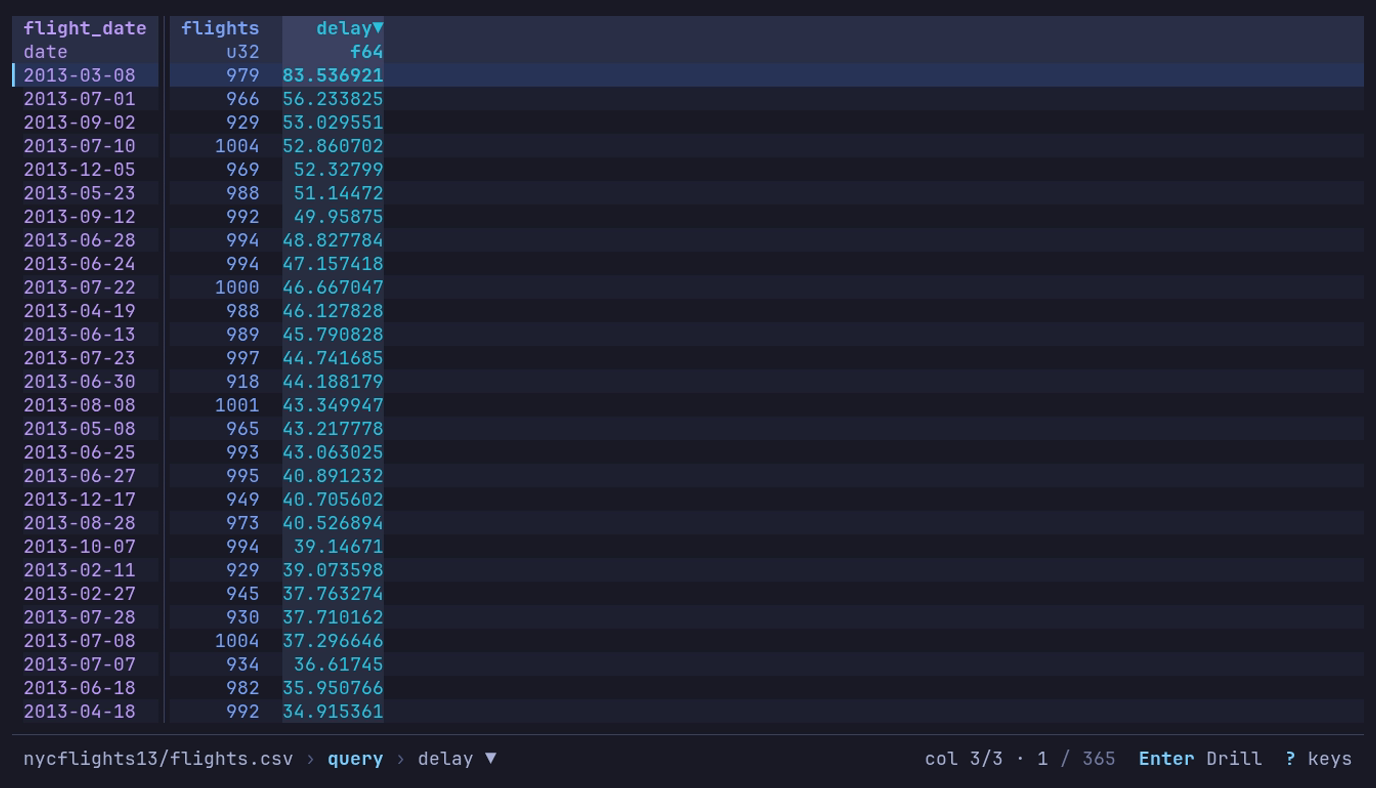
Which day of 2013 had the latest departures? Run the
daily query, then press ] on
delay: 2013-03-08, at 83.5 minutes. The footer says query › delay ▼, and the
header shows delay▼.
At rest the footer offers only ? keys. While a mode is active, it shows that
mode’s two or three keys: after the column cursor moves, +/- Filter [/] Sort F Counts;
with a find in effect, n/N Next Esc Clear; while following a file, t Pause;
on a by view, Enter Drill. A message such as Copied 3 rows briefly takes
the place of the dataset’s name; it never adds a line. On a narrow terminal the
line shortens or drops parts in this order: the dataset’s name (shortened in the
middle first), the filters and sort (counted), background work (its spinner
alone), the query, then the position (41,208 / 1.2M). The mode’s keys and
help stay.
The footer grows to at most three lines, and only while something is ongoing:
a prompt being typed (find, the command line), or a job with a
count, such as a find reading past the rows already loaded
(rows 1,200,000 / 3,475,226 with a bar and Esc Stop). The extra lines come
from the bottom of the table; the top stays put.
Go to a row
: opens the command line. Type only digits and
it becomes row:; Enter goes to that row (0 is the top).
Another table of the file
T lists the other tables in the open file. Enter opens
the chosen one in place of the current table, as --table would.
| The file | Lists | Each row says |
|---|---|---|
| An Excel workbook | Its worksheets, hidden ones included | The range and size: A1:C13, 13 × 3 |
| A SQLite database | Its tables and views | Its kind, its columns, and the rows ANALYZE stored |
| A file a format spec reads as several record types | The whole file, then each type | Its columns |
| A Hugging Face cache | Its splits | split |
The current table is marked opened. Type to narrow the list, ↑
↓ to move, and Esc to keep the current table. The query,
filters and sort stay with the table they were set on. The new table is added
to recents, and a saved view for it applies. The footer offers T
only on a file with several tables; on any other file, T says
Only one table here.
Row numbers
# shows or hides row numbers.
| What | Number |
|---|---|
| Text and logs | The line in the file, as less -N numbers it. On when they open |
| Other formats | The row’s place in the file or dataset. Off when they open |
| Under a sort or a filter | The row’s own number, which moves with it |
| A query, pivot or group’s rows | Their place in the result, which stands for no row of the source |
display.row_numbers turns them on or off for every table (true, false),
or leaves them to the format ("auto"). display.row_numbers_start sets the
first row’s number. A sorted or filtered view of a scanned file numbers its
rows only while # is on, because numbering the rows stops the filter
from being pushed down into the scan. A dataset in an object store, or one made
of many files, cannot number its rows that way: under a sort or filter,
# counts the view’s rows instead, and the footer says
# counts the view.
Sort by a column
[ sorts by the cursor’s column ascending, ] descending,
replacing the current sort. The same key again on that column removes the
sort. The header carries ▲ or ▼, and the footer names the sort. The
Sort & Filter sidebar adds secondary sorts.
Empty cells and marked columns
An empty cell shows which kind of empty it is: ∅ (ASCII ~) for a null,
· (ASCII .) for a column the row’s file does not have, ≠ (ASCII !)
for a column its file holds in another type. A column name marked * is not
in every file, or the files disagree on its type; the Info panel’s Schema tab
says where the schema came from. Files that disagree
has the details.
For long values, control characters and column widths, see Column widths and In the table.
The mouse
| Mouse | Does |
|---|---|
| Click | Puts the cursor on the cell; on a header, the column cursor on its column |
| Double-click | Enter on the row |
| Wheel | ↑ ↓, three rows a notch; the same in help, the inspector and the sidebars |
| Shift+wheel, or a sideways wheel | ← →: the column cursor |
| Drag a header onto another column | Moves the column there, as H L do |
| Drag the gap right of a header | Sets the column’s width, as < > do |
| Right-click a cell | A menu of the cell’s keys: filter, counts, sort, copy, inspect |
| Click a key in the footer | Presses it. A click on the filters presses s, and on query, : |
For dialogs, tabs and the cell’s menu, see The mouse.
Shift+drag selects text in most terminals. mouse = false under
[display], or --mouse=false, leaves the mouse to the terminal:
Mouse and text selection.
Keys typed while datui works
While a load, query or other read runs, the footer shows a spinner, and keys typed meanwhile are held and replayed in order once the work is done.
| Key | While busy |
|---|---|
| Ctrl+Q, Ctrl+C | Quit at once |
| Ctrl+O | Goes home at once, abandoning a load |
| At the plain table: q Q, the column cursor (← →, h l, Shift+← →, { }), #, ,, D, the width keys (< > = w), ? and F1 | Act at once |
| ↑ ↓ (j k) | Act at once within the rows already read, when the only work pending is reading more rows |
| A bare Esc, or an Enter that would drill | Dropped |
| An Enter that would inspect | Held as Space |
| Esc while a view is applied | Stops it; the table stays as it was |
| Esc while a find reads | Stops it and the n N typed behind it; the cursor stays put |
| While a sample is drawn: moving, find, Space, i, and the find line, inspector and Info panel | Act at once; Esc stops the sample |
| Anything else | Held |
At most 32 keys are held. When the screen they were typed at goes away, its held keys are dropped. At the loading screen nothing is held: the keys above act, and the rest are dropped. The mouse is never held: a sideways wheel, a click on a footer key and a width drag act as their keys do; the up-and-down wheel, a click on the table, a dropped header and the cell’s menu are dropped.