Connect to cloud storage
Pass datui an s3://, gs://, abfss:// or https:// URL, or open a
cloud source on the home screen.
datui s3://noaa-ghcn-pds/parquet/by_year/YEAR=2024/ELEMENT=TMAX/
datui gs://cloud-samples-data/bigquery/us-states/us-states.parquet
datui https://earthquake.usgs.gov/earthquakes/feed/v1.0/summary/all_month.csv
| Storage | URL | Login |
|---|---|---|
| Amazon S3 | s3://<BUCKET>/<KEY> | AWS profile or keys |
| MinIO, R2, Ceph | s3://<BUCKET>/<KEY>, or s3://<NAME>@<BUCKET>/<KEY> | A custom endpoint |
| Google Cloud Storage | gs://<BUCKET>/<KEY> | gcloud or a service account |
| Azure Blob Storage | abfss://<CONTAINER>@<ACCOUNT>.dfs.core.windows.net/<PATH> | Azure CLI or PowerShell |
| HTTP(S) | https://... | None |
| Public buckets | Any of the above | None |
One remote path opens per run; a directory, prefix or glob can hold many files. This page is the one home for cloud logins; the variables are listed in Environment variables.
Amazon S3
The examples below use your names: replace <PROFILE>, <BUCKET> and
<PREFIX> with yours.
AWS_PROFILE=<PROFILE> datui s3://<BUCKET>/<PREFIX>/
| Login | How |
|---|---|
| A profile | AWS_PROFILE, else default. Sign in to an SSO profile first: aws sso login --profile <PROFILE> |
| Keys | AWS_ACCESS_KEY_ID, AWS_SECRET_ACCESS_KEY, and AWS_SESSION_TOKEN for temporary ones; region from AWS_REGION or AWS_DEFAULT_REGION |
| A task role | ECS, Lambda and EKS roles are used as found. An EC2 instance role needs [cloud] instance_identity = true |
| None | Requests go unsigned, which reaches public buckets |
Each bucket’s region is found on its own.
AWS profiles
With no keys in the environment or the config, datui uses the profile the AWS tools would.
| The profile holds | datui |
|---|---|
aws_access_key_id and aws_secret_access_key | Uses them |
credential_process | Runs it (aws-vault, granted, 1Password and the like) |
sso_session, role_arn, credential_source or web_identity_token_file | Runs aws configure export-credentials --profile <name>; needs the AWS CLI |
The files are AWS_CONFIG_FILE and AWS_SHARED_CREDENTIALS_FILE, else
~/.aws/config and ~/.aws/credentials. A profile’s region and
endpoint_url (or an s3 endpoint_url under its services section) apply,
after AWS_ENDPOINT_URL_S3 and AWS_ENDPOINT_URL. Every other profile that can
log in is a source of its own on the home screen, aws-<profile>; one with an
endpoint is S3-compatible, and its URLs are s3://aws-<profile>@bucket/key.
S3-compatible storage (MinIO, R2, Ceph)
Point datui at the endpoint with the AWS variables. Replace the endpoint, keys
and <BUCKET>:
AWS_ENDPOINT_URL=http://localhost:9000 AWS_ACCESS_KEY_ID=<KEY_ID> AWS_SECRET_ACCESS_KEY=<SECRET> AWS_REGION=us-east-1 datui s3://<BUCKET>/sales.parquet
The endpoint is the first of AWS_ENDPOINT_URL_S3, AWS_ENDPOINT_URL and
AWS_ENDPOINT that is set. There are no flags or config keys for keys: on the
command line they show in ps and the shell history.
Several stores at once
Name each store in the config, with the environment variables that hold its keys; the config holds the names, never the values:
[[cloud.connections]]
name = "lab"
kind = "s3"
endpoint_url = "http://localhost:9000"
access_key_id_env = "LAB_KEY"
secret_access_key_env = "LAB_SECRET"

[[cloud.connections]]
name = "onprem"
label = "On-prem MinIO"
kind = "s3"
endpoint_url = "https://minio.corp.example:9000"
access_key_id_env = "ONPREM_KEY"
secret_access_key_env = "ONPREM_SECRET"
A name is lowercase letters, digits and -. Put it before the bucket to say
which store you mean; replace <BUCKET> and <KEY>:
datui s3://lab@<BUCKET>/<KEY>
| URL | Reaches |
|---|---|
s3://<NAME>@<BUCKET>/<KEY> | The S3-compatible store of that name |
s3://<BUCKET>/<KEY> | The AWS_* login, as above |
- Servers set up in the MinIO client (
mc alias set,MC_HOST_<alias>) or s3cmd need no config: they are the sourcesmc-<alias>ands3cfg. - A connection of
kind = "s3"withoutendpoint_urlis a second AWS login; its URLs stays3://bucket/key. - A catalog keeps a dataset of one of these
stores on the home screen with
connection = "onprem". - Cloud connections has every field.
Google Cloud Storage
Sign in, then open a file; replace <BUCKET> and <KEY>:
gcloud auth application-default login
datui gs://<BUCKET>/<KEY>
| Login | datui |
|---|---|
GOOGLE_APPLICATION_CREDENTIALS, a service account variable, or gcloud auth application-default login | Uses it directly |
Only gcloud auth login | Asks gcloud for a token, for the active configuration |
| Workload identity federation or an impersonated service account in the application-default file | Asks gcloud; without it, the row says unsupported login |
Another gcloud configuration with a different account | A source of its own, gcloud-<configuration> |
Every project the login can see is listed on the home screen. A project named
in DATUI_GCP_PROJECT or GOOGLE_CLOUD_PROJECT is listed first, and is the
one listed when the login cannot search for projects.
Azure Blob Storage
Sign in with the Azure CLI (or Connect-AzAccount in Azure PowerShell), then
open a file; replace <CONTAINER>, <ACCOUNT> and <PATH>:
az login
datui abfss://<CONTAINER>@<ACCOUNT>.dfs.core.windows.net/<PATH>
| URL | Accepted |
|---|---|
abfss://<CONTAINER>@<ACCOUNT>.dfs.core.windows.net/<PATH> | Always; the form datui writes and remembers, which Polars, Spark and DuckDB read too |
abfs://, https://<ACCOUNT>.blob.core.windows.net/<CONTAINER>/<PATH> and its dfs form | Always |
az://<CONTAINER>/<PATH>, adl://, azure:// | When the account is known: typed inside an account on the home screen, named in the environment, or the only kind = "azure" source |
| Login | Found by |
|---|---|
az login | ~/.azure (or AZURE_CONFIG_DIR); datui runs az account get-access-token |
Azure PowerShell, Connect-AzAccount | ~/.Azure/AzureRmContext.json; datui runs pwsh (or powershell.exe) once for its tokens. With az signed in too, az is used |
| A service principal or AKS workload identity | AZURE_TENANT_ID and AZURE_CLIENT_ID, with AZURE_CLIENT_SECRET or AZURE_FEDERATED_TOKEN_FILE. With AZURE_STORAGE_ACCOUNT_NAME it reads that account; without, it finds its accounts as a sign-in does |
AZURE_STORAGE_CONNECTION_STRING | A connection string with AccountKey or SharedAccessSignature; UseDevelopmentStorage=true for Azurite |
AZURE_STORAGE_ACCOUNT_NAME with AZURE_STORAGE_ACCOUNT_KEY or AZURE_STORAGE_SAS_TOKEN | An account and its key or SAS token |
With Azure tools installed and nobody signed in, the Azure row says
not signed in and names the command to run. In Azure Cloud Shell, az is
signed in already; the install script puts datui in ~/.local/bin there
(without root).
Reading blobs as a sign-in needs the Storage Blob Data Reader role; Owner or
Contributor on the subscription is not enough, except on an account with
hierarchical namespace where your login owns the container. When a read is
refused for that reason and the login may fetch the account’s keys, datui reads
with the key instead, as the Azure Portal does; the details pane says
access key, and the key stays in memory. An account with shared-key access
disabled is never read that way. To read only as your sign-in:
[cloud]
use_azure_account_keys = false
Public data
Public buckets and containers open with no login:
datui s3://noaa-ghcn-pds/parquet/by_year/YEAR=2024/ELEMENT=TMAX/
A container of many datasets opens on the home screen, to browse:
datui abfss://release@overturemapswestus2.dfs.core.windows.net/
| The machine has | datui |
|---|---|
| No login for that cloud | Reads unsigned |
| A login | Signs with it. If refused, tries once more unsigned, and remembers for the session which worked (Azure refuses a public container to a login from another tenant) |
The home screen’s Example datasets lists
public data with publishers and licenses. A
catalog of your own reads its datasets with no
login, even on a machine that has one, with auth = "anonymous". GBIF’s
occurrence snapshots are CC BY-NC 4.0 (https://www.gbif.org/terms):
label = "GBIF"

[occurrences]
name = "Occurrences"
url = "s3://gbif-open-data-us-east-1/occurrence/"
auth = "anonymous"
license = "CC BY-NC 4.0"
Parquet part files with no extension, like GBIF’s occurrence.parquet/000001,
open as Parquet, as does a local file with no extension that starts and ends
with PAR1.
Examples on public data
NOAA’s daily weather for 2024 is one hive partition, YEAR=2024, with an
ELEMENT= directory per measurement. On the home screen: Example datasets,
Enter on NOAA daily weather (GHCN-D), → on by_year,
Enter on YEAR=2024. Or:
datui s3://noaa-ghcn-pds/parquet/by_year/YEAR=2024/
38,466,379 rows, with YEAR and ELEMENT as columns from the directory
names.
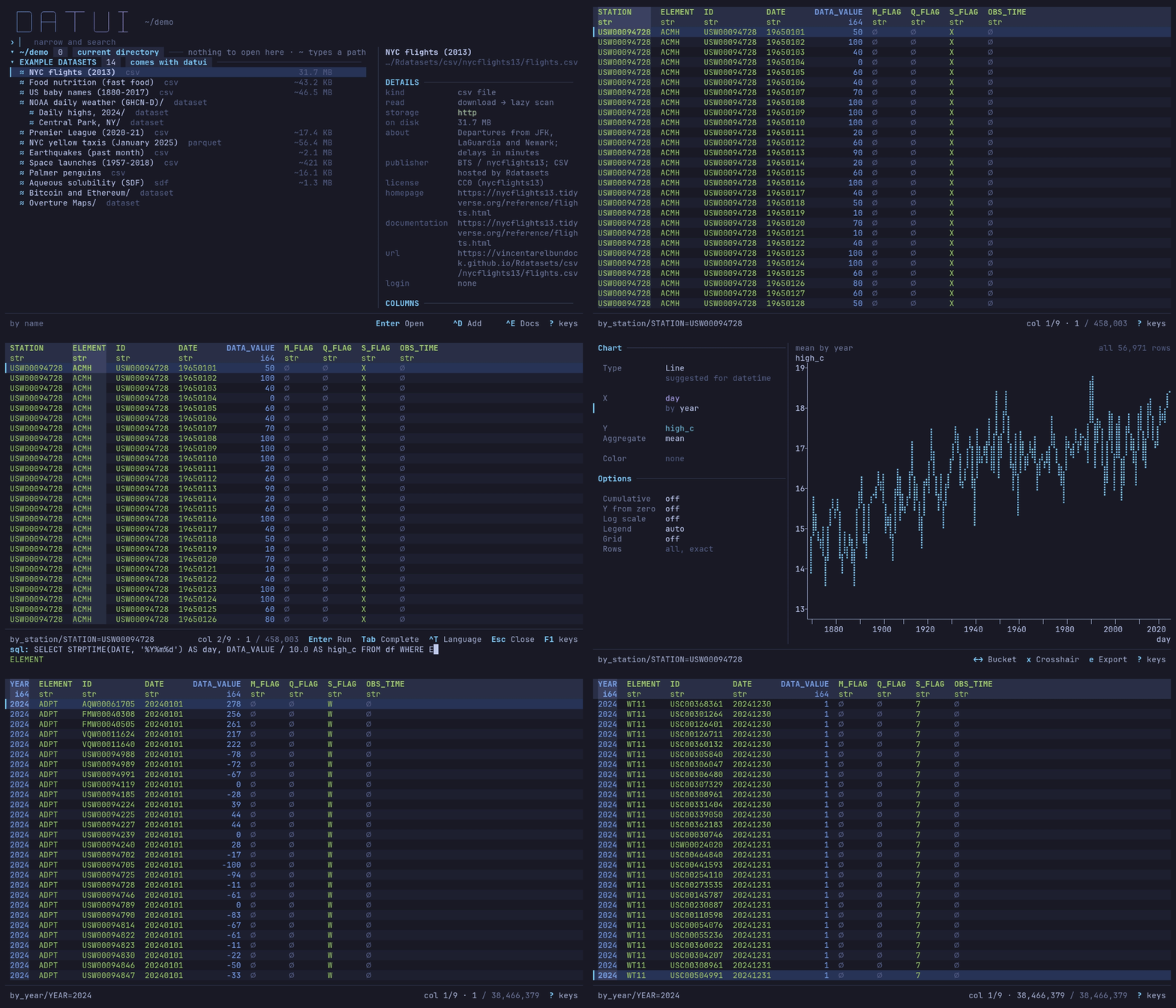
Central Park from the catalog’s bookmark, then q, ~, the path, Enter twice and G. Recorded on a wired home connection with a cold cache; the waits are real.
The most common measurements:
SELECT ELEMENT, COUNT(*) AS observations, COUNT(DISTINCT ID) AS stations
FROM df
GROUP BY ELEMENT
ORDER BY observations DESC
PRCP (precipitation) leads with 11,456,946 observations from 42,758
stations, then SNOW, TMAX and TMIN. The query reads every file.
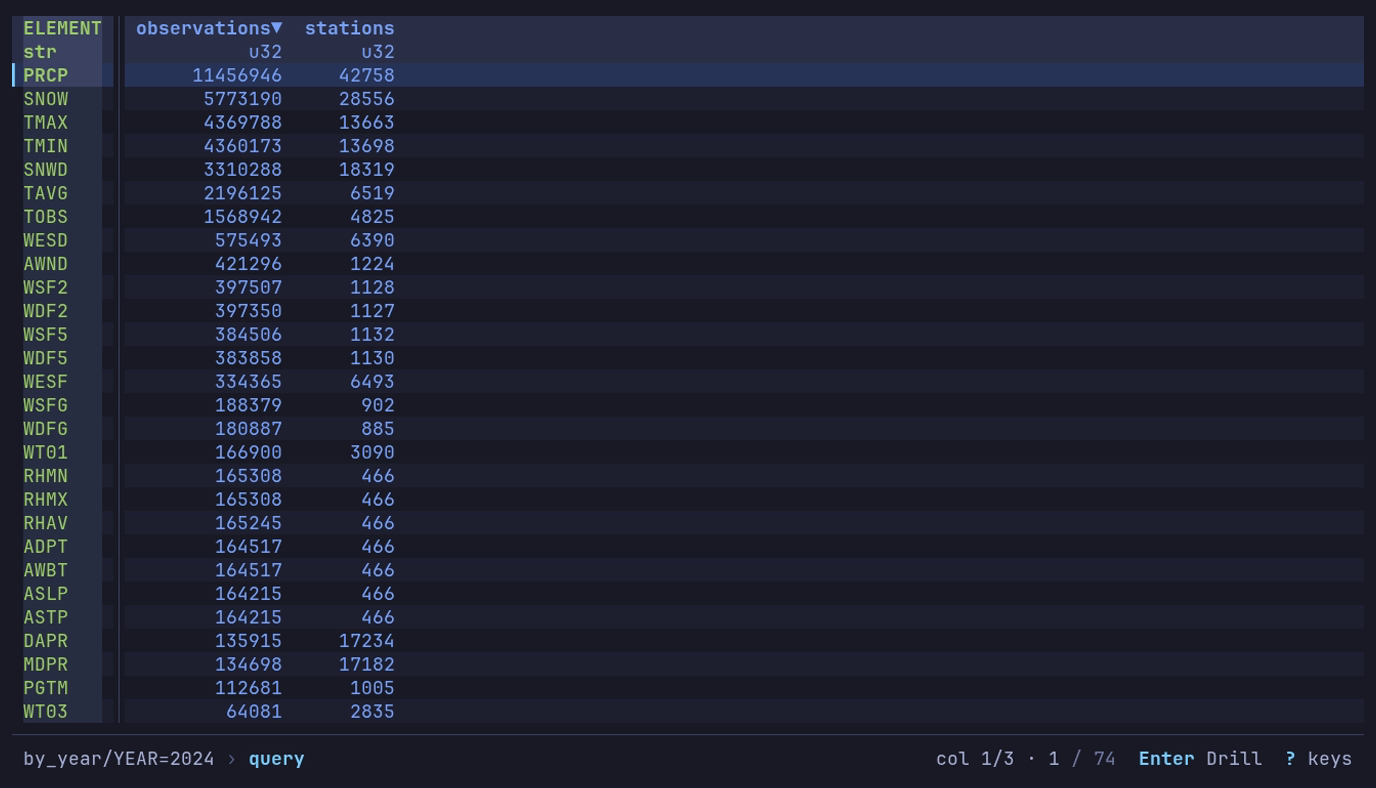
Which measurements are most common in 2024? :, the query,
Enter: 74 elements, PRCP first.
In ELEMENT=TMAX, USW00094728 is Central Park and DATA_VALUE is tenths
of a degree Celsius:
SELECT CAST(STRPTIME(DATE, '%Y%m%d') AS DATE) AS day, DATA_VALUE / 10.0 AS high_c
FROM df
WHERE ID = 'USW00094728'
ORDER BY day
366 days, from −6.0 to 35.0 °C: chart day against high_c as a line.
Bitcoin blocks are partitioned by day. On the home screen: Bitcoin and
Ethereum, → on btc, Enter on blocks. Or:
datui s3://aws-public-blockchain/v1.0/btc/blocks/
A filter on the partition column reads only the matching days:
SELECT EXTRACT(MONTH FROM mediantime) AS month, COUNT(*) AS blocks,
       SUM(transaction_count) AS txs
FROM df
WHERE date >= '2024-01-01' AND date < '2025-01-01'
GROUP BY month
ORDER BY month
12 rows, 4,179 to 4,761 blocks a month. The table opens before every footer
is read; the bar counts them, Reading footers: …, while you work.
HTTP and HTTPS
datui https://earthquake.usgs.gov/earthquakes/feed/v1.0/summary/all_month.csv
datui --format csv 'https://earthquake.usgs.gov/fdsnws/event/1/query?format=csv&starttime=2024-01-01&endtime=2024-01-02'
The file is downloaded to the temp directory (--temp-dir), then opened;
--format names a format the URL does not. The copy is removed when datui
exits, a quit mid-download included (temporary files).
A model file’s header is read by range instead (Model files).
Every request datui makes, to a web server or a cloud store, sends
User-Agent: datui/VERSION (+https://github.com/derekwisong/datui): datui and
its version, nothing about you or the machine. http.user_agent replaces it:
datui -c 'http.user_agent=<NAME/VERSION (CONTACT)>' <URL>
A file that is not there (404) or a host that does not answer says so on its home row, in place of the size, before you open it.
What gets read
| Source | Read |
|---|---|
| A Parquet file, prefix or glob in a bucket | In place: the footers, then the row groups needed |
| A CSV or NDJSON prefix in a bucket | Scanned in place |
| An Arrow IPC file, prefix or glob in a bucket | Scanned in place |
| Arrow IPC streams in a bucket | Asks, then converts each to a temporary IPC file as it downloads |
| SafeTensors or GGUF, anywhere | The header only, by range |
| HTTP(S), and every other format | Downloaded first |
The formats table has every format. Paging reads ahead of the screen; queries, sorting and analysis may read the whole input (Large datasets).
Building without cloud support
A build without the cloud and http features
(from source) refuses remote
URLs with a message saying so, and a bucket in a catalog reads
cloud support not in this build.